
1. Įvadas
This instruction manual provides essential information for the safe and efficient assembly, operation, and maintenance of your new Lafulaifu Computer Desk, Model ct140. Please read this manual thoroughly before beginning assembly or use to ensure proper setup and to maximize the product's lifespan. Keep this manual for future reference.
2. Produkto ypatybės
The Lafulaifu Computer Desk is designed with several features to enhance your workspace:
- Daugiafunkcis dizainas: This desk is versatile, suitable for use as a computer desk, office desk, work desk, gaming desk, or study table.
- Patvarus paviršius: The tabletop is constructed from medium-density fiberboard (MDF) with a glossy finish, offering resistance to scratches and water.
- Ergonomiškas monitoriaus stovas: A large, movable monitor shelf accommodates two monitors, elevating screens to improve visibility and promote better posture, reducing neck strain.
- Sturdy Construction & Storage: Features 0.6 mm thick metal legs and a robust tabletop for stability and high load capacity. An additional fixed shelf provides extra storage space.
- Lengvas surinkimas: All necessary mounting accessories and detailed instructions are included for straightforward setup.
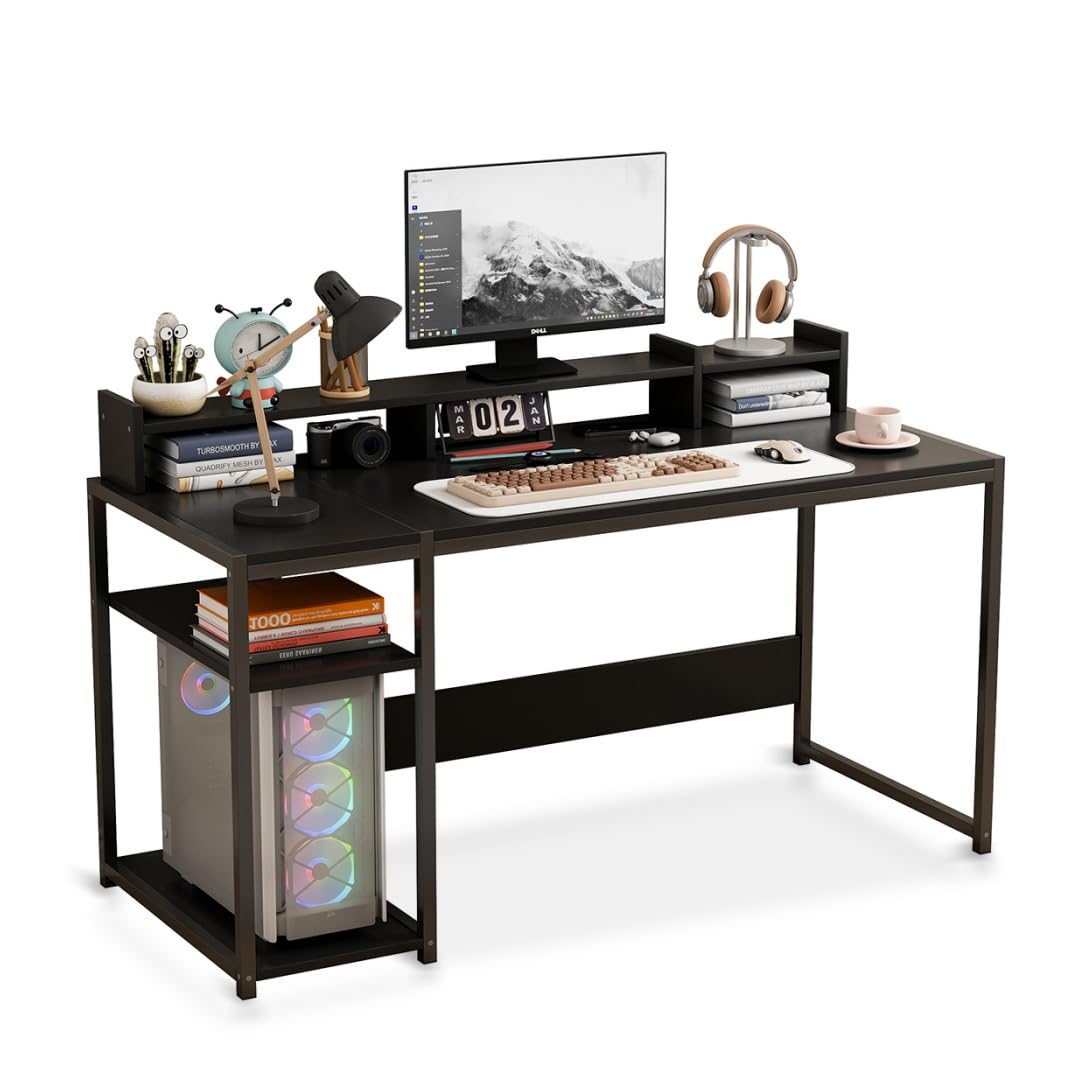
Image: The Lafulaifu Computer Desk, showcasing its spacious desktop and integrated shelving for various uses.
3. Surinkimo instrukcijos
Assembly of the Lafulaifu Computer Desk is required. Please follow the step-by-step instructions provided in the separate assembly manual included in your package. Ensure all components are present before starting.
- Išpakuokite visus komponentus ir patikrinkite juos pagal surinkimo vadove pateiktą dalių sąrašą.
- Identify all hardware (screws, bolts, etc.) which are typically organized and labeled.
- Assemble the metal frame structure according to the diagrams. Ensure all connections are secure but do not overtighten until the desk is fully assembled.
- Attach the main desktop panel to the assembled frame.
- Install the fixed storage shelf as indicated in the instructions.
- Place the movable monitor stand on the desktop. Note that this stand is not permanently affixed to the main desk surface, allowing for flexible positioning.
- Once all parts are in place, tighten all screws and bolts securely.
Note: All necessary tools for assembly are included in the package.

Image: Dimensional diagram of the desk, illustrating key measurements for setup and placement.
4. Naudojimo instrukcijos
The Lafulaifu Computer Desk is designed for immediate use upon assembly. Consider the following for optimal operation:
- Darbo vietos sąranka: Arrange your computer, keyboard, mouse, and other peripherals on the main desktop.
- Monitoriaus vieta: Utilize the monitor stand to elevate your screen(s) to eye level. This ergonomic positioning helps maintain a straight posture and reduces strain on your neck and eyes. The stand can be moved along the desktop to suit your preference.
- Saugyklos panaudojimas: Use the integrated fixed shelf for storing books, documents, or your computer tower, keeping your workspace organized and clutter-free.
- Apkrova: Distribute weight evenly across the desktop and shelves. Avoid placing excessively heavy items on any single point.

Image: Visual guide demonstrating the ergonomic benefits of using the monitor stand to maintain proper sitting posture.
5. Priežiūra ir priežiūra
Proper care and maintenance will ensure the longevity and appearance of your Lafulaifu Computer Desk:
- Valymas: Stalą ir metalinį rėmą nuvalykite minkšta, d šluosteamp cloth. For stubborn marks, use a mild soap solution and dry immediately. Avoid abrasive cleaners or harsh chemicals, as these can damage the finish.
- Išsiliejimai: The desktop is water-resistant, but spills should be wiped immediately to prevent potential damage or staining.
- Stabilumo patikrinimas: Reguliariai patikrinkite visus varžtus ir veržles, kad jie būtų tvirtai priveržti. Jei reikia, priveržkite, kad stalas išliktų stabilus.
- Venkite tiesioginių saulės spindulių: Ilgalaikis tiesioginių saulės spindulių poveikis laikui bėgant gali sukelti medžiagos išblukimą arba pablogėjimą.
- Apsauga nuo karščio: Po karštais daiktais naudokite padėkliukus arba apsauginius kilimėlius, kad stalo paviršius nebūtų pažeistas karščio.

Vaizdas: Išsamus view of the desktop material, highlighting its smooth, durable, and easy-to-maintain characteristics.
6. Problemų sprendimas
Jei kyla problemų dėl stalo, apsvarstykite šiuos įprastus sprendimus:
- Stalo virpesiai: Ensure all assembly screws and bolts are fully tightened. Check that the desk is placed on a level surface. If the floor is uneven, consider using furniture pads or shims under the legs.
- Trūksta dalių: If any parts are missing upon unpacking, refer to the parts list in your assembly manual and contact customer support for assistance.
- Monitor Stand Movement: The monitor stand is designed to be movable and is not fixed to the main desktop. This is intentional for flexibility in positioning.
7. Specifikacijos
Detailed specifications for the Lafulaifu Computer Desk, Model ct140:
| Funkcija | Detalė |
|---|---|
| Prekės ženklas | Lafulaifu |
| Modelis | ct140 |
| Spalva | Juoda |
| Gaminio matmenys (D x P x A) | 50 x 140 x 88 cm (19.7 x 55.1 x 34.6 colio) |
| Prekės svoris | 12 kilogramų (26.4 svarai) |
| Aukščiausias medžiagos tipas | Inžinerinė mediena (MDF) |
| Rėmo medžiagos tipas | Metalas (geležis) |
| Apdailos tipas | Poliruotas, blizgus |
| Lentynų skaičius | 1 (fixed) + Monitor Stand |
| Darbastalio storis | 1.5 centimetras |
| Reikalingas surinkimas | Taip |
| Įrankiai įtraukti | Taip |
| GTIN / UPC | 763523295734 |

Image: Detail of the desk's robust metal frame, emphasizing its stable and load-bearing design.
8. Informacija apie garantiją
The Lafulaifu Computer Desk, Model ct140, comes with a Ribota garantija. Please refer to the warranty card included with your purchase for specific terms, conditions, and duration of coverage. This warranty typically covers manufacturing defects and material flaws under normal use.
9. Pagalba klientams
For any questions regarding assembly, missing parts, product functionality, or warranty claims, please contact Lafulaifu customer support. Refer to your purchase documentation or the manufacturer's websvetainė, kurioje rasite kontaktinius duomenis.