
Įvadas
Thank you for choosing the TECKNET TK-MS017 Ergonomic Wireless Vertical Mouse. This manual provides detailed instructions for setting up, operating, maintaining, and troubleshooting your new mouse. Designed for comfort and efficiency, this vertical mouse helps reduce wrist strain during prolonged use.

The TECKNET Ergonomic Vertical Mouse, designed for comfortable use.
Produkto savybės
- Ergonomiškas vertikalus dizainas: Mimics a natural handshake posture to reduce wrist and arm pressure, preventing discomfort from prolonged use.
- Reguliuojamas DPI: 5 levels of DPI (800/1600/2400/3200/4800) for precise tracking and adaptable sensitivity.
- Tylūs paspaudimai: 99% noise reduction for a quiet working environment. (Forward/Backward buttons are not silent).
- 6 Mygtukai: Includes standard left/right click, scroll wheel, DPI switch, and convenient forward/backward buttons for web navigacija.
- Stable 2.4G Wireless Connection: Provides a reliable connection up to 10 meters with a plug-and-play USB receiver.
- Ilgas baterijos veikimo laikas: Features an independent power switch and automatic sleep function to conserve battery, offering up to 24 months of use.
- Platus suderinamumas: Supports Windows 11/10/8/7/XP, Mac OS X10.4, Chrome OS, and Linux.

Comparison of vertical ergonomic grip and traditional mouse grip, highlighting reduced wrist tension with the vertical design.
Sąrankos instrukcijos
- Įdėkite baterijas:
Locate the battery compartment on the underside of the mouse. Open the cover and insert two AA batteries (not included), ensuring correct polarity. Close the battery cover securely.

The underside of the mouse, illustrating the battery compartment and the storage slot for the USB receiver.
- Prijunkite USB imtuvą:
Remove the USB receiver from its storage slot next to the battery compartment. Plug the receiver into an available USB port on your computer (PC, laptop, Mac, Chromebook, or tablet).
- Maitinimas:
Flip the ON/OFF switch on the bottom of the mouse to the "ON" position. The mouse should automatically connect to your device. No additional drivers are typically required for most operating systems.
Naudojimo instrukcijos
Mygtukų funkcijos
- Kairysis spustelėjimas: Standartinis pasirinkimas ir aktyvinimas.
- Dešiniuoju pelės mygtuku spustelėkite: Atidaro kontekstinius meniu.
- Slinkties ratukas: Ritina dokumentus ir web pages vertically. Can also be pressed for middle-click functionality.
- DPI perjungimo mygtukas: Located near the scroll wheel. Press to cycle through DPI settings (800/1600/2400/3200/4800). The red indicator light will flash to confirm the change.
- Pirmyn mygtukas: Naviguoja pirmyn web naršyklės arba file explorers. (Not supported on Mac OS).
- Mygtukas atgal: Naviguoja atgal web naršyklės arba file explorers. (Not supported on Mac OS).
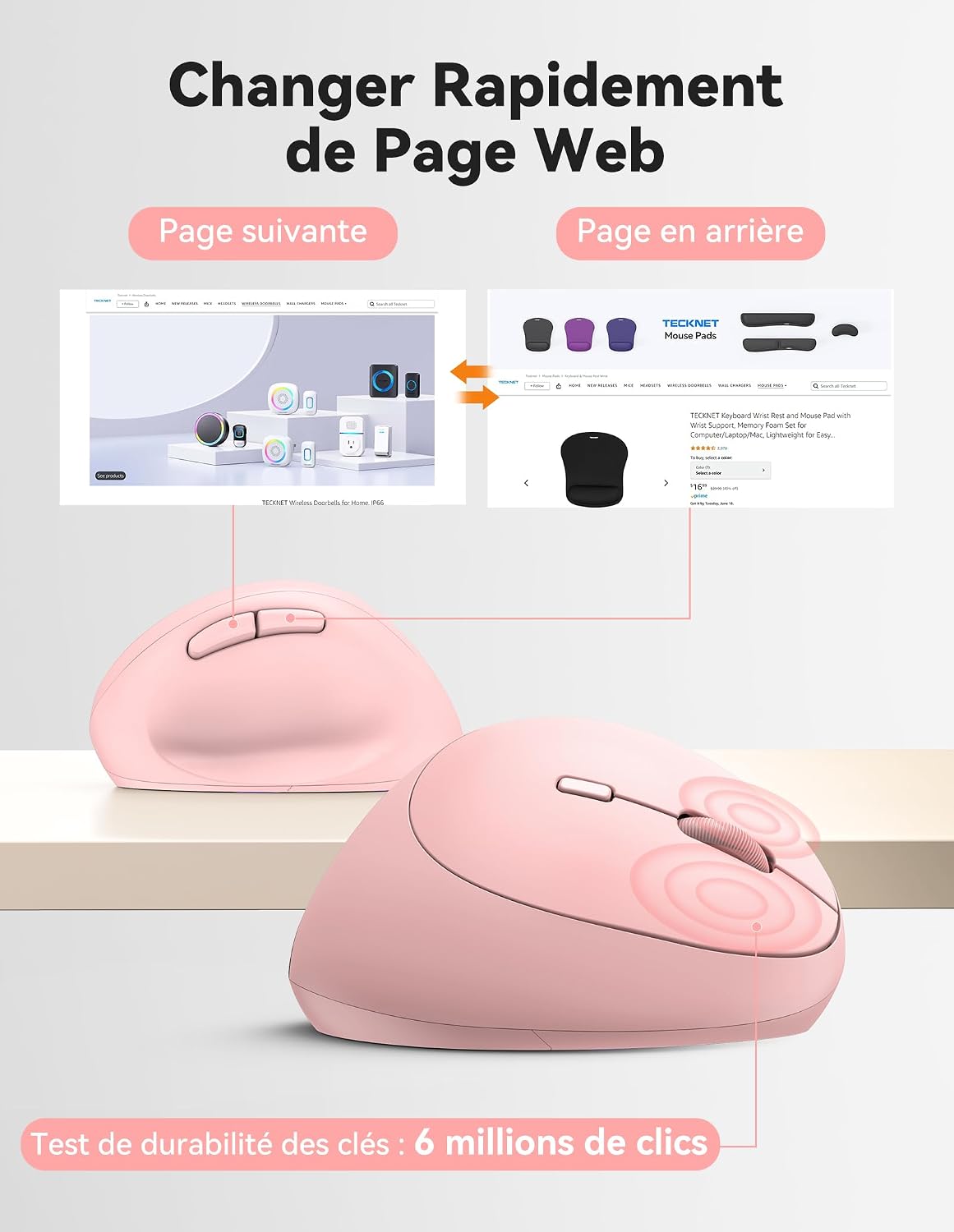
Diagram illustrating the location and function of each button on the TECKNET vertical mouse.
DPI reguliavimas
The mouse offers 5 adjustable DPI levels to suit various tasks and preferences. Press the DPI switch button to change the cursor speed. The red indicator light will flash a corresponding number of times to indicate the current DPI setting:
- Flash X1: 800 DPI (Web Navigation)
- Flash X2: 1600 DPI (Excel Editing)
- Flash X3: 2400 DPI (Video Editing)
- Flash X4: 3200 DPI (Photoshop)
- Flash X5: 4800 DPI (Gaming Track)

Visual representation of the 5 adjustable DPI levels for different usage scenarios.
Energijos taupymo režimas
To conserve battery life, the mouse will automatically enter sleep mode after 8 minutes of inactivity. To wake it up, simply move the mouse or click any button.
Priežiūra
- Valymas: Pelę valykite minkšta, sausa šluoste. Venkite naudoti stiprias chemines medžiagas ar abrazyvines medžiagas.
- Baterijos keitimas: When the mouse performance degrades or the cursor becomes erratic, it's time to replace the batteries. Ensure you use fresh AA batteries and dispose of old batteries responsibly.
- Saugykla: When not in use for extended periods, turn off the mouse using the ON/OFF switch to further conserve battery life. Store the USB receiver inside the mouse's battery compartment to prevent loss.
Trikčių šalinimas
- Pelė nereaguoja:
- Įsitikinkite, kad pelė įjungta.
- Patikrinkite, ar baterijos tinkamai įdėtos ir ar jos pakankamai įkrautos. Jei reikia, pakeiskite.
- Įsitikinkite, kad USB imtuvas yra tvirtai prijungtas prie veikiančio USB prievado. Išbandykite kitą USB prievadą.
- Kad išvengtumėte diapazono problemų, perkelkite pelę arčiau USB imtuvo.
- Iš naujo paleiskite kompiuterį.
- Nereguliarus žymeklio judėjimas:
- Nuvalykite optinį jutiklį pelės apačioje.
- Ensure you are using the mouse on a suitable surface. The mouse is designed to track on various surfaces like resin, wood, fabric, paper, and metal. Avoid highly reflective or transparent surfaces.
- Adjust the DPI setting to a lower level if the cursor is too sensitive.
- „Mac“ kompiuteryje neveikia mygtukai „Pirmyn“ / „Atgal“:
These side buttons are not supported by Mac OS. This is a system limitation, not a mouse malfunction.
Specifikacijos
| Prekės ženklas | TECNET |
| Modelio numeris | TK-MS017 |
| Ryšio technologija | 2.4G Wireless (Radio-frequency) |
| Judesio aptikimo technologija | Optinis |
| DPI lygiai | 800, 1600, 2400, 3200, 4800 |
| Mygtukų skaičius | 6 |
| Rankų orientacija | Teisingai |
| Gaminio matmenys | 10.5 ilgio x 6.5 pločio centimetrų |
| belaidis diapazonas | Iki 10 metrų |
| Maitinimo šaltinis | 2 x AA baterijos (į komplektą neįeina) |
| Vidutinis baterijos veikimo laikas | Iki 24 mėnesių |
| Suderinamos operacinės sistemos | Windows 11/10/8/7/XP, macOS X10.4+, Chrome OS, Linux |
Garantija ir palaikymas
TECKNET provides a 36-month support period for registered products. If you encounter any issues during the use of this product, please contact the professional TECKNET customer service team for assistance.
For more information and support, please visit the official TECKNET websvetainėje arba susisiekite tiesiogiai su jų klientų aptarnavimo tarnyba.
Websvetainė: TECKNET Store on Amazon


