Įvadas
This manual provides detailed instructions for the installation, operation, and maintenance of your AIDA Single Pole Motion Sensor Light Switch. This device is designed to enhance convenience and energy efficiency by automatically controlling lighting based on occupancy. Please read this manual thoroughly before installation and use to ensure proper function and safety.

Image: The AIDA Single Pole Motion Sensor Light Switch shown alongside its product packaging, highlighting its design and key features.
Svarbi saugos informacija
ĮSPĖJIMAS: ELEKTROS SMŪGIO RIZIKA. Netinkamas montavimas gali būti pavojingas arba neteisėtas. Jei nesate tikri dėl kurios nors montavimo proceso dalies, visada pasitarkite su kvalifikuotu elektriku.
- Išjunkite maitinimą: Prieš montuodami arba atlikdami jungiklio techninę priežiūrą, visada atjunkite maitinimą nuo grandinės pertraukiklio arba saugiklių dėžutės.
- Reikalingas neutralus laidas: This device requires a neutral wire for proper operation. If your electrical box does not have a neutral wire, this switch is not compatible.
- Single Pole Only: This switch is designed for single-pole control only and is not suitable for 3-way or multiple-way circuits.
- UL/CUL Certified: The switch is UL and CUL listed, ensuring compliance with safety standards.
- Veiklos ttage: Ensure your electrical system operates at 120 Volts (AC).
Pakuotės turinys
Prieš pradėdami diegti, patikrinkite, ar yra visi komponentai:
- AIDA Single Pole Occupancy Motion Sensor Light Switch
- Sieninė plokštė be varžtų
- Wire Nuts (Terminal caps)
- Tvirtinimo varžtai
- Instrukcijų vadovas (šis dokumentas)
Gaminio specifikacijos
| Funkcija | Detalė |
|---|---|
| Įvesties įvertinimas | 120/277V ~ 50/60Hz |
| Applicable Load Types | 200W LED/CFL, 500W MLV, 500W INC/HAL, 5A Ballast (120V), 1/6HP Fan (4.4A 120V) |
| Jungiklio tipas | Vieno poliaus |
| Vielos matuoklis | #14 - #12 AWG |
| Laidų tipas | Terminalo dangtelis |
| Darbinė temperatūra | nuo 32 °F iki 104 °F (nuo 0 °C iki 40 °C) |
| Produkto dydis | 4.17"x1.73"x1.77" (106x44x45mm) |
| Medžiaga | Copper, Brass (Contact Material) |
| Kontrolės metodas | Sensor, Touch |

Image: A visual representation of the product dimensions and a detailed table of specifications for the AIDA motion sensor switch.

Image: A chart illustrating the universal compatibility of the AIDA motion sensor switch with various load types including LED/CFL, MLV, INV/HAL, Ballast, and Fan.
Sąranka ir diegimas
Prieš pradėdami:
- Išjunkite maitinimą: Locate your circuit breaker panel and turn off the power to the switch box you will be working on. Verify power is off using a voltage testeris.
- Identifikuokite laidus: Carefully remove the existing wall plate and switch. Identify the following wires:
- Line Wire (Black): Maitinimas perduodamas iš grandinės pertraukiklio.
- Load Wire (Black): Perduoda energiją šviestuvui.
- Neutralus laidas (baltas): Required for this switch.
- Įžeminimo laidas (žalias arba plikas varis): For safety.
- Confirm Neutral Wire: This switch requires a neutral wire. If you do not have a neutral wire (typically white) in your electrical box, this switch is not compatible.
Laidų prijungimo instrukcijos:
Follow the wiring diagram carefully. Use the provided wire nuts to secure connections.
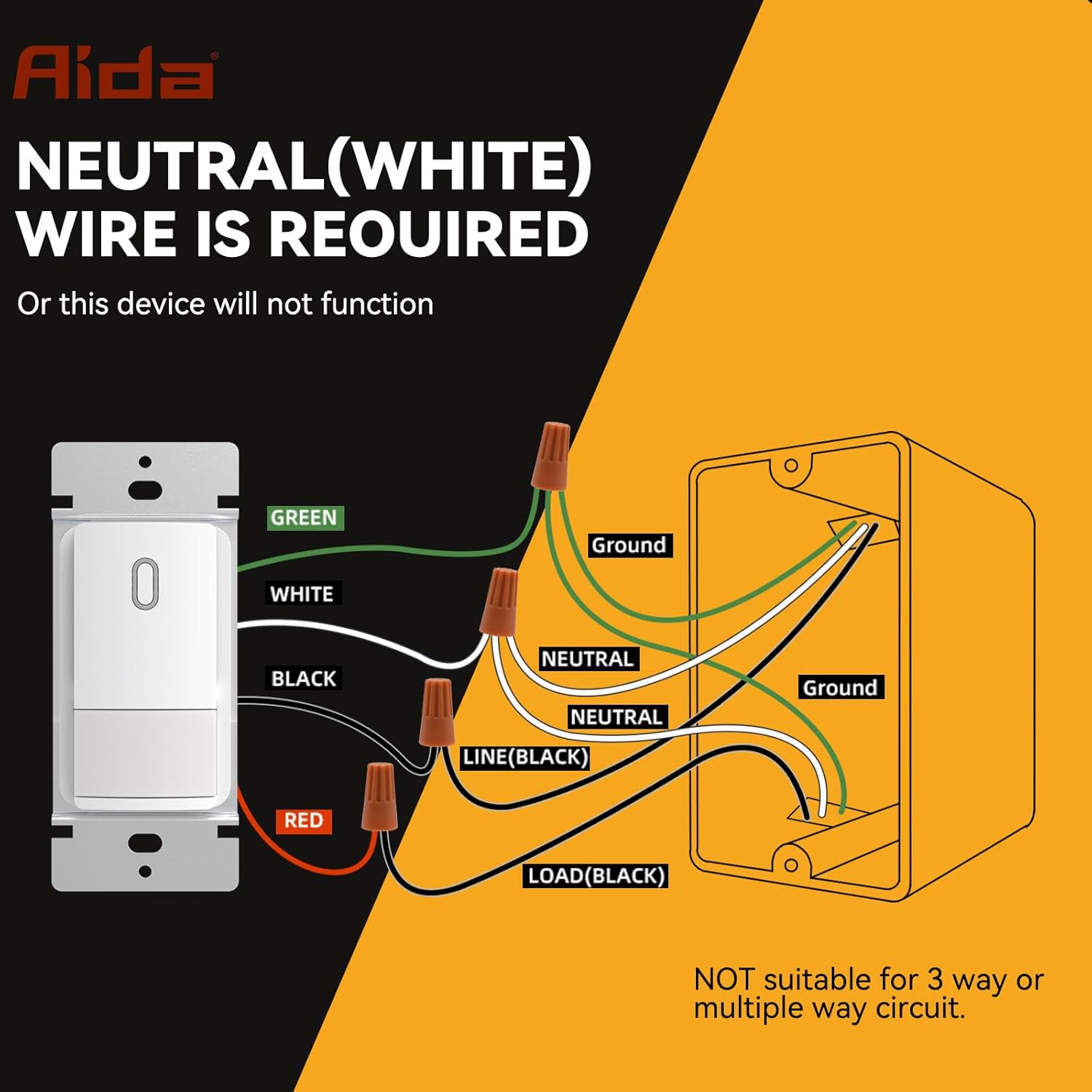
Image: A detailed wiring diagram showing connections for the AIDA motion sensor light switch, including Line, Load, Neutral, and Ground wires. It explicitly states that a neutral wire is required and the switch is not suitable for 3-way or multiple-way circuits.
- Prijunkite ŽALIA wire from the switch to your house's ŽEMĖ viela.
- Prijunkite BALTAS wire from the switch to your house's NEUTRALUS viela.
- Prijunkite JUODAS wire from the switch to your house's LINIJA (karštas laidas.
- Prijunkite RAUDONA wire from the switch to your house's Įkelti wire (to the light fixture).
Important: Ensure all connections are secure and insulated with wire nuts. This switch is for single-pole applications only. Do not use in 3-way or multi-way circuits.
Jungiklio montavimas:
- Carefully fold the wires and push the switch into the electrical box.
- Secure the switch to the electrical box using the provided screws.
- Attach the screwless wall plate.
- Atkurkite maitinimą prie grandinės pertraukiklio.

Image: A diagram showing the precise dimensions of the AIDA motion sensor light switch, its mounting bracket, and the screwless wall plate for easy installation.
Operating Instructions and Customization
The AIDA motion sensor switch offers various modes and adjustable settings to suit your needs.
Veikimo režimai:
- Occupancy Mode (Auto-On/Auto-Off): Lights automatically turn ON when motion is detected and OFF after a set delay when no motion is detected. Ideal for high-traffic areas like bathrooms, laundry rooms, and kitchens.
- Vacancy Mode (Manual-On/Auto-Off): Lights must be manually turned ON, but will automatically turn OFF after a set delay when no motion is detected. Suitable for bedrooms or TV rooms where you prefer manual control for turning on lights.
Reguliuojami nustatymai:
The switch features internal dip switches for customizing settings. Carefully remove the faceplate to access these controls.

Vaizdas: Stambus planas view of the AIDA motion sensor switch's internal settings, showing dip switches for Adjustable Light Level (Timeout), PIR Sensitivity, and Ambient Light Sensor Mode.
- Adjustable Light Level (Timeout): This setting determines how long the light stays on after the last detected motion. Options typically include 30 seconds, 1 minute, 5 minutes, 15 minutes, or 30 minutes. Refer to the switch's internal labels for specific settings.
- PIR jautrumas: Adjusts the sensitivity of the Passive Infrared (PIR) sensor to detect motion. Settings range from Low (L) to High (H). A higher sensitivity detects smaller movements or movements at a greater distance.
- Ambient Light Sensor Mode: Controls how the switch reacts to ambient light.
- Žemas/aukštas: The switch will only turn on lights if the ambient light level is below a certain threshold (e.g., only turn on at night).
- Išjungta: The ambient light sensor is disabled, and the switch will turn on lights regardless of ambient light.
- Pasirinktinis: Allows for more specific ambient light level adjustments.
Note: After adjusting any internal settings, reattach the faceplate securely.

Paveikslėlis: detalus view of the AIDA motion sensor switch with its cover removed, showing the dip switches for adjusting timeout, PIR sensitivity, and ambient light sensor mode.
Priežiūra
The AIDA Motion Sensor Light Switch is designed for long-lasting, maintenance-free operation. To ensure optimal performance:
- Valymas: Periodically wipe the switch and wall plate with a soft, damp šluoste. Nenaudokite abrazyvinių valiklių ar tirpiklių, nes jie gali pažeisti apdailą ar vidinius komponentus.
- Kliūtis: Ensure the sensor lens is not obstructed by furniture, decorations, or other objects, as this can impair motion detection.
- Nėra naudotojo aptarnaujamų dalių: There are no user-serviceable parts inside the switch. Do not attempt to open or repair the unit beyond adjusting the dip switches.
Trikčių šalinimas
| Problema | Galima priežastis | Sprendimas |
|---|---|---|
| Light does not turn ON with motion. |
|
|
| Light stays ON constantly. |
|
|
| Light turns OFF too quickly or too slowly. |
|
|
| Switch makes a clicking noise. |
|
|
Garantija ir klientų aptarnavimas
AIDA products are manufactured to high-quality standards and are backed by a limited warranty. For specific warranty details, please refer to the warranty card included with your purchase or visit the official AIDA websvetainę.
If you encounter any issues or have questions regarding your AIDA Single Pole Motion Sensor Light Switch, please contact our customer support team:
- Websvetainė: Visit the AIDA Store on Amazon (bendra informacija apie produktą)
- El. paštas: Žiūrėkite produkto pakuotę arba oficialų websvetainė kontaktiniam el. paštui.
- Telefonas: Žiūrėkite produkto pakuotę arba oficialų websvetainė su kontaktiniu telefono numeriu.
Please have your model number (B0DM4SGNBQ) and purchase date ready when contacting support.