
ZWP RMF-TX820U
Instruction Manual for ZWP RMF-TX820U Replacement Remote Control
Modelis: RMF-TX820U
Įvadas
This manual provides comprehensive instructions for the ZWP RMF-TX820U Replacement Remote Control, designed for Sony BRAVIA 3 Smart TVs. This remote offers a reliable and comfortable user experience, serving as a direct replacement without the need for complex programming. Please note that this specific model does not support voice control functionality.
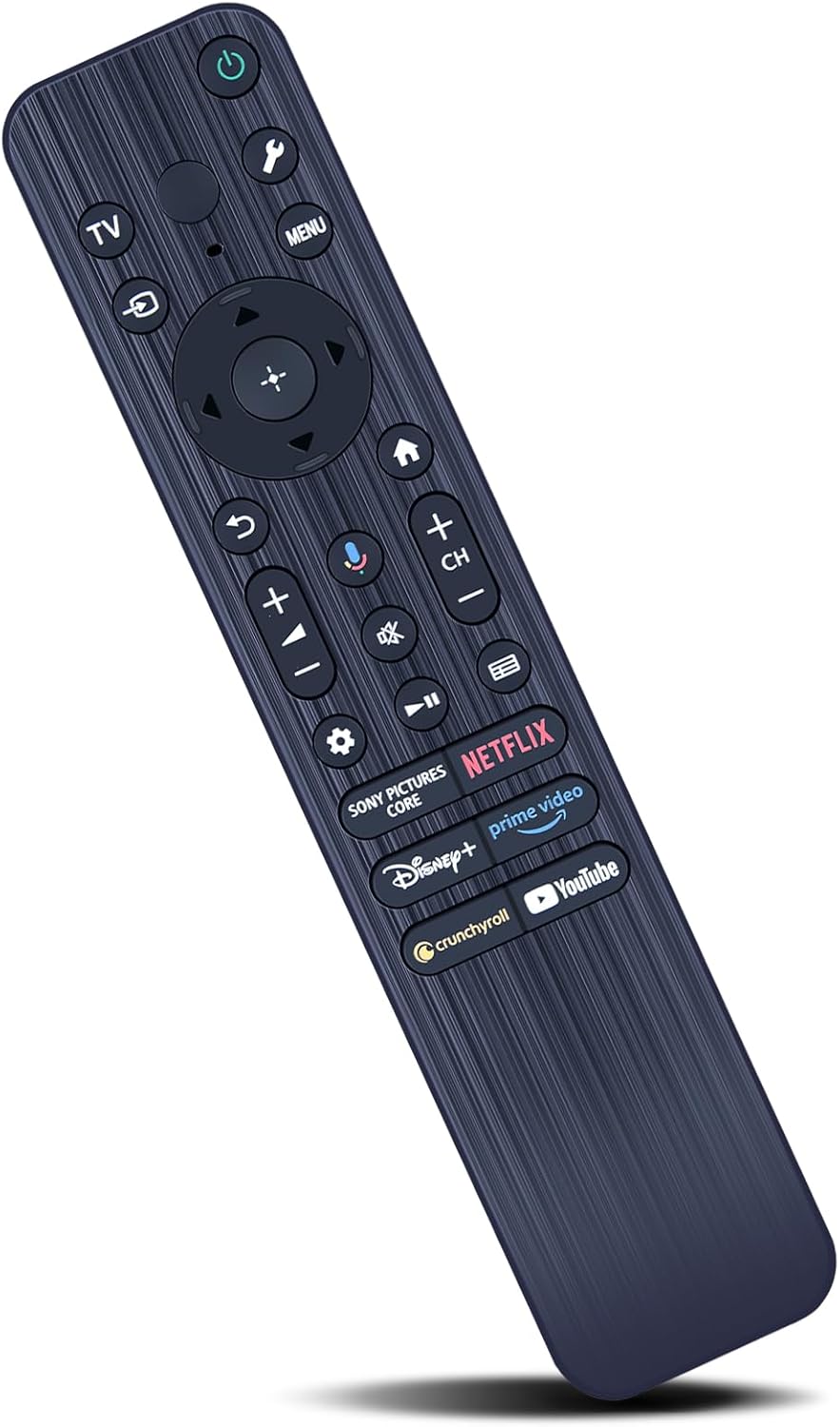
Figure 1: The ZWP RMF-TX820U Replacement Remote Control, showcasindėl savo ergonomiško dizaino ir mygtukų išdėstymo.
Sąranka
Akumuliatoriaus montavimas
Nuotolinio valdymo pultui reikalingos dvi AAA baterijos (nepridedamos). Norėdami jas įdėti, atlikite šiuos veiksmus:
- Nuotolinio valdymo pulto gale raskite baterijų skyrių.
- Baterijos dangtelį stumkite žemyn, kad jį atidarytumėte.
- Įdėkite dvi AAA tipo baterijas, užtikrindami, kad teigiamas (+) ir neigiamas (-) poliai teisingai sutaptų su žymėjimais baterijų skyriuje.
- Stumkite akumuliatoriaus dangtelį atgal į vietą, kol jis patikimai užsifiksuos.

Figure 2: Illustration of battery installation, showing the battery compartment and required AAA batteries.
Pradinis naudojimas
No programming is required for this remote control. Once batteries are installed, it is ready to operate your compatible Sony BRAVIA Smart TV directly.
Naudojimo instrukcijos
The RMF-TX820U remote control is designed for intuitive operation of your Sony BRAVIA Smart TV. It provides a stable and quick response for an enhanced viewpatirtį.
Pagrindinės funkcijos
- Maitinimo mygtukas: Located at the top, press to turn the TV on or off.
- Naršymo skydelis: Use the directional arrows and center 'OK' button to navigate menus and select options.
- Garsumo valdymas (+/-): Sureguliuokite televizoriaus garsumą.
- Kanalų valdymas (CH +/-): Keisti televizijos kanalus.
- Meniu mygtukas: Pasiekite pagrindinį televizoriaus meniu.
- Atgal mygtukas: Grįžti į ankstesnį ekraną arba meniu.
- Namų mygtukas: Go to the TV's home screen.
Programos spartieji mygtukai
Dedicated shortcut buttons provide quick access to popular streaming services:
- Netflix
- Pagrindinis vaizdo įrašas
- Disney+
- "YouTube"
- Crunchyroll
- Sony Pictures Core

Figure 3: The remote control highlighting the dedicated shortcut buttons for popular streaming applications.
Control Range and Responsiveness
This remote control offers a precise control distance of up to 40 feet (approximately 12 meters) and supports multi-angle control up to 120 degrees, ensuring reliable operation from various positions in your room.

Figure 4: Visual representation of the remote's long-range (26ft shown, product states 40ft) and multi-angle (120°) control capabilities.

Figure 5: Depiction of the remote's quick response time and strong signal transmission.
Svarbi pastaba: As stated in the product title, this RMF-TX820U replacement remote control does ne include voice function capabilities. Any visual representations or buttons on the remote that might suggest voice control are non-functional for this specific model.
Priežiūra
Valymas
Norėdami išlaikyti nuotolinio valdymo pulto išvaizdą ir funkcionalumą:
- Nuvalykite paviršių minkšta, sausa šluoste.
- Įsisenėjusiam purvui šiek tiek pamirkykiteamplt šluostę nuvalykite vandeniu arba švelniu, neabrazyviniu valikliu.
- Venkite naudoti stiprias chemines medžiagas, tirpiklius ar abrazyvines valymo priemones, nes jos gali pažeisti nuotolinio valdymo pulto apdailą ar vidinius komponentus.
Baterijos keitimas
Replace batteries when the remote's responsiveness decreases or it stops functioning. Always replace both batteries at the same time with new AAA batteries. Dispose of old batteries according to local regulations.
Sandėliavimas
Nuotolinio valdymo pultą laikykite vėsioje, sausoje vietoje, toliau nuo tiesioginių saulės spindulių ir ekstremalių temperatūrų. Jei ilgesnį laiką laikysite, išimkite baterijas, kad išvengtumėte pratekėjimo.
Trikčių šalinimas
| Problema | Galima priežastis | Sprendimas |
|---|---|---|
| Nuotolinio valdymo pultas nereaguoja. | Išsikrovusios arba neteisingai įdėtos baterijos. Kliūtis tarp nuotolinio valdymo pulto ir televizoriaus. Nuotolinio valdymo pultas nepasiekiamas. | Replace batteries, ensuring correct polarity. Remove any objects blocking the signal path. Move closer to the TV (within 40 feet). |
| Neveikia konkretūs mygtukai. | Mygtukas užstrigo arba buvo pažeistas. | Gently press the button multiple times. If still unresponsive, the button may be damaged. |
| Nuotolinis valdymas veikia su pertrūkiais. | Low battery power. Signal interference. | Replace batteries. Ensure no strong light sources (like direct sunlight) are interfering with the TV's IR receiver. |
| Voice function button does not work. | This model does not support voice control. | This is expected behavior. The RMF-TX820U model is explicitly stated to have no voice function. |
Specifikacijos
- Modelis: RMF-TX820U
- Prekinis ženklas: ZWP
- Suderinami televizorių modeliai: Sony BRAVIA K-43S30, K-43XR70, K-50S30, K-50XR70, K-55S30, K-55XR70, K-65S30, K-65XR70, K-75S30, K-75XR70, K-85S30, K-85XR70
- Medžiaga: High-quality ABS (Acrylonitrile Butadiene Styrene)
- Spalva: Juoda
- Matmenys: 7.6 x 1.77 x 0.98 colio (maždaug 19.3 x 4.5 x 2.5 cm)
- Prekės svoris: 2.08 uncijos (apie 59 gramų)
- Kontrolinis atstumas: Iki 40 pėdų (apie 12 metrų)
- Mygtuko tarnavimo laikas: Daugiau nei 160 000 paspaudimų
- Maitinimo šaltinis: 2 x AAA baterijos (į komplektą neįeina)
- Ypatinga funkcija: Ergonomic design for comfortable hand feeling
- Balso funkcija: Nepalaikoma

Figure 6: Detailed dimensions of the ZWP RMF-TX820U remote control.

Figure 7: Key features of the remote, including long life, ABS material, comfortable feel, and quality assurance.

8 pav. Baigtaview of the remote's stable and smart performance, including stable link, quick response, smart chip, and power saving.
Garantija ir palaikymas
Aptarnavimas po pardavimo
ZWP provides up to 1 year of after-sales service for this remote control. Your satisfaction and product quality are our basic principles.
Susisiekite su palaikymo tarnyba
Should you encounter any issues or have questions regarding the use of your remote control, please contact ZWP customer support. Refer to your purchase documentation or the seller's information for specific contact details. We are committed to resolving any problems you may experience.
Ask a question about this manual
Ask about setup, troubleshooting, compatibility, parts, safety, or missing instructions. Manuals+ will review the question and use this page’s manual context to help answer it.