
1. Produktas baigtasview
The Greadio R12 is a versatile portable radio designed for outdoor activities and emergency preparedness. It features multiple radio bands, Bluetooth connectivity, various charging methods, and essential emergency functions.
1.1. Komponentai ir valdikliai
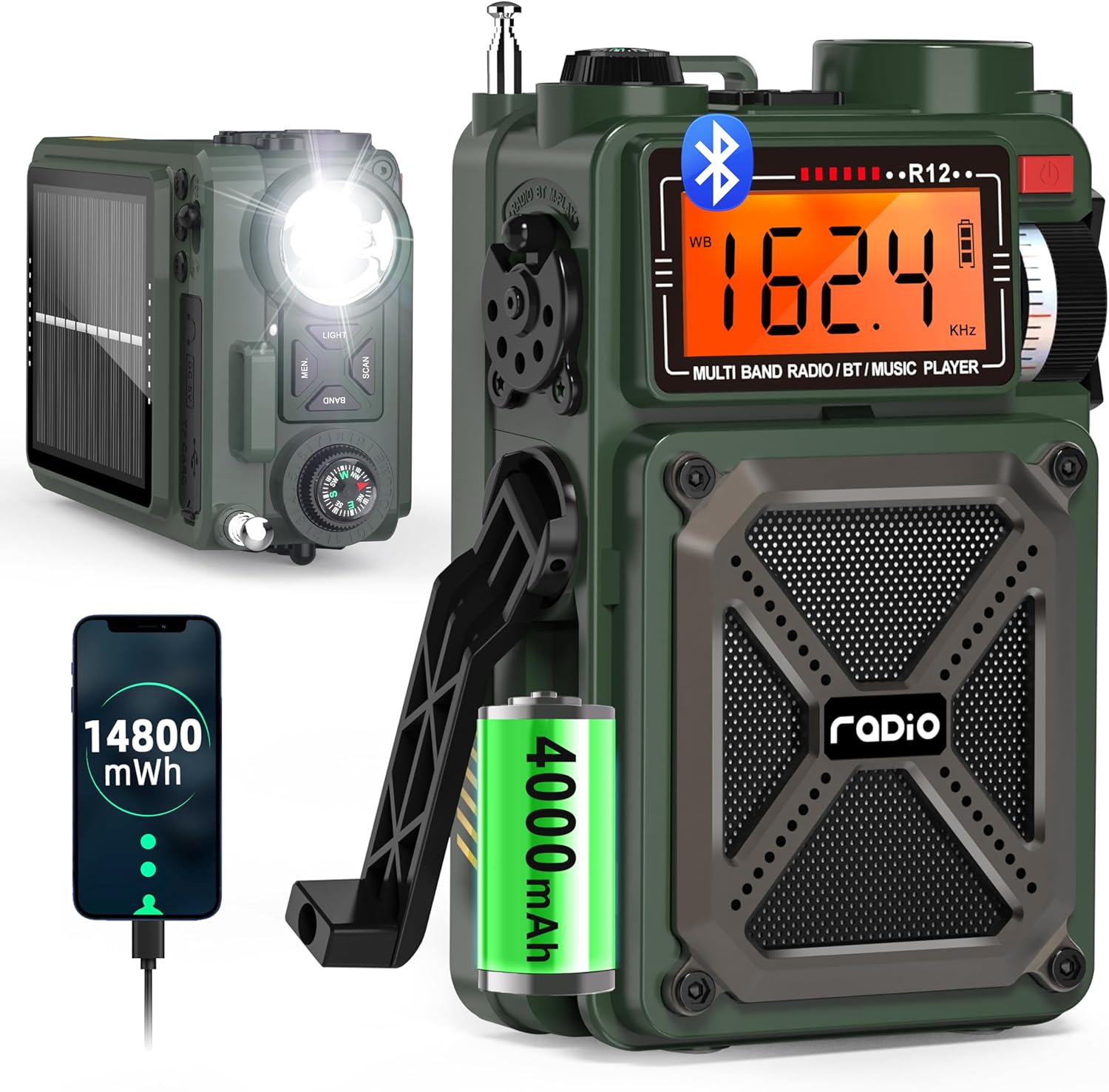
Figure 1: Greadio R12 Portable Multi-Band Emergency Radio. This image displays the front and side views of the green Greadio R12 radio, highlighting its compact design, digital display, speaker grille, flashlight, and hand crank.

Figure 2: Greadio R12 Multi-Function Radio Diagram. This diagram illustrates the various ports and controls on the side of the radio, including the 3.5mm earphone jack, USB Type-C charging port, TF/SD card slot, and USB port.
Priekinis skydelis:
- LCD ekranas: Shows frequency, mode, battery level, and other indicators.
- Pranešėjas: Garso išvestis.
- Derinimo rankenėlė: Reguliuoja radijo dažnį.
- Maitinimo jungiklis: Įjungia/išjungia radiją.
- Įkrovimo indikatorius: Šviečia kraunant.
Viršutinis skydelis:
- LED žibintuvėlis: Suteikia apšvietimą.
- Kompasas: Integruota navigacijai.
- Garsumo rankenėlė: Reguliuoja garso stiprumą.
- Antena: Ištraukiamas, kad pagerėtų radijo ryšys.
- Šviesos mygtukas: Activates the flashlight.
- MEM. Button: Accesses and stores preset stations.
- Juostos mygtukas: Switches between radio bands (FM/AM/SW/WB).
- SCAN mygtukas: Initiates automatic station search.
Šoninis skydelis:
- Funkcinis jungiklis: Selects between Radio, Bluetooth (BT), TF/SD Card, and USB modes.
- Rankinis švaistiklis: Rankiniam energijos generavimui.
- SOS Switch: Įjungia avarinę signalizaciją.
- Ausinių lizdas (3.5 mm): Privačiam pasiklausymui.
- C tipo įkrovimo prievadas: Išorinio maitinimo įėjimui.
- TF/SD kortelės lizdas: For playing audio from memory cards.
- USB prievadas: For playing audio from USB drives or charging external devices.
Galinis skydas:
- Saulės skydas: Įkrovimui saulės energija.
2. Sąranka ir įkrovimas
2.1. Pradinis įjungimas / išjungimas
- To turn on the radio, long press the Maitinimo jungiklis maždaug 2 sekundes.
- To turn off the radio, long press the Maitinimo jungiklis dar kartą maždaug 2 sekundes.
2.2. Radijo įkrovimas
The Greadio R12 offers three methods for charging its internal 4000mAh battery:

Figure 3: Three Ways to Charge the Greadio R12. This image visually explains the three charging methods: Type-C cable, hand crank, and solar panel.
- C tipo įkrovimas: Connect a standard Type-C charging cable (5V 1A/2A adapter, not included) to the Type-C charging port on the side of the radio. The charging indicator light will turn red during charging.
- Saulės įkrovimas: Place the radio with its solar panel facing direct sunlight. The charging indicator lights will turn red when solar charging is active. This method is ideal for maintaining charge or slow charging in outdoor conditions.
- Rankinis švaistiklio įkrovimas: Extend the hand crank on the side of the radio. Turn the hand crank clockwise or anti-clockwise. The red charging indicator will light up, indicating that power is being generated. Continuous cranking is required for effective charging.
Video 1: How to Use USB-C, Hand Crank and Solar Charging. This video demonstrates the three charging methods for the Greadio R12 radio: connecting a USB-C cable, utilizing the solar panel, and operating the hand crank.
3. Naudojimo instrukcijos
3.1. Radio Modes (AM/FM/SW/NOAA)

Figure 4: Greadio R12 Radio Bands. This image highlights the supported radio frequencies for WB (NOAA Weather Band), AM, FM, and SW (Shortwave) bands.
- Juostos pasirinkimas: Paspauskite BAND button on the top panel to cycle through FM, AM, SW, and WB (NOAA Weather Band) modes.
- Tiuningas: Naudokite Derinimo rankenėlė on the front panel to manually adjust the frequency within the selected band.
- Automatinė paieška: Ilgai paspauskite mygtuką NUSKAITYTI button to automatically search for and stop at available stations.
- Iš anksto nustatytos stotys: Ilgai paspauskite mygtuką Atm. button to automatically search and store stations as presets. Short press the Atm. button to recall preset stations, then use the Derinimo rankenėlė perjungti tarp jų.
Video 2: How to Perform Radio Channel Switching and Feature Switching. This video demonstrates how to switch between different radio bands (AM, FM, SW, WB) and other features using the radio's controls.
Video 3: How to Preset Stations and Operate Bluetooth/TF/USB Modes. This video guides users through presetting radio stations and operating the Bluetooth, TF card, and USB playback modes.
3.2. „Bluetooth“ režimas

Figure 5: Greadio R12 Bluetooth 5.4 Connectivity. This image shows the radio connected via Bluetooth to a smartphone, illustrating the wireless audio streaming capability.
- Sureguliuokite Funkcija Jungiklis on the side of the radio to the "BT" position to enter Bluetooth mode.
- On your mobile device, enable Bluetooth and search for the device named "R12".
- Select "R12" to pair and connect. Once connected, you can stream audio from your device to the radio.
3.3. USB/TF kortelių atkūrimas
- Sureguliuokite Funkcija Jungiklis to the "M-PLAY" position.
- Insert a Micro SD (TF) card or a USB drive into the respective slot/port. The radio supports MP3 and WAV formats up to 256GB.
- Use the Previous/Next buttons (often integrated with scan/mem buttons or separate controls) to navigate tracks. Short press the Play/Pause button to control playback.
4. Avarinės funkcijos
4.1. SOS signalizacija

Figure 6: Greadio R12 SOS Alarm. This image shows the radio with its SOS alarm activated, emitting a loud sound and flashing light for emergency signaling.
In an emergency, slide the SOS Switch on the side of the radio to activate a loud siren and flashing light to attract attention.
Video 4: Emergency Outdoor Radio. This video highlights the emergency features of the Greadio R12, including the SOS alarm and flashlight, demonstrating their use in outdoor scenarios.
4.2. Žibintuvėlis
Paspauskite ŠVIESA button on the top panel to turn on the integrated LED flashlight. Press it again to turn it off.
4.3. Power Bank Function (USB Output)

Figure 7: Greadio R12 USB Output Charging Phone. This image shows the radio being used to charge a smartphone via its USB output port.
Radijas gali veikti kaip išorinė baterija išoriniams įrenginiams įkrauti:
- Paspauskite Funkcija Jungiklis to the lightning symbol position (USB output mode).
- Plug your device's charging cable into the USB output port.
- Ensure the radio has sufficient charge to power your external device.
4.4. Kompasas
The integrated compass on the top panel provides basic directional guidance. Ensure the radio is held level for an accurate reading.
5. Specifikacijos
| Funkcija | Detalė |
|---|---|
| Gaminio matmenys | 3.19 x 2.05 x 5.2 colio |
| Prekės svoris | 12.3 uncijos |
| Prekės modelio numeris | R12 |
| Baterijos | 2 Lithium Ion batteries required (built-in 4000mAh) |
| Prekės ženklas | Greadio |
| Ypatingos savybės | Built-In AM Antenna, Built-In Flashlight, Portable, Rechargeable, SOS Alarm |
| Ryšio technologija | Bluetooth 5.4, USB |
| Derintuvo technologija | AM/FM/SW/WB |
| Maitinimo šaltinis | Hand crank/Solar/Type-C Charging |
| Palaikomos radijo juostos | 4-Band (AM/FM/SW/WB) |
| Įtraukti komponentai | Shortwave Radio *1, Type-C Cord*1, Owner's Manual, Military Style Gift Box*1, Hand Strap*1 |
6. Priežiūra ir priežiūra
- Keep the radio dry and away from extreme temperatures.
- Išorę valykite minkštu, damp audinys. Nenaudokite stiprių cheminių medžiagų ar abrazyvinių valiklių.
- Regularly charge the battery, even if not in use, to prolong its lifespan. Avoid complete discharge for extended periods.
- Kai nenaudojate, radijo imtuvą laikykite vėsioje, sausoje vietoje.
7. Problemų sprendimas
- Nėra galios: Ensure the battery is charged. Try charging via Type-C, solar, or hand crank.
- Prastas radijo ryšys: Extend the antenna fully. Try repositioning the radio. In AM/SW modes, rotating the radio may improve reception.
- „Bluetooth“ neprisijungia: Ensure the radio is in BT mode and your device's Bluetooth is enabled and discoverable. Check if other devices are connected to the radio.
- USB/TF Card Playback Issues: Ensure the card/drive is inserted correctly and contains supported audio formats (MP3, WAV). Check if the radio is in M-PLAY mode.
- SOS Alarm Not Working: Verify the SOS switch is fully engaged.
8. Garantija ir palaikymas
Greadio is committed to providing quality products and customer service. For warranty information, technical support, or any inquiries regarding your Greadio R12 radio, please refer to the contact details provided in the included 'Greadio Card' or visit the official Greadio websvetainę.
Prašome išsaugoti pirkimo įrodymą bet kokiems garantiniams reikalavimams.