
1. Įvadas
This manual provides detailed instructions for the installation, operation, and maintenance of your SEBSON Outdoor Motion Detector IP65. Please read this manual carefully before installation and use to ensure proper function and safety. Keep this manual for future reference.
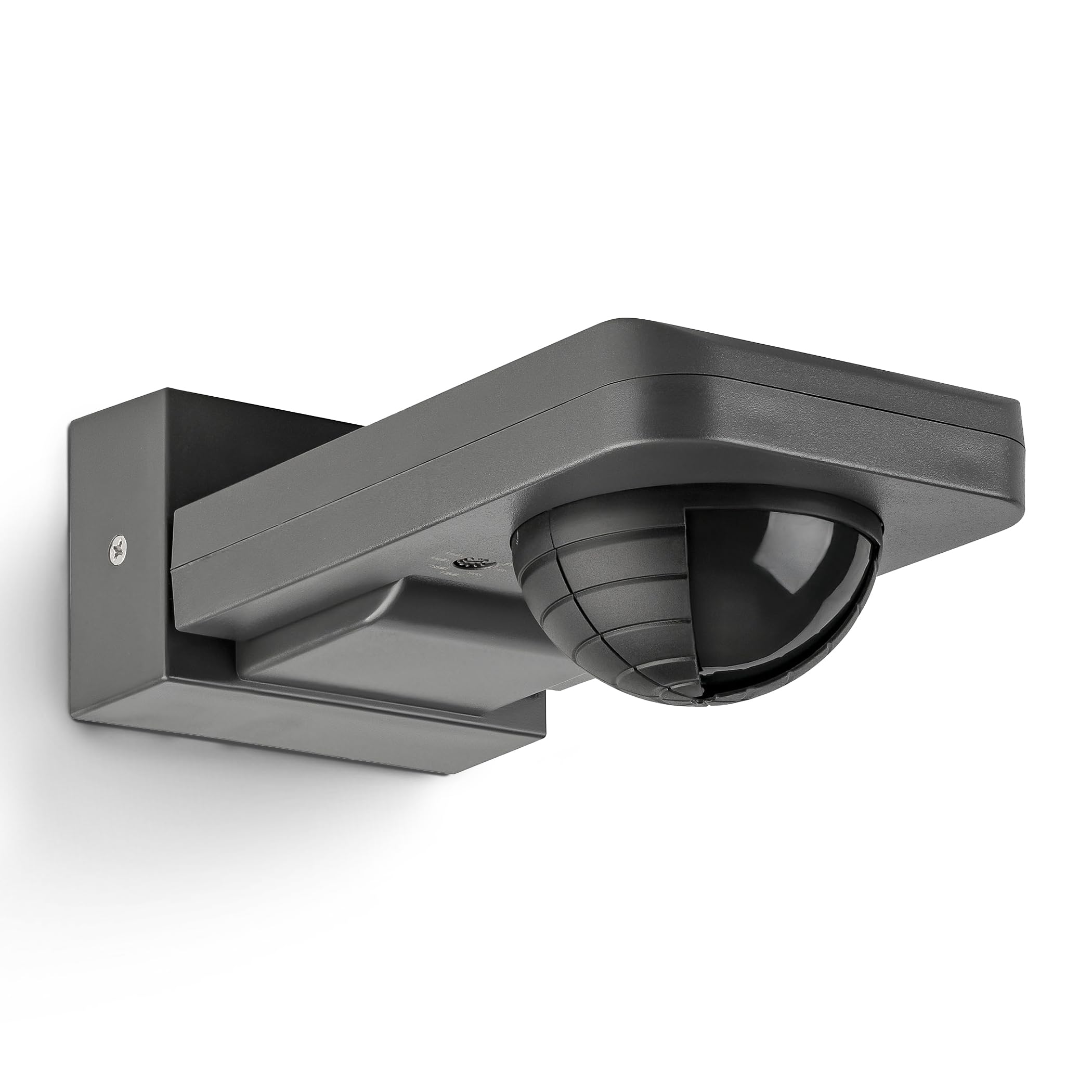
Image 1: SEBSON Outdoor Motion Detector IP65 in anthracite.
2. Saugos instrukcijos
- Montavimą turi atlikti kvalifikuotas elektrikas, laikydamasis vietinių laidų įrengimo taisyklių.
- Prieš montuodami arba atlikdami techninę priežiūrą įsitikinkite, kad maitinimas yra atjungtas.
- Do not exceed the maximum load capacity specified for the device.
- This product is designed for outdoor use with an IP65 rating, protecting against dust and low-pressure water jets.
- Avoid installing near heat sources, air conditioning units, or objects that may cause false triggers (e.g., swaying trees, reflective surfaces).
3. Produkto ypatybės
- Integrated with 3 sensors for precise detection of people, large animals, and vehicles.
- IP65 apsaugos klasė, skirta naudoti lauke.
- Suitable for surface mounting on walls or ceilings.
- Maximum load capacity: 2,000W for incandescent lamps, 1,000W for LED or energy-saving lamps.
- Detection area: 20 meters at 360°.
- Vertical orientation adjustable by 180°.
- Adjustable activation duration: 10 seconds to 30 minutes, or permanent ON/OFF.
- Adjustable ambient brightness sensor: 3-2,000 LUX.

2 vaizdas: Baigtaview pagrindinių produkto specifikacijų ir savybių.
4. Sąranka ir diegimas
4.1 Montavimo vieta
Choose a stable surface for mounting, either a wall or a ceiling. Ensure the chosen location allows for the desired detection area and is free from obstructions. The detector can be vertically oriented by 180° after installation.

Image 3: Vertical adjustment range of the motion detector.
4.2 Laidai
Connect the motion detector to the AC power supply (230V) and the light fixture according to the wiring diagram provided by a qualified electrician. Ensure all connections are secure and insulated.
4.3 Aptikimo zonos reguliavimas
The detection range is 20m at 360°. To reduce the detection range or exclude specific areas, use the provided modified cover. Cut the cover according to the desired pattern and place it over the sensor lens.
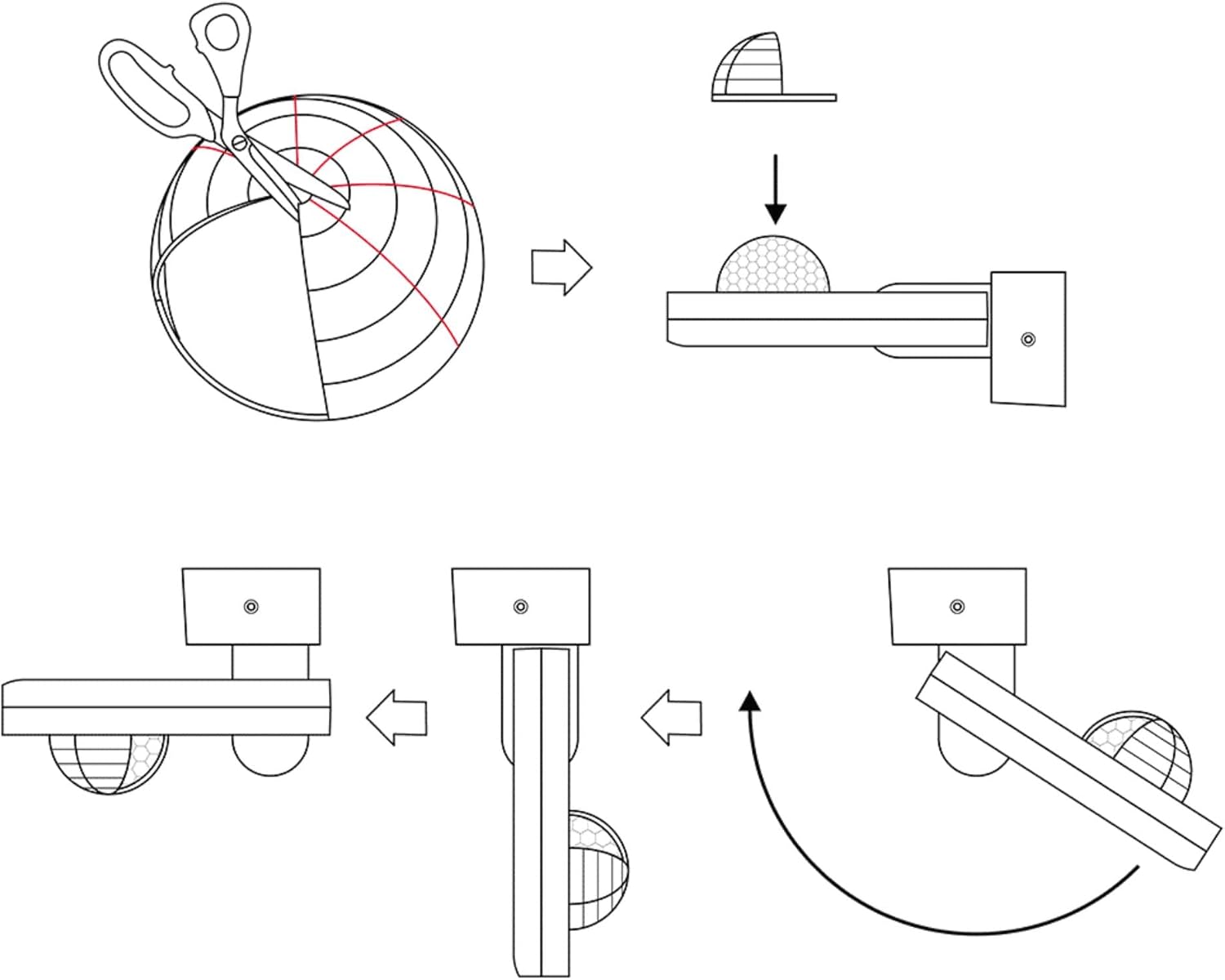
Image 4: Method for adjusting the detection area using a cover.

Image 5: Detection area diagrams for wall and ceiling mounting.
5. Naudojimo instrukcijos
5.1 Time Setting (TIME)
Use the 'TIME' knob to set the duration the light remains on after motion is detected. Settings range from 10 seconds to 30 minutes. You can also set it to permanent ON or OFF.
5.2 Light Sensitivity Setting (LUX)
Use the 'LUX' knob to adjust the ambient brightness threshold at which the motion detector activates the light. Settings range from 3 LUX (darkness) to 2,000 LUX (daylight). This allows the light to only turn on when it's dark enough.

6 pav.: Išsamus view of TIME and LUX adjustment controls.
6. Priežiūra
- Regularly clean the sensor lens with a soft, dry cloth to ensure optimal detection performance.
- Nenaudokite abrazyvinių valiklių ar tirpiklių, nes jie gali pažeisti prietaisą.
- Periodiškai tikrinkite visas elektros jungtis, ar nėra sandarumo ir susidėvėjimo požymių.
- No user-serviceable parts inside. For repairs, contact qualified personnel.
7. Problemų sprendimas
| Problema | Galima priežastis | Sprendimas |
|---|---|---|
| Šviesa neįsijungia aptikus judesį. | 1. Incorrect LUX setting (too high). 2. Nėra maitinimo šaltinio. 3. Sugedusi lemputė. | 1. Adjust LUX setting to a lower value. 2. Check power connections. 3. Pakeiskite lemputę. |
| Šviesa dega nuolat. | 1. TIME setting too long or set to permanent ON. 2. Nuolatinis judėjimas aptikimo zonoje. 3. Sensor obstructed or dirty. | 1. Adjust TIME setting. 2. Reposition detector or adjust detection area with cover. 3. Clean sensor lens. |
| Light turns on without apparent motion. | 1. Environmental factors (wind, heat, small animals). 2. Sensor too sensitive. | 1. Reposition detector or adjust detection area with cover. 2. Ensure no objects are causing false triggers. |
8. Specifikacijos
- Prekinis ženklas: SEBSONAS
- Modelio numeris: IR_OUT_CA
- Spalva: Antracitas
- Maitinimo šaltinis: kintamoji srovė (kintamoji srovė)
- Prekės svoris: 222 gramų
- Maksimalus aptikimo diapazonas: 20 metrai
- Aptikimo kampas: 360°
- Montavimo tipas: Surface mount (wall and ceiling)
- Baterijos aprašymas: Baterija neįtraukta
- Temperatūros diapazonas: 20 laipsnių Celsijaus (veikiant)
- Suderinami įrenginiai: Smart Home Hub, Light
- Rekomenduojami naudojimo būdai: Residential security, commercial sector, automation, energy management
- Matmenys: 85x55x170mm (approximate, refer to diagram for exact measurements)

7 pav.: Gaminio matmenys.
9. Garantija ir palaikymas
SEBSON products are designed for durability and performance. For warranty information or technical support, please refer to the official SEBSON websvetainėje arba susisiekite su pardavėju. Išsaugokite pirkimo kvitą kaip pirkimo įrodymą.
Dėl papildomos pagalbos galite apsilankyti SEBSON Brand Store.