
Įvadas
Thank you for choosing the SWOFY D26 MP3 Player. This device combines a high-capacity music player with the versatility of an Android 13.0 system, featuring Bluetooth and Wi-Fi connectivity, a 4.7-inch HD touchscreen, and support for various streaming applications. This manual will guide you through the setup, operation, maintenance, and troubleshooting of your new device to ensure an optimal user experience.
Kas yra dėžutėje
Atidžiai patikrinkite pakuotės turinį. Jei trūksta kokių nors daiktų arba jie pažeisti, susisiekite su klientų aptarnavimo tarnyba.
- SWOFY D26 MP3 Player (x1)
- USB-C įkrovimo laidas (x1)
- 64GB SD Card (x1)
- Wired Headphones (x1)
- Apsauginis dėklas (1x)
- Vartotojo vadovas (1x)

Image: All components included in the SWOFY D26 MP3 Player package.
Įrenginys baigtasview
The SWOFY D26 features a sleek design with a responsive touchscreen and essential physical controls.

Vaizdas: priekis view of the SWOFY D26 MP3 Player.
Pagrindinės funkcijos:
- 4.7 colių HD jutiklinis ekranas: For intuitive navigation and media viewing.
- Maitinimo mygtukas: Located on the side for turning the device on/off and screen lock.
- Garsumo mygtukai: Reguliuokite garso išvestį.
- USB-C prievadas: Įkrovimui ir duomenų perdavimui.
- 3.5 mm ausinių lizdas: Laidinei garso išvesčiai.
- MicroSD kortelės lizdas: Atminties išplėtimui.
- Integruotas garsiakalbis: Garso atkūrimui be ausinių.
Sąranka
1. Įrenginio įkrovimas
Before first use, fully charge the MP3 player. Connect the provided USB-C cable to the device's USB-C port and the other end to a compatible USB power adapter (not included) or a computer's USB port. The charging indicator will show the charging status.
2. Maitinimo įjungimas/išjungimas
- Norėdami įjungti: Paspauskite ir palaikykite maitinimo mygtuką, kol užsidegs ekranas.
- Norėdami išjungti: Paspauskite ir palaikykite maitinimo mygtuką, tada ekrane rodomoje parinkčių sąraše pasirinkite „Išjungti“.
- Norėdami užrakinti / atrakinti ekraną: Trumpai paspauskite maitinimo mygtuką.
3. Pradinė sąranka
Pirmą kartą įjungę įrenginį, vykdykite ekrane pateikiamus nurodymus:
- Pasirinkite norimą kalbą.
- Connect to a Wi-Fi network for internet access and app downloads.
- Nustatykite datą ir laiką.
4. SD kortelės įdėjimas
The device comes with 32GB of internal ROM and includes a 64GB SD card, providing a total of 96GB storage. It supports expansion up to 1TB via a microSD card.
- Suraskite „microSD“ kortelės lizdą įrenginio šone.
- Gently insert the microSD card into the slot with the gold contacts facing down until it clicks into place.
- Norėdami išimti, šiek tiek paspauskite kortelę, kol ji iššoks.
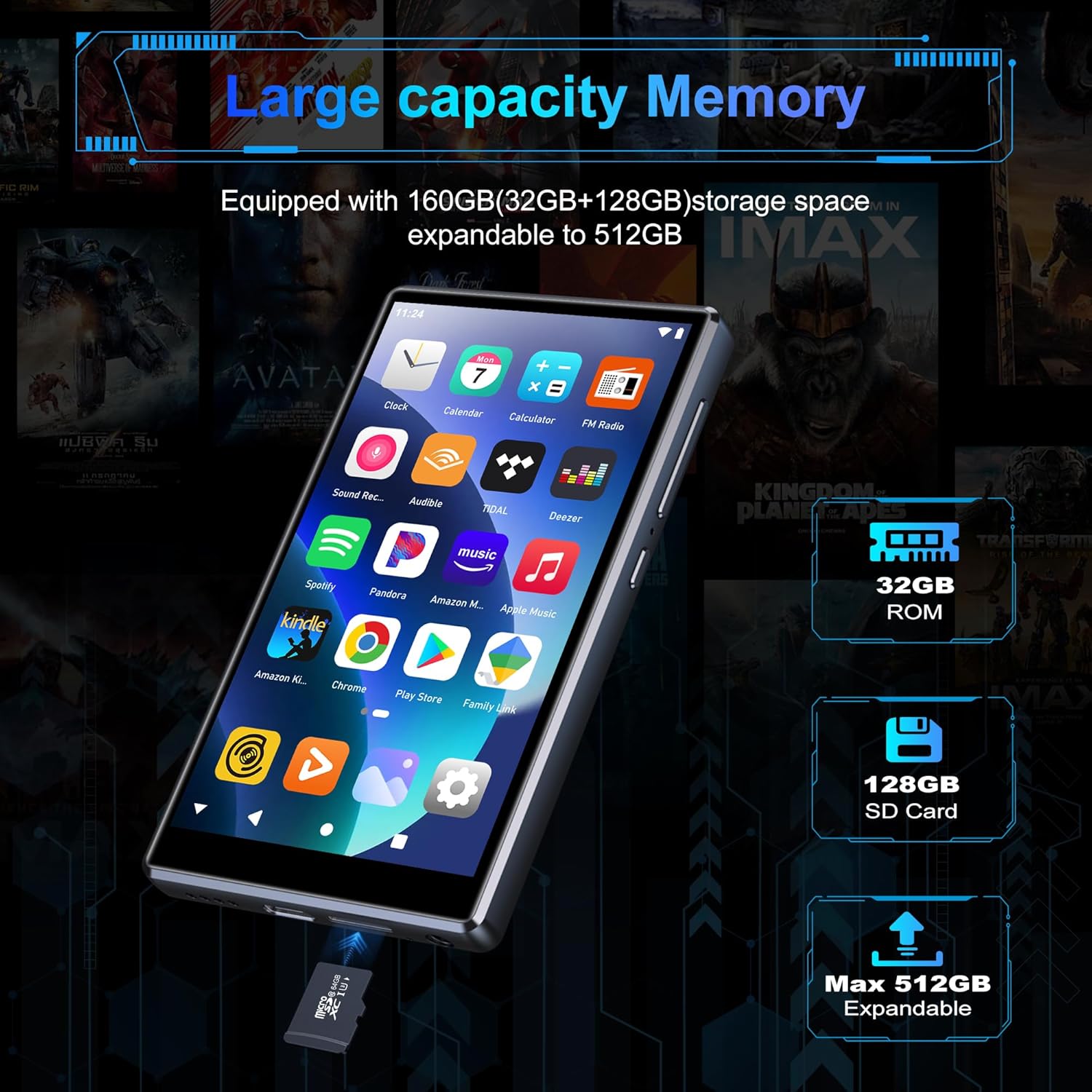
Image: Inserting an SD card for memory expansion.
Naudojimo instrukcijos
1. Pagrindinė navigacija
The SWOFY D26 operates like a standard Android device. Use touch gestures (tap, swipe, pinch) to navigate menus, open apps, and control media playback.
2. Prisijungimas prie Wi-Fi
- Eikite į Nustatymai > Tinklas ir internetas > Wi-Fi.
- Perjungti „Wi-Fi“ On.
- Iš sąrašo pasirinkite norimą tinklą ir, jei būsite paraginti, įveskite slaptažodį.
- The device supports dual-band Wi-Fi (2.4GHz and 5GHz) for stable connections.
3. „Bluetooth“ poravimas
Connect your SWOFY D26 to Bluetooth headphones, speakers, or car stereo systems.
- Eikite į Nustatymai > Prijungti įrenginiai > Bluetooth.
- Perjungti Bluetooth On.
- Įsitikinkite, kad jūsų „Bluetooth“ priedas veikia susiejimo režimu.
- Select the accessory from the list of available devices to pair.

Image: Bluetooth connectivity for audio playback.
4. Muzikos atkūrimas
The device supports various audio formats including MP3, OGG, FLAC, AAC, WAV, WMA, and APE. You can play music stored locally or stream from pre-installed apps.
- Vietinis Files: Norėdami naršyti ir leisti garso įrašus, naudokite iš anksto įdiegtą muzikos grotuvo programėlę files stored on the device or SD card.
- Srautinio perdavimo programos: Access Spotify, Amazon Music, Deezer, Pandora, HIBY, and other streaming services via their respective apps.

Image: Enjoying music with the SWOFY D26 MP3 Player.
5. Vaizdo įrašų atkūrimas
The 4.7-inch HD screen supports 720p and 1280p video playback. Supported formats include AVI, MKV, RMVB, MP4, MPG, MOV, DAT, and TS.
- Use the pre-installed video player app to watch videos stored on the device or SD card.
- Download video streaming apps from the Play Store for online content.
6. Programėlių valdymas
The device comes with several popular apps pre-installed. You can download more apps via Wi-Fi from the Google Play Store or uninstall unnecessary ones.

Image: Pre-installed applications on the SWOFY D26.
- Įdiegti programas: Open the Google Play Store app, search for your desired app, and tap "Install."
- Pašalinti programas: Eikite į Nustatymai > Programėlės, select the app, and tap "Uninstall."
7. Tėvų kontrolė
Utilize the parental control features to manage app access and screen time for children.
- Access parental control settings through the device's Nustatymai meniu.
- You can restrict app installations, remove pre-installed apps, set a reset lock, and control internet and music player usage duration.
8. FM radijas
The device includes a built-in FM radio. Connect wired headphones (acting as an antenna) to use this feature.
- Prijunkite laidines ausines.
- Open the FM Radio app.
- Scan for available stations.
Priežiūra
1. Valymas
To clean the device, use a soft, dry, lint-free cloth. Avoid using harsh chemicals, cleaning solvents, or abrasive materials, as these can damage the screen or finish.
2. Akumuliatoriaus priežiūra
The SWOFY D26 is equipped with a 2500mAh lithium battery. To maximize battery life:
- Venkite dažnai visiškai iškrauti akumuliatorių.
- Nelaikykite prietaiso ekstremaliose temperatūrose (karštyje ar šaltyje).
- Unplug the charger once the device is fully charged.
- Expected battery life: Up to 60 hours music playback, 10 hours video playback, 240 hours standby.

Image: Battery capacity and estimated usage times.
3. Programinės įrangos atnaujinimai
Periodically check for software updates to ensure optimal performance and access to new features. Connect to Wi-Fi and go to Nustatymai > Sistema > Sistemos atnaujinimas.
Trikčių šalinimas
If you encounter issues with your SWOFY D26 MP3 Player, refer to the following common solutions:
| Problema | Sprendimas |
|---|---|
| Įrenginys neįsijungia. | Ensure the device is charged. Connect to a charger for at least 30 minutes. If unresponsive, perform a hard reset by holding the power button for 10-15 seconds. |
| „Wi-Fi“ ryšio problemos. | Check if Wi-Fi is enabled in settings. Ensure the password is correct. Restart the device and your Wi-Fi router. Try connecting to a different Wi-Fi network. |
| „Bluetooth“ susiejimo klaida. | Ensure Bluetooth is enabled on both devices and the accessory is in pairing mode. Move devices closer. Restart both devices. |
| Programėlės stringa arba užstringa. | Išvalykite programos talpyklą ir duomenis Nustatymai > Programėlės. Uninstall and reinstall the app. Ensure sufficient storage space is available. |
| Prasta garso kokybė. | Check headphone connection or Bluetooth connection. Test with different headphones or speakers. Ensure audio files are not corrupted. Adjust equalizer settings if available. |
Specifikacijos
| Funkcija | Detalė |
|---|---|
| Modelio pavadinimas | D26 |
| Operacinė sistema | Android 13.0 |
| Procesorius | 8 branduolių procesorius |
| RAM | 4 GB |
| Vidinė atmintis (ROM) | 32 GB |
| Included SD Card | 64 GB |
| Max. Expandable Storage | Up to 1 TB (via microSD card) |
| Ekrano dydis | 4.7 colių |
| Ekrano raiška | 720 * 1280 (HD Touchscreen) |
| Ryšys | Dual-band Wi-Fi (2.4GHz & 5GHz), Bluetooth |
| Baterijos talpa | 2500 mAh |
| Baterijos veikimo laikas (muzika) | Iki 60 valandų |
| Baterijos veikimo laikas (vaizdo įrašas) | Iki 10 valandų |
| Palaikomi garso formatai | MP3, OGG, FLAC, AAC, WAV, WMA, APE |
| Palaikomi vaizdo formatai | AVI, MKV, RMVB, MP4, MPG, MOV, DAT, TS |
| Ypatingos savybės | Built-in Speaker, FM Radio, Parental Controls |
| Spalva | Juoda |
| Matmenys (I x P x A) | 11.9 x 6.7 x 1 cm |
| Svoris | 150 gramų |

Image: Internal processor and RAM details.
Garantija ir palaikymas
The SWOFY D26 MP3 Player comes with a standard manufacturer's warranty. For specific warranty terms and conditions, please refer to the warranty card included in your package or contact SWOFY customer support.
For technical support, troubleshooting assistance, or any product-related inquiries, please visit the official SWOFY website or contact their customer service department. Contact information can typically be found on the product packaging or the SWOFY brand store page.
SWOFY Brand Store: Visit SWOFY Store on Amazon