
1. Įvadas
Thank you for choosing the QDVOPHZA 4K 8MP PTZ Outdoor WiFi Security Camera. This manual provides detailed instructions for the installation, operation, and maintenance of your security camera. Please read this manual thoroughly before use to ensure proper functionality and to maximize the camera's performance.
This camera is designed for outdoor surveillance, offering advanced features such as 4K Ultra HD resolution, 10X optical zoom, automatic tracking, and color night vision, all within a durable, weatherproof design.

Image: The QDVOPHZA PTZ camera highlighting its key features including automatic tracking, multi-lens design, and dual-screen preview capability, alongside a mobile app interface.
2. Produkto ypatybės
- 4K 8MP itin HD raiška: Provides clear and detailed images for comprehensive surveillance.
- 10 kartų optinis priartinimas: Allows for clear magnification of distant objects without loss of image quality.
- Automatinis sekimas: Intelligently tracks moving objects, keeping them within the monitoring field.
- Spalvotas naktinis matymas: Delivers clear, colorful images even in low-light or complete darkness.
- IP66 atsparumo oro sąlygoms įvertinimas: Ensures stable operation in various weather conditions, including heavy rain and snow.
- Pakreipimo ir pasukimo funkcija: Offers a 355° horizontal pan and 90° vertical tilt for wide area coverage, controllable via mobile app.
- Dual-lens Dual-screen Preview: Enables simultaneous monitoring of a fixed wide view and a zoomed-in PTZ view.
- Humanoid Detection Alarm: Advanced detection capabilities to identify human figures and trigger alarms.
- Dvipusis garsas: Leidžia bendrauti per kamerą.
- Kelios saugojimo parinktys: Supports TF card storage (up to 128G) and cloud storage (if applicable).
3. Pakuotės turinys
Išpakuodami patikrinkite pakuotės turinį. Jei trūksta kokių nors daiktų arba jie pažeisti, susisiekite su klientų aptarnavimo tarnyba.
- QDVOPHZA 4K 8MP PTZ Outdoor WiFi Security Camera
- Maitinimo adapteris (DC 12V)
- Tvirtinimo varžtai ir sieniniai kaiščiai
- Vartotojo vadovas (šis dokumentas)
- Waterproof Kit for Network Cable (if applicable)
4. Sąrankos vadovas
4.1 Fizinis įrengimas
Choose a suitable outdoor location for installation, ensuring a clear line of sight and access to a power source. The camera can be mounted on a wall or pole.
- Gręžimo pozicijų žymėjimas: Use the mounting template (if provided) or the camera base to mark the screw holes on the desired surface.
- Gręžimo skylės: Pažymėtose vietose išgręžkite skyles. Jei tvirtinate prie mūro, įkiškite sieninius kaiščius.
- Saugi kamera: Attach the camera base to the surface using the provided screws. Ensure it is securely fastened.
- Prijunkite maitinimą: Connect the DC 12V power adapter to the camera's power input and plug it into an outdoor-rated power outlet.

Image: The QDVOPHZA PTZ camera mounted on a tree, illustrating its 355° pan and 90° tilt capabilities for wide area coverage.
4.2 Mobile App Installation and Pairing
Download the compatible mobile application (e.g., "iCSee" or similar, refer to packaging for specific app name) from your device's app store (iOS App Store or Google Play Store).
- Atsisiųsti programą: Ieškokite the recommended app and install it on your smartphone.
- Registruoti paskyrą: Atidarykite programėlę ir vykdykite ekrane pateikiamus nurodymus, kad užregistruotumėte naują paskyrą arba prisijunkite, jei jau turite.
- Pridėti įrenginį: Tap the "+" icon or "Add Device" option in the app.
- Pasirinkite kameros tipą: Choose "WiFi Camera" or "Smart Camera" and follow the prompts for network configuration.
- Prisijunkite prie WiFi: Ensure your phone is connected to a 2.4GHz WiFi network. The camera supports 2.4GHz WiFi.
- Nuskaityti QR kodą: The app will guide you to scan a QR code on the camera or generate a QR code on your phone for the camera to scan. Hold your phone's screen towards the camera lens until you hear a confirmation sound.
- Užbaigti sąranką: Once connected, name your camera and set a password.
4.3 „Micro SD“ kortelės įdėjimas (neprivaloma)
For local video storage, install a Micro SD card (up to 128GB, not included unless specified in your purchase).
- Išjungti: Disconnect the camera from the power supply before installing or removing the SD card.
- Raskite lizdą: Find the SD card slot, usually under a protective cover on the camera body.
- Įdėkite kortelę: Gently insert the Micro SD card into the slot with the contacts facing the correct direction until it clicks into place.
- Maitinimas: Reconnect the power. Format the SD card via the mobile app settings if prompted.
5. Naudojimo instrukcijos
5.1 Tiesiogiai View ir PTZ valdymas
Open the mobile app and select your camera to access the live view.
- Stumti / pakreipti: Use the directional controls (arrows or joystick) on the app interface to rotate the camera horizontally (pan) and vertically (tilt).
- Mastelio keitimas: Tiesioginio vaizdo transliacijoje naudokite žnybtelėjimo gestą, kad priartintumėte view or dedicated zoom buttons to activate the 10X optical zoom.

Image: The camera's 10X optical zoom capability, illustrating how distant objects like a camel in a snowy landscape can be clearly magnified.
5.2 Automatinis sekimas
Enable the automatic tracking feature in the camera settings within the app. When activated, the camera will automatically follow detected moving objects.
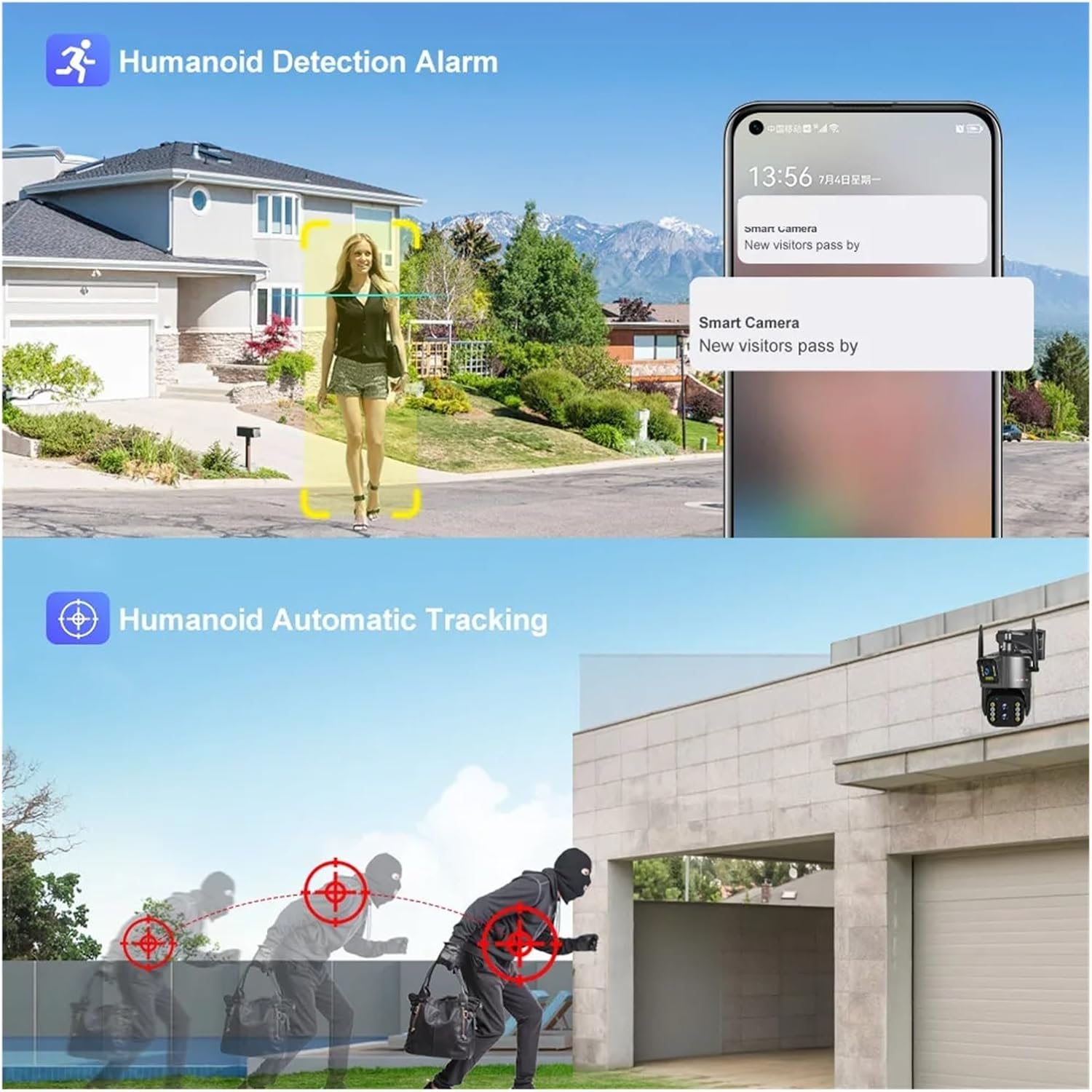
Image: Illustration of the camera's humanoid detection and automatic tracking, showing how it follows a person and a potential intruder.
5.3 Naktinio matymo režimai
The camera supports both infrared (black and white) and full-color night vision. You can switch between modes or set it to automatic in the app settings.
- Infraraudonųjų spindulių režimas: Pateikia aiškius nespalvotus vaizdus visiškoje tamsoje.
- Spalvotas naktinio matymo režimas: Utilizes built-in spotlights to illuminate the area, providing color images at night.

Image: A comparison demonstrating the clarity of infrared night vision versus the vibrant detail of full-color night vision provided by the camera.
5.4 Dual-lens Dual-screen Preview
Ši funkcija leidžia jums view two video streams simultaneously: one from the fixed wide-angle lens and another from the PTZ (pan-tilt-zoom) lens. This enables comprehensive monitoring with both a general overview and detailed close-ups.

Image: The dual-lens dual-screen preview feature, displaying both a wide-angle fixed view and a zoomed-in PTZ view concurrently on a single screen.
5.5 Įrašymas ir atkūrimas
Recordings are stored on the Micro SD card or cloud storage (if subscribed). Access playback through the app's "Playback" or "History" section.
- Renginio įrašas: Records automatically when motion or humanoid detection is triggered.
- Nepertraukiamas įrašymas: Can be enabled in settings for 24/7 recording (requires sufficient storage).
- Atkūrimas: Select a date and time in the app to review įrašytas footage.
6. Priežiūra
- Valymas: Kad užtikrintumėte aiškią vaizdo kokybę, periodiškai valykite kameros objektyvą minkštu, sausu skudurėliu. Nenaudokite stiprių cheminių medžiagų.
- Firmware atnaujinimai: Check the mobile app regularly for firmware updates. Keeping the firmware updated ensures optimal performance and security.
- Maitinimas: Įsitikinkite, kad maitinimo adapteris ir laidas nepažeisti. Jei reikia, pakeiskite.
- SD kortelės tvarkymas: If using an SD card, periodically check its status in the app. Consider formatting it every few months to maintain performance.
7. Problemų sprendimas
7.1 Kamera neprisijungus
- Patikrinkite galią: Ensure the camera is properly connected to a power source and the outlet is working.
- Check WiFi: Verify your WiFi router is functioning and the camera is within range. Restart the router if necessary.
- Iš naujo susiekite kamerą: Jei problema išlieka, pabandykite iš naujo susieti kamerą su programėle.
7.2 Prasta vaizdo kokybė
- Švarus objektyvas: Nuvalykite fotoaparato objektyvą, ar nėra nešvarumų ar dėmių.
- Tinklo stabilumas: Ensure a stable WiFi connection. Poor signal can affect streaming quality.
- Rezoliucijos nustatymai: Check the resolution settings in the app; ensure it's set to 4K or 8MP for best quality.
7.3 Automatic Tracking Not Working
- Įjungti funkciją: Confirm that automatic tracking is enabled in the app settings.
- Aišku View: Įsitikinkite, kad nėra jokių kliūčių, blokuojančių kameros view.
- Jautrumas: Programėlėje sureguliuokite judesio aptikimo jautrumą.
7.4 SD Card Not Recording
- Įdėkite teisingai: Įsitikinkite, kad SD kortelė įdėta teisingai.
- Formato kortelė: Format the SD card through the app.
- Card Capacity/Health: Check if the SD card is full or damaged. Replace if necessary.
- Įrašymo nustatymai: Verify that recording options (event or continuous) are enabled in the app.
8. Specifikacijos
| Funkcija | Detalė |
|---|---|
| Modelio numeris | w0u5903wei (LS-WL341) |
| Rezoliucija | 4K 8MP (4.0 Megapixels) |
| Optinis priartinimas | 10X |
| Objektyvas | 2.8-12 mm |
| "Pan" diapazonas | 0°-360° (typically 355° controllable) |
| Pakreipimo diapazonas | Other (typically 90° controllable) |
| Naktinis matymas | Color Night Vision, Infrared Mode |
| Ryšys | „Wi-Fi“ (2.4 GHz) |
| Sandėliavimas | TF kortelė (iki 128 GB), debesies saugykla (neprivaloma) |
| Garsas | Dviejų krypčių garsas |
| IP reitingas | IP66 (atsparus vandeniui / oro sąlygoms) |
| Maitinimo šaltinis | DC 12V |
| Darbinė temperatūra | -10°C iki 60°C (14°F iki 140°F) |
| Matmenys (I x P x G) | 25x20x18cm (approx. 9.8 x 7.9 x 7.1 inches) |
| Palaikomos mobiliosios sistemos | Android, iOS |
| Vaizdo įrašų suspaudimas | H.264, H.265 |
9. Garantija ir palaikymas
For warranty information and technical support, please refer to the documentation included with your purchase or visit the official QDVOPHZA website. You may also contact the seller directly through the platform where the product was purchased.
Prašome išsaugoti pirkimo įrodymą bet kokiems garantiniams reikalavimams.