
TECSUN S-8800
TECSUN S-8800 Multi-conversion AM/FM/LW/SW/SSB Radio Receiver User Manual
Modelis: S-8800
1. Įvadas
The TECSUN S-8800 is a versatile multi-conversion radio receiver designed for optimal reception across AM, FM, LW, SW, and SSB bands. It incorporates advanced High-IF analog circuits, triple AM conversion, and DSP decoding technology to deliver superior audio performance. This manual provides comprehensive instructions for setting up, operating, and maintaining your S-8800 receiver.
2. Pakuotės turinys
Patikrinkite, ar jūsų pakuotėje yra visi toliau išvardyti daiktai:
- TECSUN S-8800 Radio Receiver
- USB-MiniUSB Cable
- 2 x 18650 Li-ion Batteries
- Nuotolinio valdymo pultas
- 2 x AAA baterijos (nuotolinio valdymo pultui)
- BNC Antenna Adapter
- Vartotojo vadovas (šis dokumentas)
3. Produktas baigtasview
Familiarize yourself with the main components and controls of your TECSUN S-8800 radio receiver.

Figure 3.1: TECSUN S-8800 radio receiver and its remote control.
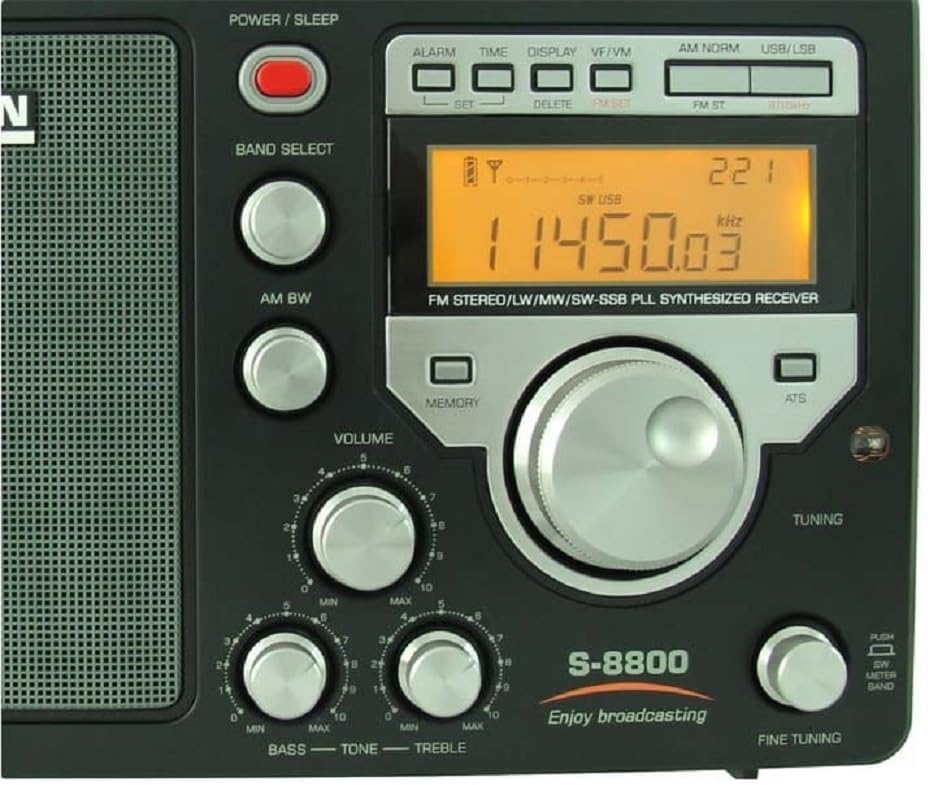
Figure 3.2: Front panel with display, tuning knob, and audio controls.

3.3 pav.: šonas view illustrating headphone, line-out, and external antenna connections.

Figure 3.4: Rear panel with FM/SW BNC, AM/GND antenna terminals, and MiniUSB charging port.
4. Sąranka
4.1. Maitinimo šaltinis
- Akumuliatoriaus montavimas: Open the battery compartment cover on the rear of the radio. Insert the two 18650 Li-ion batteries, ensuring correct polarity as indicated inside the compartment. Close the cover securely.
- AC Power / Charging: Connect the supplied USB-MiniUSB cable to the radio's MiniUSB port (DC 5V/1A) and a compatible USB power adapter (not included) or a computer's USB port. The radio can operate while charging.
4.2. Antenos jungtys
- Vidinė antena: For FM and SW reception, extend the telescopic antenna fully. For AM (MW) and LW reception, the radio utilizes an internal ferrite bar antenna.
- Išorinės antenos:
- FM/SW: Connect an external FM or SW antenna to the BNC (50 Ohm) connector on the side of the radio. Use the provided BNC adapter if necessary.
- AM/LW: For improved AM/LW reception, connect an external AM antenna to the AM + GND (500 Ohm) terminals on the rear panel.
4.3. Garso išvestis
- Ausinės: Connect 3.5mm stereo headphones to the 'STEREO VIA EARPHONE' jack for private listening.
- Išrikiuoti: Use the RCA (LEFT+RIGHT) line-out ports to connect the radio to an external ampilgaamžiškumą ar įrašymo įrenginį.
5. Naudojimo instrukcijos
5.1. Maitinimo įjungimas/išjungimas
Paspauskite MAITINIMAS/MIEGAS button located on the top right of the front panel to turn the radio on or off.
5.2. Juostos pasirinkimas
Paspauskite BAND SELECT button repeatedly to cycle through the available frequency bands: FM, AM (MW), LW, SW, and SSB.
5.3. Derinimo režimai
- Rotary Tuning Knob: Rotate the large central tuning knob to adjust the frequency.
- Tiesioginis dažnio įvedimas: Using the remote control, enter the desired frequency directly using the number pad.
- AutoScan (ATS): Paspauskite ATS button to automatically scan and store available stations within the current band into memory.
- Rankinis derinimas: Naudokite +/- buttons (if available on remote/front panel) for step-by-step frequency adjustments.
- Tikslus derinimas: Naudokite skirtą FINANSINIS TUNINGAS knob for precise frequency adjustments, particularly useful for SSB reception.
5.4. Frequency Steps
The radio supports various tuning steps depending on the band:
- FM: 10 KHz / 100 KHz
- LW: 1 KHz / 9 KHz
- MW: 1 KHz / 9-10 KHz
- SW: 1 KHz / 5 KHz
5.5. Atminties funkcijos
The S-8800 can store up to 650 stations (FM 100, LW 100, MW 100, SW 250, SSB 100).
- Parduotuvės stotis: Tune to the desired station, then press and hold the ATMINTIS mygtuką, kol ekrane bus patvirtintas išsaugojimas.
- Recall Station: Paspauskite ATMINTIS button briefly, then use the tuning knob or number pad on the remote to select a stored memory location.
5.6. SSB (vienos šoninės juostos) veikimas
- Select the SSB band using the BAND SELECT mygtuką.
- Naudokite USB/LSB switch to select either Upper Side Band (USB) or Lower Side Band (LSB).
- Adjust the dedicated FINANSINIS TUNINGAS controller (± 10 Hz) for clear voice reception.
5.7. Garso valdikliai
- Apimtis: Garso išvesties lygį reguliuokite naudodami TOMAS rankenėlė.
- Žemieji / aukštieji dažniai: Naudokite skirtą BASS ir TREBLE knobs to adjust the audio tone to your preference.
5.8. Ekranas ir apšvietimas
The LCD display shows the current frequency, time, and other operational information. Press the EKRANAS button to activate the backlight or set it to stay on. A visual signal meter indicates the strength of the received signal.
5.9. Alarm and Sleep Timer
- Signalizacija: Set an alarm to automatically turn on the radio at a specified time. Refer to the display controls for setting the alarm time.
- Miego laikmatis: The radio can be set to automatically turn off after a period ranging from 1 to 120 minutes.
5.10. Užrakinimo funkcija
Paspauskite UŽRAKTAS button to disable all controls and prevent accidental changes to settings. Press it again to unlock.
6. Priežiūra
6.1. Valymas
Wipe the radio with a soft, dry cloth. Do not use abrasive cleaners, solvents, or strong chemicals, as these may damage the finish or internal components.
6.2. Akumuliatoriaus priežiūra
If the radio will not be used for an extended period, remove the 18650 Li-ion batteries from the main unit and the AAA batteries from the remote control to prevent leakage and damage.
6.3. Sandėliavimas
Store the radio in a cool, dry place, away from direct sunlight, high humidity, and extreme temperatures. Protect it from dust and physical impact.
7. Problemų sprendimas
If you encounter issues with your TECSUN S-8800, please refer to the following common problems and solutions:
- Nėra galios:
- Ensure the 18650 Li-ion batteries are correctly installed and fully charged.
- Verify the USB-MiniUSB cable is properly connected for AC power or charging.
- Patvirtinkite MAITINIMAS/MIEGAS mygtukas buvo paspaustas.
- Prastas priėmimas:
- Fully extend the telescopic antenna for FM/SW bands.
- Try connecting an external antenna to the appropriate BNC or AM/GND terminals.
- Adjust the radio's position or location to minimize interference.
- For AM/LW, rotate the radio to optimize the internal ferrite bar antenna's reception.
- Patikrinkite RD JAUTRUMAS switch (DX/Local) for optimal signal handling.
- Nėra garso:
- Patikrinkite TOMAS lygiu.
- Ensure headphones are not connected if expecting sound from the internal speaker.
- Verify that the correct band and frequency are selected.
- SSB Distortion:
- Atsargiai sureguliuokite FINANSINIS TUNINGAS knob for clear voice reception.
- Ensure the correct USB/LSB mode is selected for the signal you are trying to receive.
8. Specifikacijos
| Modelis | TECSUN S-8800 |
| Dažnio diapazonai | FM: 64/76/87.5-108 MHz MW (AM): 522-1620 KHz LW: 100-519 KHz SW: 1711-29999 KHz |
| Derinimo žingsniai | FM: 10 KHz / 100 KHz LW: 1 KHz / 9 KHz MW: 1 KHz / 9-10 KHz SW: 1 KHz / 5 KHz |
| Derinimo režimai | Direct Frequency Entry, AutoScan, Manual, Rotary Knob |
| Atminties išankstiniai nustatymai | 650 (FM 100, LW 100, MW 100, SW 250, SSB 100) |
| SSB | USB/LSB with ±10 Hz Fine Tuning |
| Garsas | AB klasė Amplifier, Ultra-dynamic Full-range Speaker, Bass/Treble Controls |
| Maitinimo šaltinis | 2 x 18650 Li-ion Batteries (included), MiniUSB DC 5V/1A for charging |
| Jungtys | FM/SW Antenna: BNC (50 Ohm) AM Antenna: AM + GND (500 Ohm) Headphone Output: 3.5mm Stereo Jack Line Output: RCA (Left + Right) |
| Ekranas | Backlit LCD with Signal Meter |
| Ypatingos savybės | Triple Conversion, PLL Digital Synthesized, DSP Decoding, Remote Control, Alarm, Sleep Timer, Lock Function |
| Matmenys | 27 x 17 x 9 cm (apytiksliai) |
| Svoris | 1.5 kg (with batteries, approximately) |
| Gamintojas | JETFON |
| Kilmės šalis | Honkongas |
9. Informacija apie garantiją
This product is covered by a standard manufacturer's warranty. Please refer to the warranty card included in your package or contact your retailer for specific terms and conditions regarding warranty coverage and service. Keep your purchase receipt as proof of purchase.
10. Pagalba klientams
For technical assistance, troubleshooting, or service inquiries, please contact your local dealer or the point of purchase. When contacting support, please have your product model (S-8800) and purchase details readily available for faster service.
Ask a question about this manual
Ask about setup, troubleshooting, compatibility, parts, safety, or missing instructions. Manuals+ will review the question and use this page’s manual context to help answer it.