
Įvadas
This manual provides detailed instructions for the safe and efficient operation of your Phomemo M836-B Portable Thermal Printer. The M836-B is an inkless, wireless thermal printer designed for portability and convenience, supporting various paper sizes including US Letter and A4. Please read this manual thoroughly before using the printer to ensure optimal performance and longevity.
Produktas baigtasview
Pagrindinės savybės
- Be rašalo terminis spausdinimas: Utilizes thermal technology, eliminating the need for ink cartridges or ribbons.
- Belaidis ryšys: Supports Bluetooth for seamless connection with iOS and Android devices.
- USB jungtis: Compatible with Windows, macOS, ChromeOS, and Linux via USB Type-C.
- Didelė raiška: Offers a print resolution of 300 DPI for clear text and graphics.
- Nešiojamas dizainas: Compact and lightweight, ideal for travel and on-the-go printing.
- Multi-Size Paper Support: Accommodates various thermal paper sizes, including US Letter (8.5'' x 11'') and A4.
- Vienspalvis išėjimas: Prints in black and white.

Image: The Phomemo M836-B printer demonstrating its inkless thermal printing capability, highlighting no mess from ink.

Paveikslėlis: Viršview of the Phomemo M836-B's key features, including wireless connectivity, inkless operation, 2600mAh battery capacity, and 300 DPI resolution.
Pakuotės turinys
Patikrinkite, ar pakuotėje yra visi reikalingi daiktai:
- Phomemo M836-B Portable Thermal Printer
- Thermal Paper (as specified in the box)
- C tipo USB kabelis
- Vartotojo vadovas (šis dokumentas)
Sąrankos vadovas
1. Spausdintuvo įkrovimas
- Connect the provided USB Type-C cable to the printer's charging port.
- Kitą USB laido galą prijunkite prie suderinamo USB maitinimo adapterio (nepridedamas) arba kompiuterio USB prievado.
- The indicator light will show charging status. Charge the printer fully before first use.
2. Popieriaus įdėjimas
The Phomemo M836-B supports both thermal paper rolls and sheet-fed thermal paper.
- Atidarykite popieriaus skyriaus dangtį.
- For roll paper: Insert the thermal paper roll into the designated slot, ensuring the printing side faces upwards. Gently pull a small length of paper out.
- For sheet-fed paper: Insert the thermal paper sheet into the input slot, ensuring it is straight and aligned.
- Tvirtai uždarykite popieriaus skyriaus dangtelį.

Image: Illustration of how to load different types of thermal paper (roll and sheet) into the Phomemo M836-B printer, showing the paper selection mechanism.
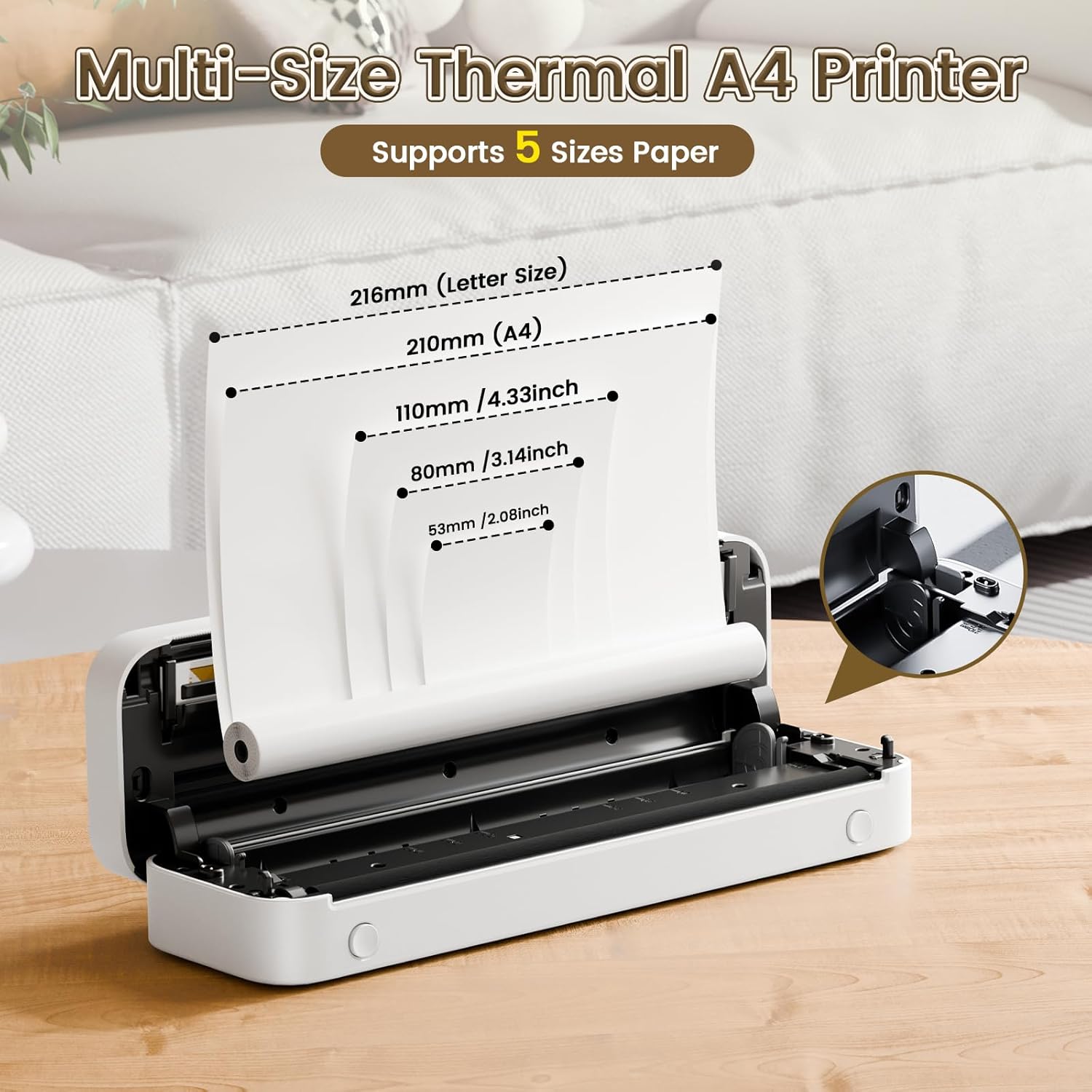
Image: The Phomemo M836-B printer demonstrating support for multiple paper sizes, including US Letter (216mm) and A4 (210mm).
3. Prisijungimas prie įrenginių
Spausdintuvas palaiko tiek „Bluetooth“, tiek USB jungtis.
Bluetooth Connection (for iOS/Android)
- Atsisiųskite oficialią „Phomemo“ programėlę iš savo įrenginio programėlių parduotuvės.
- Turn on the printer by pressing and holding the power button.
- Įjunkite „Bluetooth“ savo mobiliajame įrenginyje.
- Open the Phomemo app, search for the printer (M836-B), and pair with it.
- Vykdykite visus ekrane pateikiamus nurodymus, kad užbaigtumėte susiejimo procesą.
USB Connection (for Windows/macOS/ChromeOS/Linux)
- Įsitikinkite, kad spausdintuvas įjungtas.
- Prijunkite spausdintuvą prie kompiuterio naudodami pridedamą USB C tipo laidą.
- Apsilankykite oficialioje „Phomemo“ svetainėje websvetainė (www.phomemo.com) to download and install the appropriate drivers for your operating system.
- Once drivers are installed, the printer should be recognized by your computer.

Image: Diagram illustrating the two types of connections supported by the Phomemo M836-B: Bluetooth for Android, iOS, and iPad, and USB for Windows, macOS, ChromeOS, and Linux.
Naudojimo instrukcijos
Spausdinimas iš mobiliųjų įrenginių
- Ensure your printer is charged, loaded with paper, and connected via Bluetooth to your mobile device.
- Atidarykite programą „Phomemo“.
- Select the document or image you wish to print from within the app.
- Adjust print settings (e.g., paper size, density) as needed.
- Norėdami pradėti spausdinti, palieskite spausdinimo mygtuką.
Printing from Computers
- Ensure your printer is charged, loaded with paper, and connected via USB to your computer with drivers installed.
- Atidarykite dokumentą arba file norite spausdinti savo kompiuteryje.
- Eikite į „File" > "Print" (or use the shortcut Ctrl+P/Cmd+P).
- Select the Phomemo M836-B from the list of available printers.
- Prireikus pakoreguokite spausdinimo nuostatas (pvz., popieriaus dydį, orientaciją).
- Spustelėkite „Spausdinti“.
Paper Handling Tips
- Always use high-quality thermal paper for best results.
- Ensure the paper is loaded correctly with the printable side facing the print head.
- Avoid exposing thermal paper to direct sunlight or high temperatures, as this can degrade print quality over time.
- Manually tear off printed documents carefully after printing, as the printer does not have an automatic cutter.
Priežiūra
Spausdintuvo valymas
- Išjunkite spausdintuvą ir atjunkite jį nuo maitinimo šaltinio.
- Šiek tiek naudokite minkštą, be pūkelių šluostę dampened with isopropyl alcohol to gently wipe the print head. Allow it to dry completely before use.
- Clean the exterior of the printer with a soft, dry cloth. Do not use abrasive cleaners or solvents.
Sandėliavimas
- Spausdintuvą laikykite vėsioje, sausoje vietoje, apsaugotoje nuo tiesioginių saulės spindulių ir ekstremalių temperatūrų.
- If storing for an extended period, ensure the printer is fully charged to maintain battery health.
- Keep thermal paper in its original packaging in a dark, cool place to prevent premature fading.
Trikčių šalinimas
If you encounter issues with your Phomemo M836-B printer, refer to the following common problems and solutions:
Spausdintuvas neįsijungia
- Patikrinkite akumuliatorių: Ensure the printer is sufficiently charged. Connect it to a power source and try again.
- Maitinimo mygtukas: Press and hold the power button for a few seconds to ensure it's properly activated.
Connectivity Issues (Bluetooth/USB)
- Bluetooth:
- Ensure Bluetooth is enabled on your device and the printer is within range.
- Unpair and re-pair the printer in your device's Bluetooth settings.
- Iš naujo paleiskite spausdintuvą ir mobilųjį įrenginį.
- USB:
- Patikrinkite, ar USB kabelis yra tvirtai prijungtas prie spausdintuvo ir kompiuterio.
- Ensure the correct printer drivers are installed on your computer. Reinstall if necessary.
- Išbandykite kitą USB prievadą arba kabelį.
Poor Print Quality (Blurry, Faded, Streaks)
- Spausdinimo galvutės valymas: Follow the cleaning instructions in the Maintenance section.
- Paper Quality/Type: Ensure you are using high-quality thermal paper and that it is loaded correctly.
- Spausdinimo tankis: Adjust print density settings in the Phomemo app or printer driver.
- Popieriaus laikymas: Thermal paper exposed to heat or light can degrade. Try a fresh roll of paper.
Popieriaus strigtys
- Išjunkite spausdintuvą: Immediately turn off the printer.
- Pašalinti popierių: Gently pull out any jammed paper. Do not force it, as this can damage the printer.
- Įkelti iš naujo: Ensure paper is loaded correctly and not wrinkled or bent before restarting.
Techninės specifikacijos
| Funkcija | Specifikacija |
|---|---|
| Prekės ženklas | Phomemo |
| Modelio pavadinimas | M836-B |
| Ryšio technologija | „Bluetooth“, C tipo USB |
| Spausdinimo technologija | Šiluminis |
| Spausdintuvo išvestis | Vienspalvis |
| Maksimali spausdinimo raiška | 300 DPI |
| Maksimalus spausdinimo greitis (vienspalvis) | 1.5 puslapis per minutę |
| Suderinami įrenginiai | Android Devices, Mac, Windows, iPhone, iPad |
| Maksimalus laikmenos dydis | 8.5 x 11 colių (JAV laiškas) |
| Palaikomi popieriaus formatai | US Letter, A4 |
| Printing Media Type | Terminis popierius |
| Prekės svoris | 1.53 svaro (apie 694 g) |
| Gaminio matmenys (D x P x A) | 7.8 gylio x 26.4 pločio x 4.5 aukščio centimetrų |
| Kontrolės metodas | Programėlė |
| Kilmės šalis | Kinija |
Garantija ir palaikymas
Specific warranty details for the Phomemo M836-B Portable Thermal Printer are not provided within this document. For information regarding warranty coverage, technical support, or service, please refer to the warranty card included with your product or contact Phomemo customer service directly through their official websvetainėje arba kontaktinę informaciją, pateiktą jūsų produkto pakuotėje.
Oficialus Phomemo Websvetainė: www.phomemo.com