
1. Įvadas
The Audizio Avola is a comprehensive audio system designed to provide a wide range of listening options. It integrates Internet Radio, DAB+, FM radio, a CD player, and Bluetooth connectivity into a single, elegant unit. This manual will guide you through the setup, operation, and maintenance of your Avola system, ensuring you can fully utilize its features for an optimal audio experience.
2. Saugos instrukcijos
- Maitinimas: Naudokite tik pateiktą maitinimo adapterį. Įsitikinkite, kad įtampatage atitinka jūsų regiono reikalavimus.
- Vanduo ir drėgmė: Do not expose the unit to rain, moisture, or liquids. Avoid placing objects filled with liquids, such as vases, on the unit.
- Vėdinimas: Užtikrinkite tinkamą vėdinimą aplink įrenginį. Neužblokuokite ventiliacijos angų.
- Šilumos šaltiniai: Laikykite įrenginį atokiau nuo šilumos šaltinių, tokių kaip radiatoriai, šildytuvai, viryklės ar kiti šilumą skleidžiantys prietaisai.
- Valymas: Disconnect the unit from the power supply before cleaning. Use a soft, dry cloth. Do not use liquid cleaners or aerosol cleaners.
- Aptarnavimas: Nebandykite patys atlikti įrenginio techninės priežiūros. Visus techninės priežiūros darbus patikėkite kvalifikuotiems techninės priežiūros darbuotojams.
- CD grotuvas: Do not insert foreign objects into the CD tray. Handle CDs by their edges to avoid scratches.
3. Pakuotės turinys
Patikrinkite, ar pakuotėje yra visi daiktai:
- 1x Audizio Avola Internet Radio
- 1x nuotolinio valdymo pultas
- 1x maitinimo adapteris
- 1x User Manual (Quick Start Guide)

Image: Audizio Avola unit shown with its remote control and power adapter.
4. Produktas baigtasview
4.1 Priekinis skydelis

Vaizdas: priekis view of the Audizio Avola with the CD tray closed.
The front panel features the main display, control buttons, a CD tray, and input ports.
- Ekranas: Color display for navigation and information.
- Valdymo mygtukai: MENU, INFO, REC/DEL, PRESET/REPEAT, STANDBY, I/R, Play/Pause, Stop, Skip/Fast Forward/Rewind.
- CD dėklas: Garso kompaktinių diskų įdėjimui.
- TUNE/SELECT Knob: Rotate to navigate menus, press to select.
- GARSUMO rankenėlė: Reguliuoja garso išvesties lygį.
- USB prievadas: Skirta USB atminties įrenginiams prijungti.
- SD kortelės lizdas: Skirta SD atminties kortelių įdėjimui.
- AUX įvestis: 3.5 mm lizdas išoriniams garso šaltiniams.
- Ausinių lizdas: 3.5 mm lizdas privačiam klausymuisi.

Image: Close-up of the Audizio Avola front panel showing USB, SD, AUX, and headphone ports.
4.2 Galinis skydelis
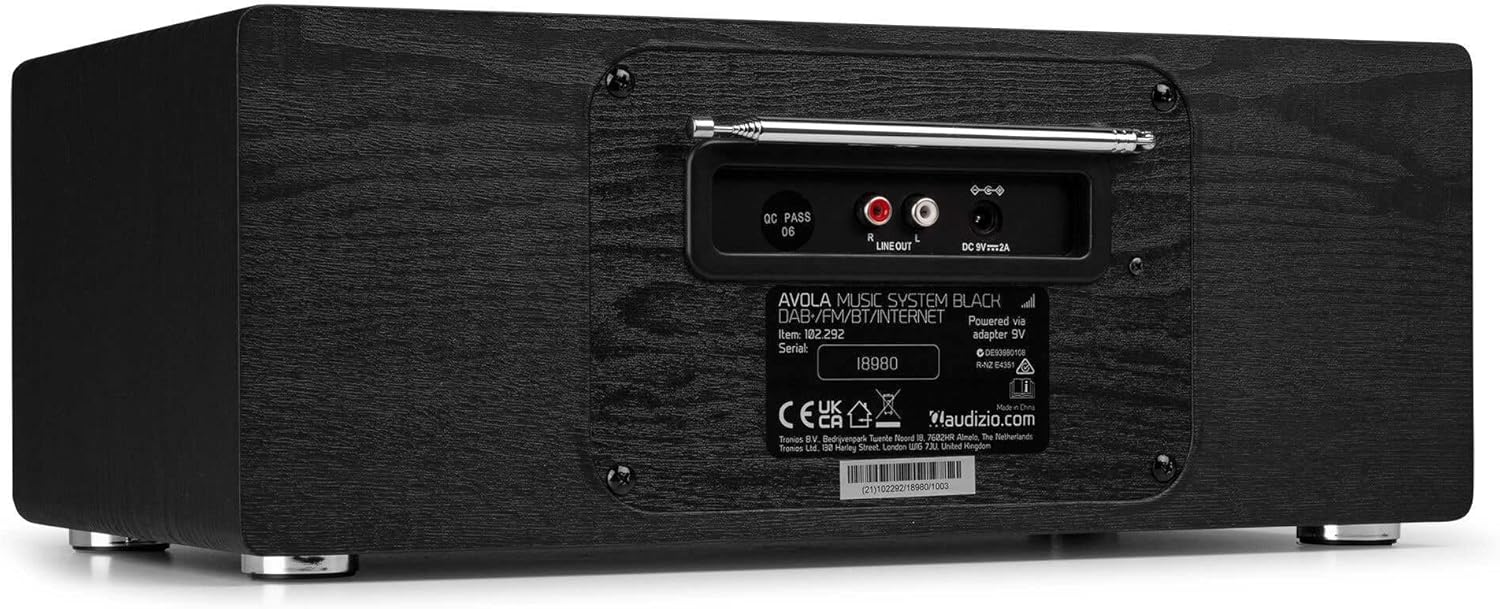
Vaizdas: Galinis view of the Audizio Avola, highlighting the antenna and connection ports.
The rear panel houses essential connections:
- Teleskopinė antena: For DAB+ and FM radio reception. Extend fully for best signal.
- LINIJOS IŠVAŽIAVIMAS (RCA): Prijungimui prie išorinio ampkeltuvai ar garsiakalbiai.
- Maitinimo įvestis: 9 V nuolatinė srovė, 2 A Maitinimo adapterio prijungimui.
5. Sąranka
5.1 Maitinimo jungtis
- Connect the power adapter to the DC 9V 2A input on the rear of the Avola unit.
- Prijunkite maitinimo adapterį į tinkamą sieninį lizdą.
- The unit will enter standby mode. Press the STANDBY button on the unit or remote control to power on.
5.2 Antenos sąranka
Optimaliam DAB+ ir FM radijo priėmimui visiškai ištieskite teleskopinę anteną, esančią galiniame skydelyje. Sureguliuokite jos padėtį, kad gautumėte geriausią signalo kokybę.
5.3 Initial Setup (WLAN Connection)
To access Internet Radio features, the Avola must be connected to a Wi-Fi network.
- Upon first power-on, the unit may prompt you to set up the network connection. If not, press MENU, navigate to 'System Settings' and then 'Network'.
- Select 'Wi-Fi Network' and choose 'Scan' to find available networks.
- Sąraše pasirinkite savo „Wi-Fi“ tinklą.
- Enter your Wi-Fi password using the TUNE/SELECT knob to navigate characters and press to confirm each character.
- Prisijungus, ekrane pasirodys „Wi-Fi“ piktograma.
6. Veikimo režimai
6.1 Interneto radijas
Pasiekite tūkstančius radijo stočių visame pasaulyje per „Wi-Fi“ ryšį.
- Press the MENU button and select 'Internet Radio'.
- Galite naršyti stotis pagal vietą, žanrą arba ieškoti konkrečių stočių.
- Use the TUNE/SELECT knob to navigate and select.
- To save a station as a preset, press and hold the PRESET/REPEAT button until the preset menu appears, then select a preset number.

Image: The Audizio Avola display showing the Internet Radio interface.
6.2 DAB+ radijas
Digital Audio Broadcasting Plus offers high-quality digital radio.
- Press the MENU button and select 'DAB Radio'.
- Įrenginys automatiškai ieškos prieinamų DAB+ stočių.
- Use the TUNE/SELECT knob to browse and select stations.
- Save presets as described for Internet Radio.
6.3 FM radijas
Listen to traditional analog FM radio broadcasts.
- Press the MENU button and select 'FM Radio'.
- Use the TUNE/SELECT knob to manually tune or press and hold to auto-scan for stations.
- Save presets as described for Internet Radio.
6.4 CD grotuvas
Play your favorite audio CDs.
- Press the MENU button and select 'CD Player'.
- Press the 'Open' button next to the CD tray to open it.
- Carefully place an audio CD onto the tray with the label side facing up.
- Press the 'Open' button again to close the tray. The unit will begin playing the CD automatically.
- Use the Play/Pause, Stop, and Skip buttons for playback control.
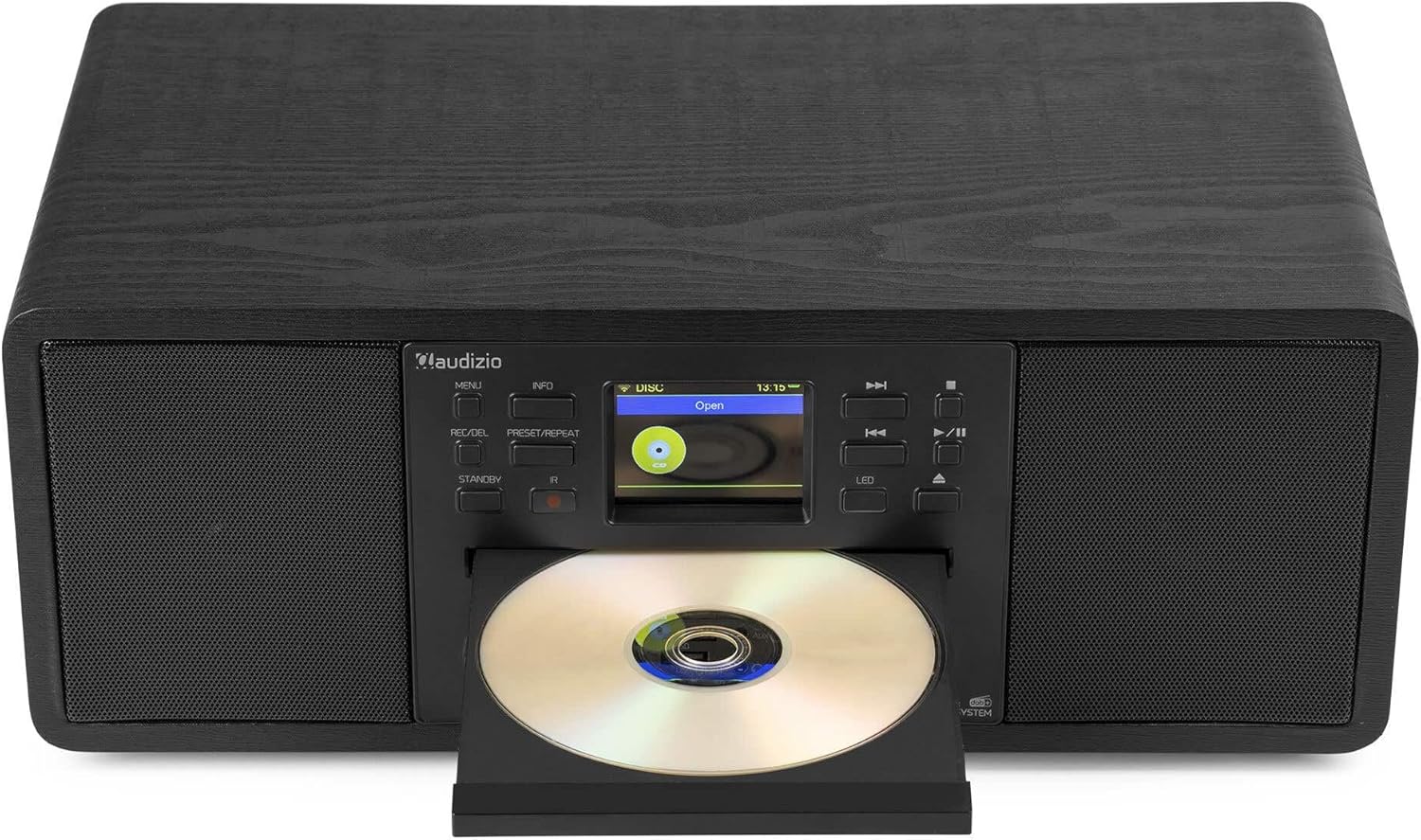
Image: The Audizio Avola with its CD tray open, ready for disc insertion.
6.5 „Bluetooth“ ryšys
Belaidžiu būdu transliuokite garsą iš savo išmaniojo telefono, planšetinio kompiuterio ar kitų „Bluetooth“ įrenginių.
- Press the MENU button and select 'Bluetooth'.
- The Avola will enter pairing mode and become discoverable.
- On your Bluetooth device, search for 'Audizio Avola' in the Bluetooth settings and select it to pair.
- Once connected, the display will show 'BT Connected'. You can now play audio from your device through the Avola.

Image: The Audizio Avola display indicating a successful Bluetooth connection.
6.6 USB/SD atkūrimas
Leisti garsą fileiš USB atmintinių arba SD kortelių.
- Insert a USB drive into the USB port or an SD card into the SD card slot on the front panel.
- Press the MENU button and select 'USB' or 'SD' (the unit may automatically switch to the correct mode).
- Naršykite po savo files and folders using the TUNE/SELECT knob.
- Press the TUNE/SELECT knob to play a selected track.
7. Priežiūra
- Įrenginio valymas: Use a soft, dry, lint-free cloth to clean the exterior of the unit. Do not use abrasive cleaners, waxes, or solvents.
- CD objektyvo valymas: Jei CD atkūrimas tampa netolygus, lazerio lęšį nuvalykite komerciškai įsigyjamu CD lęšio valymo disku.
- Saugykla: Jei įrenginį ilgesnį laiką sandėliuosite, atjunkite jį nuo maitinimo šaltinio ir laikykite vėsioje, sausoje vietoje.
8. Problemų sprendimas
| Problema | Galima priežastis | Sprendimas |
|---|---|---|
| Nėra galios | Neprijungtas maitinimo adapteris arba sugedęs lizdas. | Patikrinkite maitinimo jungtis. Išbandykite kitą lizdą. |
| Nėra garso | Per mažas garsumas, įjungtas nutildymas arba pasirinktas neteisingas šaltinis. | Increase volume. Check if mute is active. Ensure correct input source is selected. |
| Internet Radio not connecting | Neteisingas „Wi-Fi“ slaptažodis, silpnas signalas arba tinklo problema. | Re-enter Wi-Fi password. Move unit closer to router. Check router status. |
| Prastas DAB+/FM priėmimas | Antena nėra ištiesta arba silpnas signalo lygis. | Visiškai ištieskite ir sureguliuokite teleskopinę anteną. Pabandykite pakeisti įrenginio padėtį. |
| CD negroja | CD inserted incorrectly, dirty/scratched CD, or unsupported format. | Ensure CD is inserted label-side up. Clean or replace CD. Verify CD format (supports CD-DA, MP3). |
| „Bluetooth“ nesusieja | Device not in pairing mode, or Avola not discoverable. | Ensure both devices are in pairing mode. Check Bluetooth settings on your device. |
9. Specifikacijos
| Funkcija | Specifikacija |
|---|---|
| Modelio pavadinimas | Avola |
| Prekės numeris | 102.292 |
| Matmenys (IxPxH) | 45.8 x 25.8 x 19.7 cm |
| Svoris | 4 kg |
| Maitinimo įvestis | 220 Volt (via power adapter) |
| Speaker Output Power (Max) | 60 vatų |
| Garso išvesties režimas | Stereo |
| Palaikomi garso formatai | CD-DA, MP3 |
| Ryšio technologija | WLAN, Bluetooth, AUX, RCA |
| Suderinami įrenginiai | MP3 Player, PC, Smartphone, Tablet |
| Spalva | Juoda |
10. Garantija ir palaikymas
Audizio products are designed and manufactured to the highest standards. In the unlikely event of a problem with your product, please contact your retailer for assistance. Keep your proof of purchase for warranty claims. For further support or inquiries, please refer to the official Audizio websvetainėje arba susisiekite su jų klientų aptarnavimo tarnyba.