
1. Įvadas
Thank you for choosing the TECPHILE K936 Wireless Keyboard and Mouse Combo. This product is designed to provide versatile and efficient input for multiple devices, featuring both Bluetooth 5.0 and 2.4GHz USB connectivity. This manual will guide you through the setup, operation, and maintenance of your new keyboard and mouse.
2. Pakuotės turinys
- TECPHILE K936 Wireless Keyboard
- TECPHILE Wireless Mouse
- USB imtuvas (laikomas pelės baterijų skyriuje)
- USB-C įkrovimo laidas
- Keyboard Protective Cover
- Vartotojo vadovas
3. Produktas baigtasview
Familiarize yourself with the components of your TECPHILE K936 Wireless Keyboard and Mouse Combo.

3.1 vaizdas: The TECPHILE K936 Wireless Keyboard and Mouse Combo in Grey. The keyboard features a full layout with a numeric keypad, and the mouse is a compact, ergonomic design.

3.2 vaizdas: Diagram showing the dimensions of the keyboard (368mm x 121mm) and mouse (110mm x 63mm x 30mm).
Klaviatūros ypatybės:
- Multi-device connectivity: 3 x Bluetooth 5.0, 1 x 2.4GHz USB
- Dedicated function keys (F1-F12) with multimedia controls
- Įkraunama 300 mAh ličio baterija
- C tipo įkrovimo prievadas
- Automatic sleep mode for power saving
- Scissor-leg key structure for comfortable typing
- Transparent protective cover included
Pelės savybės:
- Dual-mode connectivity: 1 x Bluetooth, 1 x 2.4GHz USB
- Optical movement detection technology
- Abipusis dizainas
- Quiet click buttons
4. Sąranka
4.1 Pradinis įkrovimas
Before first use, fully charge both the keyboard and mouse. Connect the provided USB-C charging cable to the charging port on the keyboard and mouse, and the other end to a 5V/1A power adapter (not included) or a computer USB port. The charging indicator light will show charging status and turn off when fully charged.
Note: Only use a 5V/1 Amp power adapter for charging to ensure optimal battery life.

4.1 vaizdas: Illustration of the keyboard's battery specifications: 2-4 hours charging time, 300mAh battery capacity, and up to 180 days standby time.
4.2 Klaviatūros prijungimas
The keyboard supports up to three Bluetooth connections and one 2.4GHz USB connection.

4.2 vaizdas: Diagram illustrating the keyboard's ability to connect to multiple devices via Bluetooth (3 channels) and 2.4GHz USB.
2.4GHz USB Connection:
- Locate the USB receiver inside the mouse's battery compartment.
- Prijunkite USB imtuvą prie laisvo kompiuterio ar įrenginio USB prievado.
- Įjunkite klaviatūrą. Klaviatūra turėtų automatiškai prisijungti.
Bluetooth Connection (BT1, BT2, BT3):
- Įjunkite klaviatūrą.
- Paspauskite ir palaikykite Fn key and one of the Bluetooth keys (BT1, BT2, arba BT3) for 3-5 seconds until the corresponding indicator light flashes rapidly. This indicates pairing mode.
- Savo įrenginyje (kompiuteryje, planšetiniame kompiuteryje, išmaniajame telefone) eikite į „Bluetooth“ nustatymus ir ieškokite naujų įrenginių.
- Select "TECPHILE Keyboard" from the list of available devices to pair.
- Kai susiejimas bus atliktas, indikatoriaus lemputė nustos mirksėti ir kelias sekundes šviečia nemirksėdama, o tada užges.
- Repeat for other Bluetooth channels to connect to additional devices.
4.3 Pelės prijungimas
The mouse supports one Bluetooth connection and one 2.4GHz USB connection.
2.4GHz USB Connection:
- Ensure the USB receiver is plugged into your device.
- Switch the mouse to 2.4GHz mode using the switch on the bottom of the mouse.
- Pelė turėtų automatiškai prisijungti.
„Bluetooth“ ryšys:
- Switch the mouse to Bluetooth mode using the switch on the bottom of the mouse.
- Press and hold the Bluetooth pairing button on the bottom of the mouse for 3-5 seconds until the indicator light flashes.
- Savo įrenginyje eikite į „Bluetooth“ nustatymus ir ieškokite naujų įrenginių.
- Select "TECPHILE Mouse" from the list to pair.
5. Naudojimo instrukcijos
5.1 Switching Between Devices (Keyboard)
To switch between connected devices on the keyboard, simply press the Fn key along with the corresponding connection key (BT1, BT2, BT3, arba 2.4G for USB). The keyboard will switch to the selected device instantly.
5.2 Switching Between Devices (Mouse)
To switch between 2.4GHz USB and Bluetooth modes on the mouse, use the toggle switch located on the bottom of the mouse.
5.3 Function Keys (Keyboard)
The keyboard features dedicated function keys (F1-F12) that can be used in conjunction with the Fn key for various multimedia and system controls.
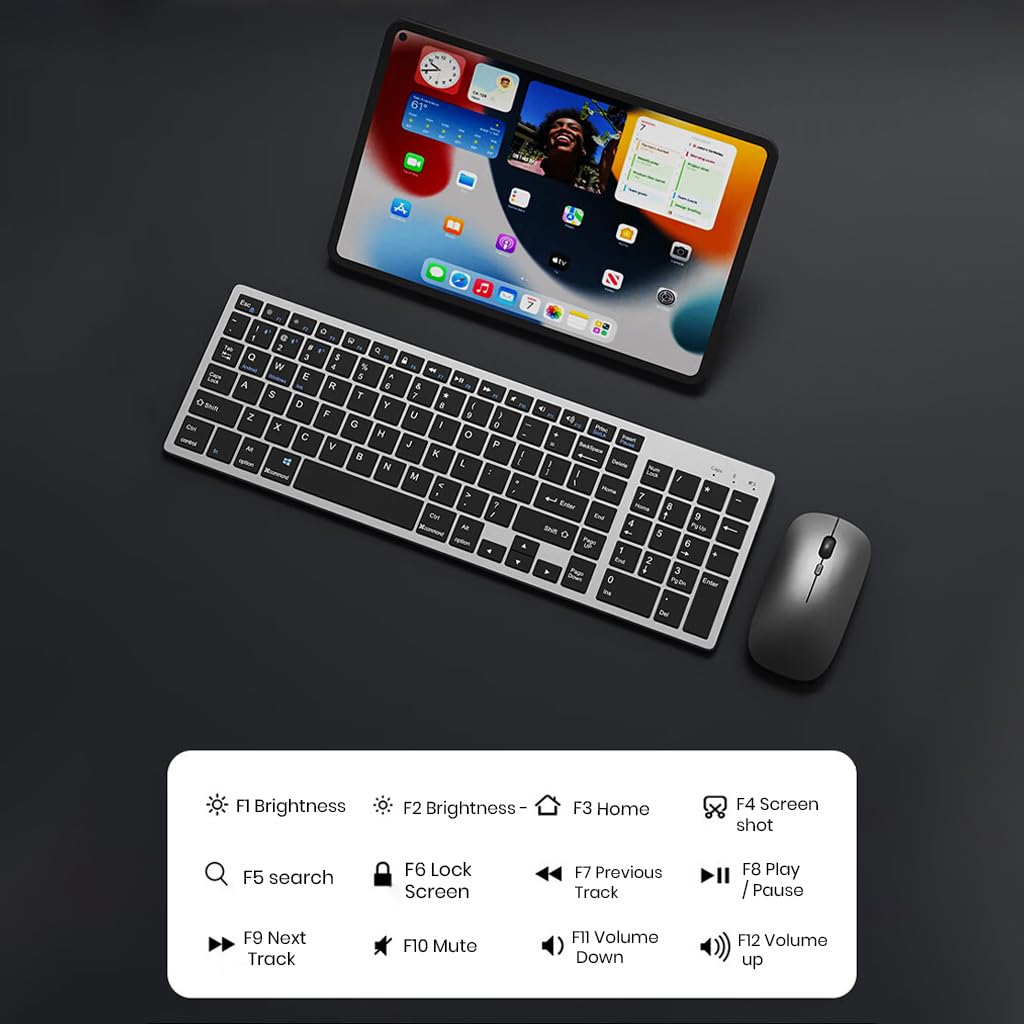
5.1 vaizdas: The keyboard displaying its function keys and their associated actions, such as brightness control, home, screen shot, search, lock screen, media playback, and volume control.
- Fn + F1: Ryškumas sumažintas
- Fn + F2: Ryškumas aukštyn
- Fn + F3: Pradžia
- Fn + F4: Ekrano kopija
- Fn + F5: Paieška
- Fn + F6: Užrakinimo ekranas
- Fn + F7: Ankstesnis takelis
- Fn + F8: Leisti / pristabdyti
- Fn + F9: Kitas takelis
- Fn + F10: Nutildyti
- Fn + F11: Sumažinti garsumą
- Fn + F12: Padidinti garsumą
5.4 Energijos taupymo režimas
The keyboard and mouse are equipped with an automatic sleep mode to conserve battery life. If inactive for 10 minutes, the devices will enter sleep mode. To wake them up, simply press any key on the keyboard or move/click the mouse.

5.2 vaizdas: Diagram illustrating the auto-sleep mode and how to reactivate the keyboard and mouse by pressing any key.
6. Priežiūra
- Valymas: Use a soft, dry cloth to clean the keyboard and mouse. For stubborn dirt, a slightly damp galima naudoti šluostę, užtikrinant, kad į įrenginį nepatektų skysčio.
- Apsauginis dangtelis: Utilize the included transparent protective cover for the keyboard to guard against dust and accidental spills.
- Saugykla: Įrenginius laikykite vėsioje, sausoje vietoje, apsaugotoje nuo tiesioginių saulės spindulių ir ekstremalių temperatūrų.
- Įkrovimas: Always use a 5V/1A power adapter for charging to prevent damage and ensure battery longevity.

6.1 vaizdas: The keyboard shown with its transparent protective keyskin, designed to prevent dust and spills.
7. Problemų sprendimas
| Problema | Galima priežastis | Sprendimas |
|---|---|---|
| Keyboard/Mouse not connecting via 2.4GHz USB. | USB receiver not properly inserted, low battery, incorrect mode selected. |
|
| Keyboard/Mouse not connecting via Bluetooth. | Not in pairing mode, device's Bluetooth is off, already connected to max devices, low battery. |
|
| Ryšio vėlavimas arba nutrūkimas. | Trikdžiai, atstumas nuo imtuvo / įrenginio, išsikrovusi baterija. |
|
| Keyboard keys not responding. | Low battery, device in sleep mode, connection issue. |
|
8. Specifikacijos
| Funkcija | Detalė |
|---|---|
| Prekės ženklas | TEKFILIS |
| Modelis | K936 |
| Ryšio technologija | Keyboard: 3 x Bluetooth 5.0, 1 x 2.4GHz USB; Mouse: 1 x Bluetooth, 1 x 2.4GHz USB |
| Suderinami įrenginiai | Nešiojamasis kompiuteris, asmeninis kompiuteris, išmanusis telefonas, planšetinis kompiuteris |
| Operacinė sistema | „Android“, „iOS“, „Windows“, „macOS“ |
| Klaviatūros baterija | 300 mAh ličio jonų (įkraunamas) |
| Įkrovimo prievadas | C tipo USB |
| Įkrovimo laikas | 2-4 valandos (apytiksliai) |
| Budėjimo laikas | Iki 180 dienų |
| Klaviatūros matmenys (I x P x A) | 36 x 13 x 1.5 cm |
| Pelės matmenys (I x P x A) | 11 x 6.3 x 3 cm (apytiksliai) |
| Prekės svoris | 661 g (combo) |
| Judesio aptikimo technologija | Optinis |
| Rankų orientacija | Abipusis |
9. Garantija ir palaikymas
TECPHILE products come with a standard warranty. For warranty claims, technical support, or any product-related inquiries, please contact TECPHILE customer service through the retailer where the product was purchased or visit the official TECPHILE websvetainė kontaktinei informacijai.
Prašome išsaugoti pirkimo įrodymą garantijos tikslais.
Manufacturer/Importer: TECPHILE, 2nd Floor, A36, Block B, Naraina Industrial Area Phase 2, Naraina, New Delhi, Delhi, 110028