
Įvadas
This manual provides detailed instructions for the setup, operation, and maintenance of your OLEVS IN-3652 Men's Multifunction Chronograph Watch. This timepiece features multiple dials, a luminous display, chronograph functions, date display, and moon phase indicator, all housed in a durable stainless steel case with water resistance.

Figure 1: OLEVS IN-3652 Multifunction Chronograph Watch (Two-tone strap, white dial variant)
Produktas baigtasview
The OLEVS IN-3652 watch is designed with precision and functionality. Key features include:
- Multi-Dial Display: Includes minute timer, 24-hour lunar phase, second time zone, second timer, and calendar window.
- Šviečiančios rodyklės ir žymekliai: Ensures visibility in low-light conditions after absorbing sufficient light.
- Atsparumas vandeniui: Rated for 30 meters, suitable for daily use and splashes, but not for swimming or hot water exposure.
- Patvari konstrukcija: Stainless steel band and case with a high-hardness coated mirror surface.
- Kvarcinis judesys: Užtikrina tikslų laiką.

Figure 2: Key features of the OLEVS IN-3652 watch, including water resistance, crystal coating, movement type, and luminous display.
Sąranka
1. Pradinis laiko ir datos nustatymas
Prieš užsidėdami laikrodį, nustatykite teisingą laiką ir datą.
- Ištraukite karūną: Gently pull the crown (the knob on the side of the watch) to position 2 (the outermost position).
- Nustatykite laiką: Rotate the crown to adjust the hour and minute hands to the current time. Ensure you differentiate between AM and PM for the 24-hour indicator and moon phase.
- Nustatykite datą: Push the crown back to position 1 (middle position). Rotate the crown to adjust the date in the calendar window.
- Push the crown back: Once time and date are set, push the crown fully back into position 0 (normal position) to start the watch and ensure water resistance.
2. Dirželio reguliavimas
The stainless steel strap can be adjusted for a comfortable fit. A watch adjustment tool is included with your purchase.
- To shorten the strap, use the provided tool to remove pins from the links.
- To lengthen the strap, additional links may be required (not included).
- It is recommended to have a professional jeweler adjust the strap to prevent damage.
Naudojimo instrukcijos
Your OLEVS IN-3652 watch features several sub-dials and pushers for various functions.
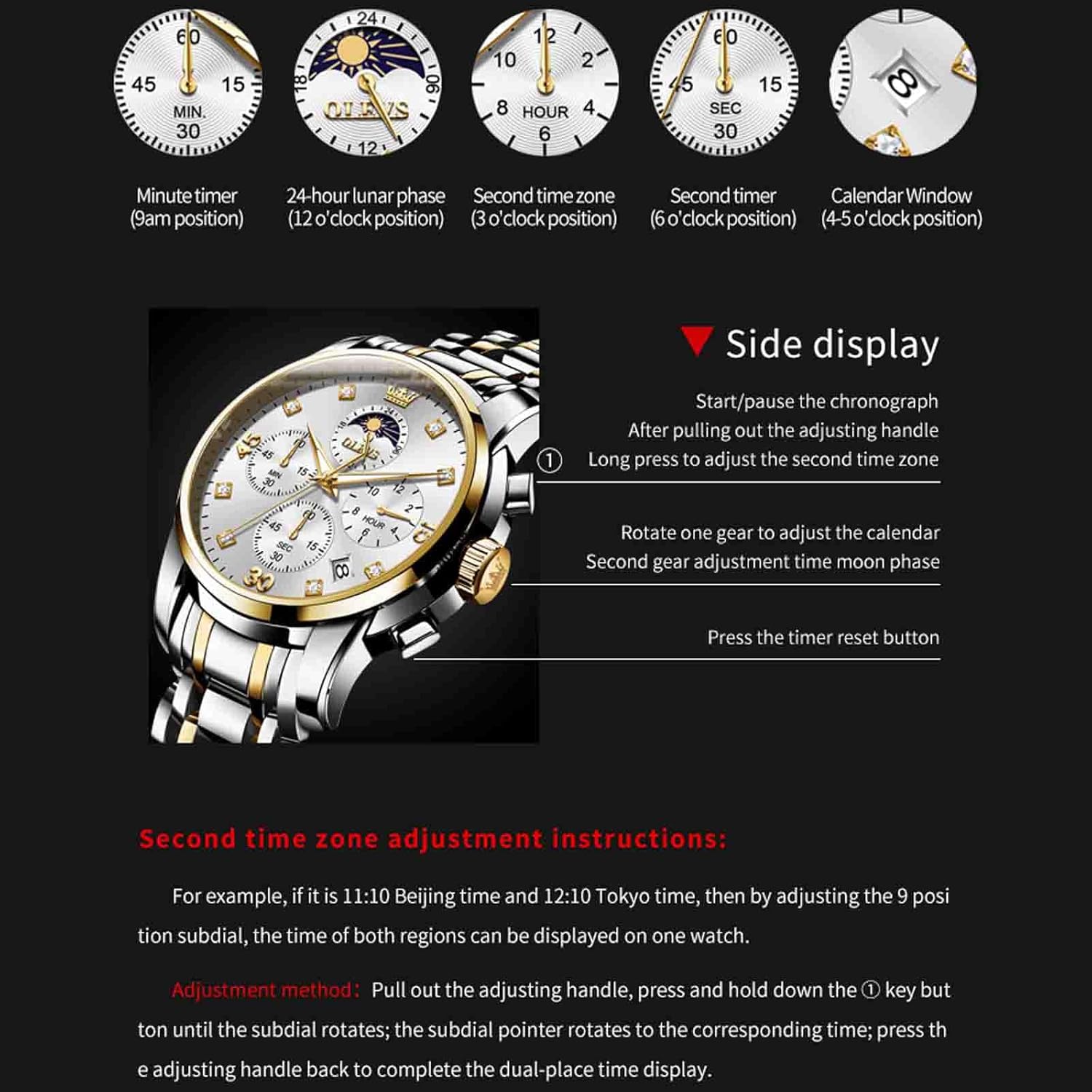
Figure 3: Watch dial functions and side control diagram.
1. Chronograph Function (Stopwatch)
- The 9 o'clock sub-dial indicates the minute timer (up to 60 minutes).
- The 6 o'clock sub-dial indicates the second timer (up to 30 seconds).
- Paleisti / pristabdyti: Press the top pusher (button above the crown) to start or pause the chronograph.
- Atstatyti: Press the bottom pusher (button below the crown) to reset the chronograph to zero. This only works when the chronograph is stopped.
2. 24-Hour Lunar Phase (Moon Phase)
- The 12 o'clock sub-dial displays the 24-hour time and lunar phase.
- To adjust the moon phase, pull the crown to position 1 (middle position) and rotate it. The moon phase will advance as you rotate.
3. Second Time Zone Adjustment
- The 3 o'clock sub-dial displays the second time zone.
- Koregavimo metodas: Pull out the adjusting handle (crown) to position 2. Press and hold down the top pusher (button above the crown). While holding, rotate the crown. The sub-dial pointer will rotate to the corresponding time. Press the adjusting handle back to position 0 to complete the dual-place time display.
4. Calendar Window
- The calendar window is located between the 4 and 5 o'clock positions.
- To adjust the calendar, pull the crown to position 1 (middle position) and rotate it.
5. Šviečiantis ekranas
The watch hands and markers contain luminous material. For optimal glow in the dark, expose the watch to a bright light source for a period of time to allow the phosphor to absorb sufficient light.
Priežiūra
1. Atsparumas vandeniui
Your OLEVS IN-3652 watch is rated for 30 meters (3ATM) water resistance. This means it is suitable for:
- Daily use, such as hand washing or light rain.
- Accidental splashes.
Svarbios atsargumo priemonės:
- Negalima wear the watch while swimming, diving, or showering.
- Venkite exposure to hot water, steam, or extreme temperature changes, as this can compromise the water-resistant seals.
- Kad išlaikytumėte atsparumą vandeniui, visada įsitikinkite, kad karūnėlė yra visiškai įstumta.

4 pav.: galinis view of the watch highlighting water resistance and buckle type.
2. Valymas
- Reguliariai valykite laikrodžio korpusą ir dirželį minkštu, sausu skudurėliu, kad pašalintumėte nešvarumus ir prakaitą.
- Nerūdijančio plieno dirželiams, šiek tiek damp galima naudoti šluostę, po kurios nedelsiant reikia išdžiovinti.
- Venkite naudoti cheminius valiklius, tirpiklius ar abrazyvines medžiagas, nes jos gali pažeisti laikrodžio apdailą.
3. Baterijos keitimas
The watch is powered by a quartz movement, which requires a battery. When the watch stops or runs erratically, the battery may need replacement. It is recommended to have the battery replaced by a qualified watch technician to ensure proper sealing and functionality.
Trikčių šalinimas
- Laikrodis neveikia: Patikrinkite, ar karūnėlė iki galo įstumta. Jei taip, gali reikėti pakeisti bateriją.
- Neteisingas laikas / data: Refer to the "Initial Time and Date Setting" section to re-adjust.
- Chronografas neatkuria nulio: Ensure the chronograph is stopped before pressing the reset pusher. If it still doesn't reset, a service may be required.
- Fogging under crystal: This indicates a loss of water resistance. Avoid further contact with water and seek professional service immediately.
Specifikacijos
| Funkcija | Specifikacija |
|---|---|
| Modelio numeris | ZC-3652-men (IN-3652) |
| Prekės ženklas | OLEVS |
| Judėjimo tipas | Kvarcas |
| Ekrano tipas | Analoginis |
| Korpuso skersmuo | 41.5 mm |
| Korpuso storis | 11 mm |
| Juostos plotis | 20 mm |
| Juostos medžiaga | Nerūdijantis plienas |
| Užsegimo tipas | Butterfly double button hidden buckle |
| Vandens atsparumo gylis | 30 metrų (3 atm) |
| Ypatingos savybės | Glow In The Dark, Multifunction, Waterproof, Chronograph, Date, Moon Phase, Second Time Zone |
| Prekės svoris | 130 g (0.13 kilogramo) |
Garantija ir palaikymas
Informacija apie garantiją
Your OLEVS IN-3652 watch comes with a Ribota garantija. Please refer to the warranty card included with your purchase for specific terms and conditions. This warranty typically covers manufacturing defects but does not cover damage resulting from improper use, accidents, or unauthorized repairs.
An optional 1-Year Extended Warranty Plan by Onsitego may be available for purchase separately.
Pagalba klientams
For any questions, service requests, or technical support regarding your OLEVS watch, please contact OLEVS customer service through the retailer where the product was purchased or visit the official OLEVS brand store online.
Gamintojas: OLEVS
Importuotojas: OLEVS
Pakuotojas: ECONETING E-COMMERCE PRIVATE LIMITED