
1. Įvadas
Ačiū, kad pirkoteasing the KTC 24-inch WQHD 100Hz IPS Monitor. This manual provides essential information for the safe and efficient use of your new monitor. Please read it thoroughly before use and keep it for future reference.
This monitor features a 24-inch IPS panel with WQHD (2560x1440) resolution, offering stunning visual clarity and vibrant colors with 122% sRGB coverage. A 100Hz refresh rate and FreeSync & G-Sync compatibility ensure smooth, tear-free visuals, ideal for both office work and casual gaming. Advanced eye care technologies, including blue light reduction and flicker-free operation, provide a comfortable viewing experience even during extended use. The monitor also supports HDR10 for enhanced dynamic range and features flexible connectivity options with HDMI and DisplayPort.
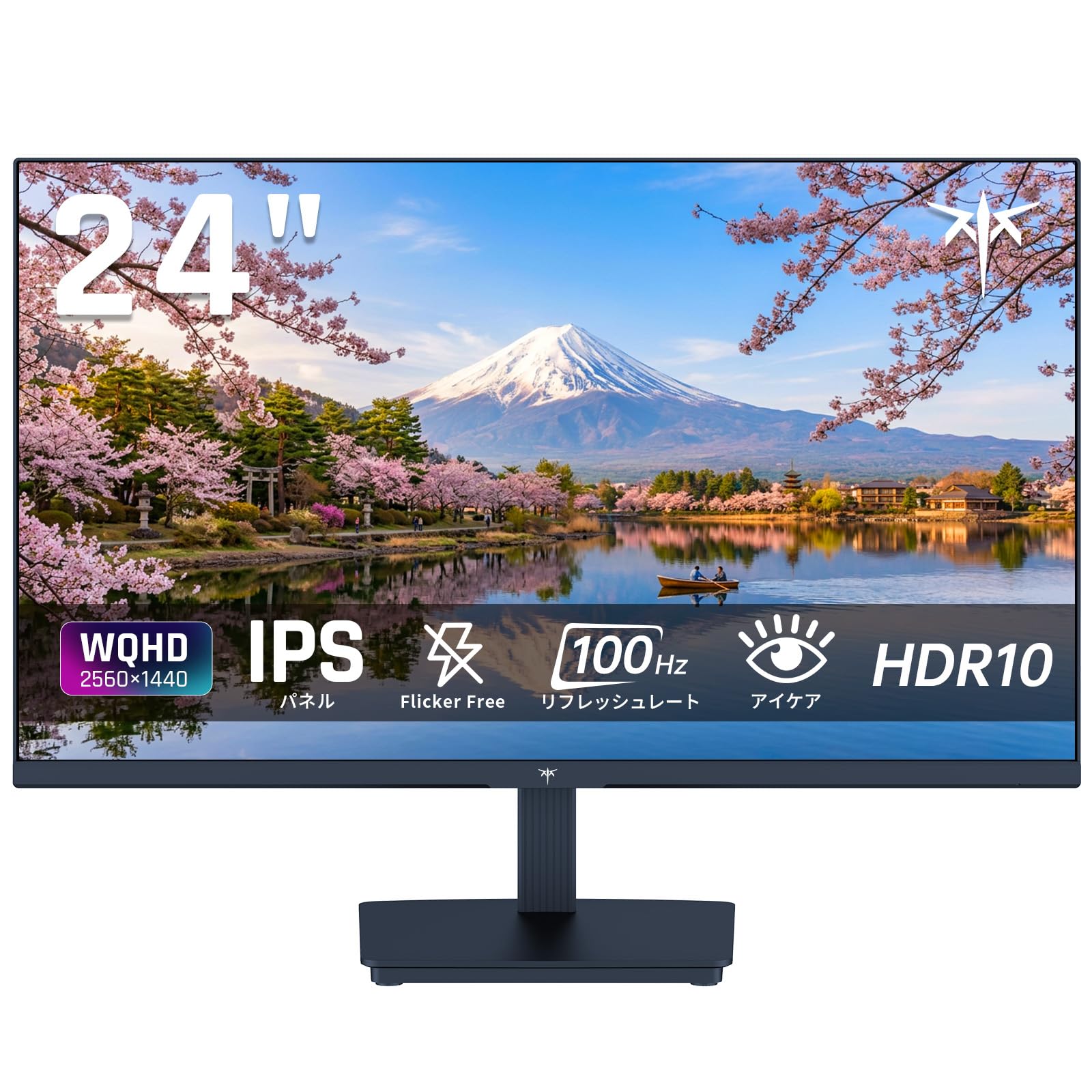
Image: KTC 24-inch WQHD 100Hz IPS Monitor.
2. Saugos informacija
Please observe the following safety precautions to prevent damage to the monitor or injury to yourself or others:
- Saugokite monitorių nuo lietaus, drėgmės ar ekstremalių temperatūrų.
- Užtikrinkite tinkamą vėdinimą aplink monitorių, kad išvengtumėte perkaitimo.
- Naudokite tik prie monitoriaus pridėtą maitinimo adapterį.
- Nedėkite sunkių daiktų ant maitinimo laido ar monitoriaus.
- Do not attempt to disassemble or repair the monitor yourself. Contact qualified service personnel.
- Laikykite monitorių atokiau nuo stiprių magnetinių laukų.
3. Pakuotės turinys
Patikrinkite, ar pakuotėje yra visi reikalingi daiktai:
- KTC 24-inch WQHD 100Hz IPS Monitor (H24T27)
- Monitoriaus bazė
- HDMI kabelis
- Maitinimo adapteris
- Vartotojo vadovas
4. Sąranka
4.1 Stovo surinkimas
- Carefully remove the monitor and base from the packaging.
- Pritvirtinkite stovo kaklelį prie monitoriaus skydelio.
- Secure the base to the stand neck using the provided screws.
4.2 Monitoriaus prijungimas
Prijunkite monitorių prie kompiuterio ar kitų įrenginių naudodami atitinkamus kabelius.
- Maitinimo jungtis: Prijunkite maitinimo adapterį prie monitoriaus nuolatinės srovės įvesties, tada įjunkite jį į maitinimo lizdą.
- Vaizdo jungtis: Use the supplied HDMI cable or a DisplayPort cable to connect your computer's video output to the corresponding port on the monitor.
- Garso išvestis: If desired, connect headphones or external speakers to the 3.5mm audio output jack.

Image: Close-up of the KTC monitor's rear ports, including DC power, HDMI, DisplayPort, and audio out.
5. Naudojimo instrukcijos
5.1 Maitinimo įjungimas/išjungimas
Norėdami įjungti arba išjungti monitorių, paspauskite ant jo esantį maitinimo mygtuką.
5.2 Ekrano meniu (OSD)
The OSD menu allows you to adjust various monitor settings. Use the control buttons (usually located on the back or bottom of the monitor) to navigate the menu and make selections.
5.3 Ekrano nustatymai
- Rezoliucija: The monitor supports WQHD (2560x1440) resolution for sharp and detailed images. Ensure your graphics card is set to this resolution for optimal display.
- Atnaujinimo dažnis: Enjoy smooth visuals with a 100Hz refresh rate. This can be configured in your operating system's display settings.
- Spalvų gama: The monitor offers 122% sRGB coverage for rich and accurate colors.

Image: KTC monitor highlighting key features like IPS panel, 100Hz, WQHD, 24-inch, Adaptive Sync, and blue light reduction.

Image: Comparison of WQHD (2560x1440) and FHD (1920x1080) resolutions, demonstrating enhanced detail with WQHD.

Image: Comparison of 100Hz and 60Hz refresh rates, showing smoother motion with 100Hz.
5.4 Adaptive Sync (FreeSync & G-Sync)
The monitor supports both FreeSync and G-Sync technologies to eliminate screen tearing and stuttering, providing a fluid gaming experience. Ensure this feature is enabled in your graphics card settings and the monitor's OSD.

Image: Monitor display showing HDR10 content on one side and standard HDR on the other, along with FreeSync & G-Sync comparison (ON/OFF).
5.5 Akių priežiūros funkcijos
The monitor includes Flicker-Free technology and a Blue Light Reduction mode to minimize eye strain during prolonged use. These settings can be adjusted via the OSD menu.

Image: KTC monitor displaying eye care features: Low Blue Light (ON/OFF) and Flicker-Free (ON/OFF).
5.6 HDR10 palaikymas
This monitor supports HDR10, providing a wider range of colors and contrasts for a more immersive viewing experience. Ensure HDR is enabled in your device's display settings for compatible content.
5.7 Reguliuojamas stovas
The monitor stand allows for tilt adjustment from -5° to 15°, enabling you to find the most comfortable viewing kampas.

Vaizdas: Šoninė view of the KTC monitor demonstrating the tilt-adjustable stand (-5° to 15°).
5.8 Platus Viewing kampas
The IPS panel provides a wide 178-degree viewfotografavimo kampą, užtikrinant pastovią spalvų ir vaizdo kokybę beveik iš bet kokios perspektyvos.

Image: KTC monitor showcasing a wide 178-degree viewing angle with consistent color.
6. Priežiūra
6.1 Monitoriaus valymas
- Visada atjunkite monitorių prieš valydami.
- Lengvai naudokite minkštą, nepūkuotą audinį dampnuplaukite vandeniu arba švelniu, neabrazyviniu ekrano valikliu.
- Nepurkškite valiklio tiesiai ant ekrano.
- Venkite naudoti stiprių cheminių medžiagų ar abrazyvinių medžiagų.
6.2 Bendroji priežiūra
- Keep the monitor in a clean, dry environment.
- Saugokite ekraną nuo aštrių daiktų.
- When moving the monitor, handle it carefully and avoid putting pressure on the screen.
7. Problemų sprendimas
Jei kyla problemų dėl monitoriaus, žr. šias dažniausiai pasitaikančias problemas ir sprendimus:
| Problema | Galimas sprendimas |
|---|---|
| Ekrane nėra vaizdo | Check power connections. Ensure video cable is securely connected to both monitor and computer. Select correct input source via OSD. |
| Vaizdas neryškus arba iškraipytas | Ensure the display resolution is set to 2560x1440. Check video cable for damage. |
| Ekrano plyšimas arba mirgėjimas | Verify FreeSync/G-Sync is enabled in both monitor OSD and graphics card settings. |
| Nėra garso iš ausinių / garsiakalbių | Check audio cable connection. Ensure volume is not muted on monitor or computer. |
| Monitorius neįsijungia | Check power outlet and power adapter connection. Try a different power outlet. |
Jei problema išlieka ir išbandžius šiuos sprendimus, susisiekite su KTC klientų aptarnavimo tarnyba.
8. Specifikacijos
Detailed technical specifications for the KTC H24T27 monitor:
| Funkcija | Specifikacija |
|---|---|
| Prekės ženklas | KTC plėtinys |
| Modelio numeris | H24T27 |
| Ekrano dydis | 24 colių |
| Rezoliucija | WQHD (2560 x 1440 pikselių) |
| Krašto santykis | 16:9 |
| Skydelio tipas | IPS |
| Ekrano paviršius | Nespindintis |
| Atnaujinimo dažnis | 100 Hz |
| Reagavimo laikas | 7 ms |
| Kontrasto santykis | 1300:1 |
| Ryškumas | 300 cd/m² |
| Spalvų gama | 122% sRGB |
| Viewing kampas | 178 laipsnių |
| HDR technologija | HDR10 |
| Adaptyvusis sinchronizavimas | FreeSync, G-Sync |
| Ryšys | 1 HDMI, 1 DisplayPort, garso išvestis |
| Energijos suvartojimas | 12 vatų |
| ttage | 100 voltų |
| Matmenys (G x P x A) | 18.3 x 54 x 40.5 cm |
| Papildomos funkcijos | Adaptive Sync, Eye Care, Flicker-Free, Blue Light Filter, Tilt Adjustment |
| Suderinami įrenginiai | Game Consoles, Laptops |
| Spalva | Juoda |
| Forma | Butas |
| Kilmė | Kinija |
9. Garantija ir palaikymas
9.1 Informacija apie garantiją
Your KTC monitor comes with a 3 metų gamintojo garantija. In the event of a product defect, a free replacement will be provided. Please note that this warranty does not cover loss or damage caused by customer negligence.

Image: KTC's 3-year free replacement warranty details and contact information.
9.2 Pagalba klientams
For any inquiries or concerns, please feel free to contact us. We are committed to providing full support to ensure your satisfaction.
Telefonas: 050-3606-8990
El. paštas: support@ktcplay.com
You can also contact support through Amazon:

Image: Step-by-step guide on how to contact customer support via Amazon.
10. Produktas baigtasview Vaizdo įrašas
Peržiūrėkite šį vaizdo įrašą, kad gautumėte vaizdinę apžvalgąview of the KTC QHD computer monitor and its features.
Video: This video showcases the KTC QHD computer monitor, highlighting its 2560x1440 (2K) resolution, 100Hz refresh rate, FreeSync and G-Sync compatibility, flicker-free and low blue light features, 8-bit & 116% sRGB color gamut, 3-side frameless design, -5° to 15° tilt adjustable stand, and available sizes (24, 27, 32 inches). It emphasizes its suitability for professional office use.