
Kaschun T7
Kaschun T7 7-Channel Audio Mixer
Vartotojo vadovas
Įvadas
The Kaschun T7 is a versatile 7-channel audio mixer designed for various applications including PC recording, parties, and weddings. It features 48V phantom power for condenser microphones, USB/MP3 input for direct media playback, and built-in DSP reverb effects to enhance your audio. This manual provides comprehensive instructions for setting up, operating, maintaining, and troubleshooting your T7 audio mixer.
Sąranka
Pakuotės turinys
Prieš pradėdami, patikrinkite, ar pakuotėje yra visi reikalingi daiktai:
- 7-channel mixer (1 unit)
- Power supply (1 unit)
- Naudotojo vadovas (1 vnt.)
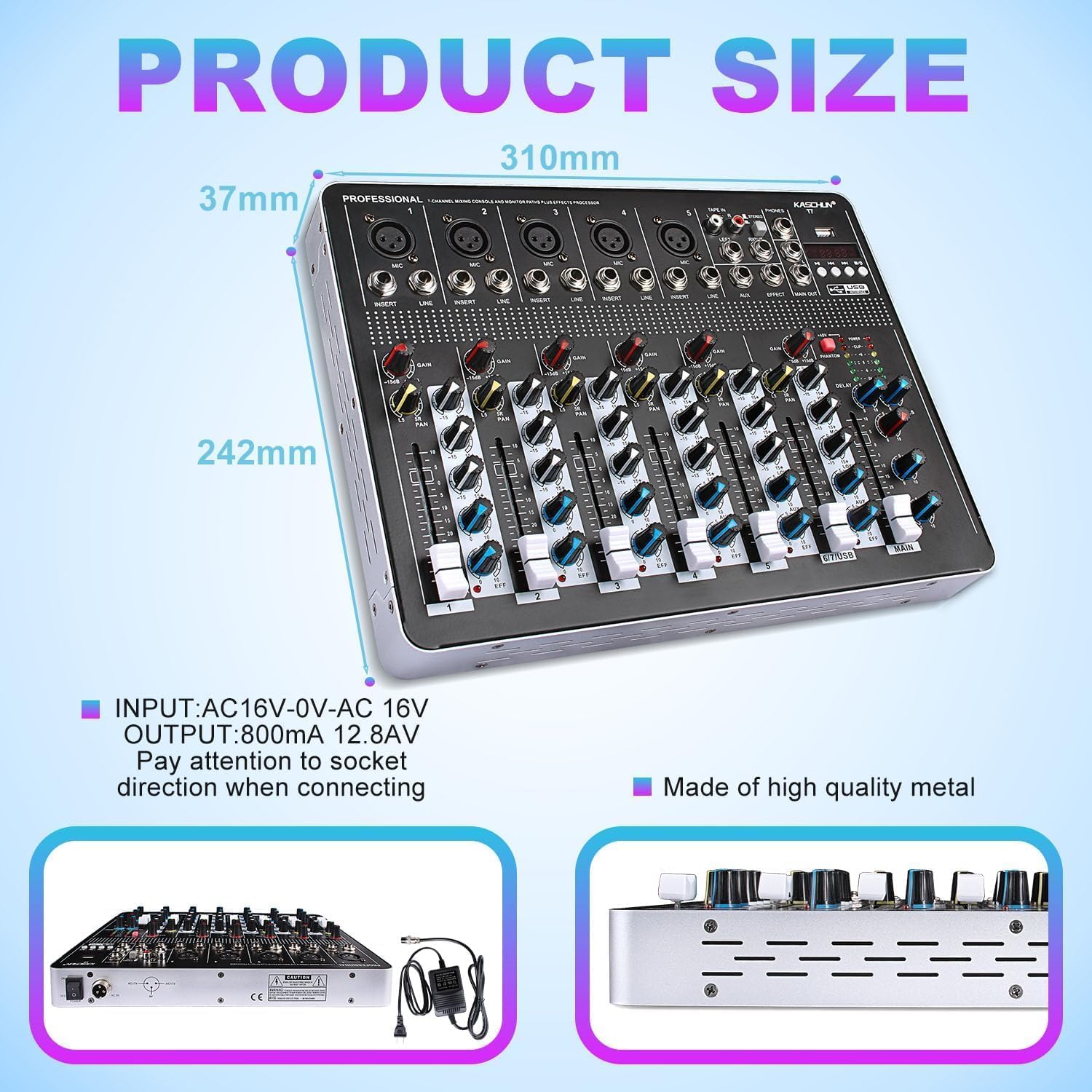
Image: The Kaschun T7 mixer, its power supply, and the user manual as included in the package.
Maitinimo prijungimas
Connect the provided AC adapter to the mixer's power input and then to a standard electrical outlet. Ensure the power supply specifications match the mixer's requirements (INPUT: AC16V-0V-AC 16V, OUTPUT: 800mA 12.8AV). Pay attention to the socket direction when connecting.

Vaizdas: Galinis view of the Kaschun T7 mixer, highlighting the power input and overall product dimensions.
Įvesties jungtys
The T7 mixer supports a variety of input sources:
- XLR įėjimai (1–5 kanalai): Connect wired microphones (dynamic or condenser), or other instruments requiring an XLR connection. For 48V condenser microphones, ensure the +48V phantom power button is pressed.
- 1/4 inch (6.35mm) Jack Inputs: Use for wireless microphones, electric guitars, DI boxes, and other instruments. Channels 6/7 are stereo 1/4 inch (6.35mm) jack inputs.
- USB sąsaja: Insert a USB flash drive or other compatible USB storage device for MP3/WAV/WMA audio playback.
- Bluetooth funkcija: Pair your smartphone, tablet, or laptop wirelessly for audio streaming.

Image: Visual representation of multiple device connections to the Kaschun T7 mixer, illustrating microphone, instrument, computer, and sound card inputs.
Išėjimų prijungimas
Connect your monitoring and amplification systems to the mixer's outputs:
- Main Outputs (L/R 6.35mm & RCA): Connect to active speakers, power amplifiers, or active sound systems.
- Ausinių išvestis: Connect headphones for monitoring the mix.
Veikiantis
Mixer Controls Overview
Familiarize yourself with the main controls of the T7 mixer:

Image: A detailed labeled diagram of the Kaschun T7 mixer's controls and ports.
- GAIN rankenėlė: Reguliuoja kiekvieno kanalo įvesties jautrumą.
- HIGH/MIDDLE/LOW Knobs: 3-band EQ for adjusting high, mid, and low frequencies of each channel.
- PAN rankenėlė: Adjusts the signal distribution between the left and right stereo channels.
- AUX/EFFECT Control: Adjusts the AUX level of each channel and the reverb effect.
- CHANNEL VOLUME Faders: Controls the individual volume of each channel.
- PAGRINDINIS faderis: Controls the overall master volume output.
- PHONES VOLUME Knob: Adjusts the output level for the earphone monitor.
- REPEATE/DELAY Knobs: Adjusts the echo repeat and echo delay time for the built-in effects.
48 V fantominė galia
The mixer provides 48V phantom power for condenser microphones on XLR inputs (Channels 1-5). To activate, press the +48V button. The indicator light will illuminate. Svarbu: It is advisable to turn off the 48V phantom power before plugging in or unplugging condenser microphones to avoid potential damage to the equipment.
USB Audio Interface / Bluetooth Function
The T7 mixer offers flexible audio playback options:
- USB atkūrimas: Insert a USB stick into the USB port. Use the built-in controls (play/pause, skip tracks) to manage audio playback. Supports MP3, WAV, and WMA formats.
- „Bluetooth“ transliacija: Activate Bluetooth on your device (iPad, smartphone, laptop) and search for the mixer's Bluetooth signal. Pair the devices for wireless audio streaming. The Bluetooth range is approximately 1.5 ft.

Image: The Kaschun T7 mixer demonstrating its function as a music player, with visual cues for USB and Bluetooth audio input.

Image: The Kaschun T7 mixer on a desk, emphasizing its enhanced Bluetooth capabilities for wireless audio streaming from various devices.
DSP Reverb Effects
The mixer includes built-in DSP reverberation effects. Adjust the REPEAT and DELAY knobs to customize the spatial sound effects, adding realism to vocals and instruments. These effects are suitable for live streaming, podcasting, small band shows, and other performances.
Priežiūra
To ensure the longevity and optimal performance of your Kaschun T7 mixer, follow these maintenance guidelines:
- Valymas: Regularly wipe the surface of the mixer with a soft, dry cloth. Avoid using abrasive cleaners or solvents, which can damage the finish.
- Saugykla: Kai nenaudojate, laikykite maišytuvą vėsioje, sausoje vietoje, toliau nuo tiesioginių saulės spindulių, per didelio karščio ar drėgmės.
- Vėdinimas: Ensure proper ventilation around the mixer during operation to prevent overheating. Do not block ventilation openings.
- Kabelių valdymas: Venkite per daug lenkti ar gofruoti laidų. Atjunkite laidus traukdami už kištuko, o ne už paties laido.
Trikčių šalinimas
If you encounter issues with your Kaschun T7 mixer, refer to the following common problems and solutions:
- Nėra garso išvesties:
- Check all cable connections to inputs and outputs.
- Ensure the mixer is powered on and the power indicator light is illuminated.
- Verify that channel volume faders and the main fader are raised.
- Check the gain settings for each input channel.
- Iškraipytas arba triukšmingas garsas:
- Reduce the GAIN knob if the signal is clipping (indicated by the CLIP light).
- Įsitikinkite, kad visi laidai yra tvirtai prijungti ir nepažeisti.
- If using a condenser microphone, ensure 48V phantom power is correctly engaged.
- Avoid splitting a single audio source into multiple input channels on the mixer, as this can lead to signal cancellation and unwanted noise. Connect one source per input.
- Garsus ventiliatoriaus triukšmas:
- Ensure the mixer is placed on a stable, flat surface with adequate ventilation around all sides.
- Check for any obstructions blocking the fan or ventilation grilles.
- If the noise persists and is disruptive, contact customer support.
- „Bluetooth“ ryšio problemos:
- Ensure the Bluetooth function is activated on both the mixer and your device.
- Move your device closer to the mixer to ensure it is within the 1.5 ft Bluetooth range.
- Pabandykite atjungti ir iš naujo susieti įrenginius.
Specifikacijos
| Funkcija | Specifikacija |
|---|---|
| Prekės ženklas | Kaschun |
| Modelio numeris | T7 |
| Kanalų skaičius | 8 (7-channel mixer with 8 total inputs) |
| Prekės svoris | 7.45 svaro (3.39 kilogramo) |
| Gaminio matmenys | 1.7 x 15.5 x 14.8 colių (1.7 colių gylis x 15.5 colių plotis x 14.8 colių aukštis) |
| Maitinimo šaltinis | Su laidu elektra |
| ttage | 110 voltai (kintamoji srovė) |
| Ryšio technologija | USB, Bluetooth |
Garantija ir palaikymas
The Kaschun T7 7-Channel Audio Mixer comes with a 12-month warranty. For troubleshooting assistance, replacement of defective parts, or any other inquiries, please contact Kaschun customer support. Refer to the contact information provided with your purchase or visit the official Kaschun websvetainėje, kur rasite išsamios pagalbos.
Ask a question about this manual
Ask about setup, troubleshooting, compatibility, parts, safety, or missing instructions. Manuals+ will review the question and use this page’s manual context to help answer it.