
Ollny NYD050A
Ollny 110FT Solar String Lights (Model NYD050A) Instruction Manual
Išsamus įrengimo, naudojimo ir priežiūros vadovas.
1. Įvadas
Thank you for choosing the Ollny 110FT Solar String Lights. This manual provides detailed instructions for the safe and efficient use of your new lighting system. Please read this manual thoroughly before installation and operation.
Pakuotės turinys:
- 1x 110FT Solar String Lights with 50 G40 LED Bulbs
- 2x Spare Shatterproof G40 LED Bulbs
- 1x Solar Panel with Ground Stake
- 1x Remote Control (2 AAA batteries included)
- Mounting Hardware (clips, screws, wall anchors)
- „1x“ USB įkrovimo laidas
- 1x Naudotojo vadovas (šis dokumentas)
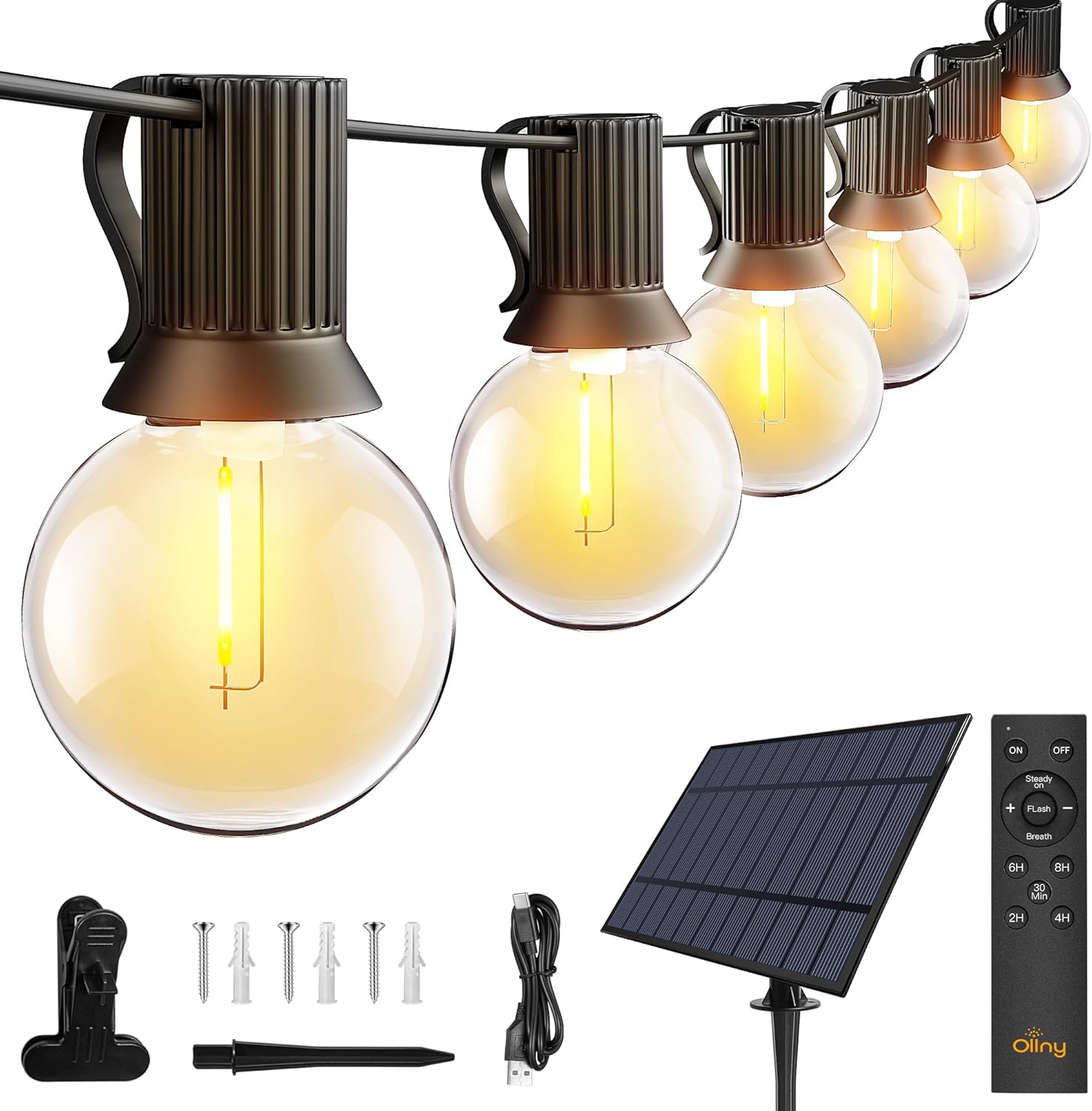
Vaizdas: Viršview of the Ollny 110FT Solar String Lights package contents, showing the string lights, solar panel, remote control, and various installation accessories.
2. Saugos informacija
- Prieš naudodami įsitikinkite, kad visi komponentai yra patikimai prijungti.
- Nebandykite modifikuoti ar taisyti gaminio. Dėl pagalbos kreipkitės į klientų aptarnavimo tarnybą.
- Kad įkrovimas būtų optimalus, saulės bateriją laikykite švarią.
- Avoid submerging the string lights or solar panel in water, despite their water-resistant rating (IP65 for solar panel, IP45 for bulbs).
- Shatterproof bulbs are designed for durability, but handle with care.
3. Sąranka ir diegimas
3.1 Saulės baterijų išdėstymas
The solar panel is crucial for charging the lights. Choose a location that receives at least 6-8 hours of direct sunlight daily. Avoid shaded areas.

Image: Close-up of the solar panel, highlighting the USB charging port and the 'MODE' and 'ON/OFF' buttons. It also shows the 4000mAh battery capacity and 10 hours of light duration.
3.2 Diegimo metodai
The solar panel offers multiple installation options:
- Antžeminis statymas: Attach the stake to the solar panel and insert it firmly into the ground.
- Sieninis laikiklis: Use the provided screws and anchors to secure the panel to a wall or fence.
- Klipo tvirtinimas: Attach the clip to the panel and secure it to a suitable edge or railing.

Image: Depicts three ways to install the solar panel: inserting it into the ground with a stake, nailing it to a wall, or clamping it to a board.
3.3 String Light Placement
Uncoil the string lights carefully. Hang them using the integrated clips on each bulb socket or other suitable fasteners. Ensure the solar panel is connected to the string lights.

Image: A diagram illustrating the total length of the 110FT solar outdoor string lights, the 2-foot spacing between bulbs, and the 11.5-foot lead cable from the solar panel to the first bulb. It also notes that the lights are not connectable.
3.4 Pradinis aktyvinimas
Before first use, press the ON button located behind the solar panel. Allow the solar panel to charge in direct sunlight for 4-6 hours, or use the USB cable for faster charging (approximately 4 hours).

Image: Illustrates two charging methods for the solar panel: solar power (6 hours charging) and USB charging (4 hours charging).
4. Naudojimo instrukcijos
4.1 Automatic ON/OFF Function
The solar panel has a built-in light sensor. The lights will automatically turn on at dusk and turn off at dawn, provided the ON button on the solar panel is activated.
Pastaba: If you wish to use the lights during daylight hours, ensure the solar panel is covered to simulate darkness.

Image: Demonstrates the light sensor function of the solar panel, with lights automatically turning on at night and off during the day. A note advises covering the solar panel for daytime use.
4.2 Nuotolinio valdymo pulto funkcijos
The included remote control allows for convenient adjustment of light settings from up to 33 feet away.

Paveikslėlis: detalus view of the remote control, illustrating buttons for power (ON/OFF), brightness adjustment (+/-), three lighting modes (Steady ON, Flash, Breath), and timer settings (30 minutes, 2 hours, 4 hours, 6 hours, 8 hours).
- ĮJUNGTA/IŠJUNGTA: Įjunkite arba išjunkite šviesas.
- Pritemdymas: Naudokite + ir - buttons to adjust brightness from 25% to 100% in Steady ON mode.
- Režimai: Select from three lighting modes:
- Nuolat įjungta: Nuolatinis apšvietimas.
- Flash: Flashing effect.
- Kvėpavimas: Gradual dimming and brightening effect.
- Laikmačiai: Set the lights to turn off automatically after a specified duration: 30 minutes, 2 hours, 4 hours, 6 hours, or 8 hours.
Video: An official product video demonstrating the Ollny G40 solar outdoor lights in various settings, showcasing their aesthetic appeal and functionality. This video is provided by the seller, Ollny Decor Lights.
5. Priežiūra
- Valymas: Periodiškai nuvalykite saulės bateriją minkšta šluosteamp cloth to remove dust and debris, ensuring maximum charging efficiency.
- Lemputės keitimas: The string lights include 2 spare bulbs. To replace a bulb, gently unscrew the old bulb and screw in a new one. Ensure the power is off before replacing bulbs.
- Saugykla: Jei šviestuvus ilgesnį laiką laikysite, įsitikinkite, kad saulės baterija yra visiškai įkrauta. Laikykite vėsioje, sausoje vietoje.

Paveikslėlis: detalus view of one of the G40 LED bulbs, showing its clear shatterproof casing and the E12 screw base.
6. Problemų sprendimas
| Problema | Galima priežastis | Sprendimas |
|---|---|---|
| Šviesos naktį neįsijungia. |
|
|
| Šviesos pritemdytos arba mirga. |
|
|
| Nuotolinio valdymo pultas neveikia. |
|
|
7. Gaminio specifikacijos
| Funkcija | Detalė |
|---|---|
| Modelio numeris | NYD050A |
| Bendras ilgis | 110 pėdų |
| Lempučių skaičius | 50 LED + 2 Spare |
| Lemputės tipas | G40 Shatterproof LED |
| Lemputės pagrindas | E12 |
| Šviesios spalvos | Šiltai balta (2700 kelvinų) |
| Maitinimo šaltinis | Maitinamas saulės energija (su USB įkrovimo galimybe) |
| Saulės baterijos | 4000 mAh |
| Saulės baterijų įkrovimo laikas | 4-6 valandos (tiesioginiai saulės spinduliai) |
| USB įkrovimo laikas | apytiksliai 4 valandas |
| Veikimo laikas | Iki 10 valandų (pilnai įkrautas) |
| Atsparumo vandeniui įvertinimas | Solar Panel: IP65, Bulbs: IP45 |
| Kontrolės metodas | Remote Control (RF, 33ft range) |
| Nuotolinio valdymo pulto baterijos | 2 AAA (įtraukta) |
| Ypatingos savybės | Dimmable (25%-100%), 3 Lighting Modes (Steady, Flash, Breath), Timers (30min/2H/4H/6H/8H), Auto ON/OFF Light Sensor |
| Medžiaga | Plastikiniai |
| Prekės svoris | 3.85 svaro (1.75 kilogramo) |
8. Garantija ir palaikymas
Ollny products are designed for quality and durability. For any questions, concerns, or technical support, please contact Ollny customer service via Amazon. Our support team is available to assist you within 24 hours.
Dėl konkrečios garantijos informacijos žr. pirkimo dokumentus.
Ask a question about this manual
Ask about setup, troubleshooting, compatibility, parts, safety, or missing instructions. Manuals+ will review the question and use this page’s manual context to help answer it.