
1. Įvadas
This manual provides detailed instructions for the operation and maintenance of your OnRetul V500 OBD2 Scanner Diagnostic Tool. The V500 is designed to assist in diagnosing vehicle issues by reading and clearing diagnostic trouble codes (DTCs), monitoring live data streams, and performing various system tests. It is compatible with most vehicles manufactured since 1996 that support OBD2 protocols.
Please read this manual thoroughly before using the device to ensure proper and safe operation.
2. Saugos informacija
- Always perform automotive repairs in a safe environment.
- Wear appropriate eye protection and protective clothing.
- Nenaudokite įrankio vairuodami.
- Keep the tool away from moisture, oil, and extreme temperatures.
- Ensure the vehicle's ignition is off before connecting or disconnecting the scanner.
- Refer to your vehicle's service manual for specific diagnostic procedures and safety precautions.
3. Pakuotės turinys
The OnRetul V500 OBD2 Scanner package typically includes:
- OnRetul V500 OBD2 Diagnostic Tool
- Vartotojo vadovas (šis dokumentas)
4. Produktas baigtasview
The OnRetul V500 features a compact design with a color display and intuitive button layout for easy navigation.

4.1 paveikslas: Priekyje view of the OnRetul V500 OBD2 Scanner Diagnostic Tool, showing the color display and control buttons.
4.1 Įrenginio komponentai

4.2 paveikslas: OnRetul V500 OBD2 Scanner showing the display, control buttons (DTC, EXIT, OK, Up, Down, Left, Right), and the universal OBD interface cable.
- Ekranas: 2.8-inch high-definition color screen for displaying diagnostic information.
- DTC mygtukas: Shortcut key to access Diagnostic Trouble Codes.
- EXIT mygtukas: Returns to the previous menu or exits the current function.
- Gerai mygtukas: Confirms selections or enters a menu.
- Naršymo mygtukai (aukštyn, žemyn, kairėn, dešinėn): Naudojamas meniu naršymui ir parinktims pasirinkti.
- OBD-II jungtis: Standard 16-pin connector for connecting to the vehicle's OBD-II port.
5. Sąranka ir prijungimas
- Raskite OBD-II prievadą: OBD-II prievadas paprastai yra po prietaisų skydeliu, vairuotojo pusėje. Jei jo nerandate, žr. savo transporto priemonės vadovą.
- Išjunkite degimą: Įsitikinkite, kad transporto priemonės uždegimo jungiklis yra IŠJUNGTOJE padėtyje.
- Prijunkite skaitytuvą: Plug the V500's OBD-II connector firmly into the vehicle's OBD-II port.
- Įjunkite degimą: Įjunkite automobilio degimą į ON padėtį (variklis išjungtas). Skaitytuvas įsijungs automatiškai.
- Establish Communication: The scanner will attempt to establish communication with the vehicle's onboard computer. This may take a few moments.
6. Naudojimo instrukcijos
The OnRetul V500 offers several diagnostic functions accessible from the main menu. Use the navigation buttons to select an option and the OK button to confirm.
6.1 Perskaitykite kodus
This function retrieves Diagnostic Trouble Codes (DTCs) from the vehicle's engine control unit (ECU). These codes indicate specific issues detected by the vehicle's diagnostic system.
- Pagrindiniame meniu pasirinkite „OBD/EOBD“ arba „Skaityti kodus“.
- The scanner will display any stored DTCs. Each code will have a corresponding description.
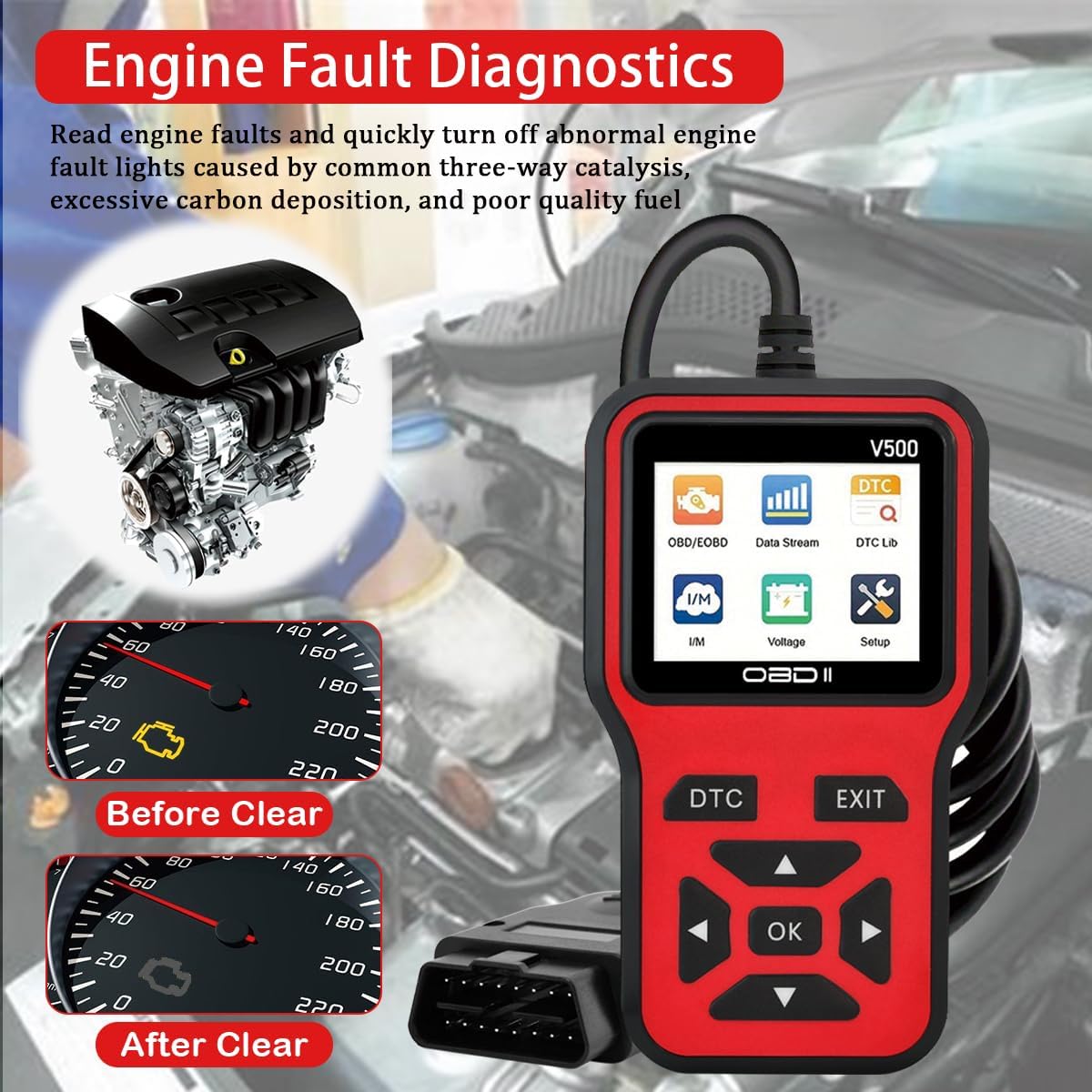
6.1 paveikslas: Example of engine fault diagnostics, illustrating how the scanner identifies issues and can clear the check engine light.
6.2 Erase Codes (Clear Check Engine Light)
This function clears all Diagnostic Trouble Codes from the vehicle's ECU and turns off the Check Engine Light (MIL).
- After reading codes, select "Erase Codes" or "Clear DTCs" from the menu.
- Kai būsite paraginti, patvirtinkite veiksmą.
- Pastaba: Clearing codes does not fix the underlying problem. If the fault is not resolved, the Check Engine Light will illuminate again.
6.3 Data Stream (Live Data)
View real-time operational parameters from the vehicle's sensors and systems. This can help identify intermittent faults or monitor system performance.
- Pagrindiniame meniu pasirinkite „Duomenų srautas“.
- Choose the specific parameters you wish to monitor (e.g., engine RPM, coolant temperature, O2 sensor readings).
- The data will be displayed numerically or graphically.

6.2 paveikslas: Live data stream display on the V500, showing real-time curves for various engine parameters like coolant temperature, load value, RPM, and vehicle speed.
6.4 I / M parengtis
This function checks the status of the vehicle's emission-related monitoring systems to determine if they are ready for an emissions test.
- Pagrindiniame meniu pasirinkite „I/M parengtis“.
- The scanner will display the status of various monitors (e.g., EVAP system, O2 sensor, catalytic converter) as "OK" or "INC" (Incomplete).
6.5 DTC peržiūra
Allows you to manually enter a DTC and view its generic description.
- Select "DTC Lib" or "DTC Lookup" from the main menu.
- Enter the desired DTC using the navigation buttons.
- Paspauskite OK, kad view Aprašymas.
6.6 Battery Test (Voltage)
Measures the vehicle's battery voltage realiu laiku.
- Pasirinkite „Garsumas“tage" or "Battery Test" from the main menu.
- Dabartinis akumuliatoriaus tūristagbus rodomas e.

6.3 paveikslas: The V500 displaying battery voltage during a battery test, showing a reading of 11.7V.
6.7 Kitos funkcijos
The V500 also supports additional functions including:
- View Sustabdyti kadrą: Displays a snapshot of vehicle operating conditions at the moment a fault code was set.
- O2 jutiklio testas: Gauna O2 jutiklio monitoriaus bandymo rezultatus.
- EVAP sistemos bandymas: Pradeda garavimo išmetimo kontrolės sistemos bandymą.
- Informacija apie transporto priemonę: Retrieves the vehicle identification number (VIN), calibration ID, and calibration verification number (CVN).
- Borto monitoriaus testas: Gauna konkrečių komponentų / sistemų borto diagnostikos stebėjimo bandymų rezultatus.
7. Supported Vehicles and Protocols
The OnRetul V500 is compatible with most OBD2 compliant vehicles.
- American Manufacturers: Vehicles produced since 1996.
- Japanese Manufacturers: Vehicles produced since 2002.
- European Manufacturers: Vehicles produced since 2008.
7.1 Palaikomi protokolai

7.1 paveikslas: The V500 displaying a list of supported languages and OBD2 communication protocols.
The tool supports the following OBD2 protocols:
- SAE J1850 PWM (41.6 kbaud)
- SAE J1850 VPW (10.4 kbaud)
- ISO9141-2 (5 bodų init, 10.4 Kbaud)
- ISO14230-4 KWP (5 bodų init, 10.4 Kbaud)
- ISO14230-4 KWP (greitasis įvedimas, 10.4 Kbaud)
- ISO15765-4 CAN (11 bitų ID, 500 Kbaud)
- ISO15765-4 CAN (29 bitų ID, 500 Kbaud)
- ISO15765-4 CAN (11 bitų ID, 250 Kbaud)
- ISO15765-4 CAN (29 bitų ID, 250 Kbaud)
8. Priežiūra
- Valymas: Use a soft, dry cloth to clean the tool. Do not use abrasive cleaners or solvents.
- Saugykla: Įrankį laikykite sausoje, vėsioje vietoje, toliau nuo tiesioginių saulės spindulių ir ekstremalių temperatūrų.
- Kabelio priežiūra: Avoid bending or twisting the OBD-II cable excessively to prevent damage.
9. Problemų sprendimas
| Problema | Galima priežastis | Sprendimas |
|---|---|---|
| Skaitytuvas neįsijungia. |
|
|
| Pranešimas „Ryšio klaida“ arba „Ryšio klaida“. |
|
|
| Nepavyksta išvalyti kodų. |
|
|
10. Specifikacijos
- Modelis: V500
- Ekranas: 2.8 colio spalvotas ekranas
- Veiklos ttage: 9-16V (from vehicle OBD-II port)
- Darbinė temperatūra: nuo 0°C iki 60°C (32°F iki 140°F)
- Laikymo temperatūra: -20°C iki 70°C (nuo -4°F iki 158°F)
- Matmenys: Apytiksliai 6 x 1 x 3.4 colio (15.24 x 2.54 x 8.64 cm)
- Svoris: Maždaug 8.1 uncijos (230 gramai)
- Palaikomi protokolai: J1850 PWM, J1850 VPW, ISO9141-2, ISO14230-4 KWP (5 baud init, fast init), ISO15765-4 CAN (11bit ID, 29bit ID, 500 Kbaud, 250 Kbaud)
11. Pagalba klientams
If you encounter any issues or have questions regarding your OnRetul V500 OBD2 Scanner, please contact our customer service team. We aim to respond to all inquiries within 24 hours.
Kontaktinę informaciją paprastai galima rasti ant produkto pakuotės arba mažmenininko websvetainė, kurioje produktas buvo įsigytas.