
Įvadas
Thank you for choosing the Xega 4G Cellular 2K PTZ Outdoor Security Camera, Model XG-18. This manual provides detailed instructions for the setup, operation, and maintenance of your camera. Please read this manual carefully before use and retain it for future reference.
Pakuotės turinys
Patikrinkite, ar pakuotėje yra visi toliau išvardyti daiktai:
- Xega 4G Cellular 2K PTZ Outdoor Security Camera
- Maitinimo adapteris
- Montavimo stovas
- Tvirtinimo varžtai
- Instrukcijų vadovas
- SIM Card (with 300MB test data for 30 days)

Figure 1: Contents of the Xega 4G Camera package.
Sąranka
1. SIM Card Insertion and 4G Connectivity
This camera operates on 4G LTE networks, making it suitable for areas without Wi-Fi access. A SIM card is included with 300MB of test data valid for 30 days. For continuous use, an unlimited data plan is recommended (e.g., 12.9€/30 days, or plans from EE, SKY, Vodafone).
- Locate the SIM card slot on the camera.
- Insert the provided SIM card or your preferred 4G SIM card into the slot. Ensure it is inserted correctly according to the diagram on the camera or in the quick start guide.
- The camera will automatically attempt to connect to the 4G network upon power-up.
2. Maitinimo šaltinis
The XG-18 camera is wired and requires continuous power. It does not contain a battery and does not support Wi-Fi connectivity.
- Connect the 3-meter power cable to the camera.
- Įjunkite maitinimo adapterį į standartinį elektros lizdą.
- Ensure the power connection is secure for uninterrupted operation.
3. Programėlės diegimas ir pradinė konfigūracija
The camera is controlled via the Ubox application, available for iOS and Android devices.
- Atsisiųskite Ubox app from your device's app store (Apple App Store for iOS, Google Play Store for Android).
- Registruokitės paskyrai arba prisijunkite, jei ją jau turite.
- Vadovaukitės programėlėje pateiktomis instrukcijomis, kad pridėtumėte naują kamerą. Paprastai tai reiškia, kad reikia nuskaityti QR kodą ant kameros arba rankiniu būdu įvesti jos ID.
- Prisijungę galite view the live feed and configure camera settings.
4. Fizinis įrengimas
The camera is designed for outdoor use and can be mounted on a wall.
- Choose a suitable location for mounting, ensuring good 4G signal reception and proximity to a power source.
- Use the provided mounting stand and screws to securely attach the camera to a wall or other stable surface.
- Sureguliuokite kameros kampą, kad apimtumėte norimą stebėjimo zoną.

Figure 2: Xega 4G Camera installed outdoors, highlighting 4G LTE connectivity.
Fotoaparato valdymas
1. 24/7 Continuous Recording
The XG-18 supports continuous 24/7 video recording, ensuring constant surveillance of your property.
- The camera records continuously as long as it is powered.
- Įrašyta footage can be accessed and played back remotely via the Ubox app.

Figure 3: Continuous 24/7 recording capability.
2. AI Human Detection and Automatic Tracking
The camera features advanced AI human detection to minimize false alarms and automatic tracking to keep subjects in view.
- When human motion is detected, you will receive an instant alert notification on your iOS/Android device via the Ubox app.
- The camera will automatically track the detected person's movement.
- This feature helps conserve 4G data and storage space by focusing on relevant events.

Figure 4: AI Human Detection and Instant Alert in action.
3. 2K Super HD Resolution and PTZ Functionality
Capture clear, detailed footage with 2K HD resolution and monitor a wide area with Pan-Tilt-Zoom (PTZ) capabilities.
- The camera provides 2K (3MP) Super HD video, offering enhanced visual detail.
- It can rotate 350° horizontally (Pan) and 100° vertically (Tilt), providing comprehensive coverage.
- Control the pan, tilt, and 4X digital zoom (no optical zoom) remotely through the Ubox app from anywhere in the world.
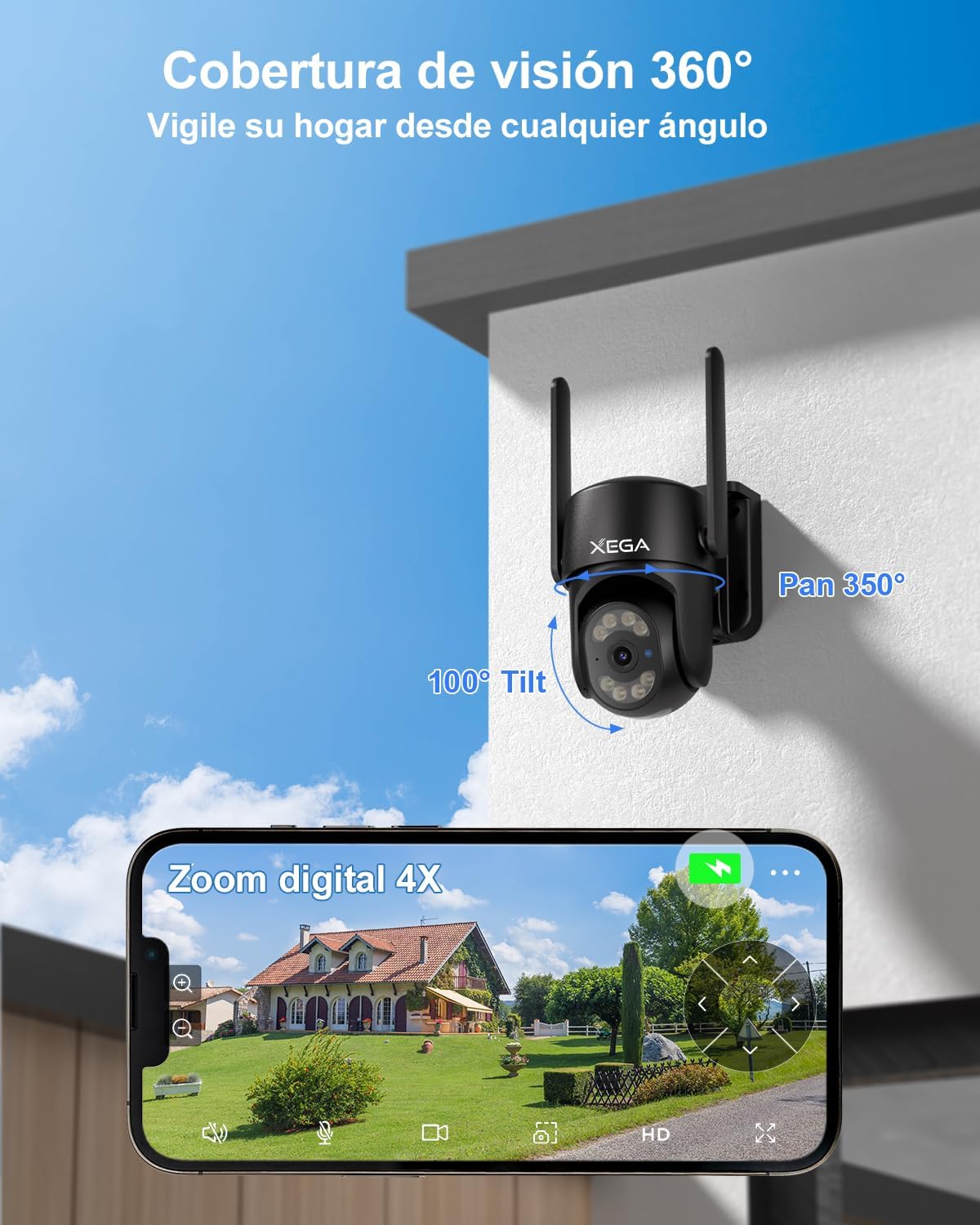
Figure 5: 360° coverage and 4X digital zoom via the Ubox app.
4. Naktinio matymo režimai
The camera offers versatile night vision options for clear monitoring in low-light conditions.
- Spalvotas naktinis matymas: With the spotlight on, the camera can capture full-color video at night, providing more detail.
- Infraraudonųjų spindulių nakties vizija: With the spotlight off, the camera uses infrared LEDs for clear black-and-white footage visiškoje tamsoje.
- Night vision range extends up to 20 meters (approximately 80 feet).

Figure 6: Comparison of 2K Super HD Color Night Vision and Infrared Night Vision.
5. Dvipusis garsas
The integrated microphone and speaker allow for two-way communication.
- Use the Ubox app to listen to audio from the camera's location.
- Kalbėkite per programėlę, kad galėtumėte bendrauti su asmenimis, esančiais šalia kameros.
Priežiūra
1. Atsparumas oro sąlygoms (IP66)
The XG-18 camera has an IP66 rating, ensuring its durability against various weather conditions.
- The camera is resistant to dust and powerful water jets, making it suitable for use in sunny, rainy, or snowy conditions.
- Darbinės temperatūros diapazonas: -30°C iki 60°C.

Figure 7: IP66 weather resistance in adverse conditions.
2. Saugojimo parinktys
The camera offers flexible storage solutions for your recordings.
- TF kortelės saugykla: Supports TF cards up to 128GB (not included). The camera will automatically record and overwrite old videos when the card is full.
- Saugykla debesyje: Optional military-grade cloud storage is available. A 30-day free trial is offered, with subscription options thereafter (e.g., approximately 1.99€/month). Cloud storage ensures data security even if the camera is stolen or damaged.
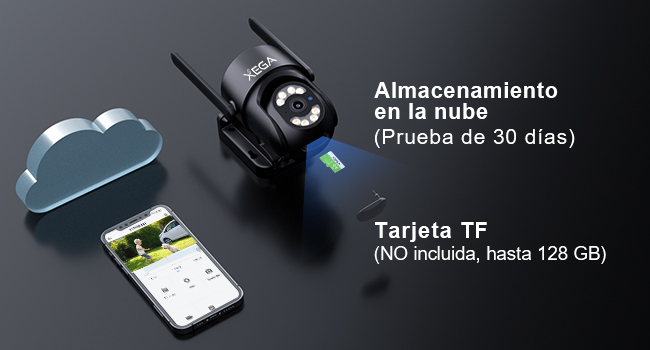
Figure 8: TF card and cloud storage options.
3. Valymas
To ensure optimal performance, periodically clean the camera lens and housing.
- Naudokite minkštą, damp cloth to wipe the camera's exterior.
- Objektyvui valyti naudokite specializuotą šluostę ir tirpalą, kad išvengtumėte įbrėžimų.
- Nenaudokite stiprių chemikalų ar abrazyvinių valiklių.
Trikčių šalinimas
If you encounter issues with your Xega 4G Camera, refer to the following common problems and solutions:
| Problema | Galima priežastis | Sprendimas |
|---|---|---|
| Camera is disconnected / Offline | No 4G signal, SIM card issue, power loss. | Check 4G signal strength at the camera's location. Verify SIM card is correctly inserted and has an active data plan. Ensure the camera is receiving continuous power. |
| No notifications received on mobile | App notification settings, phone settings, network issues. | Ensure notifications are enabled in the Ubox app settings. Check your phone's system settings to allow notifications from the Ubox app. Verify stable 4G connection for both camera and phone. |
| Prasta vaizdo kokybė | Dirty lens, low network bandwidth, app settings. | Clean the camera lens. Ensure sufficient 4G bandwidth. In the Ubox app, switch from SD to HD quality if available (note: setting may revert to SD). |
| Judesio aptikimas neveikia | Detection settings, environmental factors. | Check motion detection sensitivity and area settings in the Ubox app. Ensure no obstructions are blocking the camera's view. |
| Fotoaparatas neįsijungia | Nėra maitinimo, sugedęs adapteris. | Verify the power adapter is securely connected to both the camera and the power outlet. Test the outlet with another device. |
If these solutions do not resolve the issue, please contact Xega customer support for further assistance.
Specifikacijos
| Funkcija | Detalė |
|---|---|
| Modelio numeris | XG-18 |
| Matmenys | 18 x 16 x 12 cm |
| Svoris | 660 g |
| Ryšio technologija | Wired (Power), Cellular (4G LTE) |
| Vaizdo raiška | 2K (1920p) |
| „Pan“ kampas | 350 laipsnių |
| Pakreipimo kampas | 100 laipsnių |
| Skaitmeninis priartinimas | 4X |
| Naktinio matymo diapazonas | 20 metrų (apie 80 pėdas) |
| Naktinio matymo tipas | Spalvotas naktinis matymas, infraraudonųjų spindulių naktinis matymas |
| Ypatingos savybės | Two-Way Audio, HD Resolution, Motion Sensor, PTZ Technology, Night Vision, AI Human Detection, Auto Tracking |
| Atsparumas oro sąlygoms | IP66 (atsparus vandeniui) |
| Saugojimo parinktys | TF kortelė (iki 128 GB), debesies saugykla |
| Suderinami įrenginiai | Išmanusis telefonas („Android“, „iOS“) |
| Maitinimo šaltinis | Elektros kabelis |
| Medžiaga | Akrilnitrilo butadieno stirenas (ABS) |
Garantija ir palaikymas
For any questions, technical assistance, or warranty inquiries, please contact Xega customer support.
- Xega offers 24/7 online customer support.
- Refer to the contact information provided with your product packaging or on the official Xega webpagalbos kanalų svetainė.

Figure 9: Xega 24/7 Online Customer Support.