
Įvadas
The Tokluck PS5 Dual Controller Charging Station is designed to efficiently charge two PlayStation 5 DualSense or DualSense Edge controllers simultaneously. This station features intelligent charging protection, LED indicators, and ambient lighting to enhance your gaming setup. Its compact design helps keep your gaming area organized and ensures your controllers are always ready for use.

Image: The Tokluck PS5 Dual Controller Charging Station with two white PS5 controllers docked, showcasing its compact design and compatibility.
Kas yra dėžutėje
- 1 x PS5 Controller Charger
- 1 x USB-A to USB-C Cord (34.8 inch)
- 1 x Vartotojo vadovas

Image: A visual representation of the items included in the product packaging: the charging station, a USB-A to USB-C cable, and the user manual.
Pagrindinės savybės
- Fast Charging & Intelligent Chip: Dual PS5 controllers can be fully charged in approximately 2 hours using the included 34.8-inch USB fast charging cable. The built-in protector chip prevents over-current, over-voltage, perkaitimas ir trumpasis jungimas, užtikrinant saugų įkrovimą.
- Compatible with DualSense & Edge Controller: Specifically designed to charge both PS5 DualSense and DualSense Edge controllers simultaneously. Its compact design helps reduce cable clutter and saves space.
- LED Indicators & ON/OFF Switch: Red light indicates charging, while blue light signifies a full charge. An integrated ON/OFF switch allows for convenient power control of the entire unit.
- Aplinkos šviesa: Features a blue ambient light that complements the PS5 console. Touch control allows for switching between 9 lighting modes with a short press, and turning the light on/off with a long press.
- Easy Drop-to-Charge: Designed for effortless charging; simply place the controllers onto the dock without needing precise alignment. Anti-slip pads ensure the charging stand remains securely in place.

Image: Visual representation of the fast and safe charging capabilities, highlighting the 2-hour charging time and multiple protection features.

Paveikslėlis: detalus view of the touch control for RGB lighting, illustrating various color and breathing light effects.
Sąrankos instrukcijos
- Prijunkite maitinimą: Insert the USB-C end of the provided cable into the USB-C port on the back of the charging station.
- Maitinimo šaltinis: Connect the USB-A end of the cable to a compatible power source. This can be a USB port on your PS5 console (front or back), an original AC adapter (not included), a laptop, or other USB-compatible devices.
- Įjungti galią: Locate the ON/OFF switch on the back of the charging station and slide it to the "ON" position. The ambient lights and LED indicators will illuminate.

Image: Illustration of different power sources that can be used to power the charging station, such as the PS5 console, mobile power, AC adapter, and computer.

Image: A step-by-step visual guide demonstrating the ease of connecting the charger and placing controllers for charging.
Naudojimo instrukcijos
Įkrovimo valdikliai
- Place Controller: Gently align your PS5 DualSense or DualSense Edge controller with the charging pins in one of the two slots on the charging station.
- Patvirtinkite ryšį: The controller will settle into place, and the corresponding LED indicator on the front of the station will turn raudona, indicating that charging is in progress.
- Viso įkrovimo indikacija: Once the controller is fully charged, the LED indicator will change from raudona į mėlyna.
Aplinkos šviesos valdymas
- Keisti apšvietimo režimą: Short press the RGB button (located on the front of the station) to cycle through 9 different lighting modes.
- Įjungti/išjungti šviesą: Long press the RGB button for approximately 3 seconds to reduce the brightness and turn the ambient light on or off.
ON/OFF jungiklis
- Use the physical ON/OFF switch on the back of the charging station to completely power the unit on or off. This controls all functions, including charging and ambient lighting.
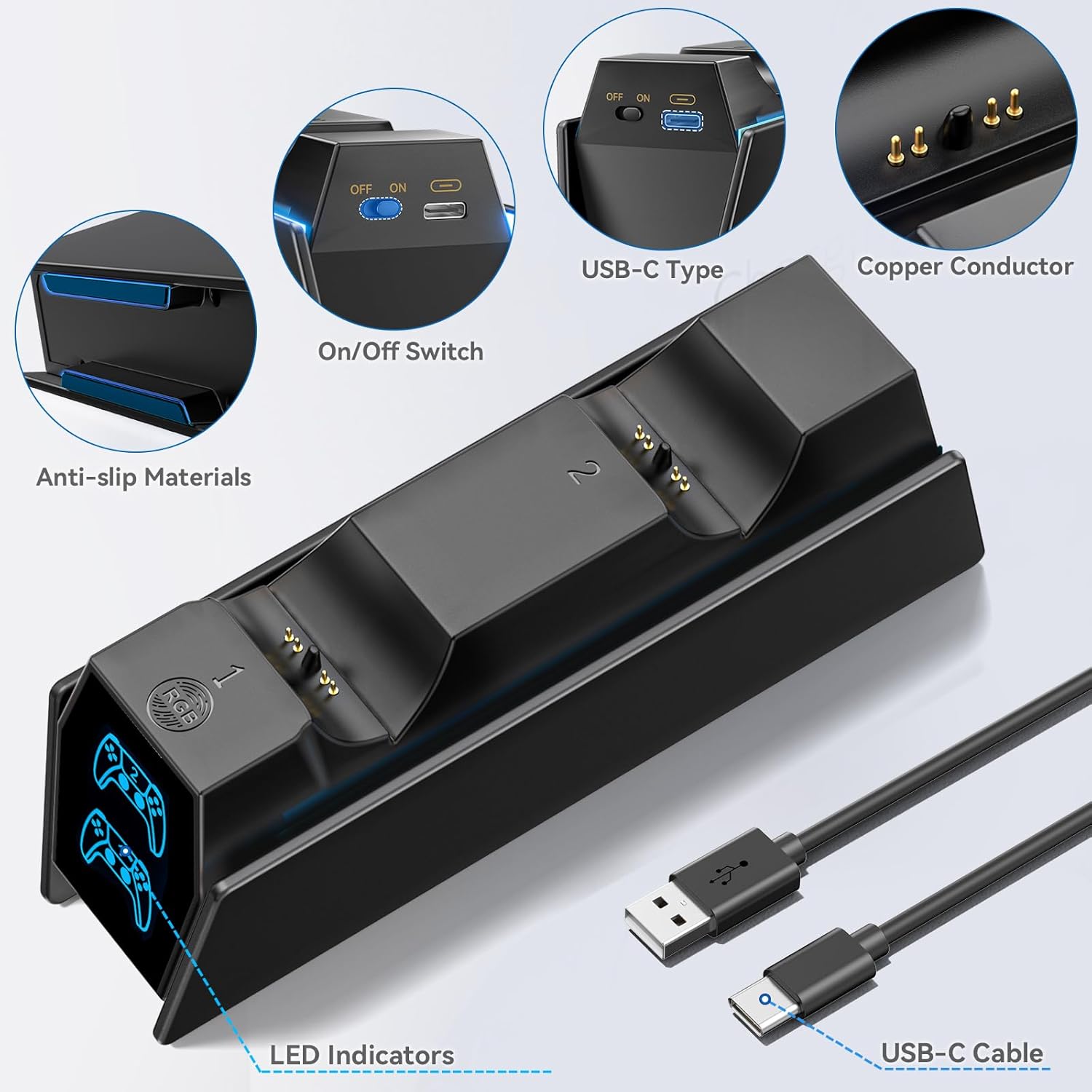
Image: Close-up of the charging station's features, including the ON/OFF switch, USB-C port, and LED indicators.
Video: This video demonstrates the various RGB lighting effects and the ease of placing PS5 controllers onto the charging station.
Priežiūra
- Keep the charging station clean and dry. Use a soft, dry cloth to wipe away dust or smudges.
- Avoid dropping the unit or subjecting it to strong impacts, which could damage internal components.
- Do not attempt to disassemble, modify, or repair the charging station yourself. Contact customer support if issues arise.
- Užtikrinkite tinkamą vėdinimą aplink įrenginį, kad išvengtumėte perkaitimo.
Trikčių šalinimas
- Valdiklis neįkraunamas:
- Ensure the USB cable is securely connected to both the charging station and the power source.
- Verify the ON/OFF switch on the back of the station is in the "ON" position.
- Check that the controller is properly aligned with the charging pins on the dock.
- Try connecting the charging station to a different USB port or power adapter.
- LED indikatorius neveikia:
- Confirm the charging station is powered on and connected correctly.
- Ensure the controller is placed firmly on the charging pins.
- Ambient light not working:
- Check the power connection and the ON/OFF switch.
- Short press the RGB button to cycle through the lighting modes.
- Long press the RGB button to ensure the light hasn't been turned off.
Specifikacijos
| Jungties tipas | C tipo USB |
| Suderinami įrenginiai | Game Consoles (PS5 DualSense, PS5 DualSense Edge) |
| Papildomos funkcijos | Fast Charging, LED Indicators, RGB Ambient Lighting, Over-current Protection, Over-voltage Protection, Over-heated Protection, Short-circuit Protection |
| Įvesties tomastage | 5 voltų |
| Amppakilimas | 2 Amps |
| Iš viso USB prievadų | 1 (maitinimo įvesties) |
| Vattage | 10 vatų |
| Išėjimo srovė | 15 Amps |
| Išėjimas ttage | 5 voltų |
| Maitinimo šaltinis | AC (AC adapter not included) |
| Nešiojami | Nr |
| Maitinimo kištukas | A tipo – 2 kontaktų (Šiaurės Amerikos) |
| Ryšio technologija | USB |
| Medžiaga | Plastikiniai |
| Prekės svoris | 0.21 kilogramo |
Garantija ir palaikymas
Šis produktas tiekiamas su a 1 metų garantija from the manufacturer. For any technical support, troubleshooting assistance, or warranty claims, please refer to the official Tokluck websvetainėje arba susisiekite tiesiogiai su jų klientų aptarnavimo tarnyba.
Prašome išsaugoti pirkimo įrodymą garantijos tikslais.