
1. Įvadas ir suderinamumas
This manual provides detailed instructions for the installation, operation, and maintenance of your Surakey Android 13 Car Stereo Radio. Please read this manual thoroughly before installation and use to ensure proper function and safety.
Svarbi suderinamumo pastaba: This car stereo is designed for Dodge Ram 1500 and 3500 models from 2013 to 2019. Before purchasing or installing, it is crucial to verify compatibility with your specific vehicle's year and model. We recommend carefully measuring your dashboard and comparing it with the product dimensions. If uncertain, please provide a complete image of the plugs on the back of your center console and the on-board main unit to your supplier for confirmation and to determine if any additional wiring harnesses or adapters are required.

Figure 1.1: Dashboard compatibility examples. Ensure your vehicle's dashboard matches the compatible design for proper fitment.
2. Produktas baigtasview ir įtraukti komponentai
The Surakey Android 13 Car Stereo Radio features a 9.7-inch touch screen, offering advanced navigation, entertainment, and connectivity options for your vehicle.
2.1 Pagrindinės funkcijos:
- 9.7-inch HD 2.5D Tempered Glass Mirror Touch Screen
- Android 13 operacinė sistema
- Wireless & Wired Apple CarPlay and Android Auto
- Integruota GPS navigacija
- Integrated Wi-Fi Connectivity
- Bluetooth with A2DP, Hands-Free Calling, and Phone Book
- FM/RDS radijo imtuvas
- DSP Function for High-Fidelity Audio
- Support for AHD Backup Camera Input
- Vairo valdymo suderinamumas
- Double USB Interface
- Multi-language Support (up to 40 national languages)
2.2 Paketo turinys:
Patikrinkite, ar pakuotėje yra visi šie komponentai:
- Surakey Android Car Stereo Unit
- Maitinimo kabelis
- RCA įvesties/išvesties kabeliai
- USB kabeliai (x2)
- Kameros įvesties kabelis
- Radijo adapterio kabelis
- GPS antena
- Instrukcijų vadovas
- External Microphone ('Wheat head')
- Canbus Box
- Car Compass

2.1 pav.: Gaminio matmenys ir pridedami priedai.
3. Sąranka ir diegimas
Professional installation is highly recommended for this product. Incorrect wiring or installation can damage the unit or your vehicle's electrical system. Always disconnect the vehicle's battery before beginning installation.
3.1 Patikrinimas prieš diegimą:
- Įsitikinkite, kad automobilio uždegimas išjungtas, o akumuliatorius atjungtas.
- Confirm dashboard compatibility and dimensions.
- Identify all existing wiring harnesses in your vehicle.
3.2 Laidų jungtys:
Refer to the wiring diagram provided in the included instruction manual for specific connections. General connections include:
- Maitinimo kabelis: Prijunkite prie transporto priemonės maitinimo, įžeminimo ir priedų laidų.
- RCA įvestis/išvestis: Išoriniam ampstiprintuvai, žemųjų dažnių garsiakalbiai arba vaizdo išvestis.
- USB kabeliai: Connect to the unit for media playback, phone charging, and CarPlay/Android Auto (wired).
- Kameros įvestis: Connect your AHD backup camera here.
- Radijo adapterio kabelis: Connect to the vehicle's antenna.
- GPS antena: Sumontuokite vietoje su skaidria view dangaus optimaliam signalo priėmimui.
- Išorinis mikrofonas: Plug in for improved hands-free call quality.
- „Canbus“ dėžutė: Connect as per vehicle-specific instructions for steering wheel controls and other vehicle data integration.

3.1 pav.: galinis view of the car stereo unit with wiring connections.
3.3 Po įrengimo:
- Prijunkite transporto priemonės akumuliatorių.
- Turn on the ignition and power on the stereo.
- Perform initial setup and test all functions (radio, Bluetooth, GPS, etc.).
4. Naudojimo instrukcijos
This section details the primary functions and how to operate your Surakey Android 13 Car Stereo.
4.1 Power On/Off and Basic Interface:
- Norėdami įjungti arba išjungti įrenginį, paspauskite maitinimo mygtuką.
- The 9.7-inch capacitive touch screen allows for easy navigation through the Android interface.
4.2 Apple CarPlay & Android Auto:
The unit supports both wireless and wired Apple CarPlay (for iOS devices) and Android Auto (for Android devices).
- „Apple CarPlay“: Connect your iPhone via Bluetooth for wireless connection or via USB for wired connection. Use the ZLINK APP on the stereo. This integrates your iOS device for navigation, calls, messages, and music.
- „Android Auto“: Connect your Android phone via Bluetooth for wireless connection or via USB for wired connection. Ensure the Android Auto APP is installed on your phone. This integrates your Android device for navigation, calls, messages, and music.

Figure 4.1: Apple CarPlay connection example.
4.3 GPS navigacija:
The unit comes with built-in offline maps. For online navigation, connect to Wi-Fi to use Google Maps or other navigation applications downloaded from the Play Store.
4.4 Wi-Fi Connectivity:
Connect the stereo to a Wi-Fi hotspot (e.g., from your smartphone) to access online features, download apps, and use online maps.
4.5 „Bluetooth“ funkcionalumas:
Pair your smartphone via Bluetooth for hands-free calling, Bluetooth music streaming (A2DP), and automatic phonebook loading.
4.6 FM/RDS Radio:
Access the FM radio tuner. The RDS function displays station information where available. You can save up to 18 preset stations.
4.7 Vairo valdikliai:
If properly connected via the Canbus box, you can control various functions of the stereo directly from your vehicle's steering wheel controls for convenience and safety.
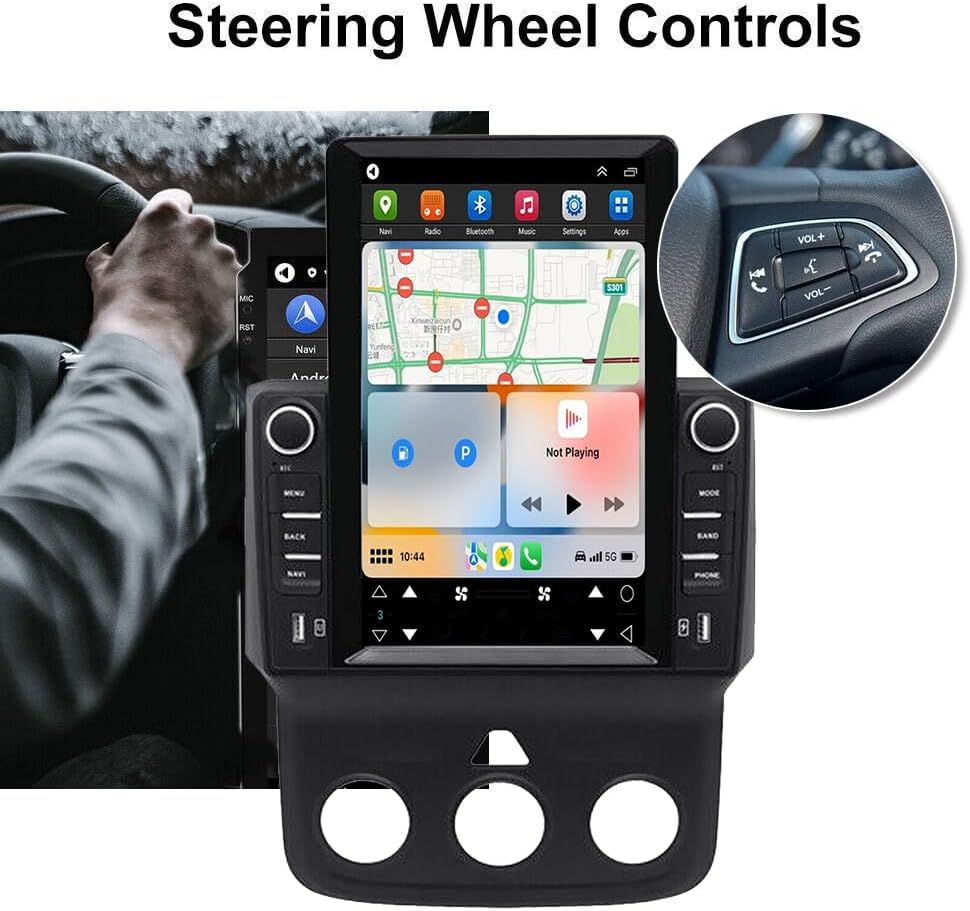
4.2 pav.: Vairo valdymo integravimas.
4.8 DSP Function:
The Digital Sound Processor (DSP) ensures high-fidelity audio reproduction, closely matching the original sound quality.
4.9 Rear Camera Input:
Connect an AHD backup camera to the CVBS input. The display will automatically switch to the camera view važiuojant atbuline eiga.
4.10 File Manager & Apps:
Įmontuotas file manager allows you to browse, download, install, and delete Android applications. You can access the Google Play Store (with Wi-Fi connected) to expand the stereo's functionality.
4.11 Laiko nustatymas:
The date and time can be set automatically via network or GPS, or adjusted manually through the system settings.
5. Priežiūra
Tinkama priežiūra užtikrina jūsų automobilio garso sistemos ilgaamžiškumą ir optimalų veikimą.
- Ekrano valymas: Jutiklinį ekraną švelniai nuvalykite minkšta, nepūkuota šluoste. Įsisenėjusias dėmes šiek tiek nuvalykiteampNuvalykite šluostę vandeniu arba ekranui saugiu valikliu. Venkite stiprių cheminių medžiagų ar abrazyvinių medžiagų.
- Programinės įrangos atnaujinimai: Periodically check for system software updates to ensure optimal performance and access to new features. Updates can usually be found in the system settings menu.
- Temperatūra: Avoid exposing the unit to extreme temperatures for extended periods. The operating temperature range is -20℃ to 75℃.
- Jungtys: Įsitikinkite, kad visi laidai yra tvirtai prijungti. Atsilaisvinusios jungtys gali sukelti protarpiais kylančių problemų.
6. Problemų sprendimas
Šiame skyriuje aptariamos dažniausiai pasitaikančios problemos, su kuriomis galite susidurti. Jei kyla problemų, kurių čia nepaminėta, susisiekite su klientų aptarnavimo tarnyba.
- Nėra galios:
- Patikrinkite visas maitinimo jungtis ir saugiklius.
- Įsitikinkite, kad transporto priemonės akumuliatorius įkrautas.
- Nėra garso:
- Patikrinkite garsiakalbių jungtis.
- Patikrinkite garsumo lygius ir nutildymo nustatymus.
- Įsitikinkite, kad pasirinktas teisingas garso šaltinis.
- GPS signalo praradimas:
- Įsitikinkite, kad GPS antena tinkamai sumontuota ir turi laisvą view dangaus.
- Check antenna cable connection.
- „Bluetooth“ ryšio problemos:
- Įsitikinkite, kad „Bluetooth“ įjungtas ir stereo sistemoje, ir telefone.
- Ištrinkite ankstesnius suporavimus ir bandykite suporuoti dar kartą.
- Iš naujo paleiskite abu įrenginius.
- „CarPlay“ / „Android Auto“ neprisijungia:
- For wired connection, try a different USB cable.
- For wireless, ensure Bluetooth and Wi-Fi are enabled on your phone.
- Verify the correct app (ZLINK for CarPlay, Android Auto app for Android Auto) is running.
- Unit Freezes or Responds Slowly:
- Perform a soft reset (refer to the specific reset procedure in the included manual, or hold the power button for 10 seconds).
- Uždarykite nereikalingas fonines programas.
Factory Settings Keyword: If prompted for a factory setting keyword, try 8888 or 3368.
7. Specifikacijos
| Funkcija | Specifikacija |
|---|---|
| Sistema | Android 13 |
| Lustų rinkinys | 8227L-DEMO |
| Ekrano dydis | 9.7 colių |
| Ekrano raiška | 1024x768 |
| Atmintis (RAM+ROM) | 2 GB RAM + 32 GB ROM |
| Radijo lustas | MT6625 |
| Maitinimo išvestis | 4x45W |
| Darbo temperatūra | -20 ℃ iki 75 ℃ |
| Galia Ampkeltuvas Chip | TDA7388 |
| Radijo grupė | FM/RDS |
| Vaizdo išvestis | Palaikoma |
| Atbulinės eigos įvestis | CVBS |
| Išorinis mikrofonas | Palaikoma |
| Padalintas ekranas | Palaikoma |
| Žemėlapiai | Integruoti žemėlapiai neprisijungus (duomenims atsisiųsti reikalingas internetas) |
| Wi-Fi | Palaikoma |
| USB sąsaja | Dvigubas USB |
| Garso formatai | APE/FLAC/WAV/MP3/WMA ir kt. |
| Vaizdo įrašų formatai | MKV / RMVB / AVI / MP4 / MDV ir kt. |
| Paveikslėlių formatai | PNG / JPEG / JPG / GIF / WBMP / BNP ir kt. |
| Gamyklinių nustatymų raktinis žodis | 8888 arba 3368 |
| Palaikomos kalbos | Chinese/English/French/Italian/Korean/Japanese/Arabic/Spanish/Portuguese/Russian/Turkish/Vietnamese/Hebrew/Polish/German (up to 40 national languages) |
| Transporto priemonės paslaugos tipas | Sunkvežimis |
| Ryšio technologija | USB |
| Žemėlapio tipas | Šiaurės Amerika |
| Garso išvesties režimas | Stereo |
| Jutiklinio ekrano tipas | Talpinis |
| Ekrano tipas | Jutiklinis ekranas |
| Žmogaus sąsajos įvestis | Jutiklinis ekranas |
| Kontrolės metodas | Palieskite |
| Palaikoma palydovinė navigacijos sistema | GPS |
| Prekės svoris | 1875 gramų |
| Modelio numeris | JIAQI-QA1572X-WYQ-2412 |
8. Garantija ir palaikymas
For warranty information and technical support, please refer to the specific warranty card included with your product or contact your retailer. Keep your purchase receipt as proof of purchase.