
1. Įvadas
This user manual provides comprehensive instructions for the Callsky 10-inch Wi-Fi Tablet, Model Ctab 10. Please read this manual carefully before using your device to ensure proper operation and to maximize its features. Keep this manual for future reference.
2. Produktas baigtasview
2.1 Pakuotės turinys
Atidarę pakuotę, patikrinkite, ar yra visi toliau išvardyti daiktai:
- Callsky Ctab 10 Tablet
- C tipo USB įkrovimo laidas
- Maitinimo adapteris
- Naudotojo vadovas (japonų k.)

Image: Package contents including the tablet, charging cable, power adapter, and user manual.
2.2 Įrenginio komponentai
Familiarize yourself with the physical layout and ports of your tablet:
- Priekinė kamera: 5 MP vaizdo skambučiams ir asmenukėms.
- Galinė kamera: 8MP with autofocus for high-resolution photos.
- Maitinimo mygtukas: Located on the side for turning the device on/off and screen lock.
- Garsumo mygtukai: Sureguliuokite garso lygius.
- C tipo USB prievadas: Įkrovimui ir duomenų perdavimui.
- 3.5 mm ausinių lizdas: Dėl garso išvesties.
- Dvigubi garsiakalbiai: Geresnei garso patirčiai.
- MicroSD kortelės lizdas: For storage expansion up to 2TB.

Vaizdas: Viršview of tablet features including face recognition, wireless projection, and physical dimensions.
2.3 Pagrindinės savybės
- Lengvas dizainas: Ultra-thin at 8.7mm and weighing 425g for easy portability.
- Android 14 OS: Enhanced privacy, personalized settings, and improved user experience.
- Didelis našumas: 1.8GHz Allwinner A523 Octa-core processor and Mali-G57 GPU for smooth multitasking, gaming, and HD video.
- Atmintis ir saugojimas: 3GB RAM + 9GB virtual memory, 128GB internal storage, expandable up to 2TB via MicroSD.
- Ryškus ekranas: 10.1-inch 1280x800 Incell IPS display with eye protection mode and Widevine L1 support for high-quality streaming.
- Ryšys: Wi-Fi 6 and Bluetooth 5.4 for stable and high-speed connections.
- Išplėstinės funkcijos: Wireless projection, face recognition, and split-screen functionality.
- Ilgai veikianti baterija: 6000 mAh baterija ilgam naudojimui.

Image: Visual summary of the tablet's core specifications and features.
3. Sąranka
3.1 Pradinis įjungimas ir pagrindiniai nustatymai
- Press and hold the Power button until the Callsky logo appears.
- Follow the on-screen prompts to select your language (e.g., English).
- Connect to a Wi-Fi network. Select your network from the list and enter the password if required.
- Review and accept the Google Services terms.
- Set up a screen lock (PIN, pattern, or password) for security. You can skip this step and set it up later.
- Complete the remaining setup steps as guided by the Android 14 interface.
3.2 „MicroSD“ kortelės įdėjimas
To expand your tablet's storage:
- Planšetinio kompiuterio šone raskite „MicroSD“ kortelės lizdą.
- Švelniai įkiškite „MicroSD“ kortelę į lizdą, kol ji spragtelės į vietą. Įsitikinkite, kad kortelė yra tinkamai orientuota.
- Planšetinis kompiuteris aptiks naują atmintį. Jūsų gali būti paprašyta formatuoti kortelę, kad ji būtų optimaliai naudojama įrenginyje.
4. Naudojimo instrukcijos
4.1 Pagrindinė navigacija
- Lietimo gestai: Palieskite, kad pasirinktumėte, braukite, kad slinktumėte, suspauskite, kad priartintumėte.
- Pagrindinis ekranas: Pasiekite programas, valdiklius ir pranešimus.
- Pranešimai: Braukite žemyn nuo ekrano viršaus iki view pranešimai ir greitieji nustatymai.
4.2 Memory and Storage Management
The tablet comes with 3GB of physical RAM and 9GB of virtual memory, totaling 12GB, along with 128GB of internal storage. You can expand storage up to 2TB using a MicroSD card.
- Norėdami patikrinti saugyklą: eikite į Nustatymai > Saugykla.
- To manage apps: Go to Nustatymai > Programos.

Image: Details on memory and storage, including RAM, internal storage, and MicroSD expansion.
4.3 Ekranas ir vaizdinė patirtis
The 10.1-inch 1280x800 Incell IPS display provides clear and vibrant visuals. It supports Widevine L1 for high-definition streaming from platforms like Netflix and YouTube.
- Akių apsaugos režimas: Activate this mode in settings to reduce blue light and eye strain during prolonged use.
- Padalintas ekranas: Use two applications simultaneously for enhanced productivity.

Image: Tablet demonstrating Widevine L1 support for streaming services.
4.4 Ryšys
The tablet supports Wi-Fi 6 and Bluetooth 5.4 for reliable and fast wireless connections.
- „Wi-Fi“: Connect to 2.4G or 5G networks. Go to Nustatymai > Tinklas ir internetas > „Wi-Fi“ ryšiams valdyti.
- Bluetooth: Pair with wireless devices like headphones or keyboards. Go to Nustatymai > Prijungti įrenginiai > „Bluetooth“.
- Belaidė projekcija: Share your screen with compatible displays. Access this feature from the quick settings panel.
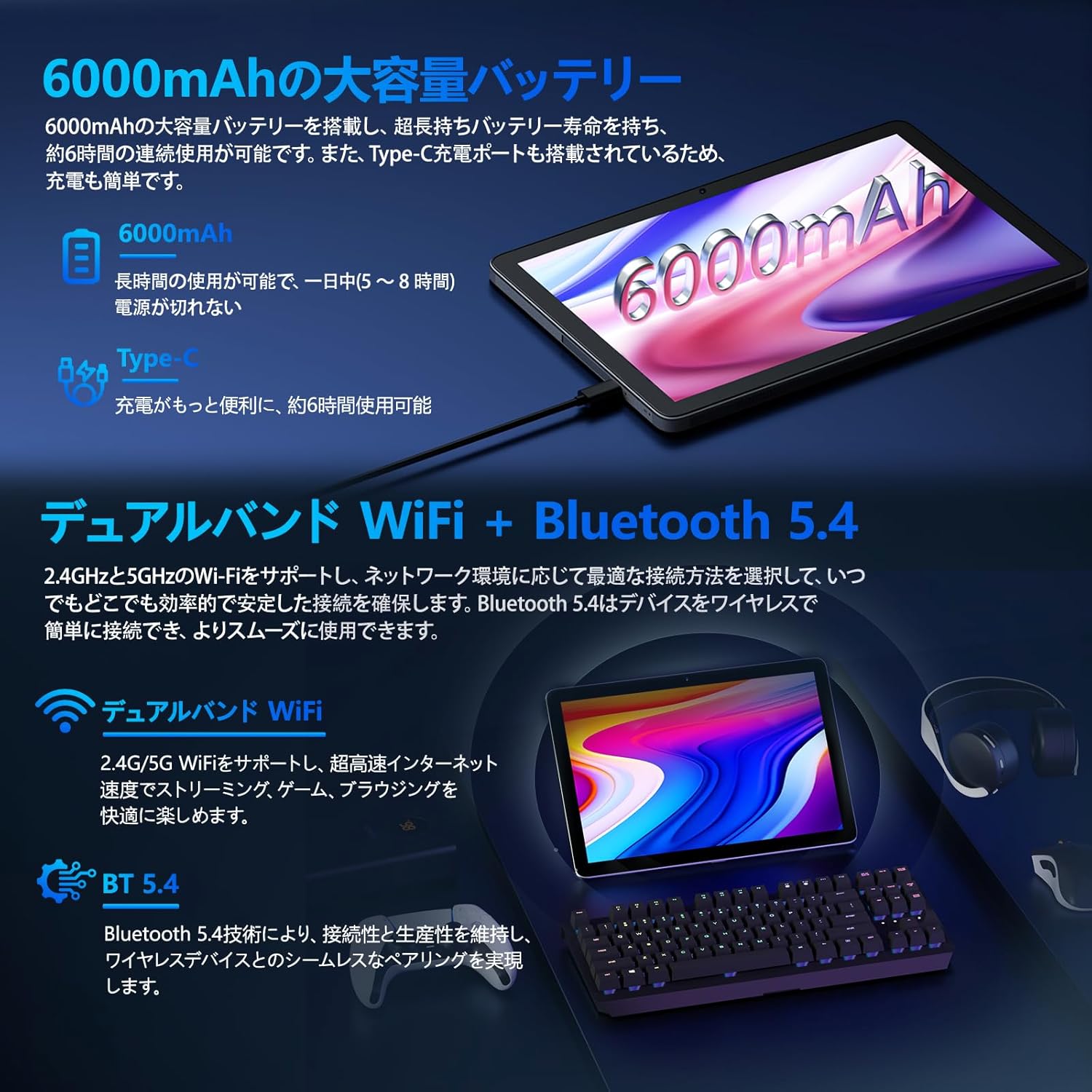
Image: Tablet highlighting battery capacity, Type-C charging, Wi-Fi, and Bluetooth features.
4.5 fotoaparatai
The tablet features a 5MP front camera and an 8MP rear camera with autofocus, suitable for video calls and capturing photos.
- Open the Camera app to take photos or record videos.
- Veido atpažinimas: Use the front camera for quick and secure unlocking. Set this up in Nustatymai > Saugumas ir privatumas > Veido atrakinimas.

Image: Illustration of the tablet's front and rear cameras and their resolutions.
4.6 Kids Mode (Parental Controls)
The tablet includes a dedicated Kids Mode and parental control features to ensure a safe and controlled environment for children.
- Access Kids Mode to provide curated content and limit screen time.
- Parents can manage app usage and content access through parental control settings.
4.7 Jutikliai
The tablet is equipped with various sensors for enhanced functionality:
- GPS: Vietos nustatymo paslaugoms ir navigacijai.
- Geomagnetic Sensor: Atlieka kompaso funkciją.
- Artumo jutiklis: Prevents unintended screen operations.
- Aplinkos šviesos jutiklis: Automatically adjusts screen brightness.
- Giroskopas: For tilt operations and AR applications.
- Akselerometras: Detects tilt, shock, and movement.
5. Priežiūra
5.1 Akumuliatoriaus priežiūra
The 6000mAh battery provides long usage times. To prolong battery life:
- Venkite ekstremalių temperatūrų.
- Neleiskite baterijai dažnai visiškai išsikrauti.
- Naudokite pateiktą įkroviklį ir laidą.
- Optimizuokite akumuliatoriaus naudojimą Nustatymai> Baterija.

Image: Tablet connected to a Type-C charger, highlighting the 6000mAh battery.
5.2 Valymas
Planšetinio kompiuterio ekraną ir korpusą valykite minkštu, nepūkuotu audiniu. Venkite naudoti stiprias chemines medžiagas ar abrazyvines medžiagas.
6. Problemų sprendimas
Jei kyla problemų dėl planšetinio kompiuterio, žr. toliau pateiktas dažniausiai pasitaikančias problemas ir sprendimus:
| Problema | Galima priežastis / sprendimas |
|---|---|
| Planšetinis kompiuteris neįsijungia | Įsitikinkite, kad akumuliatorius įkrautas. Prijunkite įkroviklį ir palaukite kelias minutes, prieš bandydami vėl įjungti. |
| Ekranas nereaguoja | Restart the tablet by holding the power button. If unresponsive, force restart by holding the power button for a longer duration (e.g., 10-15 seconds). |
| Wi-Fi ryšio problemos | Patikrinkite, ar nustatymuose įjungtas „Wi-Fi“. Paleiskite maršrutizatorių iš naujo. Pamirškite tinklą ir prijunkite iš naujo. |
| Device overheating / unexpected shutdowns | Close background applications. Avoid using the tablet in direct sunlight or hot environments. If the issue persists, contact customer support. |
| Programėlės stringa arba užstringa | Clear the app's cache (Settings > Apps > [App Name] > Storage & cache > Clear cache). Update the app. Reinstall the app. |
| Lėtas veikimas | Uždarykite nereikalingas fonines programas. Išvalykite talpyklą ir laikinąsias files. Ensure sufficient storage space. |
If the problem persists after trying these solutions, please contact Callsky customer support.
7. Specifikacijos
| Funkcija | Detalė |
|---|---|
| Prekės ženklas | Callsky |
| Modelio pavadinimas | Ctab 10 |
| Operacinė sistema | Android 14 |
| Ekrano dydis | 10.1 colių |
| Ekrano raiška | 1280x800 pixels (Incell IPS) |
| CPU | Allwinner A523 Octa-core (1.8 GHz) |
| GPU | Mali-G57 (Integrated) |
| RAM | 3GB Physical + 9GB Virtual (Total 12GB) |
| Vidinė saugykla | 128 GB |
| Išplečiama saugykla | Iki 2 TB per „MicroSD“ kortelę |
| Galinė kamera | 8 MP |
| Priekinė kamera | 5 MP |
| Wi-Fi | Wi-Fi 6 (802.11ac, 802.11b, 802.11g, 802.11n) |
| Bluetooth | Bluetooth 5.4 |
| Baterijos talpa | 6000mAh (22.8 Watt-hours, 1 Lithium Polymer cell) |
| Įkrovimo prievadas | C tipas |
| Matmenys | 32.4 x 20.3 x 3.4 cm |
| Svoris | 425 g |
| Sertifikatai | GMS Certified, PSE Certified |
8. Garantija ir palaikymas
The Callsky Ctab 10 tablet comes with a 2 metų garantija. This warranty covers manufacturing defects and ensures long-term reliability.
8.1 Pagalba klientams
If you encounter any issues or have questions regarding your Callsky tablet, please contact our customer support team. We are committed to providing prompt assistance.
- Kontaktinis būdas: Refer to your purchase platform (e.g., Amazon) for specific contact details. Typically, you can find seller contact information through your order history.
- Atsakymo laikas: We aim to respond to inquiries within 24 hours on weekdays and within 48-72 hours on weekends or holidays.
Please have your product model (Ctab 10) and purchase details ready when contacting support.