
Dosilkc RM
Dosilkc 8CH POE NVR User Manual
Modelis: RM
Produktas baigtasview
The Dosilkc 8-Channel POE Network Video Recorder (NVR) is designed for home security camera systems, supporting resolutions up to 4K. It features H.265+ video compression for efficient storage and remote access capabilities for convenient monitoring.

This image displays the front and rear panels of the Dosilkc 8-Channel POE NVR. The front panel shows indicator lights, while the rear panel features 8 PoE ports, audio input/output, VGA, HDMI, and USB ports for connectivity.
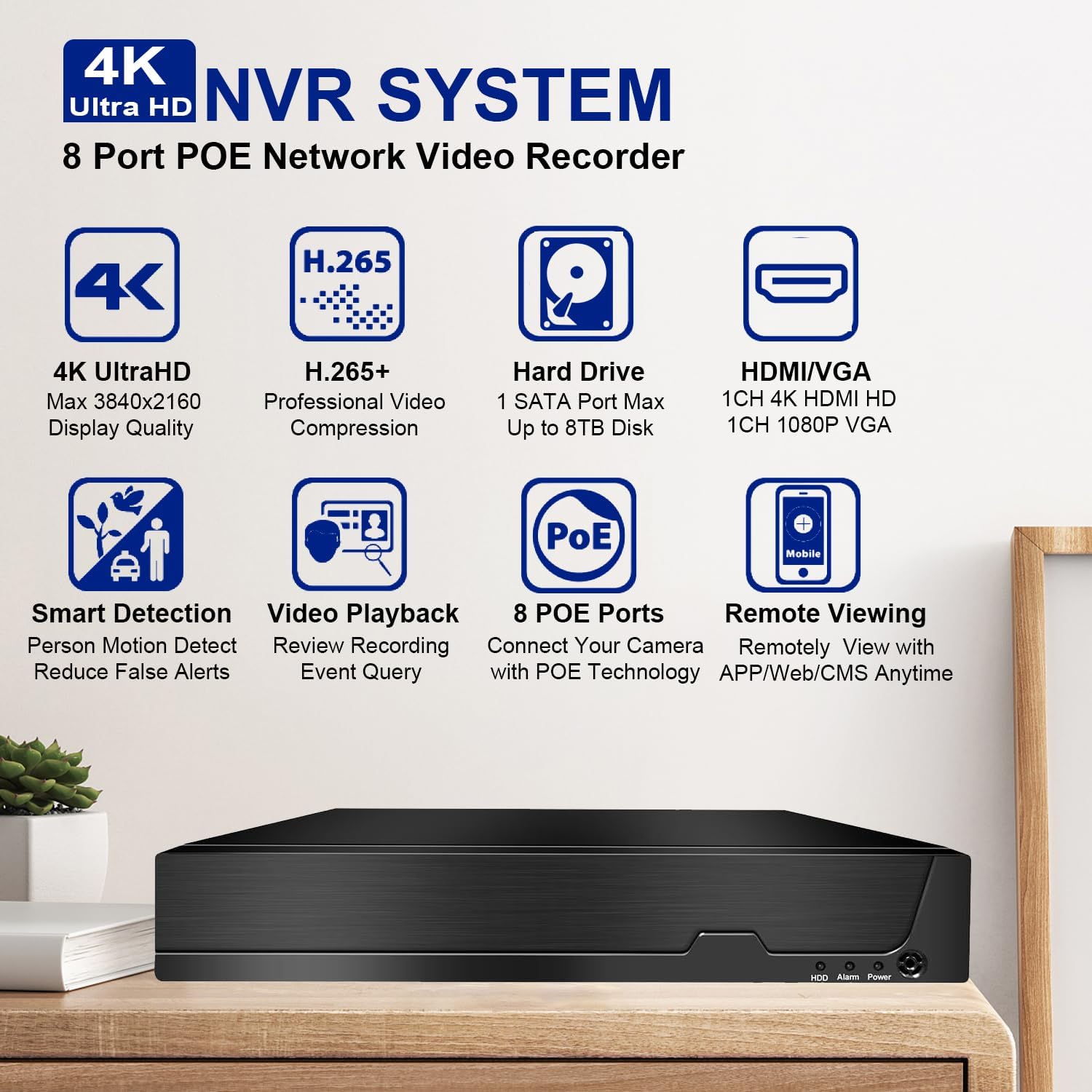
This image highlights the key features of the Dosilkc 4K Ultra HD NVR System, including 4K UltraHD display quality, H.265+ video compression, support for up to 8TB hard drive, HDMI/VGA output, smart detection, video playback, 8 PoE ports, and remote viewgebėjimus.
Pakuotės turinys
Prieš pradėdami diegimą, patikrinkite, ar pakuotėje yra visi toliau išvardyti elementai:
- NVR Unit
- USB pelė
- Maitinimo adapteris
- Vartotojo vadovas (šis dokumentas)
Sąrankos vadovas
1. Aparatinės įrangos ryšys
The Dosilkc NVR features Power over Ethernet (PoE) ports, simplifying camera installation by providing both power and data through a single Ethernet cable.
- Prijungti kameras: Connect your PoE IP cameras to the NVR's PoE ports using Ethernet cables. The NVR will automatically power the cameras.
- Prijungti monitorių: Connect a monitor to the NVR using either the HDMI or VGA port. HDMI supports up to 4K resolution, while VGA supports 1080p.
- Prijungti pelę: Prijunkite pridedamą USB pelę prie vieno iš NVR USB prievadų.
- Tinklo prisijungimas: Connect the NVR to your local network router using an Ethernet cable for remote access capabilities.
- Maitinimas: Prijunkite maitinimo adapterį prie vaizdo įrašymo įrenginio, o tada – prie maitinimo lizdo. Vaizdo įrašymo įrenginys įsijungs automatiškai.

This diagram illustrates the typical setup for the Dosilkc PoE NVR, showing connections for PoE IP cameras, a VGA/HDMI monitor, an internet router for remote viewing, audio input/output, a USB mouse, and the power supply.

This image emphasizes the "Plug & Play Easy Setup" feature, demonstrating how a single Ethernet cable provides both network access and power supply to the cameras, simplifying installation.
2. Pradinė konfigūracija
Upon first boot, the NVR may guide you through a setup wizard. Follow the on-screen prompts to set up basic parameters such as date/time, network settings, and administrator password.
Kietojo disko diegimas (jei neįdiegtas iš anksto): The NVR supports up to an 8TB SATA hard drive. Refer to the NVR's internal diagram for proper installation of the HDD. Ensure the NVR is powered off before installing or removing a hard drive.
Naudojimo instrukcijos
1. Vietinis Viewir atkūrimas
Once connected to a monitor, you can view live feeds from your cameras and manage recordings directly from the NVR interface using the USB mouse.
- Tiesiogiai View: The main screen displays live video feeds from all connected cameras.
- Atkūrimas: Norėdami iš naujo atidaryti atkūrimo meniuview įrašytas footage. You can search by time, calendar, event, or channel.
- Įrašymo režimai: The NVR supports various recording modes including manual, alarm, dynamic detection, and scheduled timing.

This image illustrates the 24/7 HDD Recording & Playback capability, showing a monitor displaying live camera feed and icons representing up to 8TB HDD storage and PC LMS Server Storage for video recording without monthly fees.
2. Nuotolinė prieiga
The NVR allows remote viewing of your security system from mobile devices or computers.
- Programėlė mobiliesiems: Download the free "Videolink" app from the App Store (iOS) or Google Play (Android). Follow the app's instructions to add your NVR using its unique ID or QR code.
- Kompiuterio klientas: Use the LMS client software for Windows or Mac to access your NVR from a computer.
- Web Naršyklė: Access the NVR interface directly via a web browser (Firefox, Google Chrome, Microsoft Edge) by entering the NVR's IP address.

This image details the various remote access methods for the NVR, including the "Videolink" mobile app for iOS and Android, AJDev Tools, LMS client for Windows and Mac, and web browser access via Firefox, Google Chrome, and Microsoft Edge, showing live view on different devices.

This image illustrates the compatibility of the Dosilkc NVR system with various viewing devices, including different types of cameras, laptops, tablets, and smartphones, allowing users to view their home from anywhere.
3. Išplėstinės funkcijos
- H.265+ vaizdo glaudinimas: This advanced compression technology reduces file sizes by up to 50% without compromising video quality, allowing for longer recording times and saving hard drive space.
- Išmanusis aptikimas ir įspėjimai: Configure the NVR for intelligent motion detection, including human and vehicle detection, to reduce false alarms. Receive alerts via FTP, app notifications, email, or live alarms.
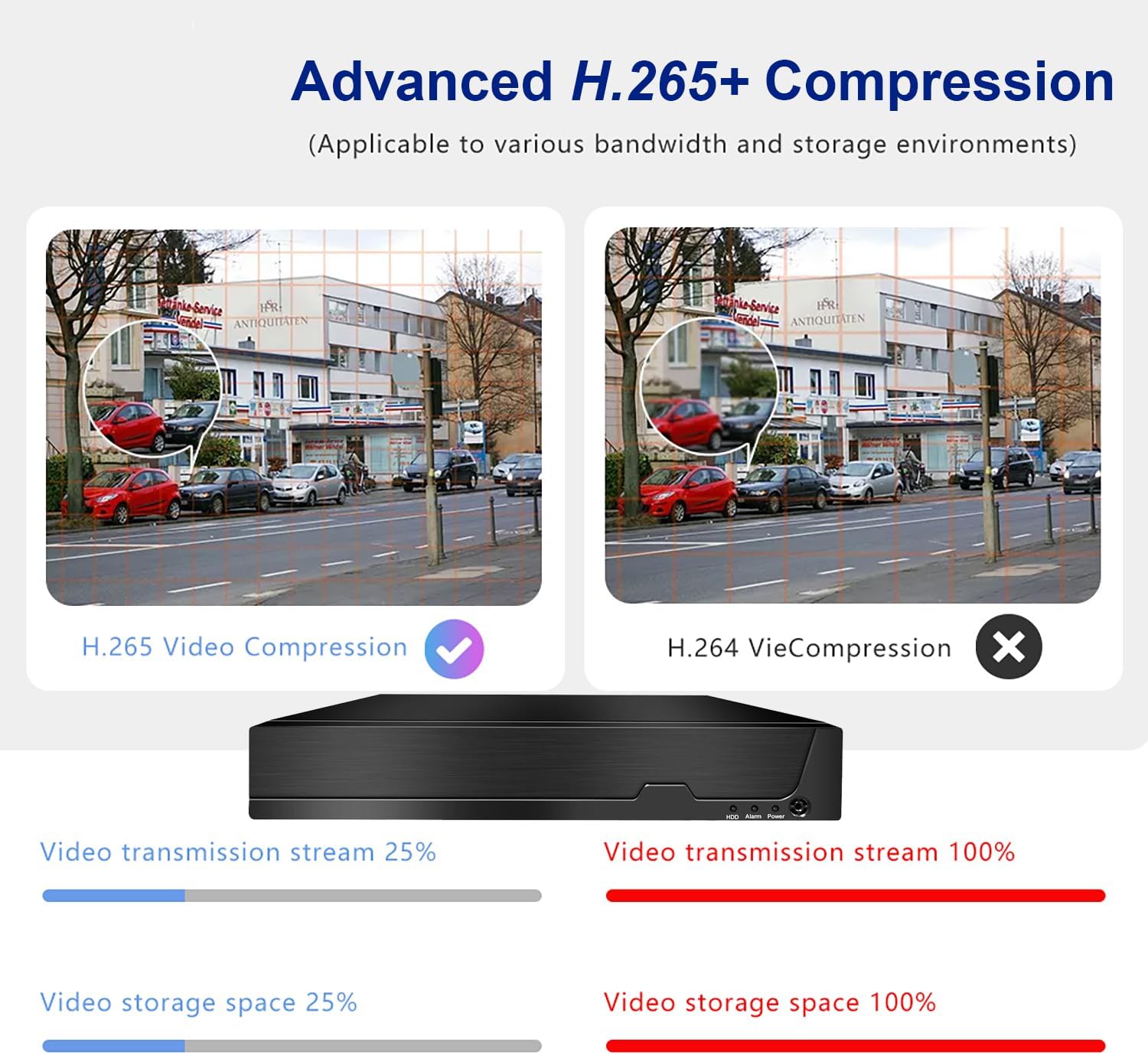
This image compares Advanced H.265+ Compression with H.264, showing that H.265+ significantly reduces video transmission stream and storage space requirements while maintaining quality.

This image demonstrates the AI Human and Vehicle Detection feature, showing how the system can differentiate between human/vehicle movement and other movements (like a dog running), sending alerts only for relevant events.

This image highlights the Smart Motion Detect & Alerts features, including options for FTP upload, app notifications, email alerts, and live alarms, ensuring users are promptly informed of detected events.
Priežiūra
- Reguliarus valymas: Keep the NVR unit free from dust. Use a soft, dry cloth for cleaning. Do not use liquid cleaners.
- Firmware atnaujinimai: Periodically check the Dosilkc official websvetainę, kurioje rasite programinės įrangos atnaujinimus, kad būtų užtikrintas optimalus našumas ir saugumas.
- Kietojo disko sveikata: Monitor the health of your hard drive through the NVR's system settings. Replace the HDD if any issues are detected to prevent data loss.
- Vėdinimas: Įsitikinkite, kad vaizdo įrašymo įrenginys yra gerai vėdinamoje vietoje, kad neperkaistų. Neužblokuokite ventiliacijos angų.
Trikčių šalinimas
Nėra vaizdo išvesties monitoriuje
- Patikrinkite, ar NVR įjungtas ir ar maitinimo adapteris yra tinkamai prijungtas.
- Verify the HDMI/VGA cable connection between the NVR and the monitor.
- Ensure the monitor is set to the correct input source (HDMI/VGA).
- Išbandykite kitą HDMI/VGA kabelį arba monitorių.
Kameros nerodomos
- Check the Ethernet cable connection for each camera to its respective PoE port on the NVR.
- Ensure the cameras are powered on (indicator lights on cameras should be active).
- If using non-Dosilkc PoE cameras, ensure they are ONVIF compatible and their IP addresses are configured to be on the same subnet as the NVR's PoE ports. Use the provided tool software to adjust IP addresses if necessary.
- Reboot the NVR and the cameras.
Remote Access Not Working
- Verify the NVR is connected to your internet router and has a valid network connection.
- Ensure your mobile device or computer has an active internet connection.
- Double-check the NVR's ID or QR code entered in the mobile app/client software.
- Check your router's firewall settings; port forwarding may be required for direct IP access (though P2P/Cloud access via app usually bypasses this).
No Recording / HDD Issues
- Ensure a hard drive is installed and properly connected inside the NVR.
- Check the HDD status in the NVR's system settings. Format the HDD if it's new or unrecognized.
- Verify that recording schedules or motion detection settings are correctly configured.
Specifikacijos
| Funkcija | Detalė |
|---|---|
| Modelio numeris | RM |
| Kanalai | 8 Channel POE |
| Maksimalios raiškos palaikymas | 12MP/8MP/5MP/4MP/3MP/1080P HD POE IP Cameras |
| Vaizdo įrašų suspaudimas | H.265 + |
| Kietojo disko sąsaja | „1 SATA“ sąsaja |
| Maksimali HDD talpa | Up to 8TB (HDD Not Included) |
| Vaizdo išvestis | HDMI (max 4K@30fps), VGA (max 1080p@30fps) |
| Remote Access App | Videolink (iOS/Android) |
| PC Client Software | LMS Client |
| Playback Quality | 1x12MP@30fps, 1x8MP@30fps, 2x5MP@25fps+2xD1, 4x4MP@25fps, 4x3MP@25fps, 4x1080p@30fps |
| Matmenys | 13.9 x 11 x 3 colio |
| Prekės svoris | 3.3 svaro |
| Ryšio technologija | VGA, Ethernet, HDMI |
Garantija ir palaikymas
Dosilkc products come with a standard manufacturer's warranty. Please refer to the warranty card included in your package or visit the official Dosilkc websvetainėje, kurioje pateikiamos išsamios garantijos sąlygos.
For technical support, troubleshooting assistance, or any inquiries regarding your Dosilkc NVR, please contact our customer support team. Contact information can typically be found on our official websvetainėje arba ant produkto pakuotės.
Internetiniai ištekliai:
- Dosilkc Official Websvetainė: Visit Dosilkc Store on Amazon
Ask a question about this manual
Ask about setup, troubleshooting, compatibility, parts, safety, or missing instructions. Manuals+ will review the question and use this page’s manual context to help answer it.