
1. Įvadas
This manual provides comprehensive instructions for the Mycket portable DAB/DAB+/FM radio, Model D009. It covers setup, operation, maintenance, and troubleshooting to ensure optimal performance and longevity of your device. Please read this manual carefully before using the product.
The Mycket D009 radio features advanced signal reception technology for clear audio, Bluetooth 5.0 for wireless streaming, USB playback, AUX-in connectivity, a dual alarm clock, and a sleep timer. Its integrated rechargeable battery offers portability for use in various environments.
2. Saugos instrukcijos
- Saugokite įrenginį nuo lietaus, drėgmės ar ekstremalių temperatūrų.
- Stenkitės, kad prietaisas nenumestų ar nepatirtų stipraus smūgio.
- Neardykite ir nebandykite taisyti įrenginio patys. Visus techninės priežiūros darbus patikėkite kvalifikuotiems specialistams.
- Laikykite įrenginį atokiau nuo šilumos šaltinių, tokių kaip radiatoriai, šildytuvai, viryklės ar kiti prietaisai (įskaitant ampkeltuvai), kurie gamina šilumą.
- Use only the specified charging cable and power adapter (5V via USB) to charge the device.
- Užtikrinkite tinkamą vėdinimą aplink įrenginį veikimo ir įkrovimo metu.
- Atsakingai utilizuokite baterijas ir elektroninius komponentus pagal vietinius reikalavimus.
3. Produktas baigtasview
3.1 Pakuotės turinys
- 1 x Mycket Portable DAB Radio (Model D009)
- 1x USB įkrovimo laidas
- 1 x Vartotojo vadovas
3.2 Įrenginio išdėstymas ir valdikliai
Familiarize yourself with the main components and controls of your Mycket radio.

1 vaizdas: Priekyje view of the Mycket D009 portable DAB radio, showing the speaker grille, LCD display, control buttons (MODE, OK, O/M, FAV, 1-4), and the telescopic antenna extended. The right side shows the DC 5V USB-C port, reset button, and headphone jack.
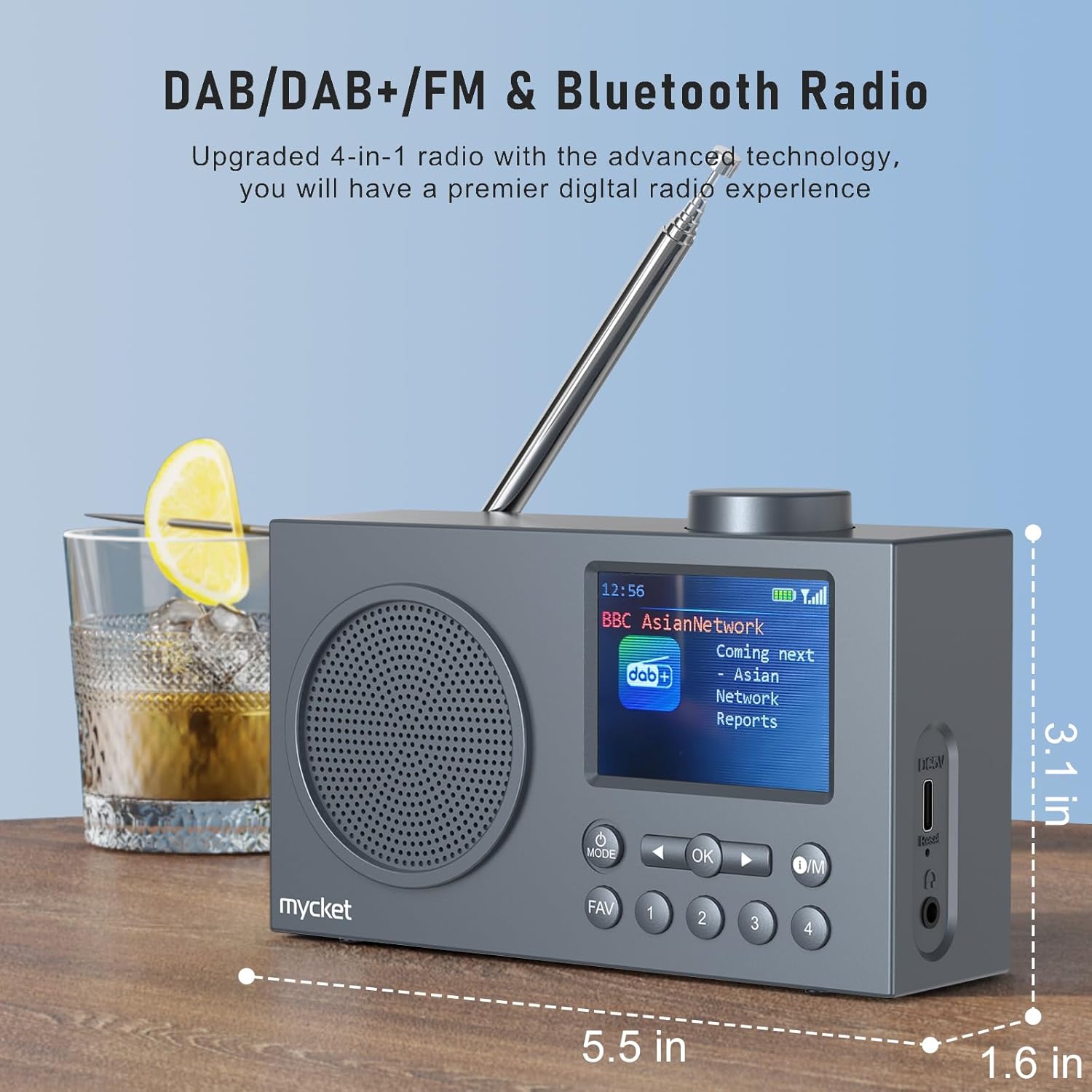
2 vaizdas: Šoninė view of the Mycket D009 radio illustrating its compact dimensions: approximately 5.5 inches (length), 1.6 inches (width), and 3.1 inches (height). The image also highlights its DAB/DAB+/FM and Bluetooth capabilities.
- Ekranas: 2.4-inch TFT color display for station information, time, and settings.
- Pranešėjas: Integrated Hi-Fi speaker for audio output.
- Teleskopinė antena: Optimaliam radijo signalo priėmimui.
- MODE mygtukas: Perjungia DAB, FM, „Bluetooth“, USB ir AUX režimus.
- Gerai mygtukas: Patvirtina pasirinkimus arba įeina į meniu.
- O/M mygtukas: Power On/Off and Menu access.
- FAV mygtukas: Accesses favorite presets.
- Skaičių mygtukai (1–4): Direct access to stored presets.
- Naršymo mygtukai (kairėn/dešinėn): Navigates menus or tunes stations.
- Garsumo rankenėlė: Reguliuoja garso stiprumą.
- DC 5V USB-C Port: Skirta vidinei baterijai įkrauti.
- Atkūrimo mygtukas: Resets the device (use a thin object to press).
- 3.5 mm ausinių lizdas: Privačiam pasiklausymui.
4. Sąranka
4.1 Akumuliatoriaus įkrovimas
The radio is equipped with a built-in 2200mAh lithium battery. Before first use, fully charge the device.
- Connect the provided USB charging cable to the DC 5V USB-C port on the side of the radio.
- Kitą USB kabelio galą prijunkite prie suderinamo USB maitinimo adapterio (nepridedamas) arba kompiuterio USB prievado.
- The charging indicator on the display will show the charging status. A full charge typically takes approximately 2.5 hours and provides up to 12 hours of playback time at 70% volume.

3 vaizdas: The Mycket D009 radio display showing a full battery indicator, emphasizing its long playback time on a single charge.
4.2 Antenos reguliavimas
Optimaliam radijo priėmimui visiškai ištieskite teleskopinę anteną. Sureguliuokite jos padėtį, kad signalo kokybė būtų geriausia.
4.3 Pradinis įjungimas
Paspauskite ir palaikykite Operacija button to power on the radio. The display will light up, and the device will typically start in the last used mode or initiate a DAB scan if it's the first use.
5. Naudojimo instrukcijos
5.1 Perjungimo režimai
Paspauskite REŽIMAS button repeatedly to cycle through available modes: DAB, FM, Bluetooth, USB, and AUX.
5.2 DAB/DAB+ radijo valdymas
- Perjunkite į DAB režimą naudodami REŽIMAS mygtuką.
- The radio will automatically perform a full scan for available DAB/DAB+ stations upon first use or if no stations are found. To initiate a manual scan, press and hold the OK button, then select "Full Scan" from the menu.
- Once the scan is complete, use the navigation buttons (Left/Right) to browse through the list of available stations.
- Paspauskite OK to select and listen to a station.

4 vaizdas: The Mycket D009 radio display showing a DAB station and highlighting the auto-scan and 40 preset features (20 DAB & 20 FM).
5.2.1 Storing DAB Presets
The radio supports up to 20 DAB presets.
- Nustatykite norimą DAB stotį.
- Press and hold one of the number buttons (1-4) arba FAV button to save the current station to a preset slot. Follow the on-screen prompts to select a slot if using the FAV button.
- To recall a preset, briefly press the corresponding number button or the FAV button and select from the list.
5.3 FM radijo veikimas
- Perjunkite į FM režimą naudodami REŽIMAS mygtuką.
- Norėdami automatiškai ieškoti FM stočių, paspauskite ir palaikykite OK mygtuką. Radijas nuskaitys ir išsaugos galimas stotis.
- To manually tune, use the navigation buttons (Left/Right) to adjust the frequency.
- Paspauskite OK to confirm the station.
5.3.1 Storing FM Presets
The radio supports up to 20 FM presets, similar to DAB presets.
- Nustatykite norimą FM stotį.
- Press and hold one of the number buttons (1-4) arba FAV button to save the current station.
- To recall a preset, briefly press the corresponding number button or the FAV button and select from the list.
5.4 „Bluetooth 5.0“ susiejimas
Connect your smartphone or tablet to the radio via Bluetooth for wireless audio streaming.
- Perjunkite į „Bluetooth“ režimą naudodami REŽIMAS button. The radio display will show "Bluetooth Pairing" or similar.
- Savo mobiliajame įrenginyje įjunkite Bluetooth ir ieškokite galimų įrenginių.
- Select "Mycket D009" from the list of devices.
- Once paired, the radio will confirm the connection, and you can play audio from your device through the radio.

5 vaizdas: The Mycket D009 radio displaying "Playing" in Bluetooth mode, next to a smartphone showing "Mycket D009" as a connected Bluetooth device.
5.5 USB atkūrimas
Groti MP3 garsą files tiesiai iš USB atmintinės.
- Įdėkite USB diską, kuriame yra MP3 files į USB prievadą.
- Perjunkite į USB režimą naudodami REŽIMAS mygtuką.
- Radijas automatiškai aptiks ir pradės groti MP3 files. Use the navigation buttons to skip tracks.
5.6 AUX įvesties jungtis
Prijunkite išorinius garso įrenginius naudodami 3.5 mm garso kabelį (nepridedamas).
- Connect one end of a 3.5mm audio cable to the AUX-in port on the radio.
- Kitą galą prijunkite prie išorinio įrenginio ausinių lizdo arba garso išvesties.
- Perjunkite į AUX režimą naudodami REŽIMAS mygtuką.
- Valdykite atkūrimą iš išorinio įrenginio.
5.7 Žadintuvo funkcija
Nustatykite iki dviejų nepriklausomų žadintuvų.
- Paspauskite ir palaikykite Operacija mygtuką, kad patektumėte į meniu.
- Navigate to "Alarm Settings" using the navigation buttons and press OK.
- Pasirinkite 1 signalą arba 2 signalą.
- Set the alarm time, source (DAB, FM, or Buzzer), and volume.
- Patvirtinkite nustatymus paspausdami OK.
5.8 Miego laikmačio funkcija
Nustatykite radiją taip, kad jis automatiškai išsijungtų po nustatyto laiko.
- Paspauskite ir palaikykite Operacija mygtuką, kad patektumėte į meniu.
- Navigate to "Sleep Timer" and press OK.
- Select the desired duration (e.g., 15, 30, 60 minutes).
- The radio will automatically power off after the set time.
5.9 Ausinių naudojimas
Connect 3.5mm headphones to the headphone jack for private listening. The internal speaker will be muted automatically.
6. Priežiūra
- Valymas: Radijo imtuvo išorę valykite minkštu, sausu skudurėliu. Nenaudokite abrazyvinių valiklių ar tirpiklių.
- Akumuliatoriaus priežiūra: Norėdami pailginti akumuliatoriaus veikimo laiką, venkite dažnai visiškai jį iškrauti. Reguliariai įkraukite įrenginį, net jei jis ilgą laiką nenaudojamas.
- Saugykla: Radijo imtuvą laikykite vėsioje, sausoje vietoje, toliau nuo tiesioginių saulės spindulių ir ekstremalių temperatūrų.
7. Problemų sprendimas
| Problema | Galima priežastis | Sprendimas |
|---|---|---|
| Nėra maitinimo / Radijas neįsijungia. | Baterija išsikrovusi. | Įkraukite radiją naudodami pridedamą USB laidą. |
| Prastas radijo signalo priėmimas (DAB/FM). | Antenna not fully extended or positioned correctly. Weak signal area. | Visiškai ištieskite ir sureguliuokite teleskopinę anteną. Pabandykite perkelti radiją į kitą vietą. Atlikite pilną stočių paiešką. |
| „Bluetooth“ susiejimas nepavyksta. | Radio not in Bluetooth mode. Device too far. Bluetooth not enabled on external device. | Ensure the radio is in Bluetooth mode. Keep devices within range (approx. 10 meters). Enable Bluetooth on your external device and search for "Mycket D009". |
| Iš garsiakalbio nėra garso. | Volume too low. Headphones connected. | Padidinkite garsumą. Atjunkite ausines, jei neketinate klausytis muzikos privačiai. |
| USB atkūrimas neveikia. | USB atmintinė netinkamai įdėta. Nesuderinama. file formatu. | Įsitikinkite, kad USB atmintinė yra visiškai įdėta. Patikrinkite, ar fileyra MP3 formatu. |
| Įrenginys nereaguoja. | Laikinas programinės įrangos triktis. | Press the reset button on the side of the radio using a thin object (e.g., a paperclip). |
8. Specifikacijos
| Prekės ženklas | Labai |
| Modelis | D009 |
| Radijo režimai | DAB, DAB+, FM |
| Bluetooth versija | 5.0 |
| Atkūrimo parinktys | FM, DAB, DAB+, Bluetooth, USB MP3, AUX-in |
| Garsiakalbio išėjimo galia | 5 vatų |
| Garsiakalbių blokas | 4 Ω10 W 78 mm x 1 |
| Ekranas | 2.4 colių spalvotas TFT LCD |
| Išankstiniai nustatymai | 40 (20 DAB, 20 FM) |
| Baterijos tipas | Built-in Lithium-ion (18650) |
| Baterijos talpa | 2200 mAh (3.7V - 2.2 Ah) |
| Atkūrimo laikas | Approx. 8-9 hours at 70% volume (up to 12 hours) |
| Įkrovimo laikas | apytiksliai 2.5 valandas |
| Maitinimo įvestis | 5V per USB |
| Matmenys (produktas) | Maždaug 14 cm (ilgis) x 4 cm (plotis) x 7.8 cm (aukštis) |
| Išvesties jungtys | 3.5 mm ausinių lizdas |
9. Garantija ir palaikymas
Mycket products are designed for reliability and performance. This product comes with:
- 12 mėnesių garantija: Enjoy a hassle-free 12-month warranty from the date of purchase.
- Klientų aptarnavimas: For any questions, issues, or support needs, please contact Mycket customer service.
Išsaugokite pirkimo įrodymą, kad galėtumėte kreiptis dėl garantijos.