
Įvadas
Thank you for choosing the Casio MWA-300H Series watch. This manual provides essential information regarding the setup, operation, and maintenance of your new timepiece. Please read this manual carefully to ensure proper use and to fully understand the features of your watch.
The Casio MWA-300H is an analog watch featuring a chronograph, 100-meter water resistance, and luminous hands for enhanced readability. It is designed for versatile wear, suitable for both daily use and recreational water activities.
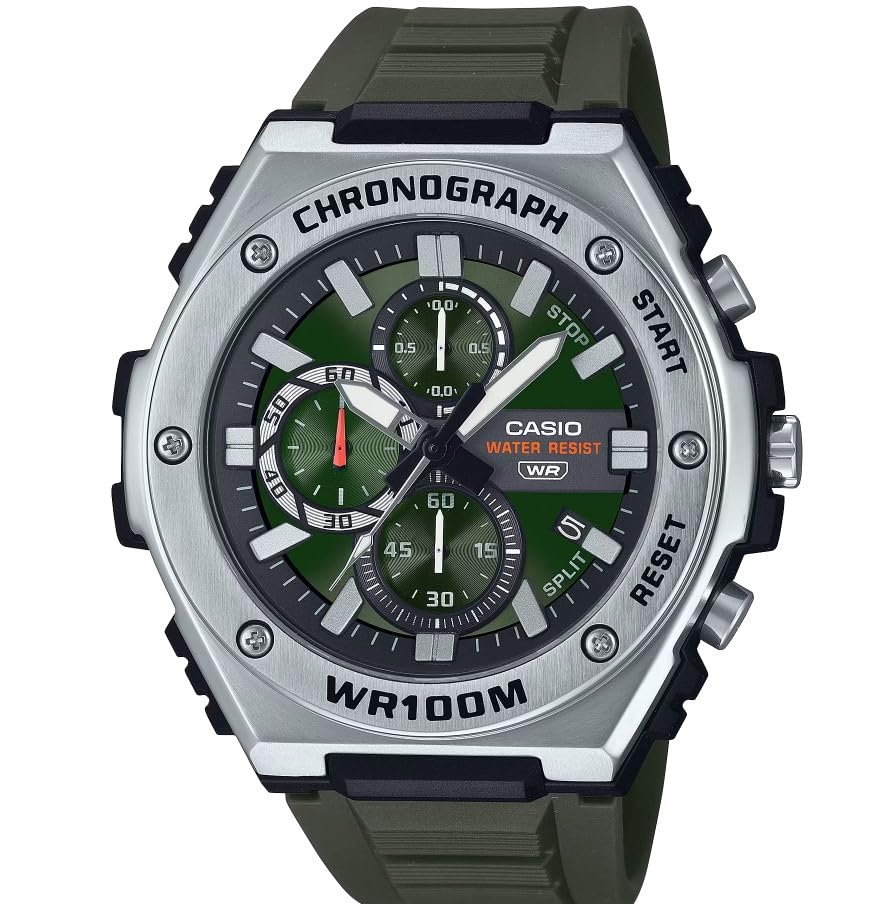
Vaizdas: priekis view of the Casio MWA-300H Series watch, highlighting its green dial, chronograph sub-dials, and black resin band.
Setup: Initial Settings
Laiko nustatymas
- Pull the crown out to the second click (time setting position). The second hand will stop.
- Rotate the crown to set the hour and minute hands. Ensure the AM/PM setting is correct if your watch has a 24-hour indicator or date changes at midnight.
- Grąžinkite karūnėlę į įprastą padėtį. Sekundinė rodyklė vėl pradės judėti.
Datos nustatymas
- Pull the crown out to the first click (date setting position).
- Rotate the crown to set the date. Avoid setting the date between 9:00 PM and 1:00 AM, as this may interfere with the automatic date change mechanism.
- Įstumkite karūną atgal į įprastą padėtį.
Informacija apie akumuliatorių
Your Casio MWA-300H watch is powered by 1 LR44 battery, which is included. The battery life is approximately 3 years. When the battery runs low, the watch may exhibit irregular movement or stop. It is recommended to have the battery replaced by a qualified watch technician to maintain water resistance.
Operating: Watch Functions
Chronografo (chronometro) naudojimas
The chronograph function allows for precise timing of events. Your watch features a 1/10-second stopwatch that captures elapsed, split, and 1st/2nd place times across three dedicated sub-dials.
- Starting the Stopwatch: Press button A (typically the upper right button) to start the stopwatch.
- Stopping the Stopwatch: Press button A again to stop the stopwatch.
- Resetting the Stopwatch: After stopping, press button B (typically the lower right button) to reset the stopwatch hands to zero.
- Dalinio laiko matavimas: While the stopwatch is running, press button B to measure split times. The stopwatch hands will momentarily stop to indicate the split time, then resume timing. Press button B again to release the split time and display the current elapsed time.
Note: Refer to the specific button layout on your watch for exact button assignments.
Atsparumas vandeniui (100 metrų)
Your Casio MWA-300H watch is water resistant up to 100 meters (330 feet). This rating means the watch is suitable for swimming, showering, and recreational water activities. It is not suitable for diving or snorkeling where significant water pressure changes occur.
- Nelieskite karūnėlės ar mygtukų, kai laikrodis yra šlapias arba panardintas.
- Po sąlyčio su sūriu vandeniu laikrodį nuplaukite gėlu vandeniu ir nusausinkite.
Šviečiančios rodyklės ir žymekliai
The watch features luminous hands and markers that absorb light and glow in the dark, providing readability in low-light conditions. The intensity and duration of the glow depend on the amount and type of light exposure.
Priežiūra
Bendroji priežiūra
- Reguliariai valykite laikrodį minkštu, sausu skudurėliu, kad pašalintumėte nešvarumus ir drėgmę.
- Venkite laikrodžio veikti itin aukštoje temperatūroje, tiesioginiuose saulės spinduliuose ar stipriuose magnetiniuose laukuose.
- Keep the watch away from solvents, detergents, perfumes, and cosmetics, as these can damage the resin materials.
Baterijos keitimas
When the battery needs replacement, it is highly recommended to take your watch to an authorized Casio service center or a reputable watch repair shop. This ensures that the watch is properly sealed and its water resistance is maintained after battery replacement.
Water Resistance Checks
To maintain the water resistance of your watch, it is advisable to have it inspected periodically (e.g., every 2-3 years) by an authorized service center, especially if it is frequently exposed to water.
Trikčių šalinimas
| Problema | Galima priežastis | Sprendimas |
|---|---|---|
| Watch hands do not move or move irregularly. | Senka baterija. | Pakeiskite bateriją. Pasikonsultuokite su profesionaliu laikrodžių techniku. |
| Laikas neteisingas. | Time not set correctly; watch has stopped and restarted. | Reset the time according to the "Setting the Time" instructions. |
| Data keičiasi ne vidurdienį, o vidurnaktį. | AM/PM nustatymas neteisingas. | Laiką pasukite 12 valandų į priekį. |
| Chronografo rodyklės nenustatomos į nulį. | Chronograph hands misalignment. | Consult the full Casio module manual for chronograph hand adjustment procedures, or contact customer support. |
| Drėgmė laikrodžio viduje. | Crown or buttons operated underwater; seals compromised. | Nedelsdami nuvežkite laikrodį į įgaliotąjį techninės priežiūros centrą apžiūrai ir remontui, kad išvengtumėte tolesnių pažeidimų. |
Specifikacijos
| Modelio pavadinimas | MWA-300H |
| Ekrano tipas | Analoginis |
| Judėjimo tipas | Kvarcas |
| Vandens atsparumo gylis | 100 metrai (330 pėdos) |
| Papildomos funkcijos | Chronografas, datos rodymas, šviečiančios rodyklės |
| Maitinimo šaltinis | Battery Powered (1 x LR44 included) |
| Bylos medžiaga | Derva |
| Juostos medžiaga | Derva |
| Krištolo medžiaga | Derva |
| Korpuso skersmuo | 50.9 milimetrų |
| Korpuso storis | 14.3 milimetrų |
| Juostos plotis | 22 milimetrų |
| Užsegimo tipas | Sagtis |
Garantija ir palaikymas
Ribota garantija
Your Casio MWA-300H watch comes with a limited warranty. Please refer to the warranty card included with your purchase for specific terms, conditions, and duration of coverage. The warranty typically covers manufacturing defects under normal use.
Pagalba klientams
For further assistance, technical support, or warranty claims, please contact Casio customer service. You can find contact information on the official Casio websvetainėje arba dokumentuose, pateiktuose kartu su laikrodžiu.
For more detailed information, including specific module operations or advanced settings, please visit the official Casio support website or refer to the full module manual for your watch.