1. Įvadas
This manual provides detailed instructions for the setup, operation, maintenance, and troubleshooting of your Transformers TF-Crystal 85 Keys Mechanical Keyboard. Please read this manual thoroughly before using the product to ensure proper functionality and longevity.
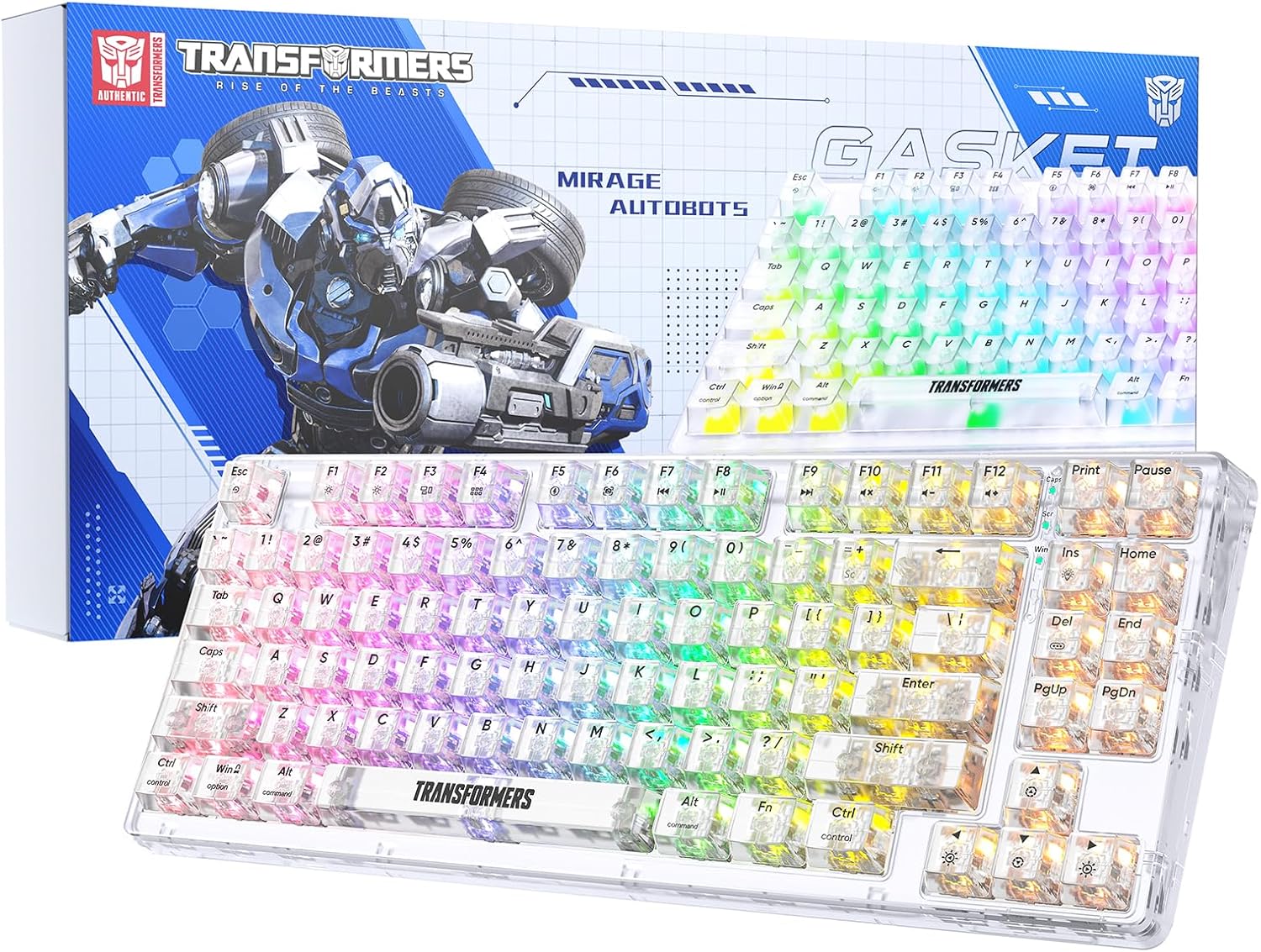
Image 1.1: Transformers TF-Crystal 85 Keys Mechanical Keyboard with its packaging, showcasing the transparent design and RGB lighting.
2. Produktas baigtasview
2.1 Pagrindinės savybės
- 85 klavišų išdėstymas: Compact 75% design retaining essential functions, arrow, and navigation keys.
- Trijų režimų ryšys: Supports Bluetooth 5.0, 2.4GHz wireless, and USB-C wired connections.
- Karšto keitimo PCB: Compatible with most 3-pin and 5-pin mechanical switches, allowing for easy customization and replacement.
- Linear Switches: Pre-lubricated switches with a 50 million keystroke lifespan for durability and smooth operation.
- Tarpiklio struktūra: Incorporates high-quality gasket materials and a silicone pad to absorb vibrations and reduce typing noise.
- Pritaikomas RGB foninis apšvietimas: Features 20 built-in backlight modes, 16.8 million color options, and dynamic music rhythm effects.
- Programmable Driver: Enables macro customization, key function remapping, and advanced lighting control.
- Ilgas baterijos veikimo laikas: Equipped with a 4000mAh battery, providing up to 240 hours of continuous use in 2.4GHz mode without backlighting.
- Platus suderinamumas: Supports Mac, Windows, iOS, Android, PC, Laptop, Smartphone, Tablet, Switch, Xbox, and PlayStation.
- Skaidrus dizainas: Features transparent keycaps and base for enhanced aesthetic appeal.
3. Sąranka
3.1 Klaviatūros įkrovimas
Before initial use, fully charge the keyboard. Connect the provided USB-C cable to the keyboard's USB-C port and the other end to a powered USB port (e.g., computer, wall adapter). The charging indicator will show the charging status.
3.2 Prisijungimas 2.4 GHz belaidžiu režimu
- Suraskite 2.4 GHz USB imtuvą, kuris paprastai laikomas klaviatūros skyriuje.
- Prijunkite USB imtuvą prie laisvo kompiuterio USB prievado.
- Toggle the mode switch on the keyboard to the 2.4G padėtis.
- The keyboard will automatically connect to your device.
3.3 Prisijungimas per „Bluetooth“ 5.0 Režimas
- Toggle the mode switch on the keyboard to the BT padėtis.
- Paspauskite ir palaikykite fn+1 (arba fn+2, fn+3) for 3-5 seconds until the indicator light flashes rapidly, indicating pairing mode.
- Savo įrenginyje (kompiuteryje, planšetiniame kompiuteryje, išmaniajame telefone) įjunkite „Bluetooth“ ir ieškokite naujų įrenginių.
- Select "TF-Crystal 85" from the list of available devices to pair.
- Once paired, the indicator light will stop flashing and remain solid. You can pair up to three Bluetooth devices using fn+1, fn+2, ir fn+3.
3.4 Prijungimas per USB-C laidinį režimą
- Prijunkite pateiktą USB-C laidą prie klaviatūros USB-C prievado.
- Prijunkite kitą USB-C kabelio galą prie laisvo kompiuterio USB prievado.
- The keyboard will automatically switch to wired mode and function without battery power.

Image 3.1: Diagram illustrating the three connection modes: Bluetooth 5.0, 2.4GHz wireless, and USB-C wired, compatible with various devices.
4. Naudojimo instrukcijos
4.1 Režimų perjungimas
Use the physical switch located on the keyboard to select between BT („Bluetooth“), 2.4G (2.4GHz wireless), and USB-C (wired) modes.
4.2 RGB foninio apšvietimo valdymas
The keyboard features customizable RGB backlighting. Use the following key combinations to adjust:
- Fn + Ins: Cycle through 20 different backlight effects.
- Fn + Del: Switch backlight colors within certain modes.
- Fn + ↑ / ↓: Reguliuokite foninio apšvietimo ryškumą (5 lygiai).
- Fn + ← / →: Adjust backlight effect speed (5 levels).
- Fn + Esc (hold for 3s): Reset backlight settings to default.

Image 4.1: Visual guide for controlling RGB backlight effects, brightness, and speed using Fn key combinations.
4.3 Programmable Driver Usage
The keyboard includes a programmable driver for advanced customization. This driver allows you to:
- Makrokomandų redagavimas: Record and edit complex key sequences.
- Key Redefinition: Customize the function of individual keys.
- RGB Effect Customization: Fine-tune lighting modes, colors, and speeds, including music rhythm lighting effects.
Refer to the software's dedicated user interface for detailed instructions on using these features.

Image 4.2: Screenshot of the programmable driver interface, showing options for macro editing, RGB effects, and key redefinition.
4.4 Karštojo keitimo jungikliai
The TF-Crystal 85 keyboard features a hot-swappable PCB, allowing you to change mechanical switches without soldering. This supports most 3-pin and 5-pin mechanical switches.
- Išjunkite klaviatūrą arba atjunkite ją nuo įrenginio.
- Norėdami atsargiai nuimti norimą klavišo dangtelį, naudokite pateiktą klavišo dangtelio traukiklį.
- Use the provided switch puller to gently grip the switch from its top and bottom clips, then pull it straight up to remove it.
- Suderinkite naujo jungiklio kaiščius su spausdintinės plokštės skylėmis. Įsitikinkite, kad kaiščiai yra tiesūs.
- Gently press the new switch into place until it clicks securely. Do not force it.
- Uždėkite klavišo dangtelį.

Image 4.3: Illustration of the hot-swappable feature, showing how to remove and insert 3-pin/5-pin switches and the linear switch specifications.
5. Priežiūra
5.1 Klaviatūros valymas
- Prieš valydami atjunkite klaviatūrą nuo visų maitinimo šaltinių.
- Šiek tiek naudokite minkštą, be pūkelių šluostę dampKlaviatūros dangtelius ir korpusą nuvalykite vandeniu arba švelniu valymo tirpalu.
- Dulkėms ir šiukšlėms tarp klavišų pašalinti naudokite suslėgtą orą arba mažą šepetėlį.
- Avoid using harsh chemicals or abrasive materials that could damage the keyboard's surface.
5.2 Akumuliatoriaus priežiūra
- Venkite dažnai visiškai iškrauti akumuliatorių.
- Kai klaviatūra ilgesnį laiką nenaudojama, laikykite ją vėsioje, sausoje vietoje.
- If the keyboard will not be used for a long time, charge it to about 50% before storage.
6. Problemų sprendimas
| Problema | Galima priežastis | Sprendimas |
|---|---|---|
| Klaviatūra nereaguoja belaidžiu režimu. | Low battery, incorrect mode selected, receiver not connected, Bluetooth not paired. | Charge the keyboard. Ensure the mode switch is set correctly (2.4G or BT). Re-insert the 2.4G receiver. Re-pair Bluetooth. |
| Raktai neregistruojami arba renkami du kartus. | Faulty switch, debris under keycap, software issue. | Clean under the keycap. Try hot-swapping the switch with a known working one. Restart your computer. |
| RGB backlight not working or incorrect. | Backlight turned off, incorrect settings, software conflict. | Reguliuokite ryškumą naudodami Fn + ↑Ciklo režimai su Fn + Ins. Reset backlight with Fn + Esc (hold 3s). Check programmable driver settings. |
| Klaviatūra neįkraunama. | Faulty USB-C cable, power source issue, keyboard port damage. | Try a different USB-C cable. Use a different USB port or power adapter. Ensure the cable is fully inserted. |
7. Specifikacijos
| Funkcija | Detalė |
|---|---|
| Modelio numeris | TF-Crystal 85 |
| Raktų išdėstymas | 85 klavišai (75 % kompaktiškas) |
| Ryšys | „Bluetooth 5.0“, 2.4 GHz belaidis ryšys, USB-C laidinis ryšys |
| Jungiklio tipas | Pre-lubricated Linear Mechanical Switches |
| Perjungimo trukmė | 50 milijonų klavišų paspaudimų |
| Greitai keičiamas | Yes (3-pin/5-pin compatible) |
| Foninis apšvietimas | RGB (20 režimų, 16.8 milijono spalvų) |
| Baterijos talpa | 4000 mAh |
| Battery Life (2.4G, no light) | Iki 240 valandų |
| Battery Life (Backlit ON) | Maždaug 22 val |
| Matmenys (I x P x A) | 34.7 cm x 14 cm x 4.5 cm |
| Suderinamumas | Mac, Windows, iOS, Android, PC, Laptop, Smartphone, Tablet, Switch, Xbox, PlayStation |

Image 7.1: Visual representation of the keyboard's battery life: 240 hours with backlight off, 22 hours with backlight on, powered by a 4000mAh battery.
8. Garantija ir palaikymas
Transformers is committed to providing exceptional customer service. If you encounter any problems with your TF-Crystal 85 Keys Mechanical Keyboard, our after-sales support team is available to assist you. This includes technical support, exchanges, or installation guidance.
Please contact our customer service for assistance. We guarantee a hassle-free service experience.