
UNITOPSCI A4034A3
UNITOPSCI 10.4 Inch Single Din Adjustable Vertical Car Stereo
Vartotojo vadovas
Model: A4034A3 | Brand: UNITOPSCI
1. Įvadas
This manual provides detailed instructions for the installation, operation, and maintenance of your UNITOPSCI 10.4 Inch Single Din Adjustable Vertical Car Stereo. Please read this manual thoroughly before using the product to ensure proper function and safety.
Pagrindinės funkcijos:
- 10.4 Inch IPS 1280*480 Vertical Touchscreen with Detachable & Adjustable Design
- Belaidis „CarPlay“ ir „Android Auto“ palaikymas
- „Bluetooth 5.2“ – skambinimui laisvų rankų įranga ir garso transliacijai
- FM/AM/RDS Radio with EQ Adjustments
- USB & TF Card Playback and Charging
- Veidrodinio ryšio funkcionalumas
- Galinio laikiklio atrama View Kameros ir vairo valdymas (SWC)
- Seven Color Backlight Options

1.1 pav. Baigtaview of the UNITOPSCI 10.4 Inch Car Stereo with included backup camera and smartphone integration icons.
2. Kas yra dėžutėje
Patikrinkite savo siuntinio turinį pagal toliau pateiktą sąrašą:
- 1 x automobilio MP5 grotuvas
- 1x maitinimo laidas
- 1 x rago kabelis
- 1 x MIC
- 1 x montavimo kronšteinas
- 1 x Vartotojo vadovas
- 1 x D-BUS kabelis
- 1 x 12 LEDs Backup Camera
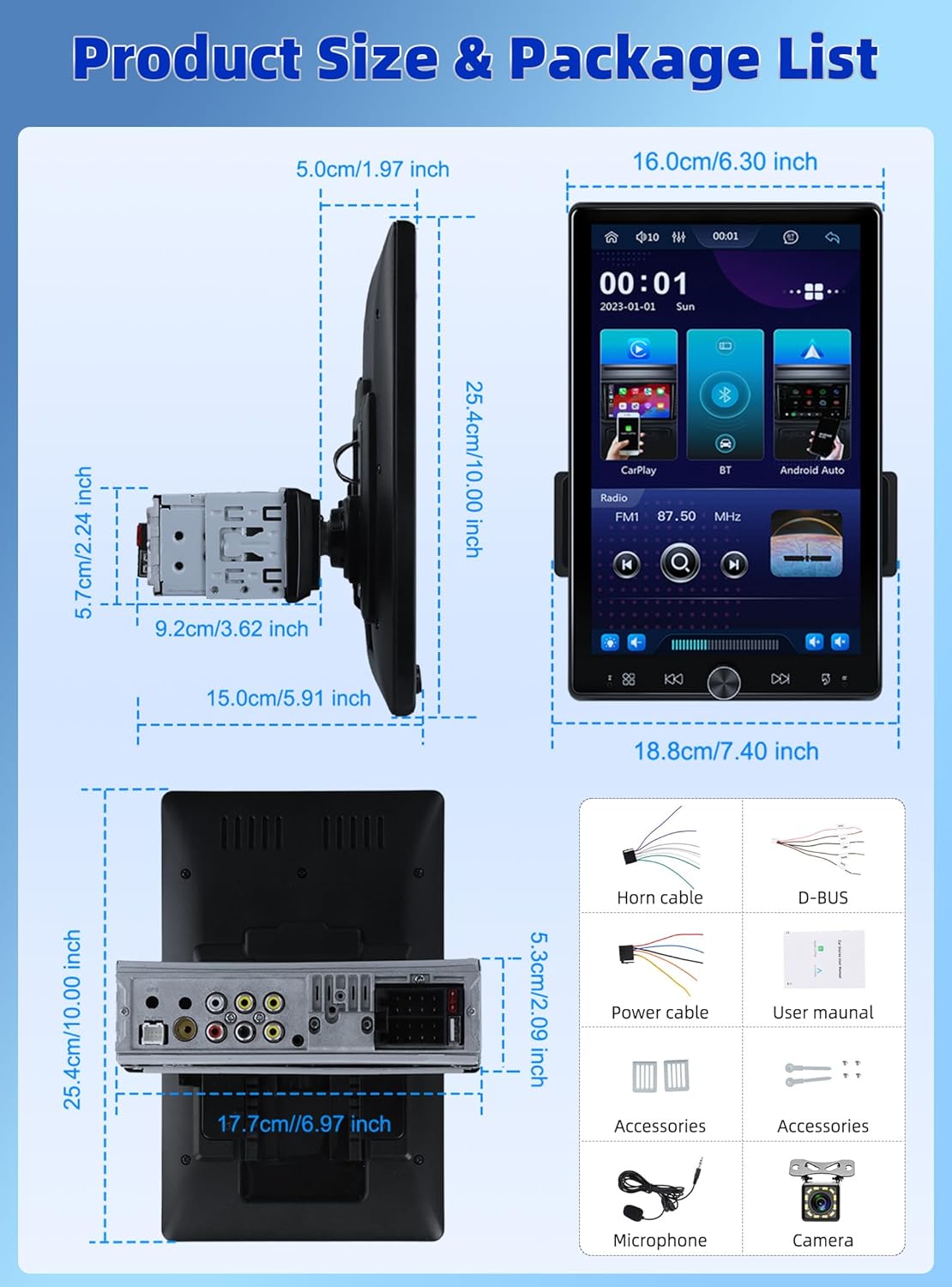
Figure 2.1: Diagram showing the dimensions of the car stereo and a visual representation of the included package contents.
3. Sąranka ir diegimas
Proper installation is crucial for optimal performance. It is recommended to have this unit installed by a professional.
3.1 Ekrano reguliavimas
The 10.4-inch floating touchscreen is designed for adjustability to provide the best viewing angle. It can be adjusted in three directions:
- Approximately 30° front/rear tilt
- Approximately 30° left/right tilt
- Approximately 5cm vertical movement

Figure 3.1: Illustration of the adjustable and floating design of the 10.4-inch touchscreen, highlighting tilt and vertical movement capabilities.
3.2 Galinis View Fotoaparato laidai
To enable the automatic display of the reversing video, connect the included rear view camera according to the diagram below. Ensure the trigger wire (labeled "back" or "reverse" on the power cable) is connected to the reversing light positive.
- The rear camera features 12 LED lights for clear images in various conditions.
- A 170° horizontal wide angle provides a comprehensive view.

3.2 pav.: Išsami galinio prijungimo schema view camera to the car stereo system.
4. Naudojimo instrukcijos
4.1 belaidis „CarPlay“ ir „Android Auto“
Connect your smartphone wirelessly or via USB to access CarPlay or Android Auto. This allows seamless integration of your phone's contacts, GPS navigation, music, and other applications directly on the car stereo screen.

Figure 4.1: Display showing the Wireless CarPlay and Android Auto interfaces, including voice assistant prompts.
4.2 „Bluetooth“ 5.2 Ryšys
The unit features advanced Bluetooth 5.2 technology for faster and more stable connections. Use Bluetooth for hands-free calling and streaming music with lossless sound quality.

Figure 4.2: Screenshots illustrating the Bluetooth 5.2 interface for hands-free calls and music playback.
4.3 FM/RDS Radio and EQ
Enjoy digital stereo FM radio with 18 preset stations. The RDS function provides real-time road conditions, news, and weather. Customize your audio experience using the multi-band EQ mode.

Figure 4.3: Visuals of the FM/RDS radio interface and the adjustable equalizer settings.
4.4 USB & TF Card Functionality
The unit supports USB for media playback and phone charging. The TF card slot allows for playing various audio formats.
4.5 Knob Control and Backlight
A physical knob provides easy adjustment for volume, mute, and power on/off. The unit also features seven customizable backlight colors to match your car's interior.

Figure 4.4: Depiction of the various interfaces, USB charging capability, the adjustable knob, and the seven-color backlight feature.
4.6 Vairo valdymas (SWC)
If your vehicle supports it, connect the SWC wires to control various functions (e.g., switch songs, adjust volume) directly from your steering wheel for convenience and safety.
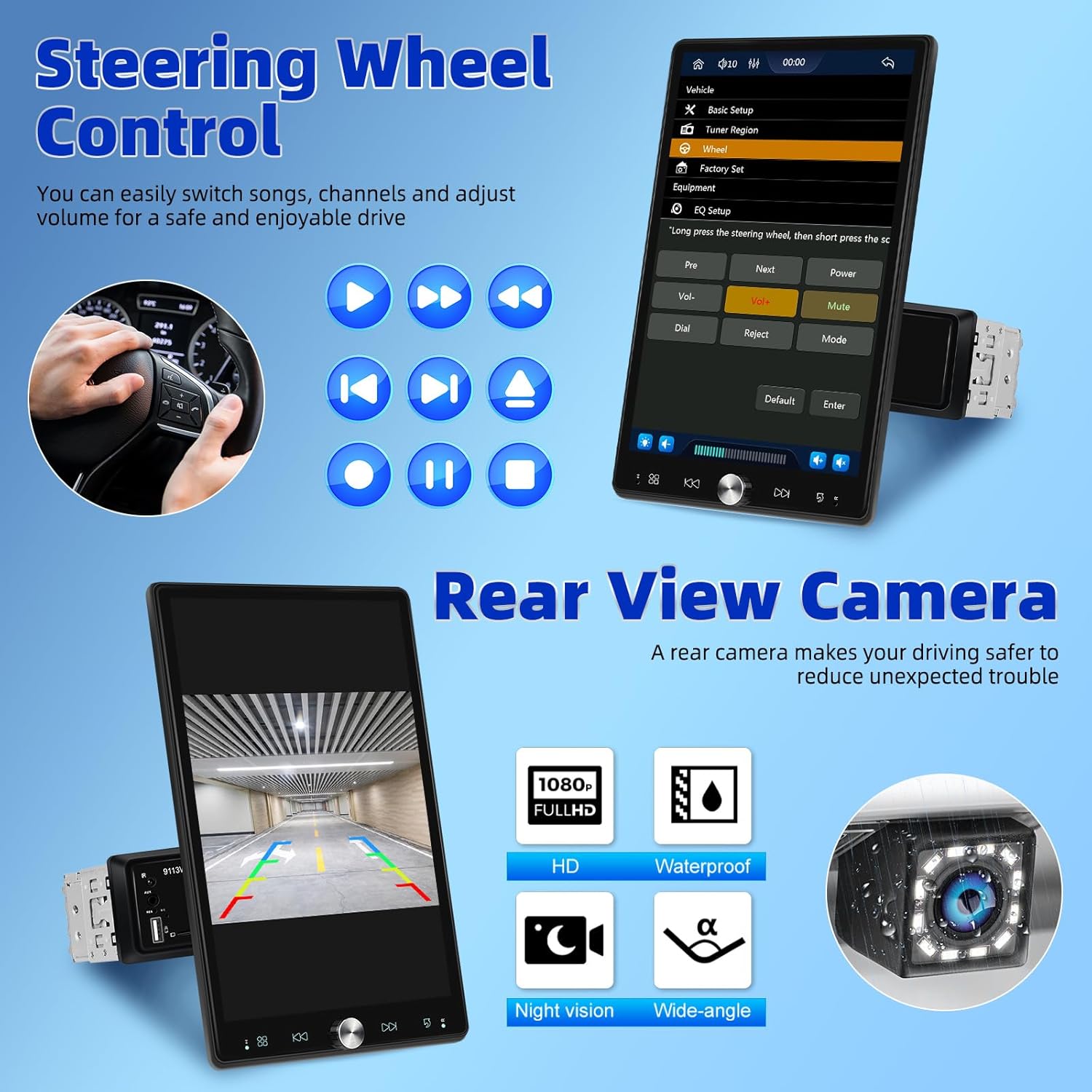
Figure 4.5: Illustration of steering wheel control functionality and the display of the rear view kameros transliacija.
4.7 Veidrodinis ryšys
The mirror link function allows you to display your smartphone's screen directly onto the car stereo's display.
5. Priežiūra
Norėdami užtikrinti automobilio garso sistemos ilgaamžiškumą ir optimalų veikimą, laikykitės šių priežiūros nurodymų:
- Valymas: Ekraną ir išorę valykite minkšta, sausa šluoste. Įsisenėjusias dėmes šiek tiek nuvalykite.ampNuvalykite šluostę vandeniu. Venkite abrazyvinių valiklių ar tirpiklių.
- Temperatūra: Do not expose the unit to extreme temperatures, direct sunlight for prolonged periods, or high humidity.
- Vėdinimas: Įsitikinkite, kad ventiliacijos angos nėra užblokuotos, kad išvengtumėte perkaitimo.
- Galia: Disconnect power before performing any cleaning or maintenance.
6. Problemų sprendimas
Jei kyla problemų dėl automobilio garso sistemos, žr. šias dažniausiai pasitaikančias problemas ir sprendimus:
| Problema | Galima priežastis | Sprendimas |
|---|---|---|
| Nėra galios | Loose power connection; Blown fuse | Check power cables and connections; Inspect and replace fuse if necessary. |
| Nėra garso | Per mažas garsumas; Įjungtas nutildymas; Garsiakalbio laidų problema | Padidinkite garsumą; Išjunkite nutildymą; Patikrinkite garsiakalbių jungtis. |
| Bluetooth neprisijungia | Bluetooth off on device/stereo; Pairing mode not active | Ensure Bluetooth is enabled on both devices; Put stereo into pairing mode; Delete previous pairings and re-pair. |
| „CarPlay“ / „Android Auto“ neveikia | Neteisingas USB laidas; Programinės įrangos triktis; Telefono suderinamumas | Use original or certified USB cable; Restart phone and stereo; Check phone's compatibility with CarPlay/Android Auto. |
| Galinė kamera nerodo | Incorrect wiring; Camera malfunction | Verify all camera wiring, especially the trigger wire; Test camera with another display if possible. |
If the problem persists after trying these solutions, please contact UNITOPSCI customer support.
7. Specifikacijos
| Funkcija | Specifikacija |
|---|---|
| Gaminio matmenys | 5.91 x 7.4 x 10 colio (15.0 x 18.8 x 25.4 cm) |
| Prekės svoris | 2.2 svaro (1 kilogramas) |
| Modelio numeris | A4034A3 |
| Ryšio technologija | Pagalbinis, „Bluetooth“, USB |
| Valdiklio tipas | Valdymas rankomis |
| Suderinami įrenginiai | Išmanusis telefonas, garsiakalbis |
| Jungties tipas | A tipo USB |
| Garso išvesties režimas | Mono |
| Išėjimo galia | 180 vatų |
| Ekrano dydis | 10.4 colių |
| Ekrano raiška | 1280*480p |
8. Garantija ir palaikymas
UNITOPSCI is committed to providing high-quality products and satisfactory services. Your product comes with the following support:
- Replacement Available: Within 24 Months of purchase.
- Greitas atsakymas: Customer support aims to respond within 16 hours.
- Lifetime After-Sales: Consult and Technical Support.
- Grąžinimo politika: 60-days No Worry to Return.
For online support, please contact us at: UNITOPSCI@126.com


Figure 8.1: Information regarding UNITOPSCI's customer support, warranty, and contact details.
Ask a question about this manual
Ask about setup, troubleshooting, compatibility, parts, safety, or missing instructions. Manuals+ will review the question and use this page’s manual context to help answer it.