
1. Įvadas
Thank you for choosing the UNITOPSCI 10.1 Inch Single Din Adjustable Car Stereo. This advanced car multimedia player is designed to enhance your driving experience with its versatile features, including Wireless CarPlay, Android Auto, Bluetooth 5.2, and a large IPS floating touchscreen. This manual provides detailed instructions for installation, operation, maintenance, and troubleshooting to ensure optimal performance and user satisfaction.

Figure 1.1: UNITOPSCI 10.1 Inch Single Din Adjustable Car Stereo with its main components.
2. Produkto ypatybės
The UNITOPSCI Car Stereo is equipped with a range of features designed for convenience and entertainment:
- 10.1 Inch Touchscreen MP5 Car Radio, Detachable Screen & Touch Button Design: Features a floating and adjustable design, allowing for 30° front/rear tilt, 30° left/right tilt, and 5cm vertical movement for optimal viewing. The touch button design simplifies volume, mute, and power control.
- Wireless CarPlay & Android Auto, Mirror Link: Seamlessly connect your smartphone via wireless/wired BT/WIFI or USB for access to navigation, contacts, and media. The Mirror Link function allows screen mirroring from your phone to the car radio display.
- Bluetooth 5.2, EQ Sound: Advanced Bluetooth 5.2 ensures faster and more stable connections for hands-free calls and music streaming. Multi-band EQ mode allows for personalized audio customization.
- You-tube Online Video, Lossless Sound Quality: Supports online video streaming via phone hotspot. Enjoy pure, uncompressed sound with FLAC mode support.
- FM/AM Radio, USB & TF & AUX-IN: Digital stereo FM/AM radio with 30 preset stations (18 FM, 12 AM) and memory function. Dual USB ports for playback and 5V_2A phone charging, plus TF card and AUX-IN support.
- Galinis View Camera, SWC: Automatic display of reversing video when in reverse gear. Includes a 12-LED backup camera with 170° wide angle for safer parking. Steering Wheel Control (SWC) compatibility for convenient function access.

Figure 2.1: Wireless CarPlay, Android Auto, and Mirrorlink capabilities.
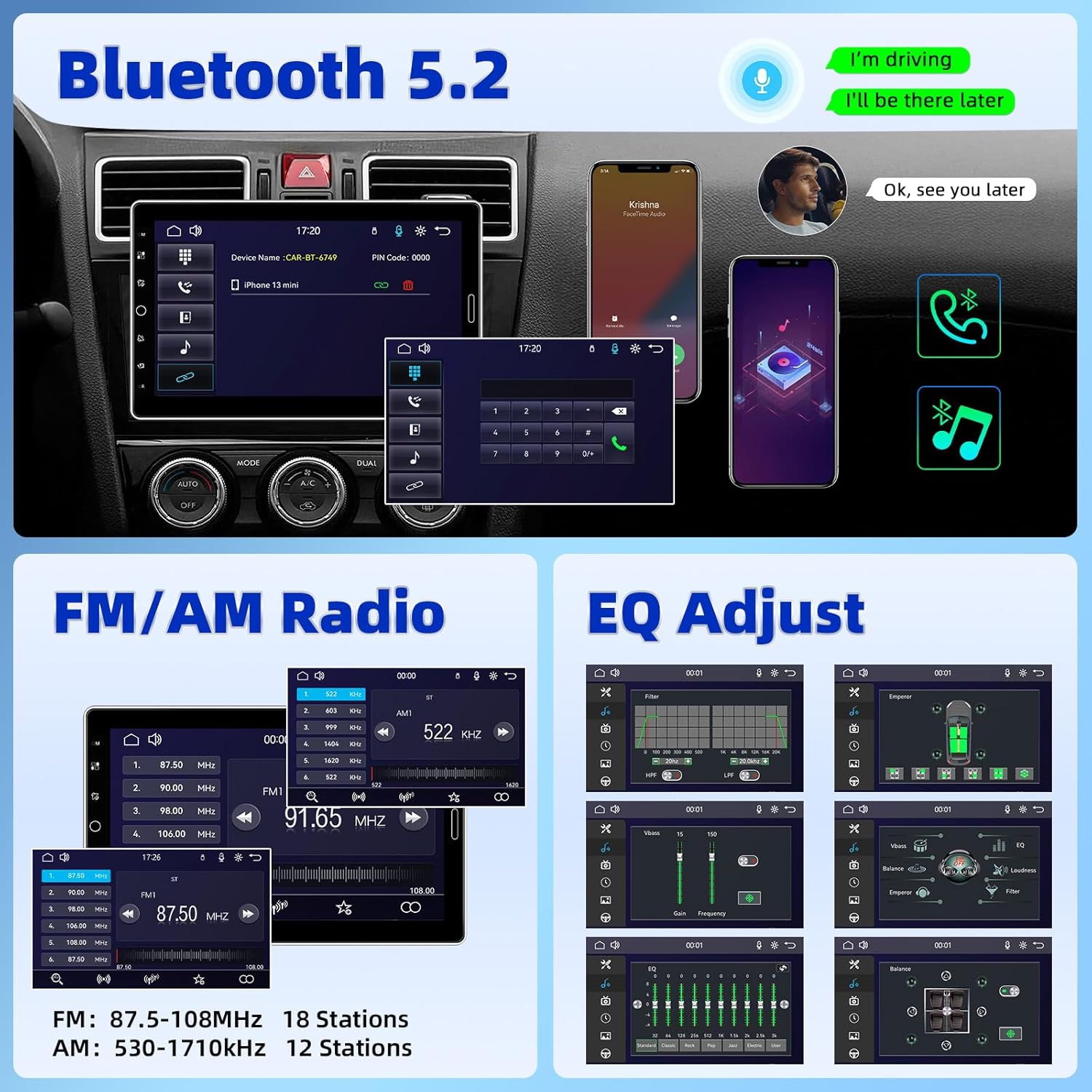
Figure 2.2: Bluetooth 5.2, FM/AM Radio, and EQ Adjustment options.

Figure 2.3: Support for YouTube Online Video playback.

Figure 2.4: Detachable and adjustable 10.1 Inch IPS Touchscreen.
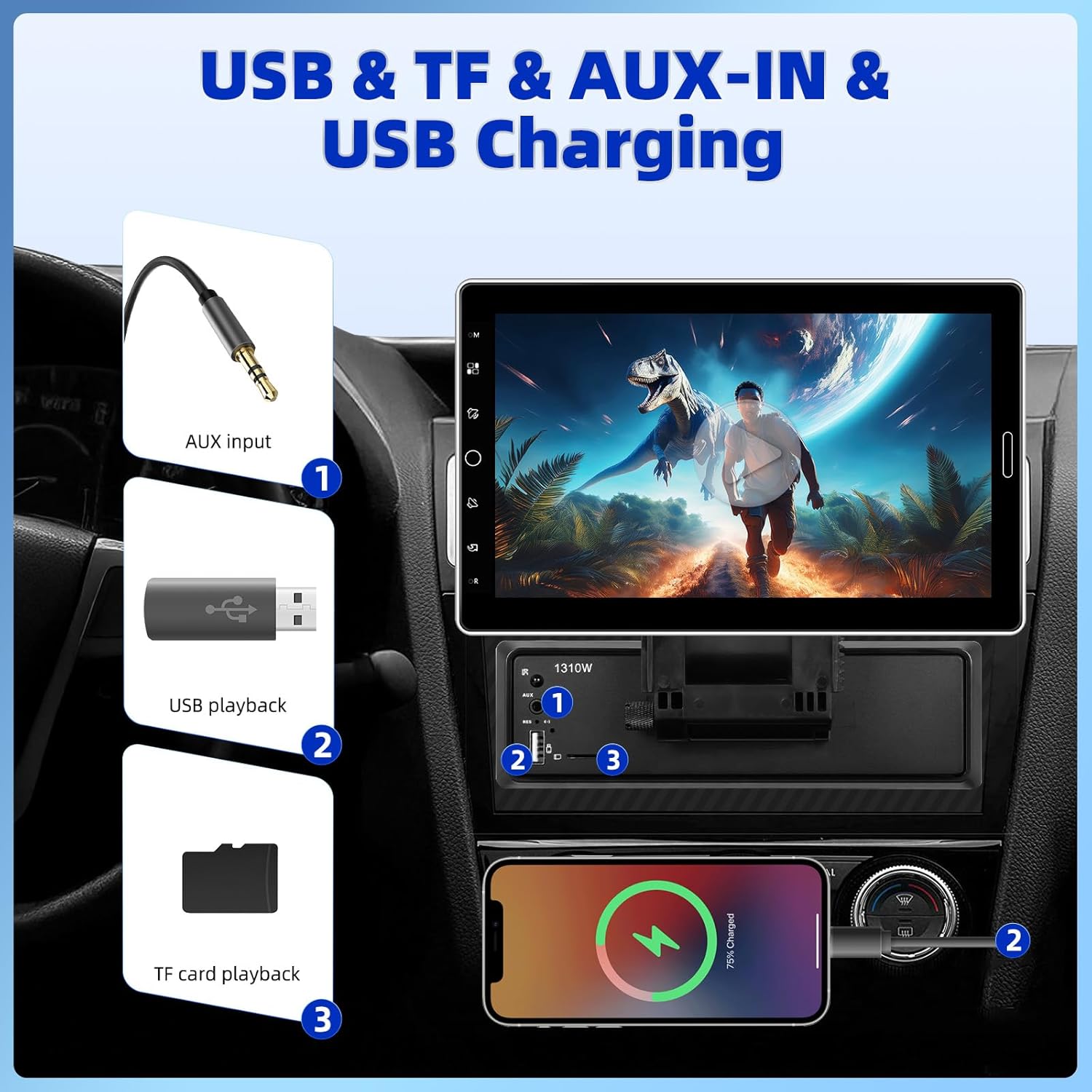
Figure 2.5: USB, TF, AUX-IN, and USB Charging ports.
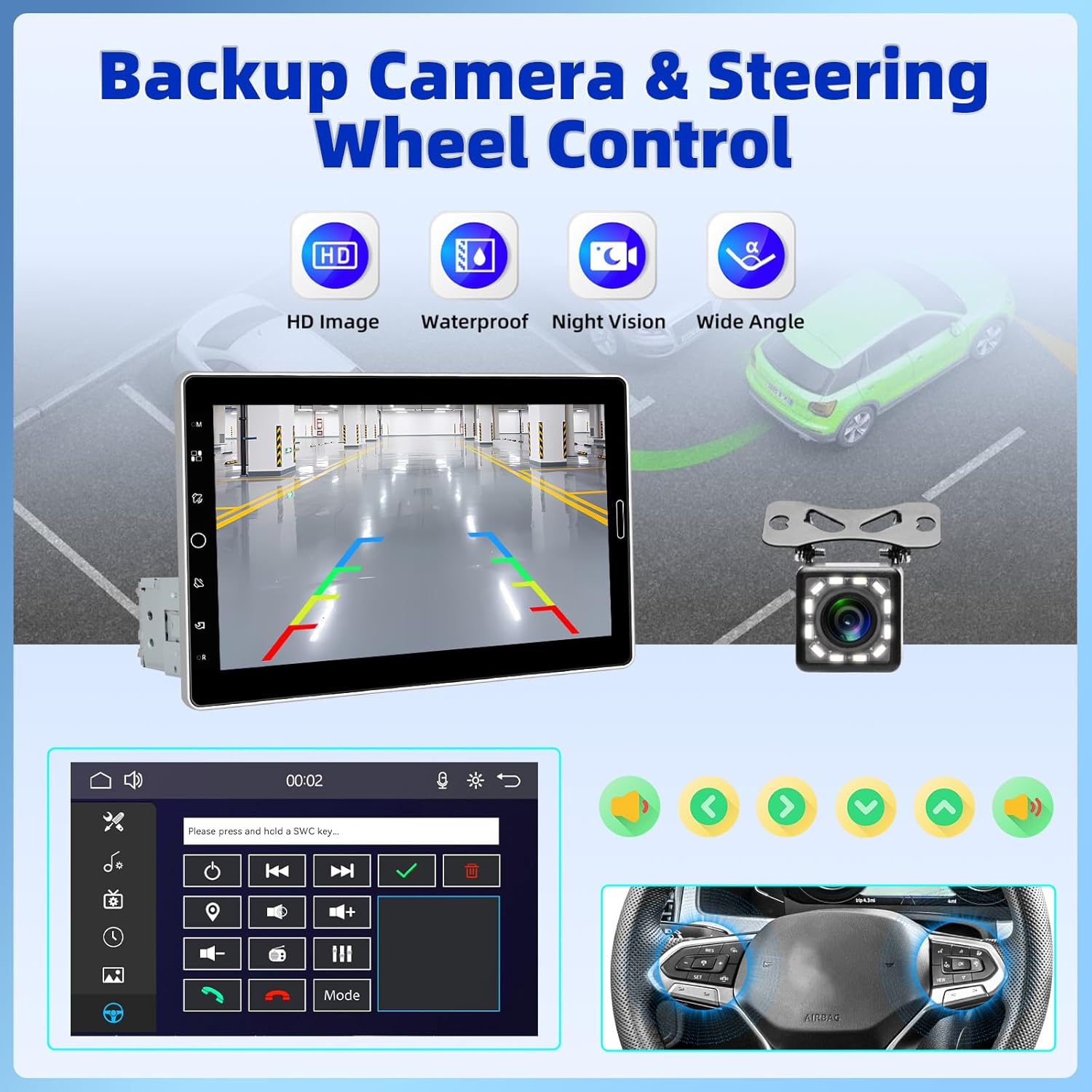
Figure 2.6: Backup Camera and Steering Wheel Control (SWC) functionality.
3. Kas yra dėžutėje
Upon opening your product package, please verify that all the following items are included:
- 1 x automobilio MP5 grotuvas (pagrindinis įrenginys)
- 1x maitinimo laidas
- 1 x rago kabelis
- 1 x MIC (mikrofonas)
- 1 x montavimo kronšteinas
- 1 x Vartotojo vadovas
- 1 x 12 LEDs Backup Camera

Figure 3.1: Product Size and Packing List overview.
4. Sąranka ir diegimas
Installing the UNITOPSCI Car Stereo requires careful wiring and mounting. Due to the complexity of car audio systems and varying vehicle models, professional installation is highly recommended to ensure proper functionality and avoid damage to your vehicle or the stereo unit. If you choose to install it yourself, please refer to the detailed wiring diagrams and instructions provided in the included user manual.
Note: Some users have reported that wiring instructions may require prior experience with car radios. Pay close attention to wire colors and functions.
4.1 Įrenginio montavimas
- Ensure the single DIN slot in your vehicle is compatible with the stereo's dimensions.
- Use the provided mounting bracket to secure the main unit firmly into the dashboard.
- Attach the 10.1-inch display to the main unit, ensuring it clicks securely into place. Adjust the screen angle for optimal viewing.
4.2 Laidų jungtys
Connect the power cable, horn cable, microphone, and backup camera according to the wiring diagram in the dedicated user manual section. Ensure all connections are secure and properly insulated to prevent short circuits.
5. Naudojimo instrukcijos
This section outlines the basic operation of your UNITOPSCI Car Stereo.
5.1 Įjungimas / išjungimas ir pagrindiniai valdikliai
- Norėdami įjungti arba išjungti įrenginį, paspauskite maitinimo mygtuką.
- Adjust volume using the touch buttons or steering wheel controls (if connected).
- The screen dimming option or screen-off feature can be accessed through the settings menu.
5.2 belaidis „CarPlay“ ir „Android Auto“
- Belaidžiam ryšiui: Enable Bluetooth and Wi-Fi on your smartphone. On the car stereo, navigate to the CarPlay or Android Auto icon. Follow the on-screen prompts to pair your device.
- Laidiniam ryšiui: Connect your smartphone to the stereo's USB port using a compatible USB cable. The system should automatically detect and launch CarPlay or Android Auto.
- Once connected, you can access navigation, make calls, send messages, and play music directly from the stereo's interface.
5.3 „Bluetooth“ ryšys
- Eikite į stereo sistemos „Bluetooth“ nustatymus.
- Enable Bluetooth on your phone and search for available devices. Select "UNITOPSCI" (or similar name) from the list.
- Confirm the pairing code on both devices. Once paired, you can make hands-free calls and stream audio.
5.4 FM/AM radijas
- Select the FM/AM radio application from the main menu.
- Naudokite nuskaitymo funkciją, kad automatiškai ieškotumėte ir išsaugotumėte galimas stotis.
- Rankiniu būdu derinkite dažnius arba pasirinkite iš iš anksto nustatytų stočių.
5.5 Media Playback (USB, TF, AUX-IN, Online Video)
- USB/TF: Insert your USB drive or TF card into the respective slot. The system will automatically detect and allow you to browse and play media files (garsas, vaizdas, vaizdai).
- AUX IN: Connect an external audio device to the AUX-IN port using a 3.5mm audio cable. Select the AUX input source on the stereo.
- Online Video (YouTube): Connect the stereo to your phone's hotspot. Open the YouTube application on the stereo to browse and stream videos.
5.6 Ekvalaizerio nustatymai
- Pasiekite EQ nustatymus iš garso meniu.
- Adjust various frequency bands to customize your sound profile. Preset EQ modes are also available.

Figure 5.1: User Interface Display and Media Playback examples.
6. Priežiūra
Tinkama priežiūra užtikrina jūsų automobilio garso sistemos ilgaamžiškumą ir optimalų veikimą.
- Ekrano valymas: Jutiklinį ekraną švelniai nuvalykite minkšta, nepūkuota šluoste. Įsisenėjusias dėmes šiek tiek nuvalykiteampNuvalykite šluostę vandeniu arba ekranui saugiu valikliu. Venkite abrazyvinių medžiagų ar stiprių cheminių medžiagų.
- Bendras valymas: Laikykite įrenginį be dulkių ir šiukšlių. Ventiliacijos angas ir prievadus valykite minkštu šepečiu arba suslėgtu oru.
- Temperatūra: Venkite įrenginio laikymo ekstremaliose temperatūrose. Ilgalaikis tiesioginių saulės spindulių ar labai šaltų sąlygų poveikis gali turėti įtakos veikimui ir tarnavimo laikui.
- Jungtys: Periodiškai patikrinkite visas laidų jungtis, kad įsitikintumėte, jog jos yra tvirtos ir be korozijos.
7. Problemų sprendimas
If you encounter issues with your UNITOPSCI Car Stereo, refer to the following common problems and solutions:
| Problema | Galima priežastis | Sprendimas |
|---|---|---|
| Įrenginys neįsijungia. | Nėra maitinimo; Perdegęs saugiklis; Neteisingas laidų pajungimas. | Check power cable connections. Inspect vehicle's fuse box and the unit's fuse. Verify wiring against the manual. |
| Nėra garso arba garsas iškraipytas. | Atjungti garsiakalbių laidai; per mažas garsumas; netinkamas garso šaltinis. | Check speaker connections. Increase volume. Ensure correct audio input (Radio, USB, Bluetooth, AUX). Adjust EQ settings. |
| „CarPlay“ / „Android Auto“ neprisijungia. | Bluetooth/Wi-Fi off; Incorrect USB cable; Phone software issue. | Ensure phone's Bluetooth/Wi-Fi is on. Use original or certified USB cable. Restart phone and stereo. |
| Galinio vaizdo kamera nerodoma. | Kamera neprijungta; atbulinės eigos paleidiklio laidas neprijungtas. | Verify camera cable connection to the stereo. Ensure the reverse trigger wire is correctly connected to the vehicle's reverse light circuit. |
| Vairo valdikliai neveikia. | SWC wires not connected; SWC not configured. | Ensure SWC wires are correctly connected. Access the stereo's settings to configure steering wheel controls. |
If the problem persists after attempting these solutions, please contact UNITOPSCI customer support for further assistance.
8. Specifikacijos
Detailed technical specifications for the UNITOPSCI 10.1 Inch Single Din Adjustable Car Stereo:
- Gaminio matmenys: 5.44 x 7.01 x 6.34 colio (13.82 x 17.81 x 16.10 cm)
- Prekės svoris: 2.2 svaro (1 kilogramas)
- Modelio numeris: A4061A3
- Ryšio technologija: Pagalbinis, „Bluetooth“, USB
- Valdiklio tipas: Valdymas rankomis
- Suderinami įrenginiai: Išmanusis telefonas, garsiakalbis
- Jungties tipas: A tipo USB
- Garso išvesties režimas: Mono
- Išėjimo galia: 180 vatų
- Ekrano dydis: 10.1 colio IPS jutiklinis ekranas
- Bluetooth versija: 5.2
- Radijo dažniai: FM: 87.5-108MHz (18 Stations), AM: 530-1710KHz (12 Stations)
9. Garantija ir palaikymas
UNITOPSCI is committed to providing high-quality products and excellent customer service. Your car stereo comes with comprehensive support and warranty coverage:
- Replacement Availability: Pakeitimai galimi per 24 mėnesių nuo įsigijimo datos.
- Greitas atsakymas: Atsakymo į jūsų užklausas tikėkitės per 16 valandų.
- Visą gyvenimą trunkantis palaikymas po pardavimo: Benefit from lifetime consultation and technical support.
- Grąžinimo politika: Mėgaukitės 60 dienų grąžinimo laikotarpiu be jokių rūpesčių.
For any technical issues, questions, or support needs, please contact us directly:
El. paštas: UNITOPSCI@126.com

Figure 9.1: UNITOPSCI Customer Support Information.