
1. Įvadas
Thank you for choosing the Bennett Read Alphabot Ultra Robotic Vacuum. This cutting-edge cleaning solution combines powerful performance with smart functionality, designed to handle sweeping, vacuuming, and wet-mopping. Equipped with advanced laser navigation and anti-fall sensors, it ensures precise tracking and smooth obstacle avoidance. This manual provides essential information for the safe and efficient operation, maintenance, and troubleshooting of your device.
Prieš naudodami gaminį, atidžiai perskaitykite šį vadovą ir išsaugokite jį ateičiai.
2. Saugos instrukcijos
Norėdami sumažinti sužalojimo ar žalos riziką, laikykitės šių saugos priemonių:
- Šį prietaisą gali naudoti vaikai nuo 8 metų ir asmenys, turintys ribotų fizinių, jutiminių ar protinių gebėjimų arba neturintys patirties ir žinių, jei jie yra prižiūrimi arba yra instruktuojami, kaip saugiai naudoti prietaisą ir supranta su tuo susijusius pavojus. .
- Vaikai neturi žaisti su prietaisu. Vaikai negali valyti ir atlikti naudotojo priežiūros darbų be priežiūros.
- Naudokite tik originalų gamintojo pateiktą maitinimo adapterį.
- Do not use the product in environments with open flames or fragile objects.
- Do not use the product to clean liquids, burning objects, or sharp objects.
- Įsitikinkite, kad įkrovimo stotelė pastatyta ant lygaus paviršiaus prie sienos, o aplink ją yra laisvos vietos.
- Plaukus, laisvus drabužius, pirštus ir visas kūno dalis laikykite toliau nuo angų ir judančių dalių.
- Prieš valydami arba atlikdami techninę priežiūrą, išjunkite prietaisą iš elektros tinklo.
3. Pakuotės turinys
Patikrinkite, ar pakuotėje yra visi komponentai:
- 1 x Bennett Read Alphabot Ultra Robotic Vacuum with Sweep and Wet-Mop
- Įkrovimo dokas
- Maitinimo adapteris
- Šoniniai šepečiai
- Valymo įrankis
- Vartotojo vadovas
4. Produktas baigtasview
Familiarize yourself with the main components of your Alphabot Ultra Robotic Vacuum.

4.1 vaizdas: Į viršų view of the Bennett Read Alphabot Ultra Robotic Vacuum, showing its sleek black design and control indicators.
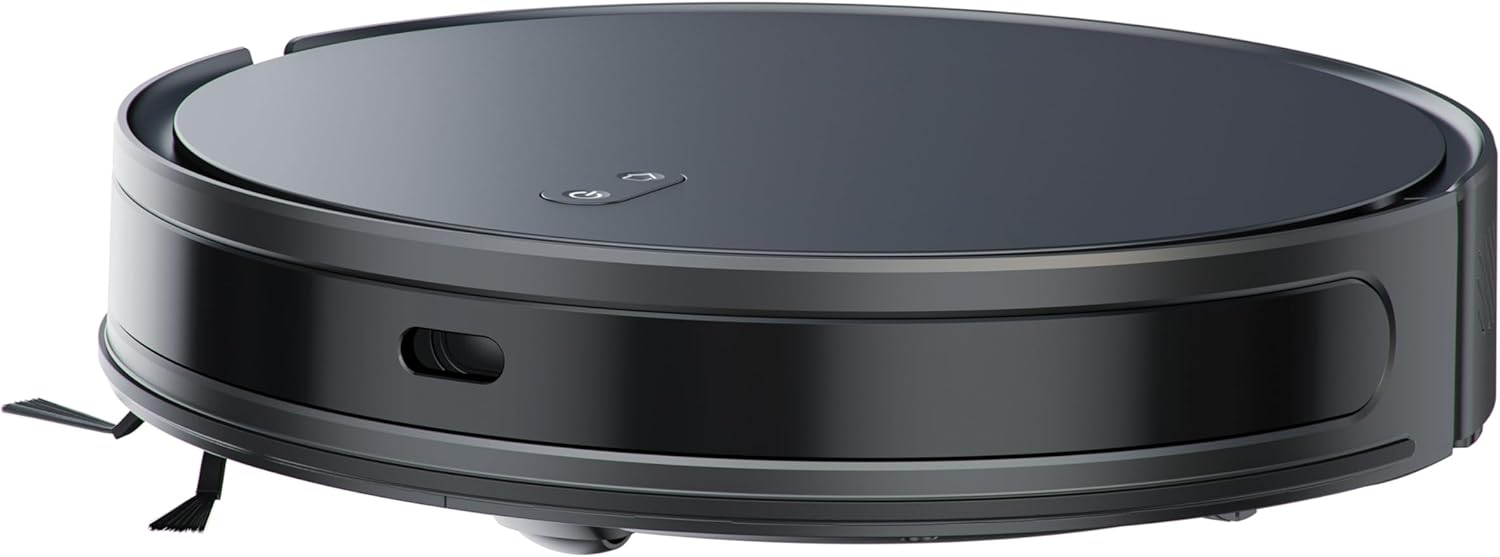
4.2 vaizdas: Šoninė view of the Alphabot Ultra, highlighting its low profile and side brushes.

4.3 vaizdas: Diagram illustrating the powerful suction path and internal components of the Alphabot Ultra.

4.4 vaizdas: Apatinė dalis view of the Alphabot Ultra, showing the main brush, side brushes, and mopping pad attachment.
5. Sąranka
5.1 Išpakavimas
- Remove the robotic vacuum and all accessories from the packaging.
- Remove any protective films or stickers from the device and charging dock.
5.2 Įkrovimo stotelės išdėstymas
- Padėkite įkrovimo stotelę ant kieto, lygaus paviršiaus prie sienos.
- Ensure there is at least 1 meter (3 feet) of clear space on both sides of the dock and 2 meters (6 feet) in front of it for optimal navigation.
- Prijunkite maitinimo adapterį prie įkrovimo stotelės ir įjunkite jį į sieninį lizdą.

5.1 vaizdas: The Alphabot Ultra robotic vacuum docked at its self-charging station, illustrating the automatic charging feature.
5.3 Pradinis mokestis
- Place the robotic vacuum onto the charging dock, ensuring the charging contacts align.
- Allow the vacuum to charge completely before its first use. The indicator lights will show charging status. A full charge can take several hours.
5.4 App Connection (Smart Life App)
- Download the 'Smart Life' app from your mobile device's app store.
- Užsiregistruokite arba prisijunkite prie savo „Smart Life“ paskyros.
- Follow the in-app instructions to add your Bennett Read Alphabot Ultra. Ensure your Wi-Fi network is 2.4GHz, as 5GHz networks are not supported.
- The app allows for scheduling, mapping, and customization of cleaning preferences.

5.2 vaizdas: Screenshot of the Smart Life app interface, demonstrating cleaning preference settings for water volume and suction.
6. Naudojimo instrukcijos
6.1 Maitinimo įjungimas/išjungimas
- To power on, press and hold the power button on the vacuum or use the app.
- To power off, press and hold the power button until the indicators turn off, or use the app.
6.2 Valymo režimai
The Alphabot Ultra supports multiple cleaning modes:
- Sweep & Vacuum: Utilizes the side brushes, main brush, and 5000Pa suction power for dry debris removal.
- Wet-Mop: For light wet cleaning of hard floors. Ensure the water tank is filled and the mopping pad is attached.
- Kombinuotas režimas: Šluoja, siurbia ir plauna grindis vienu metu, kad būtų užtikrintas išsamus valymas.
6.3 Tvarkaraštis
Use the Smart Life app to set up cleaning schedules. You can customize cleaning times, days, and specific areas for the vacuum to clean automatically.
6.4 Navigacija ir jutikliai
The Alphabot Ultra uses advanced laser navigation for precise mapping and efficient cleaning paths. Anti-fall sensors prevent the vacuum from falling down stairs or ledges, while anti-collision sensors help it avoid obstacles.

6.1 vaizdas: The Alphabot Ultra demonstrating its anti-fall sensors, preventing it from falling down stairs or ledges.
7. Priežiūra
Reguliarus techninis aptarnavimas užtikrina optimalų veikimą ir pailgina roboto dulkių siurblio tarnavimo laiką.
7.1 Dulkių surinktuvo ir filtro valymas
- Paspauskite šiukšliadėžės atleidimo mygtuką ir išimkite šiukšliadėžę.
- Open the dustbin cover and empty its contents into a waste bin.
- Remove the filter assembly and tap it gently to dislodge dust. Do not wash the HEPA filter with water.
- Jei reikia, dulkių surinktuvą praplaukite vandeniu, prieš vėl įstatydami, įsitikinkite, kad jis visiškai sausas.
- Reassemble the filter and dustbin, then reinsert into the vacuum.
7.2 Šepetėlių valymas
- Pagrindinis šepetys: Remove the main brush cover and lift out the brush. Use the provided cleaning tool to cut and remove any tangled hair or debris.
- Šoniniai šepečiai: Gently pull the side brushes to remove them. Clean off any hair or debris. If brushes are damaged, replace them.
7.3 Šluostės priežiūra
- After each mopping session, remove the mopping pad from the water tank.
- Wash the mopping pad with water and mild detergent.
- Allow the mopping pad to air dry completely before reattaching or storing.

7.1 vaizdas: The Alphabot Ultra with its 2-in-1 tank, designed for both sweeping/vacuuming and wet-mopping functionalities.
7.4 Jutiklio valymas
- Periodically wipe the cliff sensors, wall sensors, and charging contacts with a clean, dry cloth to ensure proper function.
8. Problemų sprendimas
If you encounter issues with your Alphabot Ultra, refer to the following common problems and solutions:
| Problema | Galima priežastis | Sprendimas |
|---|---|---|
| Vakuumas neįsijungia | Išsikrovęs akumuliatorius; netinkamai paspaustas maitinimo mygtukas | Charge the vacuum; Press and hold the power button for a few seconds. |
| Vacuum does not charge | Nešvarūs įkrovimo kontaktai; įkrovimo stotelė neįjungta | Clean charging contacts on both vacuum and dock; Ensure dock is plugged in and powered. |
| Prastas siurbimo efektyvumas | Pilna šiukšliadėžė; Užsikimšęs filtras; Susivėlęs pagrindinis šepetys | Ištuštinkite dulkių konteinerį; Išvalykite arba pakeiskite filtrą; Išvalykite pagrindinį šepetį. |
| Vacuum gets stuck frequently | Kliūtys ant grindų; Nešvarūs skardžio jutikliai | Clear cables, rugs, and small objects; Clean cliff sensors. |
| Programos ryšio problemos | Incorrect Wi-Fi band; Router too far | Ensure 2.4GHz Wi-Fi; Move vacuum closer to router; Restart router and vacuum. |
Jei problema išlieka, susisiekite su klientų aptarnavimo tarnyba.
9. Specifikacijos
| Funkcija | Specifikacija |
|---|---|
| Prekės ženklas | Benetas perskaitė |
| Modelio pavadinimas | Alphabot Ultra |
| Modelio numeris | HVC403 |
| Spalva | Juoda |
| Gaminio matmenys | 30L x 8W x 35H centimetrai |
| Prekės svoris | 1.8 kg |
| Siurbimo galia | 5000Pa |
| Baterijos tipas | 3200 mAh ličio jonų |
| Vykdymo laikas | Iki 180 minučių |
| Navigacija | Advanced Laser Navigation |
| Ryšys | „Wi-Fi“ (tik 2.4 GHz) |
| Variklio tipas | Patvarus variklis be šepetėlių |
| Valymo funkcijos | Sweep, Vacuum, Wet-Mop |
| Maitinimo šaltinis | Laidinis elektrinis (įkrovimo stotelei) |
10. Garantija ir palaikymas
Your Bennett Read Alphabot Ultra Robotic Vacuum is covered by a manufacturer's warranty. Please refer to the warranty card included in your package for specific terms and conditions.
For technical support, troubleshooting assistance beyond this manual, or to inquire about spare parts, please contact Bennett Read customer service. Contact details can typically be found on the official Bennett Read websvetainėje arba ant jūsų produkto pakuotės.