
Įvadas
Thank you for choosing the NKPU 52-inch Ceiling Fan. This manual provides essential information for the safe installation, operation, and maintenance of your new ceiling fan. Please read all instructions carefully before beginning installation and retain this manual for future reference.
Svarbi saugos informacija
- Prieš montuodami ar atlikdami techninę priežiūrą, visada atjunkite maitinimą nuo pagrindinio jungiklio.
- Įsitikinkite, kad visos elektros jungtys atitinka vietinius kodeksus ir potvarkius. Jei nesate susipažinę su elektros instaliacija, pasitarkite su kvalifikuotu elektriku.
- Tvirtinimo laikiklis turi būti tvirtai pritvirtintas prie pastato konstrukcijos, galinčios atlaikyti ventiliatoriaus svorį.
- Montuodami ar valydami, nelenkite peilių laikiklių.
- Ensure the fan blades are at least 7 feet (2.1 meters) from the floor.
- Nenaudokite ventiliatoriaus, jei kuri nors jo dalis yra pažeista.
Kas yra dėžutėje
Prieš pradėdami diegti, patikrinkite, ar yra visi komponentai:
- 1 x Ceiling Fan with Lights Kits
- 1 x Vartotojo vadovas
- 1x nuotolinio valdymo pultas
- 2 x Downrods (5.31" and 7.81")

Image: All components of the NKPU 52-inch ceiling fan laid out, including the motor, five double-sided blades, two downrods, remote control, and light kit.
Sąranka ir diegimas
Before starting, ensure the power is turned off at the circuit breaker. Refer to the detailed installation video provided by the manufacturer for visual guidance.
1. Ašmenų surinkimas
Attach the five double-sided blades to the blade holders using the provided screws. You can choose between the simple black side or the exquisite deep wood grain side to match your decor.
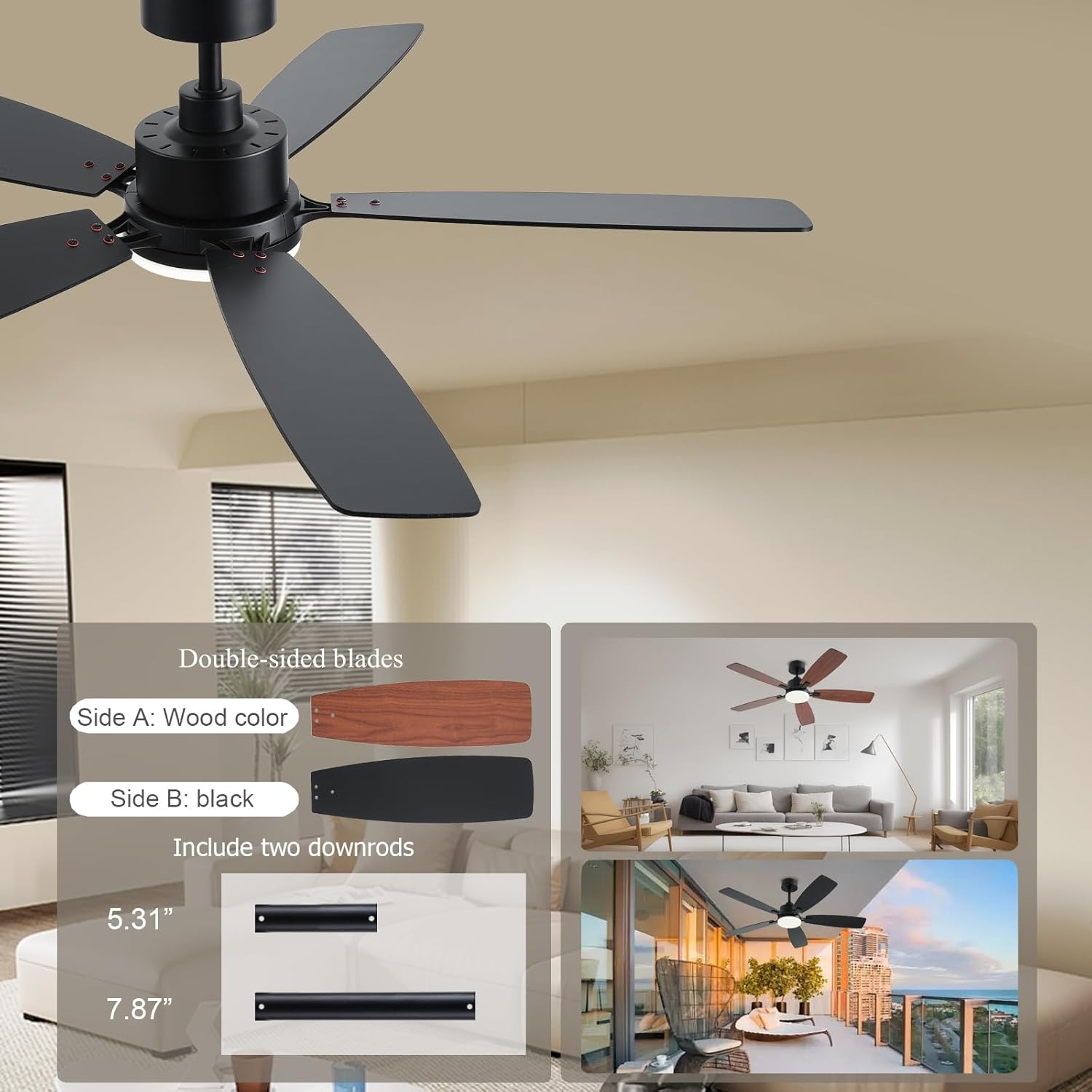
Image: Demonstrates the two sides of the fan blades (black and wood grain) and the two included downrod lengths (5.31" and 7.87").
2. Downrod Installation
Select the appropriate downrod (5.31" or 7.81") based on your ceiling height. Insert the downrod through the canopy and motor housing, securing it with the provided pin and screws.
3. Mounting Bracket and Wiring
Secure the mounting bracket to your ceiling junction box. Connect the fan's electrical wires to your household wiring according to the color-coded instructions (typically black to live, white to neutral, green to ground). Ensure all connections are tight and secure.
Video: Installation guide for the SY54 52-inch ceiling fan, demonstrating the steps for mounting and wiring the fan to the ceiling.
4. Canopy and Light Kit Installation
Once wiring is complete, slide the canopy up to cover the mounting bracket and secure it. Attach the LED light plate to the fan motor housing and then secure the light cover.
Naudojimo instrukcijos
Your NKPU ceiling fan can be controlled via the included remote control or the "Fan Lamp Pro" mobile application.
1. Nuotolinio valdymo funkcijos
The remote control allows for easy adjustment of fan speed, light settings, and timer functions. Ensure AAA batteries are installed correctly.

Image: The remote control for the ceiling fan, showing buttons for fan on/off, fan speed (1-6), light on/off, light dimming, color temperature adjustment, timer (1H/2H/4H), and forward/reverse rotation.
2. Mobile App Control (Fan Lamp Pro)
Download the "Fan Lamp Pro" app from your smartphone's app store. Ensure your phone's Bluetooth is turned on. Within 5 seconds of powering on the fan, tap the pairing button in the app. The light will flash twice to confirm successful pairing. The app provides comprehensive control over all fan and light features.
Atsisiųskite programėlę čia: https://www.jasonghost.com/fanlamppro/
3. Fan Speed and Reversible Motor
The fan features 6 adjustable speeds. The DC reversible motor allows for year-round use:
- Summer Mode (Forward Rotation): Blades rotate counter-clockwise, pushing air down to create a cooling effect.
- Winter Mode (Reverse Rotation): Mentės sukasi pagal laikrodžio rodyklę, traukdamos orą aukštyn, kad cirkuliuotų šiltas oras, įstrigęs prie lubų.

Image: Illustrates six wind speed levels, suggesting levels 1-2 for comfortable wind (sleeping/reading), levels 3-4 for medium wind (entertainment/party), and levels 5-6 for cooling wind (sports/fitness).
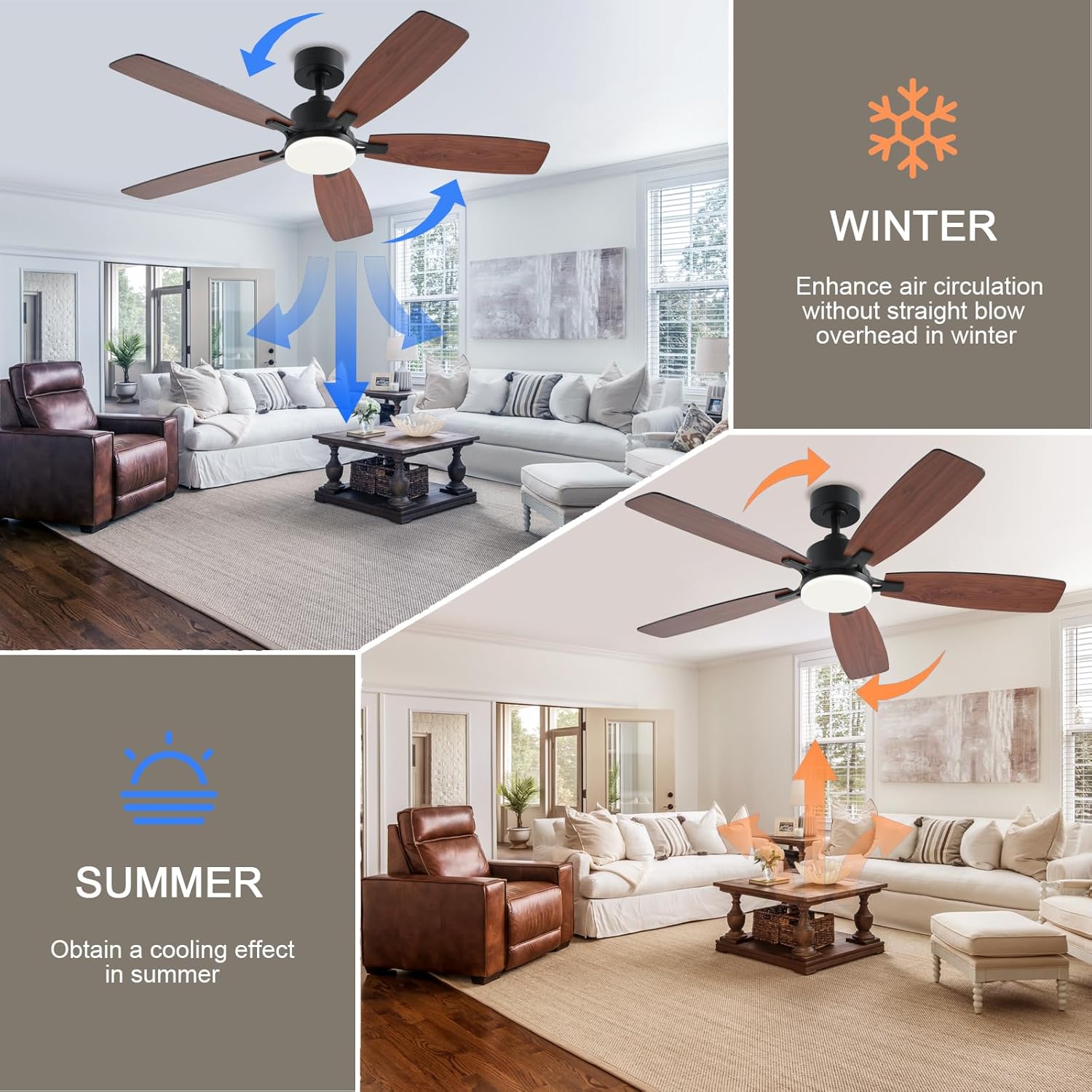
Image: Explains the reversible function of the fan, with blue arrows indicating downward airflow for summer cooling and orange arrows indicating upward airflow for winter air circulation.
4. Pritemdoma LED šviesa
The integrated LED light offers 3 color temperatures (3000K Warm Light, 4000K Natural Light, 6500K Cool Light) and is dimmable from 5% to 100% brightness (180LM to 1800LM). Adjust the light to suit your preference and activity.
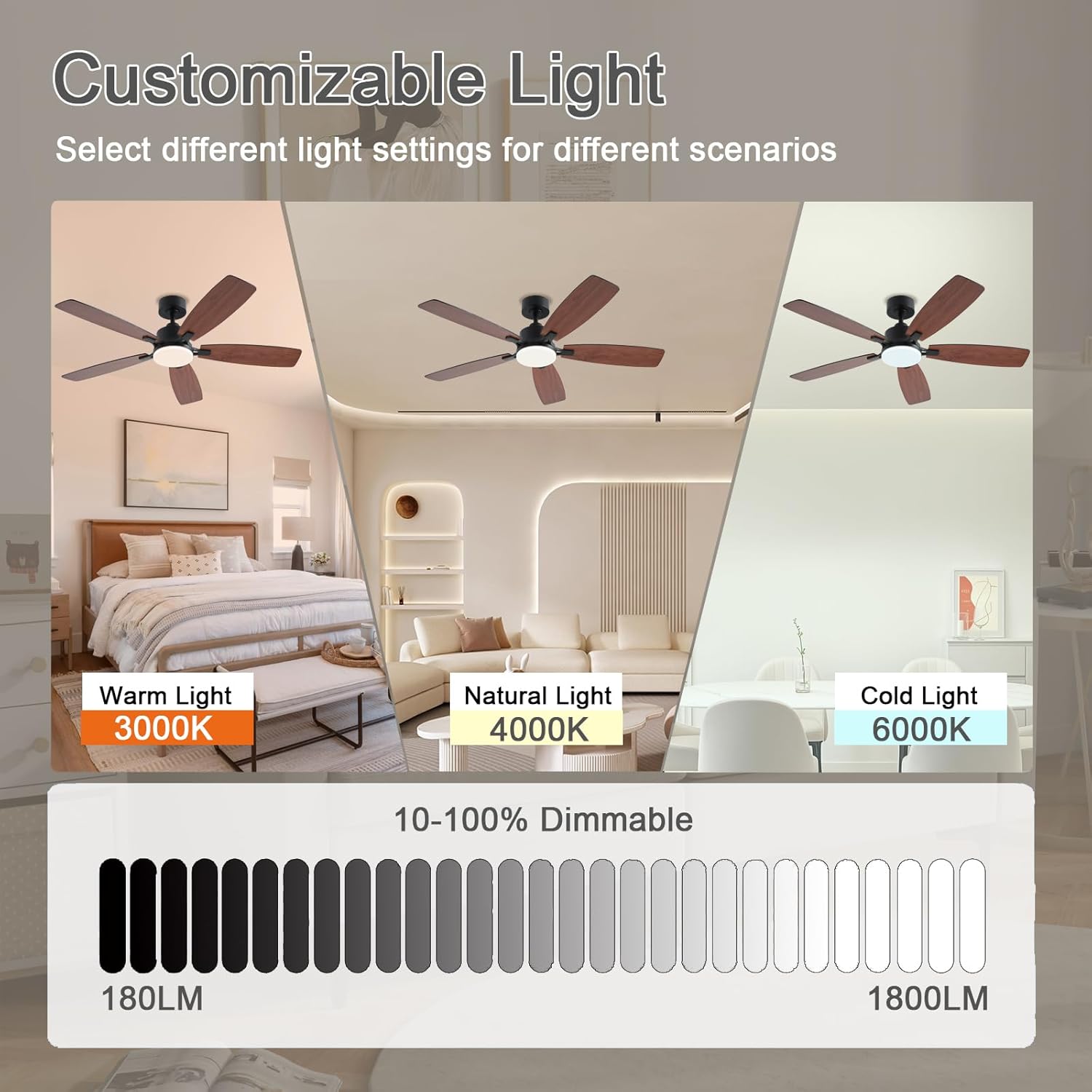
Image: Displays the customizable light feature, showing the fan light in Warm Light (3000K), Natural Light (4000K), and Cold Light (6000K), along with a 10-100% dimmable scale from 180LM to 1800LM.
5. Laikmačio funkcija
Set the fan to automatically turn off after 1, 2, or 4 hours using the remote or app.
Priežiūra
- Valymas: Norėdami išvalyti ventiliatorių, nuvalykite jį minkšta šluoste,amp audinys. Nenaudokite abrazyvinių valiklių ar stiprių cheminių medžiagų.
- Ašmenų priežiūra: Periodically check that all blade screws are tight. Over time, blades may loosen, causing wobbling.
- Šviesos viršelis: The light cover can be removed by twisting gently for cleaning or replacement of the LED module if necessary.
Trikčių šalinimas
| Problema | Galima priežastis | Sprendimas |
|---|---|---|
| Ventiliatorius neįsijungia | Ventiliatorius negauna maitinimo; Atsilaisvinusios laido jungtys; Nesuporuotas nuotolinio valdymo pultas arba išsikrovė baterijos. | Check circuit breaker; Verify all wiring connections; Replace remote batteries or re-pair remote/app. |
| Ventiliatoriaus virpėjimas | Loose blade screws; Improperly installed downrod; Unbalanced blades. | Tighten all blade screws; Recheck downrod installation; Use balancing kit (if included) to balance blades. |
| Šviesa neveikia | Atsilaisvinęs laidas prie žibintų komplekto; sugedęs LED modulis. | Patikrinkite šviesos komplekto laidus; Dėl LED modulio pakeitimo kreipkitės į klientų aptarnavimo tarnybą. |
| Nuotolinio valdymo pultas / programėlė neatsako | Batteries dead; Not paired correctly; Interference. | Replace batteries; Re-pair remote/app (see Operating Instructions); Ensure no strong interference sources nearby. |
Specifikacijos
| Funkcija | Detalė |
|---|---|
| Prekės ženklas | NKPU |
| Modelio pavadinimas | SY54 |
| Dydis | 52 colių |
| Maitinimo šaltinis | DC |
| ttage | 110 voltų |
| Vattage | 60 vatų |
| Kontrolės metodas | Programėlė, nuotolinio valdymo pultas |
| Galios lygių skaičius | 6 |
| Ypatingos savybės | Adjustable Height, Adjustable Tilt, LED Light, Remote Controlled, Reversible Motor |
| Šviesos tipas | LED (3CCT Dimmable: 3000K/4000K/6500K, 5%-100% Brightness) |
| Kambario tipas | Bedroom, Kids Room, Kitchen, Living Room, Study Room |
| Diegimo tipas | Pusiau įleidžiamas montavimas |
| Prekės svoris | 11.68 svaro |
| Gaminio matmenys | 52 x 52 x 16.54 colio |
Garantija
This NKPU ceiling fan comes with a 1-year warranty from the date of purchase. Please retain your proof of purchase for warranty claims. The warranty covers manufacturing defects under normal use.
Pagalba klientams
For any questions regarding installation, operation, or troubleshooting, please contact our customer support team. We offer 24-hour customer support to assist you.
Kontaktinę informaciją paprastai galima rasti ant gaminio pakuotės arba oficialioje gamintojo instrukcijoje. websvetainę.