
1. Įvadas
Ačiū, kad pirkoteasing the VIGORWORK 7-inch Car Stereo MP5 Player. This device is designed to enhance your in-car entertainment and connectivity with its high-definition touchscreen, Bluetooth capabilities, mirror link function, and various media playback options. Please read this manual thoroughly before installation and operation to ensure proper use and to maximize your enjoyment of the product.
2. Saugos informacija
To prevent injury or damage to the unit, please observe the following safety precautions:
- Profesionalus montavimas rekomenduojamas: Due to the complexity of car electrical systems, professional installation is highly recommended. Incorrect wiring can cause damage to the unit or the vehicle.
- Maitinimas: Ensure the unit is connected to a 12V DC power supply with a negative ground.
- Venkite vandens ir drėgmės: Saugokite įrenginį nuo vandens ar per didelės drėgmės.
- Temperatūra: Įrenginį naudokite esant įprastai transporto priemonės darbinei temperatūrai.
- Vairavimo sauga: Nenaudokite įrenginio taip, kad tai atitrauktų jūsų dėmesį nuo vairavimo. Visada teikite pirmenybę eismo saugumui.
- Vėdinimas: Užtikrinkite tinkamą vėdinimą aplink įrenginį, kad jis neperkaistų.
- Saugiklio keitimas: When replacing a fuse, ensure the new fuse has the correct amperage reitingas.
3. Pakuotės turinys
Patikrinkite pakuotę, ar joje yra šie daiktai:
- VIGORWORK 7-inch Car Stereo MP5 Player Unit
- Maitinimo kabelio jungtis
- Remote Control (Steering Wheel Controller)
- Vartotojo vadovas
- Mounting Brackets/Screws (if included)
4. Produktas baigtasview
The VIGORWORK Car Stereo MP5 Player features a 7-inch HD digital touchscreen with a 1024*600 resolution, supporting 1080P video playback. It offers a range of functionalities for an enhanced driving experience.
Pagrindinės funkcijos:
- HD jutiklinis ekranas: 7-inch display with 1024*600 resolution for clear visuals and 1080P video support.
- Bluetooth ryšys: Hands-free calling, Bluetooth music streaming, and voice navigation support.
- Veidrodinė nuoroda: Two-way connection for Android phones and one-way projection for Apple phones.
- Vairo valdymas: Compatible with included steering wheel controller for easy operation.
- Reverse Image Support: Automatiškai persijungia į galą view when reversing (requires optional camera).
- Kelių medijos failų atkūrimas: Supports USB, AUX, TF card, and various audio/video formats (APE, FLAC, WAV, DIS, MP3, AVI, MP4, etc.).
- FM radijas: High-performance digital tuning with 18 radio station presets.
- Garso pritaikymas: Electronic volume, treble, bass, balance, and sound field adjustments with various EQ modes.
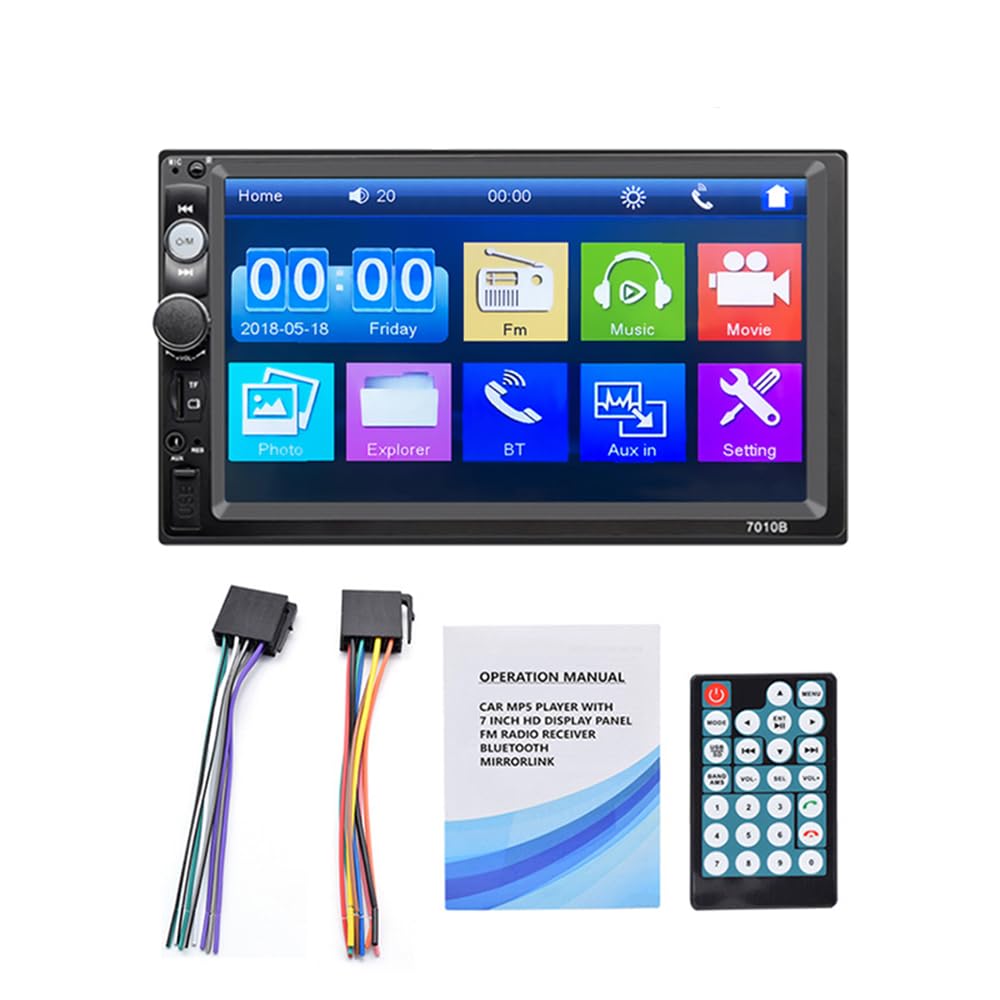
Figure 4.1: The 7-inch car stereo displaying video content, highlighting its 1024x600 resolution and multi-format playback capabilities.
5. Diegimas ir sąranka
This section provides general guidelines for installing your car stereo. Due to variations in vehicle models, specific wiring and mounting procedures may differ. If you are unsure, consult a professional installer.
5.1 Laidų schema (bendroji)
Refer to the wiring diagram provided with your unit for specific connections. A typical setup includes:
- Geltona viela: Constant 12V (Battery Positive)
- Raudonas laidas: ACC (Accessory/Ignition Switch 12V)
- Juodas laidas: Ground (Chassis Ground)
- Orange/Brown Wire: Illumination (Connect to vehicle's illumination wire)
- Mėlyna viela: Maitinimo antena/Amp„Lifier“ nuotolinis įjungimas
- Garsiakalbių laidai: Prijunkite prie atitinkamų automobilio garsiakalbių (pvz., balta/balta-juoda priekiniam kairiajam garsiakalbiui, pilka/pilka-juoda priekiniam dešiniajam garsiakalbiui, žalia/žalia-juoda galiniam kairiajam garsiakalbiui, violetinė/violetinė-juoda galiniam dešiniajam garsiakalbiui).
- Atbulinės pavaros laidas: Connect to the vehicle's reverse light circuit for automatic camera switching.
- Vaizdo įvestis: Galiniam view fotoaparatas.
5.2 Įrenginio montavimas
- Nuimkite esamą automobilio stereo sistemą nuo prietaisų skydelio.
- Connect the wiring harness from the new unit to your vehicle's wiring. Ensure all connections are secure.
- Slide the new stereo into the dashboard opening. Secure it using the provided mounting brackets and screws.
- Surinkite prietaisų skydelio apdailą.
- Prieš baigdami diegimą, išbandykite visas funkcijas.
6. Naudojimo instrukcijos
6.1 Pagrindinės operacijos
- Maitinimo įjungimas/išjungimas: Press the power button or turn the ignition key to ACC/ON.
- Garsumo valdymas: Use the rotary knob or steering wheel controls to adjust volume.
- Meniu naršymas: Tap icons on the touchscreen to access different functions (Radio, Bluetooth, USB, AUX, Settings, etc.).
6.2 „Bluetooth“ ryšys
Connect your mobile phone via Bluetooth for hands-free calls and audio streaming.
- Stereo sistemoje eikite į „Bluetooth“ meniu.
- Įjunkite „Bluetooth“ savo mobiliajame telefone ir ieškokite galimų įrenginių.
- Select "Car Radio" or a similar name from the list on your phone.
- Jei būsite paraginti, patvirtinkite susiejimo kodą.
- Prijungę, galite skambinti / priimti skambučius ir leisti muziką per automobilio stereo sistemą.

Figure 6.1: The Bluetooth interface of the car stereo, demonstrating hands-free call functionality and music streaming.
6.3 Veidrodinio susiejimo funkcija
Mirror Link allows you to display your phone's screen on the car stereo. Use a USB data cable for connection.
- „Android“ telefonams: Supports two-way connection (control from stereo or phone). Connect your phone via USB and follow on-screen prompts to enable USB debugging and allow screen mirroring.
- Apple telefonams: Supports one-way screen projection (view only, control from phone). Connect your iPhone via USB and allow screen mirroring when prompted.

Figure 6.2: Illustration of the Mirror Link feature, showing how mobile phones connect to the car stereo for screen mirroring.
6.4 FM radijo veikimas
Access the FM radio function to listen to your favorite stations.
- Automatinis nuskaitymas: Press the "SCAN" button to automatically search and save available stations.
- Rankinis derinimas: Dažniams tiksliai sureguliuoti naudokite rodyklių mygtukus.
- Išankstiniai nustatymai: Tap on a preset number (1-6) to recall a saved station. To save a station, tune to it and then press and hold a preset number.

Figure 6.3: The FM radio interface, displaying frequency tuning and station preset options.
6.5 Media Playback (USB, AUX, TF Card)
Įrenginys palaiko įvairias medijos įvestis garso ir vaizdo atkūrimui.
- USB: Insert a USB flash drive into the USB port. The unit will automatically switch to USB mode or you can select it from the main menu.
- TF kortelė: Insert a TF (Micro SD) card into the designated slot. The unit will detect the card and allow playback.
- AUX: Connect an external audio device (e.g., MP3 player) to the AUX input using a 3.5mm audio cable. Select AUX mode from the main menu.

Figure 6.4: Visual representation of the four available playback modes: USB flash disk, AUX input, Bluetooth, and TF Card.
6.6 Vairo valdymas
Use the provided steering wheel controller for convenient operation without taking your hands off the wheel.
- Atsakymas / pokalbis: Manage phone calls.
- Praleisti takelius: Navigate to the next or previous song.
- Garso reguliavimas: Increase or decrease the audio volume.

6.5 paveikslas: buvęsample of a steering wheel controller, illustrating its functions for managing calls, changing tracks, and adjusting volume.
6.7 Atbulinės eigos kameros funkcija
Jei pasirenkamas galinis view camera is connected and properly wired, the stereo will automatically display the reverse image when the vehicle is shifted into reverse gear.

Figure 6.6: The car stereo screen automatically switching to a reverse image with parking guidelines when the vehicle is in reverse gear.
7. Priežiūra
- Ekrano valymas: Jutiklinį ekraną nuvalykite minkšta, sausa šluoste. Įsisenėjusias dėmes šiek tiek nuvalykite.ampNuvalykite šluostę vandeniu arba elektronikos ekranams skirtu valikliu. Venkite stiprių cheminių medžiagų.
- Bendras valymas: Laikykite įrenginį be dulkių ir šiukšlių. Mygtukus ir prievadus valykite minkštu šepetėliu arba suslėgtu oru.
- Venkite ekstremalių temperatūrų: Prolonged exposure to extreme heat or cold can affect the unit's performance and lifespan.
8. Problemų sprendimas
| Problema | Galima priežastis | Sprendimas |
|---|---|---|
| Nėra galios | Neteisingas laidų pajungimas; Perdegęs saugiklis; Atsilaisvinusi jungtis. | Check power and ground connections. Inspect and replace fuses if necessary. Ensure all wires are securely connected. |
| Nėra garso | Volume too low; Mute function active; Incorrect speaker wiring; Faulty speakers. | Increase volume. Check if mute is active. Verify speaker connections. Test with known good speakers. |
| Bluetooth neprisijungia | Bluetooth not enabled on phone/stereo; Device not discoverable; Incorrect pairing process. | Ensure Bluetooth is on for both devices. Make sure the stereo is in pairing mode. Delete previous pairings and try again. |
| Veidrodinė nuoroda neveikia | Incorrect USB cable; USB debugging not enabled (Android); Phone not compatible. | Use a high-quality USB data cable. Enable USB debugging in Android developer options. Ensure your phone model supports Mirror Link with the unit. |
| Galinis view kamera nerodo | Kamera neprijungta; atbulinės eigos paleidiklio laidas neprijungtas; sugedusi kamera. | Check camera video input and power connections. Ensure the reverse trigger wire is correctly connected to the vehicle's reverse light circuit. |
9. Specifikacijos
| Funkcija | Detalė |
|---|---|
| Ekrano dydis | 7-inch HD Digital Touch Screen |
| Rezoliucija | 1024*600 |
| Vaizdo įrašų atkūrimas | Supports 1080P video |
| Bluetooth | Hands-free calls, music player, voice navigation |
| Veidrodinė nuoroda | Android (two-way), Apple (one-way) |
| Garso formatai | APE, FLAC, WAV, DIS, MP3, WMA, ACC, OGG, RA, AC3, MP2, AMR |
| Vaizdo įrašų formatai | AVI, MP4, FLV, PMP, RM, RMVB, MPG |
| Vaizdo formatai | JPEG |
| USB prievadas | High-speed USB 2.0, supports high current output for phone charging |
| TF kortelių lizdas | Taip |
| AUX įvestis | Taip |
| FM radijas | Automatic scanning, 18 station storage |
| Maitinimo šaltinis | 12 V DC (neigiamas įžeminimas) |
| Matmenys (apytiksliai) | 180 mm (plotis) x 104 mm (aukštis) x 63 mm (gylis) |

Figure 9.1: Product dimensions of the VIGORWORK 7-inch Car Stereo, indicating width, height, and depth.
10. Garantija ir palaikymas
VIGORWORK products are designed and manufactured to the highest quality standards. For warranty information and technical support, please refer to the warranty card included with your product or contact your retailer. Keep your purchase receipt as proof of purchase.
For further assistance, please visit the VIGORWORK official websvetainėje arba susisiekite su klientų aptarnavimo tarnyba.