
Bonacell B0DT8G5RST
Bonacell Wireless Controller Instruction Manual
Model: B0DT8G5RST
Įvadas
Thank you for choosing the Bonacell Wireless Controller. This manual provides detailed instructions for setting up, operating, and maintaining your controller. Please read this manual carefully before use to ensure optimal performance and longevity of your device.

Image: The Bonacell Wireless Controller, black with blue illuminated buttons, shown alongside its white USB receiver adapter.
Produkto savybės
- Platus suderinamumas: Supports PS4, PS5, PC (Windows), Android, and iOS devices.
- Dvigubo variklio vibracija: Enhances gaming immersion with realistic haptic feedback.
- 6-Axis Gyroscope Sensor: Užtikrina tikslų judesio valdymą palaikomuose žaidimuose.
- Turbo funkcija: Enables continuous rapid input for specific buttons.
- 3.5 mm garso lizdas: Allows connection of headphones for in-game audio.
- Jutiklinė dalis: Integrated touchpad for additional control options.
- RGB Multi-color Buttons: Customizable lighting effects for personalized aesthetics.
- Ilgas baterijos veikimo laikas: Built-in 1000mAh battery provides extended usage.

Vaizdas: Stambus planas views highlighting the controller's 360-degree joysticks, 3.5mm headphone jack, and 6-axis gyroscope sensor.
Sąranka ir prijungimas
1. Valdiklio įkrovimas
The controller is equipped with a 1000mAh battery. Before first use, or when the battery is low, charge the controller using the provided Type-C cable or a compatible charging base.
- Įkrovimo laikas: Maždaug 2.5 valandos.
- Naudojimo laikas: Iki 16 valandų visiškai įkrovus.

Image: Visual representation of the controller's battery specifications, including its 1000mAh capacity, working time, and charging duration.
2. Connecting to PS5 (Wireless Receiver)
To play PS5 games, the controller must be connected via the wireless receiver. Direct Type-C cable connection does not support PS5 games.
- 1 veiksmas: Plug the wireless receiver adapter into a USB port on your PS5 console. Briefly press the pairing button on the adapter.
- 2 veiksmas: On the Bonacell Wireless Controller, press and hold the DALINTIS mygtuką ir tada laikykite nuspaudę P button simultaneously for 5 seconds to enter pairing mode.
- 3 veiksmas: Once successfully paired, the lights on both the controller and the adapter will remain illuminated.
Note: For the first connection, it is recommended to activate the device with a USB cable before attempting wireless pairing.
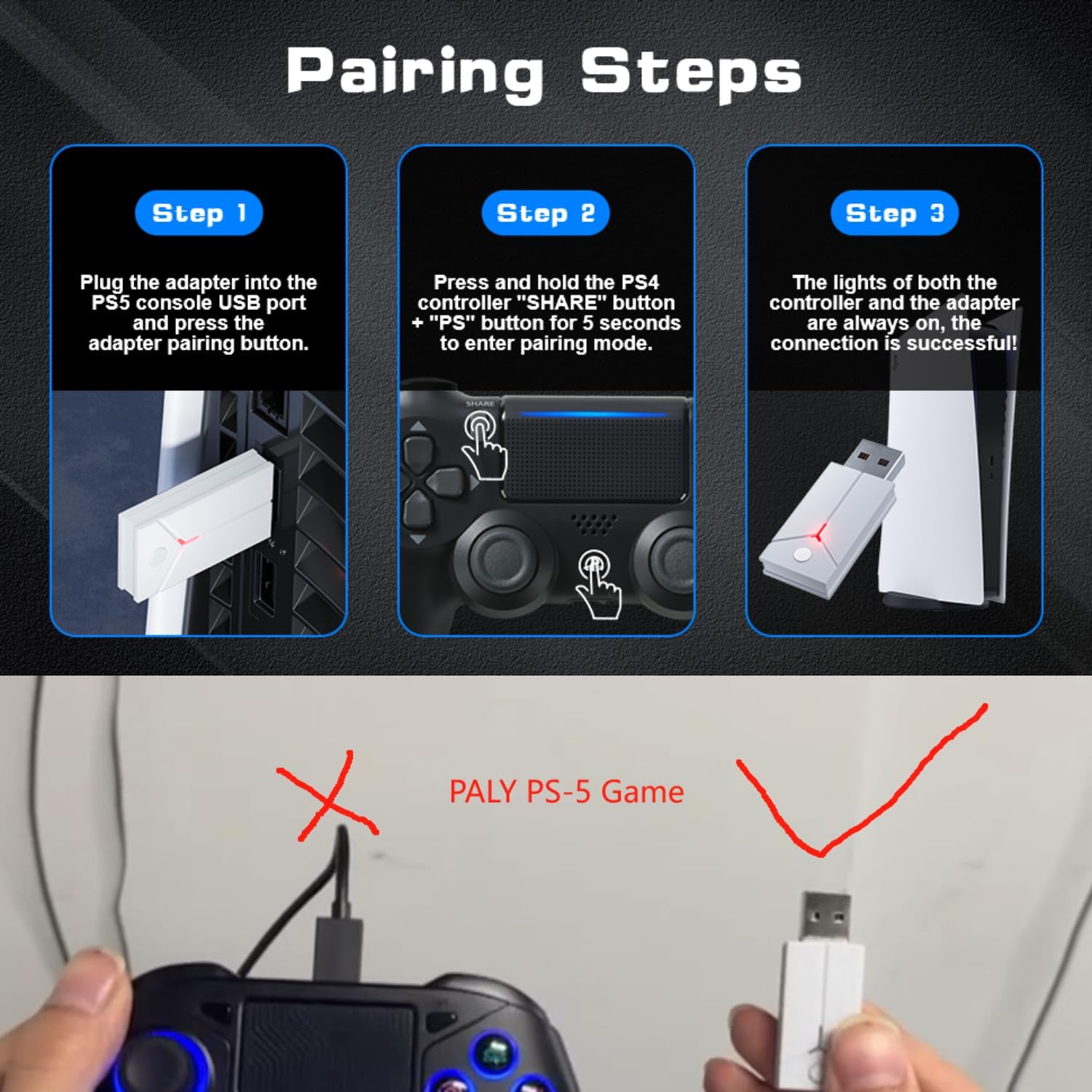
Image: A three-step visual guide demonstrating how to pair the controller with a PS5 console using the USB adapter.
3. Connecting to PC (Wired)
Connect the controller to your PC directly using the Type-C data cable.
4. Prijungimas prie kompiuterio („Bluetooth“)
- 1 veiksmas: Ensure your PC's Bluetooth function is enabled.
- 2 veiksmas: On the Bonacell Wireless Controller, press and hold the DALINTIS mygtuką ir P button simultaneously for 3 seconds to enter pairing mode.
- 3 veiksmas: On your PC, search for and select the controller from the list of available Bluetooth devices to complete the pairing.
5. Connecting to Android and iOS (Bluetooth)
Supports iOS 13+ devices.
- 1 veiksmas: Activate the Bluetooth function on your mobile phone or tablet.
- 2 veiksmas: On the Bonacell Wireless Controller, press and hold the DALINTIS mygtuką ir P button simultaneously for 3 seconds to enter pairing mode.
- 3 veiksmas: On your mobile device, search for and select the controller from the list of available Bluetooth devices to complete the pairing.

Image: An illustration showing the Bonacell Wireless Controller's compatibility with various platforms such as PS5, PS4, PC, Android, and iOS.
Naudojimo instrukcijos
1. RGB Multi-color Button Customization
- To change the light color: Press and hold the L3 mygtuką ir R3 button simultaneously for 3 seconds. The controller will vibrate for 1 second, indicating that the light color can now be changed.
- To switch light effect modes: Press and hold the NUSTATYTI mygtuką ir R3 button simultaneously. Cycle through modes: Colorful → Monochrome → Colorful Transformation → Monochrome Breathing.
2. Turbo funkcija
The Turbo function allows for continuous rapid input of a button press. This can be useful in games requiring fast, repeated actions.
Specific instructions for activating and deactivating the Turbo function are typically found in the game's control settings or may involve a combination of the Turbo button (if present) and another action button. Refer to the controller's quick start guide or product packaging for exact button combinations if not detailed here.

Image: An illustration highlighting the dual vibration motors and the Turbo function capability of the controller.
Priežiūra
- Valymas: Valdiklį valykite minkšta, sausa šluoste. Venkite naudoti stiprias chemines medžiagas ar abrazyvines medžiagas.
- Saugykla: Laikykite valdiklį vėsioje, sausoje vietoje, apsaugotoje nuo tiesioginių saulės spindulių ir ekstremalių temperatūrų.
- Akumuliatoriaus priežiūra: Norėdami pailginti baterijos veikimo laiką, venkite dažnai visiškai iškrauti valdiklį. Reguliariai jį įkraukite, net jei ilgesnį laiką nenaudojate.
Trikčių šalinimas
- Valdiklis neprisijungia:
- Įsitikinkite, kad valdiklis įkrautas.
- Verify the correct pairing procedure for your device (PS5, PC, Android/iOS).
- For PS5, ensure you are using the wireless receiver.
- For Bluetooth connections, ensure Bluetooth is enabled on your host device and the controller is in pairing mode.
- Try restarting both the controller and the host device.
- Mygtukai arba valdymo svirtys nereaguoja:
- Įsitikinkite, kad valdiklis tinkamai prijungtas.
- Patikrinkite, ar aplink mygtukus / valdymo svirtis nėra fizinių kliūčių ar šiukšlių.
- If connected via PC, ensure drivers are up to date.
- Vibracija neveikia:
- Įsitikinkite, kad žaidimas palaiko vibracijos grįžtamąjį ryšį.
- Patikrinkite žaidimo nustatymus, kad įsitikintumėte, jog įjungta vibracija.
Specifikacijos
| Funkcija | Detalė |
|---|---|
| Produkto pavadinimas | Belaidis valdiklis |
| Modelio numeris | B0DT8G5RST |
| Matmenys | 165 x 105 x 45 mm |
| Svoris | 0.26 kg (Item Package Weight: 300 g) |
| Baterijos talpa | 1000 mAh ličio jonų |
| Naudojimo laikas | Iki 16 valandų |
| Įkrovimo laikas | Maždaug 2.5 val |
| Įkrovimo būdas | Base or Type-C charging |
| Ryšys | 2.4GHz USB Receiver, Bluetooth, USB-C (wired) |
| Suderinamumas | PS4, PS5, PC (Windows), Android (iOS 13+) |
| Pagrindinės savybės | Dual Shock Motor, Six-Axis Gyroscope, Touchpad, 3.5mm Audio Jack, Turbo Function, RGB Buttons |
| Medžiaga | ABS |
Garantija ir palaikymas
For warranty information or technical support, please refer to the product packaging or contact Bonacell customer service through the retailer's platform where the product was purchased.
Ask a question about this manual
Ask about setup, troubleshooting, compatibility, parts, safety, or missing instructions. Manuals+ will review the question and use this page’s manual context to help answer it.