
1. Produktas baigtasview
The Fanvil V60P is a professional IP phone designed for business communication. It features a color display, programmable keys, and Power over Ethernet (PoE) support for simplified installation and operation. This manual provides essential information for setting up, operating, and maintaining your device.
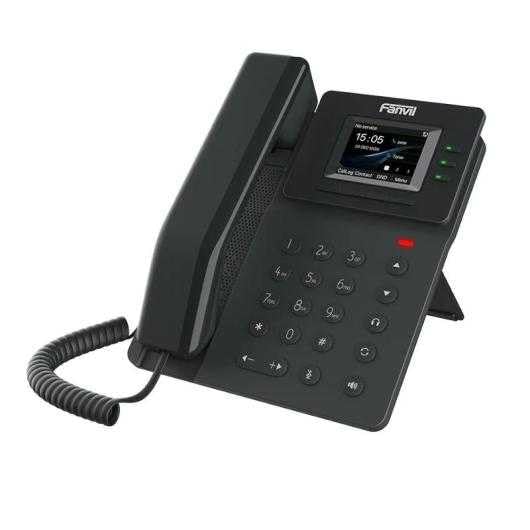
Figure 1: Fanvil V60P Professional IP Phone. This image shows the black IP phone with its handset, color display, and numeric keypad. The display shows "15:05" and menu options.
2. Sąranka ir diegimas
2.1 Pakuotės turinys
Before installation, verify that all items are present in the package:
- Fanvil V60P IP Phone unit
- Ragelis ir susuktas laidas
- Ethernet kabelis
- Stovi
- Greito diegimo vadovas (jei pridėtas)
2.2 Fizinis ryšys
- Pritvirtinkite stovą: Securely attach the desk stand to the back of the phone unit.
- Prijunkite ragelį: Vieną susukto laido galą prijunkite prie ragelio, o kitą – prie ragelio prievado telefono bazėje.
- Prijungimas prie tinklo ir maitinimo (PoE):
- Prijunkite vieną Ethernet kabelio galą prie LAN prievadas telefone.
- Connect the other end of the Ethernet cable to a Power over Ethernet (PoE) enabled switch or injector. The phone will power on automatically.
- Prijungimas prie kompiuterio (nebūtina): If you need to connect a computer through the phone, connect an Ethernet cable from your PC to the PC prievadas telefone.
Note: If PoE is not available, a separate power adapter (not included) may be required. Refer to the product specifications for compatible power adapter details.
3. Naudojimo instrukcijos
3.1 Pagrindinės skambinimo funkcijos
- Skambinimas:
- Pick up the handset or press the Speakerphone button.
- Surinkite norimą numerį naudodami klaviatūrą.
- Paspauskite Surinkite programinį klavišą arba palaukite, kol pasibaigs automatinio rinkimo skirtasis laikas.
- Atsiliepimas į skambutį:
- Pakelk ragelį.
- Alternatively, press the Speakerphone button or the Atsakymas programinis mygtukas.
- Skambučio pabaiga: Padėkite ragelį arba paspauskite garsiakalbio mygtuką.
3.2 Using Programmable DSS Keys
The Fanvil V60P features 6 programmable DSS (Direct Station Select) keys. These keys can be configured for various functions such as speed dial, line keys, busy lamp field (BLF), or other custom features as defined by your system administrator.
- To use a programmed DSS key, simply press the corresponding button.
- Configuration of DSS keys is typically done via the phone's web interface or your IP PBX system.
3.3 Local Phonebook
The phone supports a local phonebook with up to 1000 entries.
- Access the phonebook via the Katalogas or Kontaktai programinį klavišą ekrane.
- Use the navigation keys to browse entries.
- Pasirinkite įrašą ir paspauskite Surinkite programinį klavišą, kad pradėtumėte skambutį.
3.4 Garso konferencijos
The V60P supports local 6-party audio conferencing.
- Establish a call with the first participant.
- Paspauskite Konf soft key. The first participant will be put on hold.
- Dial the number of the second participant and establish the call.
- Paspauskite Konf soft key again to merge all participants into a conference.
- Repeat steps 2-4 to add more participants, up to a total of 6.
4. Priežiūra
4.1 Prietaiso valymas
To maintain the appearance and functionality of your Fanvil V60P IP Phone (made of plastic material), follow these cleaning guidelines:
- Disconnect the phone from its power source (PoE) before cleaning.
- Naudokite minkštą, šiek tiek damp, lint-free cloth to wipe the surfaces.
- Avoid using harsh chemicals, abrasive cleaners, or solvents, as these can damage the plastic and display.
- Nepurkškite valiklių tiesiai ant telefono.
4.2 Firmware atnaujinimai
Firmware updates may be released periodically to improve performance, add features, or fix bugs. Consult your IT administrator or Fanvil's official website for information on available updates and instructions for installation.
5. Problemų sprendimas
This section addresses common issues you might encounter with your Fanvil V60P IP Phone.
| Problema | Galima priežastis | Sprendimas |
|---|---|---|
| Telefonas neįsijungia. | Nėra PoE ryšio arba sugedęs Ethernet kabelis. | Ensure the Ethernet cable is securely connected to the LAN port and a PoE-enabled switch/injector. Verify the PoE source is active. |
| Nėra rinkimo tono. | SIP registration failure or network issue. | Check network connectivity. Verify SIP account settings with your IT administrator. Restart the phone. |
| Negaliu skambinti / priimti skambučių. | Network issues, incorrect SIP configuration, or firewall blocking. | Confirm network connection. Check SIP registration status on the phone's display. Contact your IT administrator for network and SIP configuration verification. |
| Prasta garso kokybė. | Network congestion or faulty handset/speaker. | Check network bandwidth and latency. Try using a different handset or speaker mode. If the issue persists, contact support. |
6. Specifikacijos
| Funkcija | Detalė |
|---|---|
| Modelis | V60P |
| Sistema | Linux |
| Ekranas | 2.4-inch, 320 x 240 Color Screen |
| DSS raktai | 6 programuojami klavišai |
| SIP linijos | 4 |
| Local Phonebook | 1000 įrašai |
| Ragelis | Laidinis ragelis |
| Garso konferencijos | 6-party Local Conference |
| Wideband Codecs | G.722, Opus |
| Narrowband Codecs | G.711, G.723.1, G.726, G.729, G.729A, G.729B, G.729AB, iLBC |
| PoE | Taip |
| Tinklo prievadai | 2 x 10/100 Mbps Ethernet Ports |
| Aplinkosaugos ir sveikatos palaikymas | Taip |
| IPv6 palaikymas | Taip |
| Medžiaga | Plastikiniai |
| Matmenys (IxPxH) | 15 x 200 x 15 cm |
| Svoris | 600 gramų |
| Skambintojo ID | Taip |
| Daugiaeilis valdymas | Taip |
| Conference Call Functionality | Support Multiple Conferences |
| Standby Duration (if applicable) | 10 valandos |
7. Garantija ir palaikymas
7.1 Gaminio garantija
The Fanvil V60P IP Phone comes with a trejų metų garantija nuo gamybos defektųŠi garantija taikoma medžiagų ir gamybos defektams, atsiradusiems įprasto naudojimo sąlygomis. Išsaugokite pirkimo įrodymą, jei galėtumėte pateikti pretenzijas dėl garantijos.
7.2 Techninė pagalba
For technical assistance, troubleshooting beyond this manual, or warranty inquiries, please contact your reseller or Fanvil's official customer support channels. You may need to provide your product model (V60P) and serial number.