
Įvadas
The LogiLink HDW0111 Wireless HDMI Presentation Kit provides a convenient solution for transmitting HDMI video and audio signals wirelessly. This kit is designed for BYOD (Bring Your Own Device) environments, enabling easy content sharing in meeting rooms, conference halls, or educational settings. It supports Ultra HD 4K/60Hz resolution and can transmit signals up to 50 meters in clear line of sight. The system is plug-and-play, requiring no additional software installation for most devices.
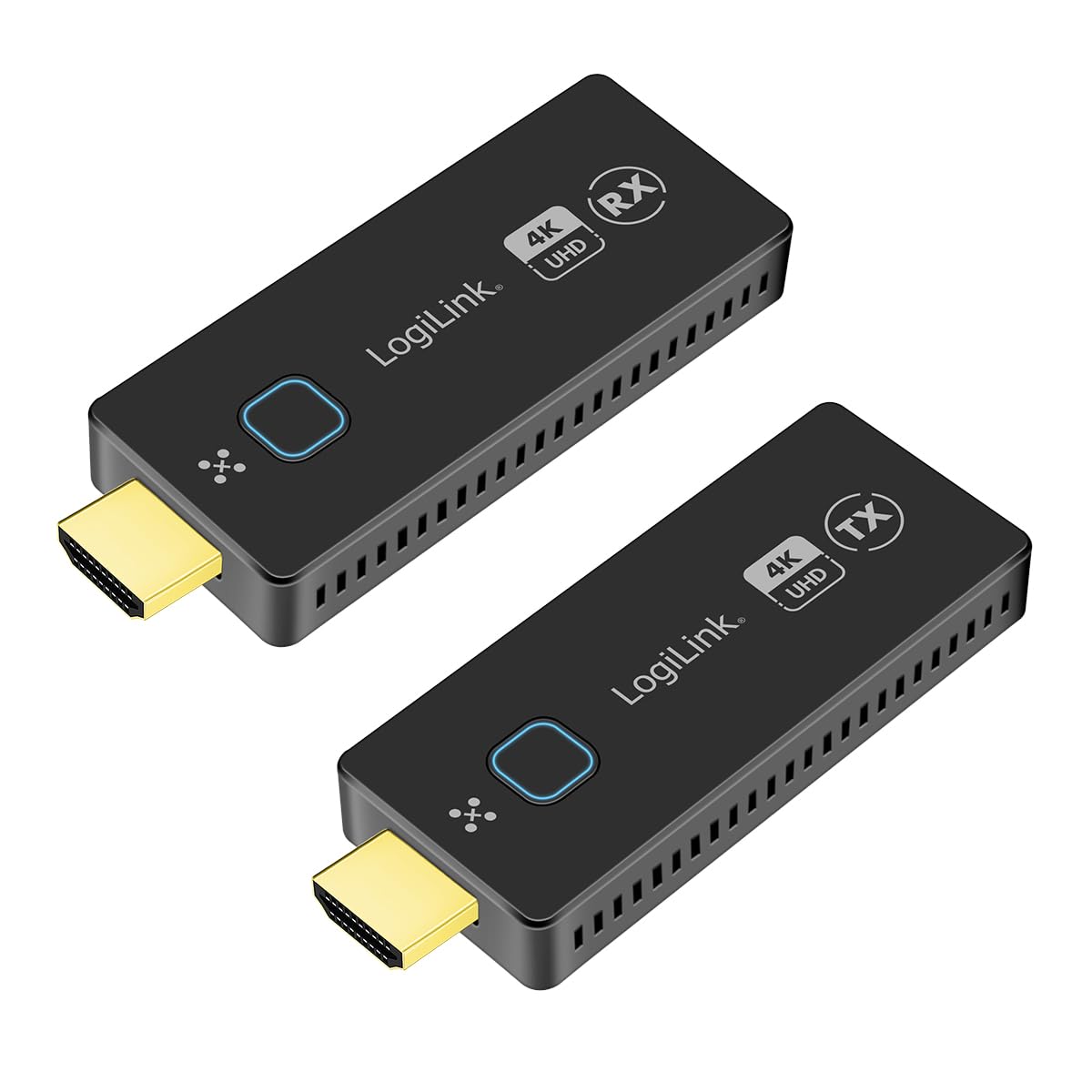
Image: The LogiLink HDW0111 Wireless HDMI Presentation Kit facilitating a meeting presentation.
Pakuotės turinys
Prašome patikrinti, ar pakuotėje yra visi reikalingi daiktai:
- 1x LogiLink HDW0111 Receiver Unit (RX)
- 1x LogiLink HDW0111 Transmitter Unit (TX)
- 2x USB-C to USB-A Power Cables
- 2x HDMI Extension Cables
- 1x vartotojo vadovas

Image: The LogiLink HDW0111 Transmitter (TX) and Receiver (RX) units.
Produktas baigtasview
The LogiLink HDW0111 system consists of two main components: a Transmitter (TX) and a Receiver (RX).
Siųstuvas (TX)
The Transmitter unit connects to your source device (e.g., laptop, PC, smartphone, tablet) via an HDMI port. It captures the video and audio signal and transmits it wirelessly to the Receiver.
- HDMI jungtis: Connects to the source device.
- USB-C prievadas: For power supply (DC 5V/0.5A required).
- Funkcijos mygtukas: Used for pairing and switching between multiple transmitters.
- Būsenos indikatorius: Rodo ryšio būseną.
Imtuvas (RX)
The Receiver unit connects to your display device (e.g., TV, projector, monitor) via an HDMI port. It receives the wireless signal from the Transmitter and outputs the video and audio.
- HDMI jungtis: Connects to the display device.
- USB-C prievadas: For power supply (DC 5V/0.5A required).
- Funkcijos mygtukas: Used for pairing and managing connections.
- Būsenos indikatorius: Rodo ryšio būseną.

Vaizdas: Stambus planas view of the LogiLink HDW0111 Transmitter and Receiver units, showing ports and indicators.
Sąrankos instrukcijos
- Prijunkite imtuvą (RX):
- Plug the LogiLink HDW0111 Receiver (RX) into an available HDMI input port on your display device (TV, projector, monitor). Use an HDMI extension cable if needed for better fit or signal path.
- Connect one of the provided USB-C to USB-A power cables to the USB-C port on the Receiver. Plug the USB-A end into a USB power source (e.g., a USB port on your display device, a USB wall adapter, or a power bank). Ensure the power source provides at least 5V/0.5A.
- Įjunkite ekraną ir pasirinkite tinkamą HDMI įvesties šaltinį.
- Prijunkite siųstuvą (TX):
- Plug the LogiLink HDW0111 Transmitter (TX) into an available HDMI output port on your source device (e.g., laptop, PC). Use an HDMI extension cable if needed.
- Connect the second USB-C to USB-A power cable to the USB-C port on the Transmitter. Plug the USB-A end into a USB power source (e.g., a USB port on your laptop, a USB wall adapter, or a power bank). Ensure the power source provides at least 5V/0.5A.
- Pradinis susiejimas (jei reikia):
- The Transmitter and Receiver units are usually pre-paired from the factory. If they do not connect automatically, press the function button on both the Transmitter and Receiver simultaneously for a few seconds until their status indicators show a successful connection (e.g., solid blue light).
Naudojimo instrukcijos
- Pradėti siuntimą:
- Once both the Transmitter and Receiver are powered on and connected, the status indicators should show a stable connection.
- Your source device's screen content should automatically appear on the connected display.
- Switching Transmitters (for multiple TX units):
- The system supports up to 16 Transmitter units (additional TX units sold separately, model HDW0111AT).
- To switch between active transmitters, simply press the function button on the desired Transmitter unit. The Receiver will automatically switch to display the content from that Transmitter.
- Mobile Device Sharing:
- For smartphones and tablets, you can share content directly via your device's operating system's casting features (e.g., Miracast, AirPlay, Google Cast). No additional app is required.
- Ensure your mobile device is connected to the same Wi-Fi network as the LogiLink HDW0111 Receiver, or follow your device's specific instructions for screen mirroring to a wireless display.
- Energijos taupymas:
- The units can be powered directly from the HDMI port if the source/display provides sufficient power (0.5A). For stable operation, especially with longer cables or high resolutions, using the dedicated USB power cable is recommended.
Priežiūra
- Valymas: Use a soft, dry cloth to clean the units. Do not use liquid or aerosol cleaners.
- Saugykla: Laikykite prietaisą vėsioje, sausoje vietoje, apsaugotoje nuo tiesioginių saulės spindulių ir ekstremalių temperatūrų.
- Tvarkymas: Avoid dropping or subjecting the units to strong impacts. Do not attempt to disassemble or modify the device, as this will void the warranty.
- Galia: Always use the provided power cables or compatible 5V/0.5A USB power sources.
Trikčių šalinimas
| Problema | Galima priežastis | Sprendimas |
|---|---|---|
| Ekrane nėra signalo. |
|
|
| Intermittent signal or flickering. |
|
|
| Garsas, bet ne vaizdas, arba atvirkščiai. |
|
|
| Cannot connect more than one transmitter. |
|
|
Specifikacijos
- Modelis: HDW0111
- Belaidis standartas: 802.11ac
- HDMI standartas: HDMI 2.0
- Pralaidumas: 18 Gbps (6 Gbit/s per line at 600 MHz)
- Maksimalus perdavimo atstumas: Iki 50 metrų (matymo linija)
- Palaikomos rezoliucijos: Up to 4K (3840x2160) @ 60Hz, Full HD, Full 3D
- HDCP atitiktis: HDCP 1.4 ir 2.2
- Garso palaikymas: Uncompressed LPCM 7.1 (up to 48 kHz), Compressed DTS, Dolby Digital (including DTS-HD Master Audio, Dolby TrueHD)
- Latencija: Near-zero
- Maitinimo įvestis: DC 5V/0.5A (via USB-C)
- Korpuso medžiaga: Metalas
- Max Transmitters: Up to 16 (with additional HDW0111AT units)
- Suderinami įrenginiai: TVs, Personal Computers, Smartphones, Tablets, Laptops
- Vaizdo įrašų kodekai: H.264, H.265/HEVC
Garantija ir palaikymas
LogiLink products are designed for reliability and performance. For specific warranty terms and conditions, please refer to the warranty card included with your purchase or visit the official LogiLink websvetainę.
Atsarginių dalių prieinamumas: Informacija apie atsarginių dalių prieinamumą nepateikiama.
Programinės įrangos atnaujinimai: Informacija apie garantuojamus programinės įrangos atnaujinimus nepateikiama.
For technical support or further assistance, please contact your local LogiLink distributor or visit the LogiLink support portal.