
1. Įvadas
1.1 Produktas baigtasview
The Rraycom 5MP Wireless Security Camera is a battery-powered, outdoor-ready surveillance device designed for home security. It features 5MP ultra-HD video, a 130° wide field of view, and dual light source night vision for both full-color and infrared options. Equipped with AI motion detection, two-way audio, a siren alarm, and spotlight, it provides comprehensive monitoring and deterrence. The camera supports both cloud and local SD card storage and is compatible with Amazon Alexa.
1.2 Pagrindinės savybės
- 2.5K (5MP) Ultra-HD Video: Užtikrina aiškią ir išsamią stebėjimo informacijątage.
- 130° platus laukas View: Minimizes blind spots for broader coverage.
- Full-Color & Infrared Night Vision: Offers versatile night monitoring options.
- Įkraunama baterija: Ensures wire-free operation and flexible placement.
- IP65 atsparus vandeniui: Sukurta atlaikyti įvairias oro sąlygas, skirta naudoti lauke.
- PIR Motion Detection with AI Analysis: Accurately detects human movement and sends real-time notifications.
- Dvipusis garsas: Allows for remote communication with visitors or intruders.
- Siren Alarm & Spotlight: Deters unwanted visitors with audible and visual alerts.
- Cloud/SD Card Storage: Offers flexible options for video recording storage.
- Alexa integracija: Enables voice control for live view prieiga.

Vaizdas: Viršview of the Rraycom 5MP Wireless Security Camera and its main features.
1.3 Kas yra dėžutėje?
Patikrinkite siuntinio turinį. Jei trūksta kokių nors daiktų arba jie pažeisti, susisiekite su klientų aptarnavimo tarnyba.
- Rraycom 5MP Wireless Security Camera (x1)
- Tvirtinimo laikiklis (x1)
- Mounting Screws and Wall Anchors (x1 set)
- USB įkrovimo kabelis (x1)
- Vartotojo vadovas (1x)
2. Darbo pradžia: sąranka
2.1 Kameros įkrovimas
Before initial use, fully charge the camera battery. Connect the provided USB charging cable to the camera's charging port and to a standard 5V USB power adapter (not included). The indicator light will show charging status and turn solid when fully charged.
2.2 Programos diegimas
Download the companion app, VistaFlow, from your mobile device's app store.
- „iOS“ įrenginiams: Ieškokite "VistaFlow" in the Apple App Store.
- „Android“ įrenginiams: Ieškokite "VistaFlow" in the Google Play Store.
Vykdykite ekrane pateikiamus nurodymus, kad sukurtumėte paskyrą ir prisijungtumėte.
2.3 Device Pairing (Wi-Fi Connection)
- Įsitikinkite, kad jūsų mobilusis įrenginys yra prijungtas prie 2.4 GHz „Wi-Fi“ tinklasKamera nepalaiko 5 GHz „Wi-Fi“.
- Open the VistaFlow app and tap the "Add Device" or "+" icon.
- Iš sąrašo pasirinkite savo fotoaparato modelį.
- Follow the in-app instructions to power on the camera and put it into pairing mode (usually indicated by a flashing LED).
- Scan the QR code displayed on your phone screen with the camera lens, or follow alternative pairing methods if prompted.
- Prijungę, pavadinkite kamerą ir užbaikite sąrankos procesą.
2.4 Fotoaparato montavimas
Choose a suitable location for your camera, considering Wi-Fi signal strength, desired viewing angle, and power access for occasional recharging. The camera is IP65 waterproof, making it suitable for outdoor installation.
- Pažymėkite gręžimo skyles, naudodami tvirtinimo laikiklį kaip šabloną.
- Jei tvirtinate prie mūro arba gipso kartono, gręžkite skyles ir įstatykite sieninius inkarus.
- Pritvirtinkite tvirtinimo laikiklį prie sienos arba lubų varžtais.
- Pritvirtinkite kamerą prie tvirtinimo laikiklio ir sureguliuokite kampą, kad užtikrintumėte optimalų aprėpties lygį.
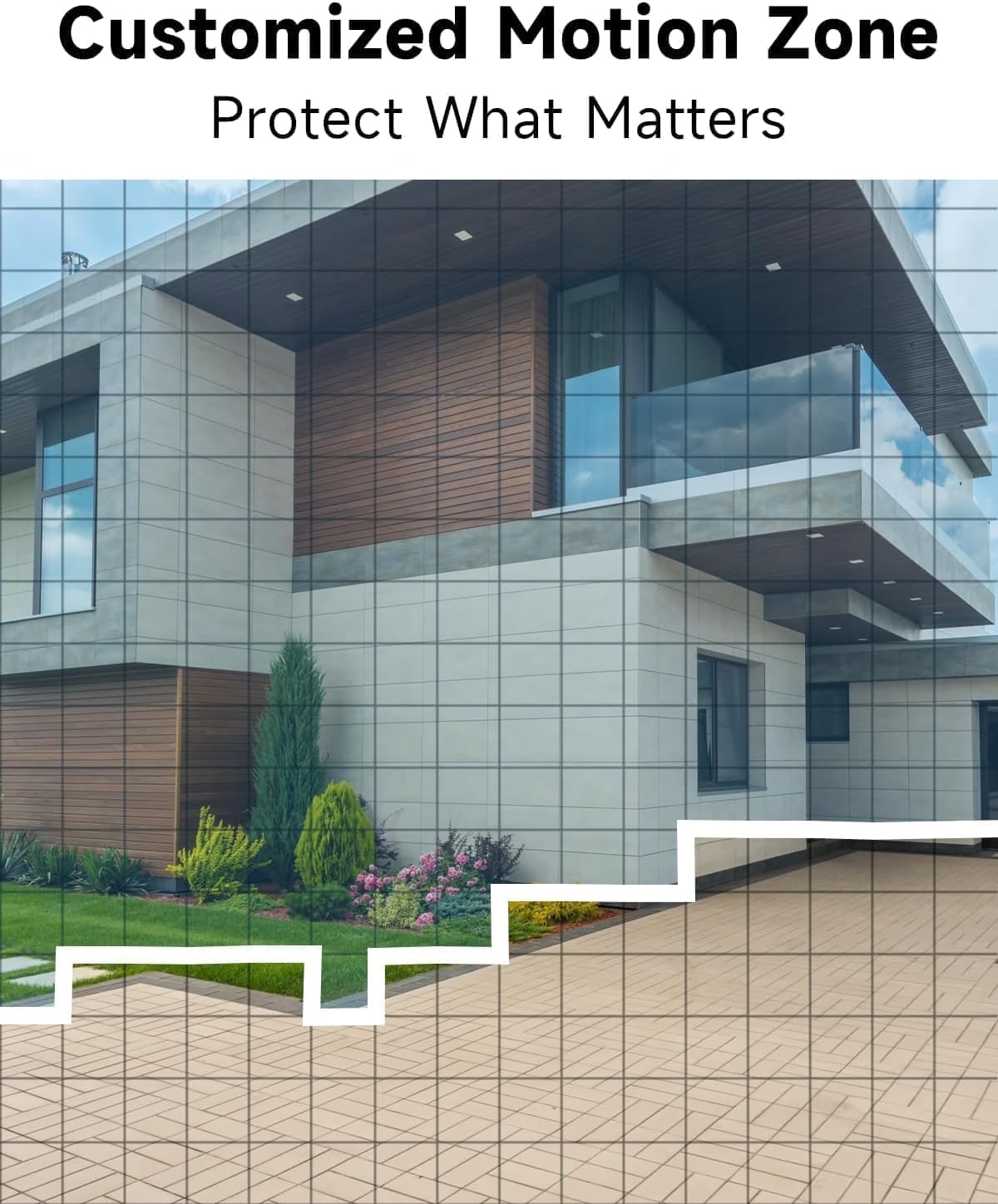
Vaizdas: pvzample of camera placement and customized motion zone setup.
3. Naudojimo instrukcijos
3.1 Tiesiogiai View
Access the VistaFlow app and select your camera to view the live feed. You can pinch to zoom and pan across the 130° wide-angle view. The 5MP resolution provides clear details.

Image: Visual comparison of 5MP versus 1080P video resolution.
3.2 Judesio aptikimas ir dirbtinio intelekto analizė
The camera uses a PIR sensor and AI analysis to detect motion, specifically identifying persons to reduce false alarms. When motion is detected, you will receive a notification on your phone.
- Customized Activity Zones: In the app settings, you can define specific areas within the camera's view kur turėtų būti aktyvus judesio aptikimas, ignoruojant kitas zonas.
- Jautrumo reguliavimas: Adjust the motion detection sensitivity to suit your environment and reduce unwanted alerts.

Image: AI Motion Detection in action, highlighting alert options.
3.3 Dvipusis garsas
The built-in microphone and speaker allow for real-time two-way communication. Tap the microphone icon in the live view to speak through the camera, and listen to audio from the camera's location.

Image: Demonstrating two-way audio communication.
3.4 Naktinis matymas
Kamera turi du naktinio matymo režimus:
- Spalvotas naktinis matymas: Utilizes the built-in spotlight to provide color images in low-light conditions.
- Infraraudonųjų spindulių nakties vizija: Naudoja infraraudonųjų spindulių šviesos diodus, kad būtų galima gauti nespalvotus vaizdus visiškoje tamsoje.
Programėlės nustatymuose galite perjungti šiuos režimus arba nustatyti juos į automatinius.

Image: Comparison of color and infrared night vision modes.
3.5 Siren Alarm & Spotlight
In response to motion detection, or manually activated via the app, the camera can trigger a siren alarm and turn on its spotlight to deter intruders. You can customize the siren sound with pre-recorded messages.
3.6 Saugojimo parinktys
Kamera palaiko du įrašytų vaizdo įrašų saugojimo būdus:
- Saugykla debesyje: A free rolling 3-day cycled cloud storage service is provided. Optional subscription plans may be available for extended cloud storage.
- „Micro SD“ kortelė: Insert a micro SD card (up to 256GB, not included) into the camera's SD card slot for local storage.
3.7 „Alexa“ integracija
The Rraycom camera is compatible with Amazon Alexa. To enable this feature:
- Atidarykite „Alexa“ programėlę savo mobiliajame įrenginyje.
- Go to "Skills & Games" and search for "VistaFlow".
- Enable the skill and link your VistaFlow account.
- Atraskite įrenginius.
You can then use voice commands such as: "Alexa, show me the [camera name]" to view tiesioginę transliaciją suderinamuose „Alexa“ įrenginiuose (pvz., „Echo Show“).
4. Priežiūra
4.1 Akumuliatoriaus valdymas
The camera is powered by a rechargeable battery. Battery life varies based on usage, motion detection frequency, and environmental factors.
- Įkrovimas: When the battery level is low, you will receive a notification via the app. Disconnect the camera from its mount and charge it using the provided USB cable.
- Baterijos veikimo laiko optimizavimas: Reduce motion detection sensitivity, shorten recording duration, and minimize live view access to extend battery life.
4.2 Valymas
Periodically clean the camera lens and body to ensure optimal performance.
- Use a soft, dry, lint-free cloth to wipe the lens. For stubborn smudges, a slightly damp galima naudoti šluostę, po to – sausą.
- Nuvalykite kameros korpusą reklaminiu valikliuamp audinys. Venkite naudoti stiprių cheminių medžiagų ar abrazyvinių valiklių.
5. Problemų sprendimas
5.1 Bendrosios problemos ir sprendimai
| problema | Galimas sprendimas |
|---|---|
| Kamera neprisijungia prie „Wi-Fi“. | Ensure your Wi-Fi is 2.4GHz. Check Wi-Fi signal strength at the camera's location. Restart your router and the camera. Re-attempt pairing in the app. |
| Judesio aptikimas neveikia arba per daug klaidingų aliarmų | Check motion detection settings in the app. Adjust sensitivity. Define activity zones to exclude irrelevant areas. Ensure camera lens is clean. |
| Prasta vaizdo kokybė | Ensure the camera lens is clean. Check Wi-Fi signal strength. Ensure the camera is set to 5MP resolution in app settings if available. |
| Akumuliatorius neįkraunamas | Ensure the USB cable is securely connected. Try a different USB power adapter. Check if the charging port is clean and free of debris. |
| Cannot hear or speak through two-way audio | Patikrinkite garsumo nustatymus telefone ir programėlėje. Įsitikinkite, kad programėlei suteikti leidimai naudoti mikrofoną ir garsiakalbį. |
6. Techninės specifikacijos
| Funkcija | Specifikacija |
|---|---|
| Rezoliucija | 5MP (2.5K QHD) |
| Laukas View | 130° |
| Ryšys | „Wi-Fi“ (tik 2.4 GHz) |
| Maitinimo šaltinis | Maitinamas baterijomis |
| Atsparumas oro sąlygoms | IP65 Atsparus vandeniui |
| Naktinis matymas | Full-Color, Infrared |
| Garsas | 2 krypčių garsas |
| Judesio aptikimas | PIR with AI Analysis (Person Detection) |
| Saugojimo parinktys | Cloud (3-day free rolling), Micro SD Card (up to 256GB) |
| Išmaniųjų namų integracija | Amazon Alexa |
| Suderinami įrenginiai | iOS, Android |
| Naudojimas viduje / lauke | Lauke |
7. Garantija ir klientų aptarnavimas
7.1 Informacija apie garantiją
Rraycom products come with a limited warranty. Please refer to the warranty card included in your package or visit the official Rraycom websvetainėje, kurioje pateikiamos išsamios garantijos sąlygos.
7.2 Pagalba klientams
If you encounter any issues or have questions regarding your Rraycom 5MP Wireless Security Camera, please contact our customer support team. Contact information can be found on the Rraycom websvetainėje arba produkto pakuotėje.