
Produktas baigtasview
The Ymiko Alarm Clock with Bed Shaker is designed to provide a reliable wake-up solution, especially for heavy sleepers. It features adjustable volume, multiple wake-up modes, and a vibrating bed shaker to ensure you wake up on time.

Vaizdas: The Ymiko Alarm Clock, bed shaker, and USB cable. This image displays all components included in the package.
Pakuotės turinys
Patikrinkite, ar pakuotėje yra visi reikalingi daiktai:
- 1 x žadintuvas
- 1 x Bed Shaker
- 1 x naudojimo instrukcija
- 1x USB laidas
Sąranka
Žadintuvo įjungimas
The alarm clock can be powered via the included USB cable or by batteries for backup.
- Connect the USB cable to the alarm clock's power input port and plug the other end into a compatible USB power adapter (not included) or a USB port.
- For battery backup, open the battery compartment on the back of the alarm clock and insert 2 x AAA batteries (not included), ensuring correct polarity.
Connecting the Bed Shaker
To utilize the vibration feature, connect the bed shaker to the alarm clock.
- Locate the dedicated port for the bed shaker on the alarm clock.
- Insert the bed shaker's plug firmly into this port.
- Place the bed shaker under your pillow or mattress for optimal vibration.
Vaizdas: Galinis view of the alarm clock, highlighting the power input and bed shaker port.
Naudojimo instrukcijos
Laiko nustatymas
- Paspauskite LAIKO NUSTATYMAS button. The time display will begin to flash.
- Pasukite left bell knob (HR SETTING / DIMMER) to adjust the hour.
- Pasukite right bell knob (MIN SETTING / DIMMER) to adjust the minute.
- Paspauskite LAIKO NUSTATYMAS dar kartą, kad patvirtintumėte ir išeitumėte iš laiko nustatymo režimo.

Vaizdas: Šoninė view of the alarm clock showing the "TIME SET" button and other controls.
Switching 12/24 Hour Format
The default time format is 12-hour.
- Paspauskite 12/24 val. mygtuką, kad perjungtumėte 12 valandų ir 24 valandų rodymo formatus.
1 signalo nustatymas
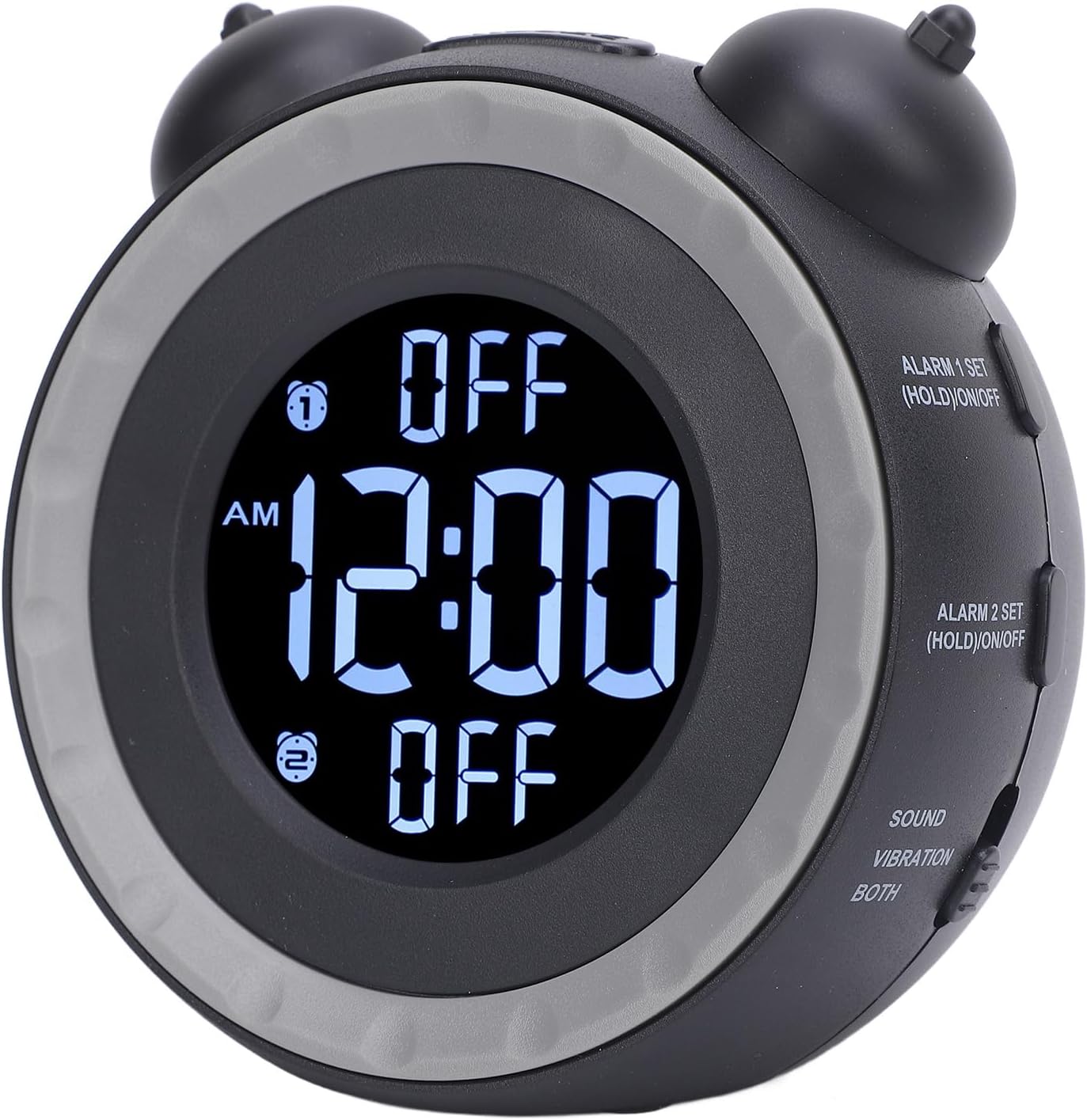
- Paspauskite ir palaikykite ALARM 1 SET (HOLD)/ON/OFF button for 3 seconds. The Alarm 1 time will flash.
- Pasukite left bell knob , kad sureguliuotumėte žadintuvo valandą.
- Pasukite right bell knob , kad sureguliuotumėte žadintuvo minutes.
- Paspauskite 1 SIGNALAS NUSTATYMAS dar kartą, kad patvirtintumėte ir išeitumėte iš žadintuvo nustatymo režimo.
- To turn Alarm 1 ON or OFF, short press the ALARM 1 SET (HOLD)/ON/OFF button. An indicator will appear on the display when Alarm 1 is active.

Vaizdas: Šoninė view of the alarm clock showing the "ALARM 1 SET" and "ALARM 2 SET" buttons.
2 signalo nustatymas
Follow the same steps as Setting Alarm 1, but use the ALARM 2 SET (HOLD)/ON/OFF mygtuką.
Adjusting Alarm Sound and Wake-up Mode
The alarm clock offers 3 wake-up modes and 3 music alarm tones.
- Paspauskite ALARM GARSAS button to cycle through the available alarm tones (e.g., beeping, bird chirping, music).
- Naudokite SOUND / VIBRATION / BOTH switch to select your preferred wake-up mode:
- GARSU: Alarm will only use the selected sound tone.
- VIBRACIJA: Alarm will only use the bed shaker.
- Abu: Alarm will use both the selected sound tone and the bed shaker.
Garso reguliavimas
The alarm volume can be adjusted to suit your preference.
- Paspauskite TOMAS button to adjust the alarm sound level.
Adjusting Screen Brightness (Dimmer)
The display brightness can be continuously adjusted.
- Pasukite HR SETTING / DIMMER knob (left bell knob) or MIN SETTING / DIMMER knob (right bell knob) to adjust the screen brightness.

Vaizdas: Į viršų view of the alarm clock, indicating the hour and minute setting knobs which also function as dimmer controls.
Snaudimo funkcija
Kai skamba žadintuvas, paspauskite SNAIGĖ button located on top of the clock to temporarily pause the alarm. The alarm will sound again after a short interval.
Priežiūra
To ensure the longevity and proper functioning of your Ymiko Alarm Clock, follow these maintenance guidelines:
- Valymas: Wipe the alarm clock and bed shaker with a soft, dry cloth. Do not use abrasive cleaners, solvents, or harsh chemicals, as these can damage the surfaces.
- Saugykla: If storing the device for an extended period, remove the AAA batteries to prevent leakage. Store in a cool, dry place away from direct sunlight and extreme temperatures.
- Venkite vandens: Keep the alarm clock and bed shaker away from water and high humidity. This device is not waterproof.
- Elkitės atsargiai: Saugokitės, kad prietaisas nenukristų ir nepatirtų stipraus smūgio.
Trikčių šalinimas
If you encounter issues with your Ymiko Alarm Clock, refer to the following common problems and solutions:
| Problema | Galima priežastis | Sprendimas |
|---|---|---|
| Clock display is blank or flickering. | Nėra maitinimo arba išsikrovęs akumuliatorius. |
|
| Žadintuvas neskamba ir nevibruoja. | Alarm not activated, volume too low, or bed shaker not connected. |
|
| Cannot set time or alarm. | Neteisinga mygtukų seka arba režimas. |
|
| Ekranas per ryškus arba per tamsus. | Reikia pakoreguoti pritemdymo nustatymus. |
|
Specifikacijos
| Funkcija | Detalė |
|---|---|
| Prekės ženklas | Ymiko |
| Modelio numeris | Ymikovzge57sar2 |
| Ekrano tipas | Skaitmeninis |
| Gaminio matmenys (P x A) | 4.72 colio pločio x 4.33 colio aukščio |
| Maitinimo šaltinis | AC/DC (USB connectivity) |
| Baterijos reikalavimas | 2 x AAA baterijos (į komplektą neįeina) |
| Rėmo medžiaga | Akrilnitrilo butadieno stirenas |
| Ypatingos savybės | Adjustable volume, 3 wake-up modes, 3 alarm tones, bed shaker, screen brightness dimmer. |
| Naudojimas viduje / lauke | Vidinis |
Informacija apie garantiją
For detailed warranty information regarding your Ymiko Alarm Clock, please refer to the warranty card included in your product packaging or visit the official Ymiko websvetainėje. Garantijos sąlygos gali skirtis priklausomai nuo regiono ir mažmenininko.
Palaikymas
If you require further assistance or have questions not covered in this manual, please contact Ymiko customer support.
- Palaikymas internetu: Visit the official Ymiko store on Amazon for product information and support resources: Ymiko Store
- Kontaktinė informacija: Refer to your product packaging or the Ymiko website for specific customer service contact details.