
1. Įvadas
Thank you for choosing the ELISWEEN Wireless PC Gaming Controller. This controller is designed to provide a superior gaming experience across multiple platforms, including PC, Nintendo Switch, Android, and iOS devices. Featuring advanced Hall Effect joysticks, programmable back buttons, and customizable vibration, this manual will guide you through its setup, operation, and maintenance to ensure optimal performance.
2. Pakuotės turinys
- ELISWEEN Wireless PC Gaming Controller
- USB-C įkrovimo laidas (1.5 m)
- 2.4 GHz USB raktas
- Vartotojo vadovas
3. Produktas baigtasview
Familiarize yourself with the controller's components:
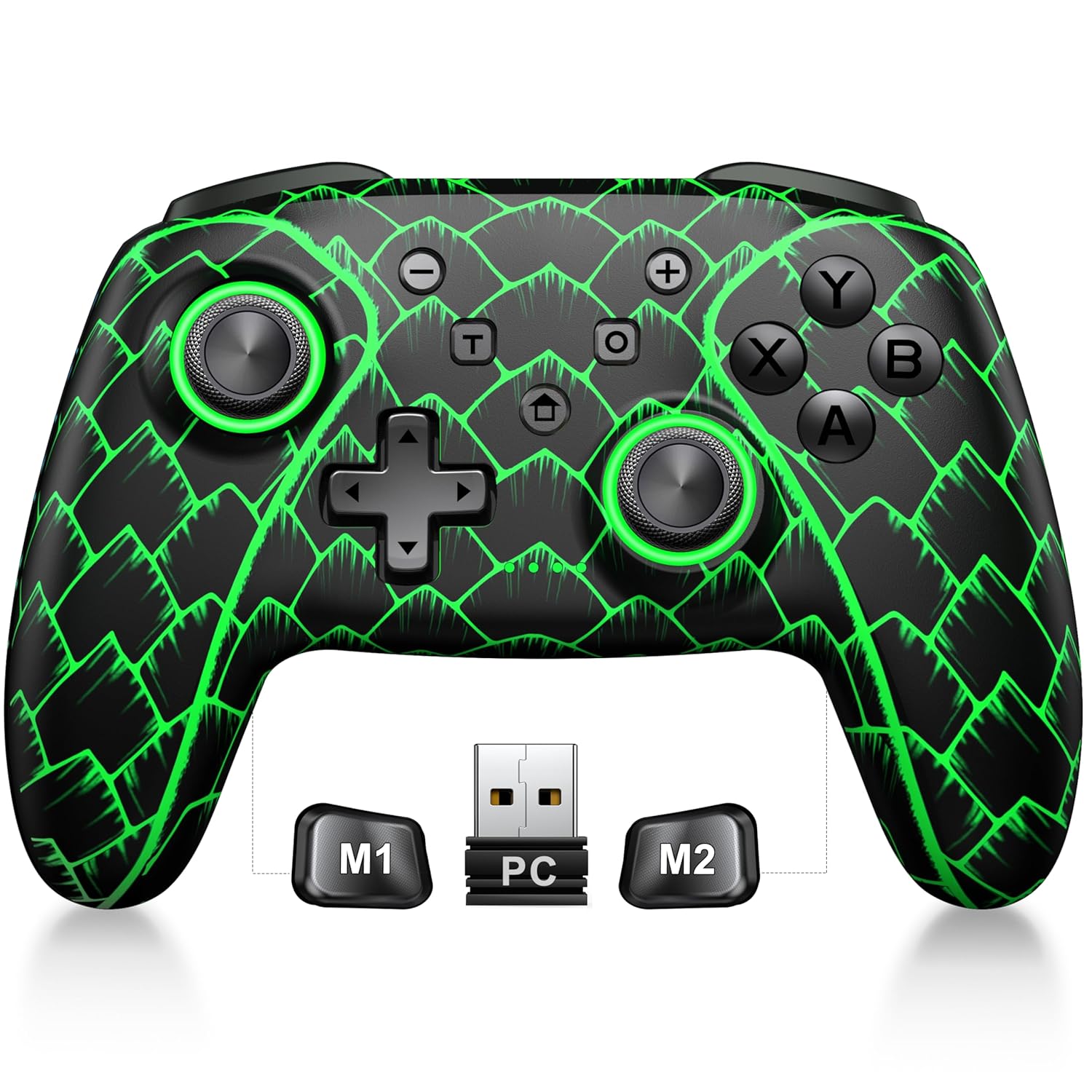
Figure 3.1: ELISWEEN Wireless PC Gaming Controller with its 2.4GHz USB dongle and highlighted M1/M2 programmable buttons.
- Kairysis/dešinysis analoginiai valdikliai: Hall Effect joysticks for precise movement.
- D-Pad: Kryptinis įvedimas.
- Veiksmų mygtukai (A/B/X/Y): Standartiniai žaidimų įvesties mygtukai.
- Pečių sagos (K/D): Viršuje montuojami mygtukai.
- Trigger Buttons (ZL/ZR): Hall Effect analog triggers.
- M1/M2 mygtukai: Programuojami mygtukai atgal.
- Namų mygtukas: Powers on/off and returns to system home screen.
- +/- mygtukai: System navigation/menu buttons.
- Ekrano kopijos mygtukas: Fiksuoja ekrano kopijas.
- Turbo mygtukas: Įjungia / išjungia turbo funkciją.
- USB-C prievadas: Įkrovimui ir laidiniam prijungimui.
4. Sąranka ir prijungimas
4.1 Valdiklio įkrovimas
Before first use, fully charge the controller. Connect the USB-C cable to the controller's USB-C port and the other end to a USB power source (e.g., PC, USB wall adapter). The charging indicator will show status and turn off when fully charged. A full charge takes approximately 3 hours.
4.2 Connecting to PC (Wireless 2.4GHz)

Figure 4.1: Multi-platform compatibility of the ELISWEEN controller, including PC, Switch, Android, and iOS.
- Insert the 2.4GHz USB dongle into an available USB port on your PC.
- Press the Home button on the controller to power it on.
- The controller will automatically connect to the dongle. The indicator lights will stabilize once connected.
4.3 Connecting to PC (Wired USB-C)
- Connect the USB-C cable to the controller and the other end to your PC.
- The controller will be recognized as a plug-and-play device.
4.4 Prijungimas prie „Nintendo Switch“
- On your Nintendo Switch, go to System Settings > Controllers and Sensors > Disconnect Controllers.
- Tada eikite į Valdikliai ir jutikliai > Keisti rankeną / tvarką.
- Press and hold the Home button on the ELISWEEN controller until the indicator lights begin to flash rapidly.
- Once paired, the indicator light(s) corresponding to the player number will remain solid.
4.5 Connecting to Android/iOS (Bluetooth)
- Įsitikinkite, kad jūsų „Android“ arba „iOS“ įrenginyje įjungtas „Bluetooth“.
- On the controller, press and hold the X + Home buttons simultaneously until the indicator lights flash rapidly, indicating pairing mode.
- On your device, search for Bluetooth devices and select "STK-7040RG" (or similar) to pair.
- Once connected, the indicator light will stabilize. Supports iOS 13+ MFi titles.
5. Naudojimo instrukcijos
5.1 Holo efekto valdymo svirtelės
The controller features precision Hall Effect joysticks and triggers, designed to prevent stick drift and provide accurate, responsive control. These magnetic, contactless sensors ensure long-term durability and precision.

5.1 pav. Vidinis view of Hall Effect joystick technology, highlighting its magnetic, contactless design for enhanced accuracy and durability.
Zero Deadzone Mode: For competitive gaming, activate a temporary 0 deadzone mode by holding the T mygtukas + R3 (right stick click) or L3 (left stick click). A green light confirms activation. To revert to default calibration, press the same combo (blue light indicator). The controller automatically resets to factory default settings upon restart for consistent anti-drift performance.
5.2 Programuojami grįžimo mygtukai (M1/M2)
The M1 and M2 back buttons can be programmed to map up to 21 different key combinations, allowing for quick execution of complex actions.

Figure 5.2: The M1 and M2 programmable back buttons, capable of mapping up to 21 different actions for enhanced control.
Refer to the Keylinker App (search "NC300") for detailed instructions on programming and customizing these buttons.
5.3 Turbo funkcija
The controller supports Turbo fire functionality for 10 action buttons with adjustable speeds (5, 12, or 20 presses per second).
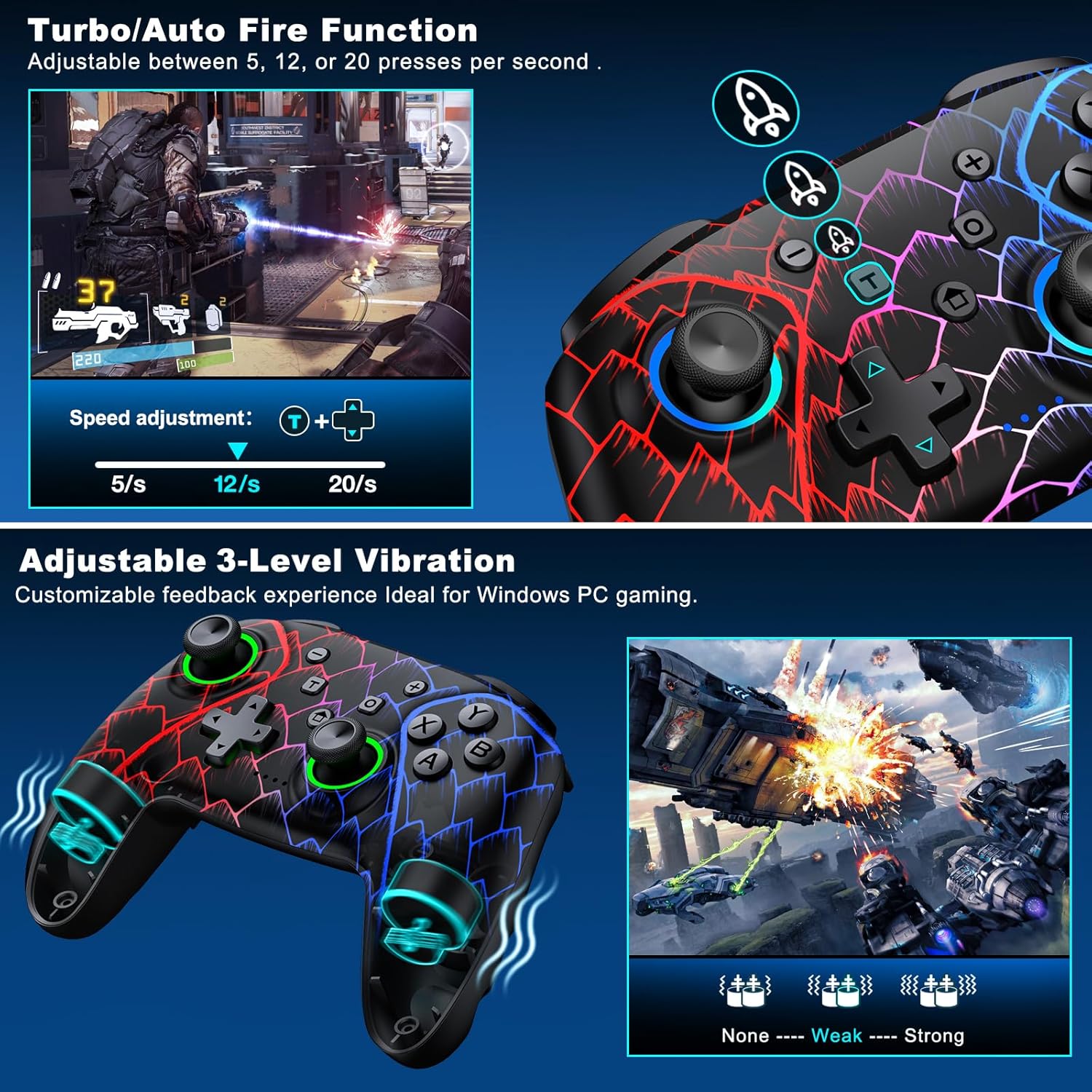
Figure 5.3: Visual representation of the Turbo/Auto Fire function and the adjustable 3-level vibration feature.
- Įjunkite turbo režimą: Paspauskite Turbo button + the desired action button.
- Sureguliuokite greitį: Paspauskite Turbo + Up arrow (increase) or Žemyn arrow (decrease) on the D-pad.
- Clear Turbo: Laikykite Minusas mygtukas + Žemyn arrow on the D-pad to instantly clear all Turbo binds.
5.4 Vibracijos reguliavimas
Experience immersive feedback with dual vibration motors offering 3 intensity levels.
- Adjust intensity by pressing L + R + ZL + ZR simultaneously. Cycle through levels: None, Weak, Strong.
- Note: Vibration is disabled on mobile platforms. Gyro functionality works only with Nintendo systems.
5.5 Hair Trigger Locks
Shorten trigger pulls for faster response times in games requiring quick inputs, such as first-person shooters.
5.6 Baterijos veikimo laiko valdymas
The controller is equipped with a 1000mAh battery, providing over 20 hours of continuous gameplay on a single charge. Charging takes approximately 3 hours via USB-C.

Figure 5.4: The ELISWEEN controller's 1000mAh battery provides extended playtime with quick charging capabilities.
5.7 Dinaminio apšvietimo efektai
Customize the controller's lighting effects via the Keylinker App (search "NC300").
5.8 Automatic Power-off
To conserve battery, the controller will automatically power off after 20 minutes of inactivity.
6. Priežiūra
- Valymas: Valdiklį valykite minkšta, sausa šluoste. Nenaudokite abrazyvinių valiklių ar tirpiklių.
- Saugykla: Laikykite valdiklį vėsioje, sausoje vietoje, apsaugotoje nuo tiesioginių saulės spindulių ir ekstremalių temperatūrų.
- Akumuliatoriaus priežiūra: Avoid fully discharging the battery frequently. Charge it regularly to prolong its lifespan.
7. Problemų sprendimas
- Valdiklis neprisijungia:
- Įsitikinkite, kad valdiklis įkrautas.
- Verify the correct connection method for your device (2.4GHz dongle for PC, Bluetooth for mobile, pairing for Switch).
- Pabandykite iš naujo paleisti valdiklį ir įrenginį, prie kurio jungiatės.
- For PC, try a different USB port for the dongle or wired connection.
- Stick drift or inaccurate input:
- Activate the 0 deadzone mode (T + R3/L3) to recalibrate.
- Ensure the controller firmware is up to date via the Keylinker App.
- Mygtukai nereaguoja:
- Patikrinkite, ar valdiklis tinkamai prijungtas.
- Įsitikinkite, kad po mygtukais nėra įstrigusių šiukšlių.
- Perform a factory reset if issues persist (refer to Keylinker App or contact support).
- Įkrovimo problemos:
- Išbandykite kitą USB-C laidą ir maitinimo šaltinį.
- Ensure the USB-C port on the controller is clean and free of obstructions.
8. Specifikacijos
| Ryšys | „Bluetooth 5.2“, 2.4 GHz belaidis ryšys, USB-C laidinis ryšys |
| Suderinamumas | PC, Nintendo Switch, Android, iOS (iOS 13+ MFi) |
| Baterijos talpa | 1000 mAh |
| Žaidimo laikas | 20+ valandos (apytiksliai) |
| Įkrovimo laikas | 3 valandų (maždaug) |
| Vairasvirtės | Hall Effect (Drift-Proof) |
| Programuojami mygtukai | 4 Back Buttons (M1/M2) |
| Vibracija | Dual Motors, 3 Adjustable Levels |
| Matmenys | 6.38 x 4.72 x 2.64 colio |
| Svoris | 11.99 uncijos (apie 340 g) |
| Gamintojas | Qixun Tech |
| Kilmės šalis | Kinija |
9. Garantija ir palaikymas
The ELISWEEN Wireless PC Gaming Controller comes with a standard manufacturer's warranty. For specific warranty terms and conditions, please refer to the product packaging or contact our customer support.
For any technical assistance, troubleshooting, or inquiries, our 24/7 Expert Support team is available to help. Please refer to the contact information provided on the product packaging or our official websvetainę.