
1. Įvadas
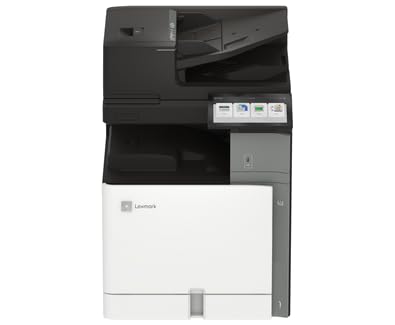
This manual provides essential information for the safe and efficient operation of your Lexmark CX962se MFP Color Laser Printer. Please read it thoroughly before using the device. The Lexmark CX962se is an A3 multifunction color laser printer designed for versatility and productivity, offering vivid prints up to 45 pages per minute, an intuitive 10-inch color touchscreen, and single-pass two-sided scanning capabilities.
2. Saugos informacija
- Elektros sauga: Always connect the printer to a grounded power outlet. Do not use damaged power cords. Disconnect the power cord before cleaning or servicing.
- Lazerio spinduliuotė: This product uses a laser. Use of controls or adjustments or performance of procedures other than those specified herein may result in hazardous radiation exposure.
- Karšti paviršiai: Internal components of the printer can become hot during operation. Avoid touching areas marked with a hot surface warning.
- Vėdinimas: Ensure adequate space around the printer for proper ventilation to prevent overheating. Do not block ventilation openings.
- Tonerio kasetės: Handle toner cartridges carefully. If toner comes into contact with skin or clothing, wash immediately with soap and cold water. Keep toner out of reach of children.
3. Pakuotės turinys
Patikrinkite, ar pakuotėje yra visi reikalingi daiktai:
- Lexmark CX962se MFP Color Laser Printer
- Maitinimo laidas
- Starter Toner Cartridges (Black, Cyan, Magenta, Yellow)
- Sąrankos vadovas
- Software and Documentation (may be provided via download link)
4. Sąranka
Follow these steps to set up your Lexmark CX962se printer:
- Išpakavimas: Carefully remove the printer from its packaging. Remove all protective tapes, films, and packing materials from the exterior and interior of the printer. Refer to the Setup Guide for specific locations.
- Vieta: Place the printer on a stable, level surface with adequate space for ventilation and access to power and data ports.
- Prijunkite maitinimą: Prijunkite maitinimo laidą prie spausdintuvo, o tada – prie įžeminto elektros lizdo.
- Pradinis įjungimas: Press the power button. Follow the on-screen instructions on the 10-inch color touchscreen to select language, region, and initial settings.
- Įdėkite tonerio kasetes: If not pre-installed, open the front cover and insert the toner cartridges into their corresponding slots until they click into place.
- Programinės įrangos diegimas: Insert the software CD (if provided) into your computer or visit the official Lexmark support website to download the latest drivers and utilities for your operating system. Follow the on-screen instructions to complete the installation.
- Prisijunkite prie kompiuterio: Connect the printer to your computer using a USB cable (not included) or configure network connectivity as per the software instructions.
5. Naudojimo instrukcijos
This section covers basic operations of your printer.
- Valdymo skydelis: The 10-inch color touchscreen provides access to all printer functions. Navigate through menus by tapping icons and swiping.
- Popieriaus įdėjimas: Open the paper tray, adjust the paper guides to fit the paper size (up to 8.5 x 11 inch), and load up to 250 sheets of plain paper. Ensure the paper is not creased or bent.
- Spausdinimas: From your computer, open the document you wish to print. Select "Print" from the application's menu, choose the Lexmark CX962se printer, adjust settings as needed (e.g., color, duplex), and click "Print."
- Kopijuojama: Place your document face-down on the scanner glass or face-up in the Automatic Document Feeder (ADF). On the printer's touchscreen, select "Copy," adjust settings like quantity, color, and duplex, then press "Start."
- Nuskaitymas: Place your document on the scanner glass or in the ADF. On the touchscreen, select "Scan." Choose your desired scan destination (e.g., computer, network folder, email) and adjust scan settings (e.g., resolution, file type), then press "Start."
6. Priežiūra
Reguliarus spausdintuvo aptarnavimas užtikrina optimalų našumą ir ilgaamžiškumą.
- Replacing Toner Cartridges: When a toner cartridge is low or empty, a message will appear on the touchscreen. Open the front cover, press the release lever for the empty cartridge, pull it out, and insert a new Lexmark genuine toner cartridge until it clicks into place. Close the cover.
- Spausdintuvo valymas: Use a soft, lint-free cloth to wipe the exterior of the printer. For the scanner glass, use a glass cleaner applied to the cloth (not directly to the glass) to remove smudges. Periodically clean the interior of the printer as instructed in the full user guide available on the Lexmark websvetainę.
- Firmware atnaujinimai: Periodically check the Lexmark support website for firmware updates. Installing the latest firmware can improve performance and add new features. Follow the instructions provided with the update.
7. Problemų sprendimas
Šiame skyriuje aptariamos dažniausiai pasitaikančios problemos, su kuriomis galite susidurti.
- Popieriaus strigtys: If a paper jam occurs, the touchscreen will display instructions on how to clear it. Carefully open the indicated access points and remove any jammed paper, ensuring no torn pieces remain.
- Spausdinimo kokybės problemos: If prints are faded, streaky, or have incorrect colors, check the toner levels. Perform a print quality diagnostic from the printer's control panel. Clean the print heads or transfer belt if recommended.
- Ryšio problemos: Ensure the USB cable is securely connected to both the printer and the computer. If using a network connection, verify network cables are connected and IP settings are correct. Restart both the printer and the computer.
- Klaidų kodai: If an error code appears on the display, note the code and refer to the Lexmark support website or the comprehensive user guide for detailed solutions.
8. Specifikacijos
| Prekės ženklas | Lexmark |
| Modelio pavadinimas | CX962se (20L8250) |
| Spausdinimo technologija | Lazeris |
| Funkcijos | Spausdinti, kopijuoti, nuskaityti |
| Didžiausias spausdinimo greitis (spalva) | 15 ppm |
| Maksimalus spausdinimo greitis (vienspalvis) | 35 ppm |
| Rezoliucija | 600 x 600 dpi |
| Ryšio technologija | USB |
| Skaitytuvo tipas | ADF (automatinis dokumentų tiektuvas) |
| Maksimali lapų talpa | 250 XNUMX lapų |
| Maksimalus laikmenos dydis | 8.5x11 colių |
| Gaminio matmenys (D x P x A) | 29" x 43" x 31" |
| Rašalo spalva | Juoda, žydra, rausvai raudona, geltona |
| Ypatinga funkcija | Automatinis įjungimas |
9. Garantija ir palaikymas
Your Lexmark CX962se MFP Color Laser Printer comes with a Ribota garantija. For specific terms and conditions of the warranty, please refer to the documentation included with your product or visit the official Lexmark websvetainę.
For further assistance, technical support, driver downloads, and additional documentation, please visit the official Lexmark support websvetainėje. Ten taip pat galite rasti klientų aptarnavimo kontaktinę informaciją.
„Lexmark“ oficialus asmuo Websvetainė: www.lexmark.com