
1. Įvadas
The Delton F75 Foldable Bluetooth Keyboard with Touchpad is designed for portability and convenience, offering a full-sized typing experience in a compact form factor. This manual provides detailed instructions for setting up, operating, and maintaining your keyboard to ensure optimal performance across various devices.
2. Pakuotės turinys
Patikrinkite pakuotę, ar joje yra šie daiktai:
- 1 x Delton F75 Foldable Bluetooth Keyboard with Touchpad
- 1 x USB-C įkrovimo laidas
- 1 x Naudotojo vadovas (šis dokumentas)
3. Produktas baigtasview
Familiarize yourself with the key components of your Delton F75 keyboard.
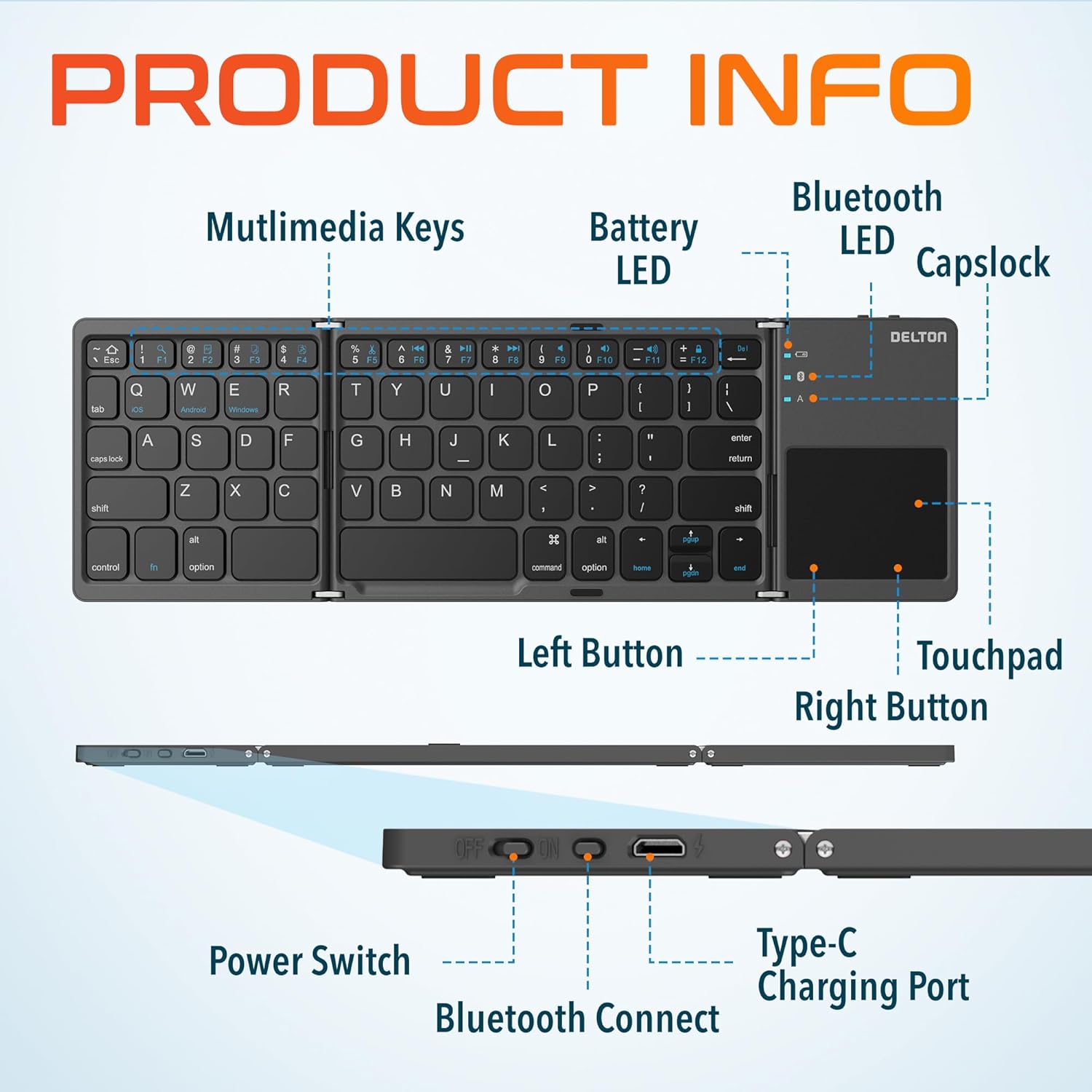
Image: Diagram showing multimedia keys, battery LED, Bluetooth LED, Capslock, Left/Right Touchpad Buttons, Touchpad, Power Switch, Bluetooth Connect button, and Type-C Charging Port.
- Multimedijos klavišai: Access various functions like volume control, media playback, and more.
- Baterijos šviesos diodas: Nurodo akumuliatoriaus būseną.
- „Bluetooth“ šviesos diodas: Nurodo Bluetooth ryšio būseną.
- Capslock Indicator: Shows when Caps Lock is active.
- Jutiklinė dalis: For navigation and gesture control.
- Kairysis / dešinysis jutiklinės planšetės mygtukai: Function as mouse clicks.
- Maitinimo jungiklis: Įjungia arba išjungia klaviatūrą.
- Bluetooth prisijungimo mygtukas: Įjungia „Bluetooth“ susiejimo režimą.
- C tipo įkrovimo prievadas: For recharging the keyboard's internal battery.
4. Sąranka ir prijungimas
4.1 Pradinis įkrovimas
Before first use, fully charge the keyboard. Connect the provided USB-C charging cable to the keyboard's Type-C port and the other end to a USB power source (e.g., computer, wall adapter). The Battery LED will indicate charging status.
4.2 Įjungimas / išjungimas
To power on the keyboard, slide the Power Switch to the "ON" position. To power off, slide it to the "OFF" position.
4.3 Bluetooth poravimas
- Unfold the keyboard completely. This action often automatically powers on the device.
- Paspauskite „Bluetooth Connect“ mygtukas (usually indicated by a Bluetooth icon) to enter pairing mode. The Bluetooth LED will blink, indicating it is discoverable.
- On your device (PC, laptop, tablet, smartphone), go to Bluetooth settings.
- Ieškokite available Bluetooth devices and select "Delton F75" (or similar name).
- Follow any on-screen prompts to complete the pairing process. The Bluetooth LED will stop blinking and remain solid once connected.
The keyboard supports seamless integration across Windows, macOS, iOS, and Android operating systems.

Image: Visual representation of the Delton F75 keyboard's compatibility with various tablets, phones, and laptops/PCs, including iPad, Galaxy Tab, iPhone, Galaxy, Google Pixel, OnePlus, iMac, Macbook, Dell, and HP, and operating systems like Windows, macOS, and iOS.
5. Naudojimo instrukcijos
5.1 Rašymas
The Delton F75 features an optimized key layout and scissor switch keys for comfortable and precise typing. The quiet keys minimize disturbance, making it suitable for various environments.
5.2 Jutiklinės planšetės naudojimas
The integrated touchpad supports full gesture functions, eliminating the need for an additional mouse. It includes left and right-click buttons for standard mouse operations.

Image: Close-up of the Delton F75 keyboard's sensitive touchpad, highlighting its gesture control capabilities with a finger touching the pad.
Refer to your device's operating system documentation for specific touchpad gestures supported.
5.3 Daugialypės terpės klavišai
The keyboard includes dedicated multimedia keys. These keys often require pressing the Fn (Function) key simultaneously with the desired multimedia key to activate their secondary functions (e.g., volume up/down, play/pause).
6. Įkrovimas ir baterijos veikimo laikas
The Delton F75 keyboard is equipped with a rechargeable battery that provides up to 50 hours of continuous use on a single charge. When the battery is low, the Battery LED will indicate this status. Connect the keyboard to a power source using the USB-C cable for recharging.
7. Priežiūra
- Keep the keyboard clean by wiping it with a soft, dry cloth.
- Venkite klaviatūros laikymo ekstremaliose temperatūrose, drėgmėje ar tiesioginiuose saulės spinduliuose.
- Nenaudokite stiprių chemikalų ar abrazyvinių valiklių.
- Store the keyboard in its folded, compact state when not in use to protect the keys and touchpad.
8. Problemų sprendimas
- Klaviatūra neprisijungia per „Bluetooth“: Ensure the keyboard is charged and powered on. Make sure Bluetooth is enabled on your device and the keyboard is in pairing mode (Bluetooth LED blinking). Try unpairing and re-pairing the device.
- Klavišai nereaguoja: Check if the keyboard is powered on and connected. Ensure the battery is not depleted.
- Jutiklinė planšetė neveikia: Verify the keyboard is connected. Some devices may require specific settings for external touchpads.
- Pertraukiamas ryšys: Ensure there are no obstructions between the keyboard and your device. Move closer to your device. Avoid strong electromagnetic interference.
- Typing lag: This can sometimes be due to interference or a low battery. Try recharging the keyboard or moving closer to your device.
9. Specifikacijos
| Funkcija | Specifikacija |
|---|---|
| Modelio numeris | F75 |
| Produkto matmenys (išlankstytas) | 11.9 x 6 x 0.7 colio (I x P x A) |
| Prekės svoris | 8.4 uncijos |
| Ryšio technologija | Bluetooth |
| Suderinami įrenginiai | Laptop, PC, Tablet, Smartphone (Windows, macOS, iOS, Android) |
| Klaviatūros aprašymas | Ergonomic, Scissor Switch Keys |
| Ypatingos savybės | Foldable, Portable, Touchpad, Rechargeable, Hotkeys and Media Keys, Lightweight, Compact |
| Baterijos veikimo laikas | Iki 50 valandų nepertraukiamo naudojimo |
| Įkrovimo prievadas | C tipas |
| Medžiaga | Plastikas ir Metalas |
| Spalva | Juoda |
10. Garantija ir palaikymas
For warranty information or technical support, please refer to the documentation included with your purchase or visit the official Delton websvetainėje. Išsaugokite pirkimo įrodymą garantiniams reikalavimams.