
Svarbi saugos informacija
Please read this manual carefully before assembly and use. Keep it for future reference.
- Always ensure the desk is properly anchored to the wall or floor to prevent tipping. Use appropriate anchoring hardware for your wall type.
- Do not place heavy objects on the desk that could cause it to tip or become unstable. Distribute weight evenly.
- Exercise caution during assembly to avoid injuries from heavy or sharp components. It is recommended to assemble with two people.
- Laikykite vaikus ir naminius gyvūnus toliau nuo surinkimo zonos.
- Prieš naudodami įsitikinkite, kad visi varžtai ir tvirtinimo detalės yra tvirtai priveržti. Periodiškai patikrinkite ir prireikus priveržkite.
- Do not overload the integrated power outlets. Refer to the specifications for maximum load.
Sąranka ir surinkimas
This Grandder L-Shaped Gaming Desk (Model E109-40T) requires assembly. The package includes detailed assembly instructions. While all necessary tools are not included, standard household tools may be required.
Pakuotės turinys
Verify that all components listed in the included assembly guide are present before beginning assembly.
- Desk panels (carbon fiber surface, MDF)
- Metalinio rėmo komponentai
- Monitoriaus stovas
- Integrated power strip (2 AC outlets, 1 USB, 1 Type-C)
- LED light strip with controller
- Surinkimo detalės (varžtai, veržlės ir kt.)
- Surinkimo instrukcija
Surinkimo žingsniai
- Išpakuokite ir atpažinkite: Atsargiai išpakuokite visus komponentus ir padėkite juos ant švaraus, minkšto paviršiaus, kad nesusibraižytumėte. Kiekvieną dalį atpažinkite pagal pateiktą surinkimo schemą.
- Rėmo surinkimas: Assemble the main metal frame according to the instructions. Ensure all connections are secure but do not fully tighten screws until the entire frame is assembled.
- Apverčiamas dizainas: Decide whether you want the L-shaped corner on the left or right side of the desk. The design is reversible, allowing for flexible placement. Follow the specific instructions for your chosen orientation.
- Pritvirtinkite stalo plokštes: Secure the carbon fiber desk panels to the assembled frame.
- Monitoriaus stovo montavimas: Attach the monitor stand to the main desk surface.
- Integruotas maitinimo blokas: Install the recessed power strip into its designated slot. Connect the power cable.
- Užtepkite LED šviesos juostelę: Adhere the LED light strip to the underside of the monitor stand or as indicated in the manual. Connect it to the power source.
- Sandėliavimo lentynos įrengimas: Attach the adjustable storage shelf to the side frame. This shelf is also removable.
- Galutinis priveržimas: Kai visi komponentai yra savo vietose ir sulygiuoti, visiškai priveržkite visus varžtus ir tvirtinimo detales.
- Išdėstymas ir tvirtinimas: Position the desk in its desired location. For safety, anchor the desk to a wall using appropriate hardware (not included) to prevent tipping, especially if heavy equipment is placed on it.

Figure 1: Dimensions and reversible design of the Grandder L-shaped gaming desk. The corner section can be installed on either the left or right side.
Naudojimo instrukcijos
Integruotas maitinimo blokas
The desk features a recessed power strip for convenient access to power and charging.
- AC lizdai: Two 125V/12A AC outlets are provided for powering devices such as monitors, computers, or other peripherals.
- USB prievadai: One 5V/3A USB-A port and one 5V/3A USB-C port are available for charging smartphones, tablets, and other USB-powered devices.
- Maitinimo kabelis: The integrated power strip is connected via a 1.5m power cable. Plug this cable into a standard wall outlet.
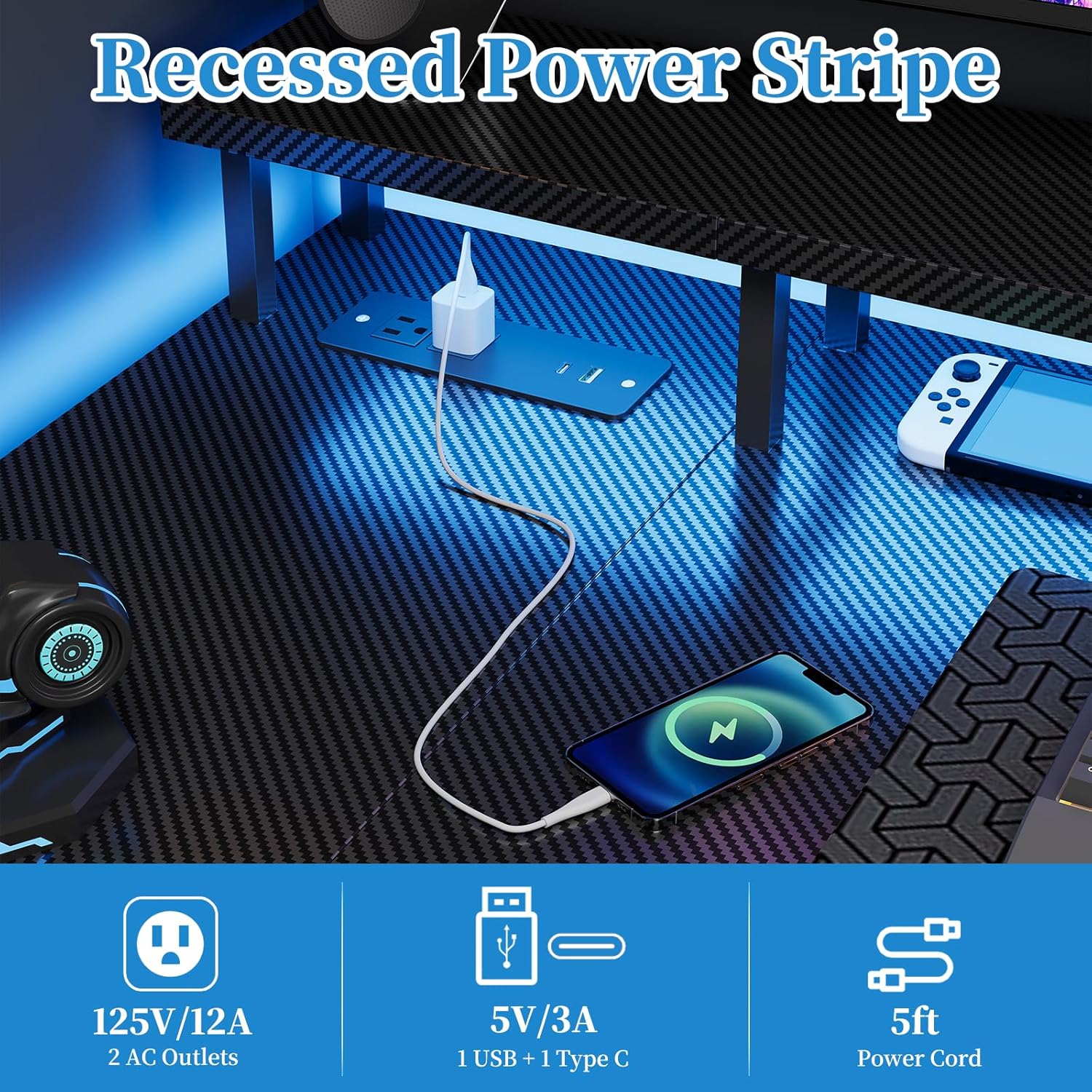
Figure 2: Recessed power strip with AC, USB-A, and USB-C outlets.
LED šviesos juostos veikimas
The desk includes a multi-functional LED light strip to enhance your environment. It is controlled via an inline controller.
- Maitinimo įjungimas/išjungimas: Use the power button on the controller to turn the LED strip on or off.
- Spalvos pasirinkimas: Cycle through various colors using the color selection button. The strip offers 20 color change options.
- Ryškumo reguliavimas: Adjust the brightness levels to your preference using the dedicated brightness buttons.
- Greičio valdymas: For dynamic lighting modes, adjust the speed of color transitions or effects.
- Predefined Modes: The controller may offer several predefined lighting modes for different atmospheres.

Figure 3: LED light strip with controller for color, brightness, and speed adjustments.
Monitor Stand and Storage Shelf
- Monitoriaus stovas: The elevated monitor stand promotes ergonomic viewing posture, reducing neck and eye strain. Place your monitor(s) directly on this stand.
- Adjustable Storage Shelf: The side storage shelf can be adjusted or removed to accommodate various items, such as a computer tower, books, or accessories.

Figure 4: Ergonomic design of the monitor stand for improved posture.

Figure 5: Adjustable storage shelf for flexible organization.
Priežiūra
- Valymas: Stalo paviršius nuvalykite minkšta,amp cloth. Avoid abrasive cleaners or harsh chemicals that could damage the carbon fiber finish or MDF.
- Tvirtinimo detalės: Periodiškai patikrinkite visus varžtus ir tvirtinimo detales, kad jie būtų tvirtai priveržti. Jei reikia, priveržkite, kad išlaikytumėte stabilumą.
- Elektriniai komponentai: Ensure the power strip and LED light strip connections are secure. Do not attempt to repair electrical components yourself. If damage occurs, discontinue use and contact customer support.
- Svorio pasiskirstymas: Avoid concentrating heavy loads on one area of the desk. Distribute weight evenly across the surface and shelves.
Trikčių šalinimas
Desk Instability
- Problema: Rašomasis stalas svyruoja arba jaučiasi nestabilus.
- Sprendimas:
- Patikrinkite visus surinkimo varžtus ir veržles. Priveržkite visas atsilaisvinusias tvirtinimo detales.
- Ensure the desk is on a level surface. Use leveling feet (if included) or shims to stabilize.
- Verify that the desk is properly anchored to the wall if heavy items are placed on it.
Neveikia maitinimo lizdai
- Problema: Devices plugged into the AC or USB ports are not receiving power.
- Sprendimas:
- Ensure the desk's main power cable is securely plugged into a functional wall outlet.
- Patikrinkite, ar pats sieninis lizdas veikia, prijungdami prie jo kitą įrenginį.
- Avoid overloading the power strip. Disconnect some devices to see if power is restored.
- If the issue persists, contact customer support. Do not attempt to disassemble the power strip.
LED Light Strip Not Functioning
- Problema: The LED light strip does not turn on or is not responding to the controller.
- Sprendimas:
- Ensure the LED strip is properly connected to its power source and the controller.
- Check if the main power cable for the desk is plugged in.
- Verify that the controller's battery (if applicable) is functional or that it is receiving power.
- Try pressing the power button on the controller firmly.
- Jei problema išlieka, susisiekite su klientų aptarnavimo tarnyba.
Gaminio specifikacijos
| Modelio numeris | E109-40T |
| Prekės ženklas | Grandder |
| Tipas | Reversible L-Shaped Gaming Desk |
| Matmenys (I x P x A) | 100 x 50 x 75 cm (main section), 70 x 100 x 75 cm (overall L-shape) |
| Svoris | 12.8 kilogramo |
| Spalva | Carbon Black Aspect |
| Medžiaga | Carbon Fiber Surface, Engineered Wood (MDF) |
| Maitinimo lizdai | 2 x AC (125V/12A), 1 x USB-A (5V/3A), 1 x USB-C (5V/3A) |
| Maitinimo kabelio ilgis | 1.5 metrų |
| Ypatingos savybės | Integrated LED Lights, Recessed Power Strip, Monitor Stand, Reversible L-Shape, Adjustable Storage Shelf |
| Reikalingas surinkimas | Taip |
Informacija apie garantiją
The Grandder L-Shaped Gaming Desk (Model E109-40T) comes with a Visą gyvenimą trunkanti garantija. This warranty covers manufacturing defects and material flaws under normal use. It does not cover damage resulting from misuse, accidents, unauthorized modifications, or normal wear and tear.
To make a warranty claim, please retain your proof of purchase and contact Grandder customer support.
Pagalba klientams
If you have any questions, require assistance with assembly, or encounter any issues with your Grandder L-Shaped Gaming Desk, please do not hesitate to contact our professional customer service team.
Our team is available 24/7 to provide prompt and reliable assistance.
Kontaktinė informacija: Please refer to the contact details provided on your purchase receipt or the Grandder official websvetainė, kurioje rasite naujausius palaikymo kanalus.


