
Įvadas
The VTech PAW Patrol Light-Up Missions Pup Pad is an interactive electronic learning toy designed for children aged 3 years and up. This device features 26 light-up letter buttons and offers various activities to help children learn letters, words, spelling, and counting, all while engaging with their favorite PAW Patrol characters.

Priekyje view of the VTech PAW Patrol Light-Up Missions Pup Pad, displaying its interactive screen and character details.
Kas yra dėžutėje
- PAW Patrol Light-Up Missions Pup Pad
- Greitos pradžios vadovas
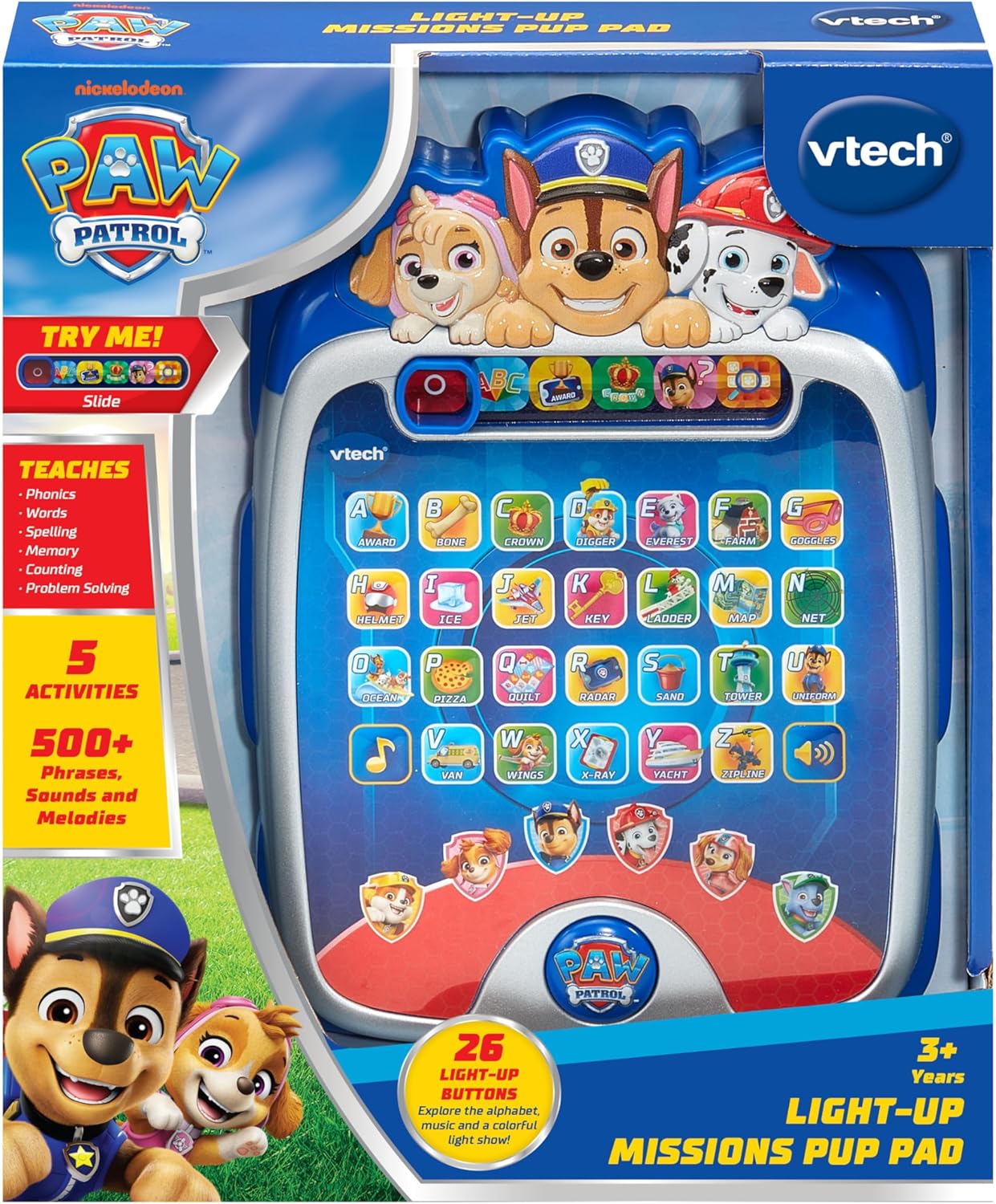
The PAW Patrol Light-Up Missions Pup Pad as it appears in its packaging.
Akumuliatoriaus montavimas
The Pup Pad requires 3 AA batteries for operation. Batteries are included for demonstration purposes only. For regular use, new batteries are recommended.
- Suraskite akumuliatoriaus skyrių įrenginio gale.
- Atsuktuvu atlaisvinkite baterijų skyriaus dangtelio varžtą.
- Nuimkite dangtelį.
- Įdėkite 3 naujas AA baterijas, užtikrindami teisingą poliškumą (+/-).
- Uždėkite akumuliatoriaus skyriaus dangtelį ir priveržkite varžtą.
Always use fresh batteries of the recommended type. Do not mix old and new batteries or different types of batteries.
Darbo pradžia
To power on the Pup Pad, locate the On/Off switch, typically found on the side or top of the device. Slide the switch to the 'On' position. The device will greet you and prompt you to begin an activity.

The Pup Pad screen with all letter buttons lit up, indicating it is ready for play.
Operating Modes and Activities
The Pup Pad offers several interactive learning activities. Use the mode selector buttons at the top of the screen to switch between activities.
1. Explore Letters and Words
Press any of the 26 light-up letter buttons to hear the letter's name, its phonetic sound, and a word starting with that letter. The device will also provide a fun fact about the word.
2. Spelling Practice
In this mode, the Pup Pad will prompt you to spell a word. Press the light-up letter buttons in the correct sequence to spell the word. The device provides guidance and positive reinforcement.
3. Counting Game
Follow the light-up sequence of the letter buttons to practice counting. The device will guide you through the numbers.
4. Guessing Game
Ryder will give clues, and you need to press the correct letter button on the Pup Pad to guess the word or object. This activity encourages problem-solving skills.
5. Pup Character Buttons
Press the six character buttons featuring PAW Patrol pups (Chase, Marshall, Skye, Rubble, Rocky, Liberty) to hear their special skills and learn how to spell their names.

A child engaging with the Pup Pad on the floor.

A child playing with the Pup Pad while seated on a couch.
Oficialus produkto vaizdo įrašas
This official video demonstrates the various interactive features and learning activities of the VTech PAW Patrol Light-Up Missions Pup Pad.
Priežiūra
- Valymas: Nuvalykite įrenginį šiek tiek damp audinys. Nenaudokite stiprių cheminių medžiagų ar abrazyvinių valiklių.
- Saugykla: Store the Pup Pad in a cool, dry place away from direct sunlight and moisture when not in use.
- Akumuliatoriaus priežiūra: Jei prietaisas ilgesnį laiką nebus naudojamas, išimkite baterijas, kad išvengtumėte elektrolito pratekėjimo.
Trikčių šalinimas
| Problema | Sprendimas |
|---|---|
| Įrenginys neįsijungia arba nereaguoja. | Check battery installation. Ensure batteries are fresh and correctly inserted. Replace if necessary. |
| Sound is distorted or too low/high. | While there is no dedicated volume button, ensure the speaker is not obstructed. Replace batteries if sound issues persist. |
| Lights are not working correctly. | Replace batteries. If the issue continues, contact customer support. |
Specifikacijos
- Gaminio matmenys: 7.24 x 9.84 x 1.8 colio
- Prekės svoris: 1 svaras
- Modelio numeris: 80-582400
- Gamintojo rekomenduojamas amžius: 3 metai ir daugiau
- Baterijos: 3 AA baterijos (pridedamos demonstraciniams tikslams)
- Gamintojas: „VTech“
- Išleidimo data: 5 m. birželio 2025 d
Garantija ir palaikymas
For warranty information or technical support, please refer to the contact details provided in the Quick Start Guide or visit the official VTech websvetainėje. Išsaugokite pirkimo kvitą kaip pirkimo įrodymą bet kokiems garantiniams prašymams.