
AVMATRIX PKC4000-NDI
AVMATRIX PKC4000-NDI PTZ kameros valdiklio naudotojo vadovas
Model: PKC4000-NDI
1. Įvadas
Thank you for choosing the AVMATRIX PKC4000-NDI PTZ Camera Controller. This device is designed for professional live streaming, church, and conference applications, offering intuitive control over PTZ cameras. Featuring a 5-inch touch screen and a 4D joystick, it provides precise control over camera functions such as pan, tilt, zoom, focus, and iris. This manual will guide you through the setup, operation, maintenance, and troubleshooting of your controller.
2. Saugos informacija
Prieš naudodami įrenginį, perskaitykite ir supraskite visas saugos instrukcijas. Išsaugokite šį vadovą ateičiai.
- Saugokite įrenginį nuo lietaus, drėgmės ar ekstremalių temperatūrų.
- Užtikrinkite tinkamą vėdinimą, kad išvengtumėte perkaitimo.
- Naudokite tik pridedamą maitinimo adapterį arba suderinamą „PoE“ šaltinį.
- Venkite dėti sunkių daiktų ant valdiklio.
- Nebandykite ardyti ar modifikuoti įrenginio. Visus techninės priežiūros darbus patikėkite kvalifikuotiems darbuotojams.
- Clean the device with a soft, dry cloth. Avoid liquid cleaners.
3. Pakuotės turinys
Patikrinkite, ar pakuotėje yra visi toliau išvardyti daiktai:
- AVMATRIX PKC4000-NDI PTZ Camera Controller x1
- 12V DC maitinimo adapteris x1
- Tally jungtis x1
- Vartotojo vadovas (šis dokumentas)
4. Produktas baigtasview
The PKC4000-NDI controller features a robust design with a clear 5-inch touch screen and a precise 4D joystick for comprehensive camera control.
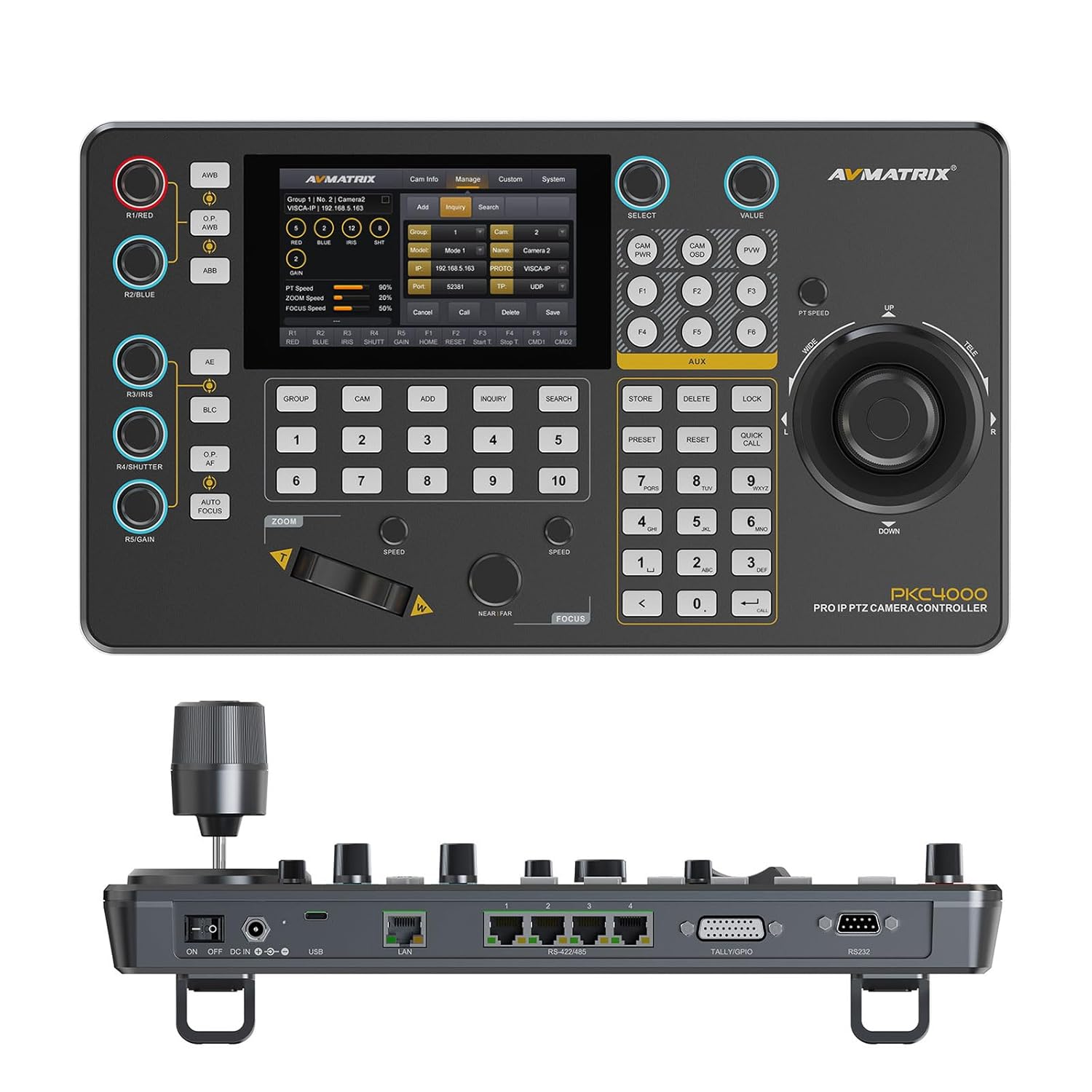
4.1 pav.: priekis view of the PKC4000-NDI Controller
Pagrindinės funkcijos:
- Universal Compatibility & Protocol Support: Supports IP and serial control protocols including VISCA, VISCA-IP, ONVIF, PELCO P&D, and NDI (NDI for Optional). Works with AVMATRIX PTZ cameras and most major PTZ brands.
- Fast Setup with Intuitive Touchscreen: Equipped with a 5-inch full-color touchscreen and menu knob for quick setup and operation.
- Smooth, Professional PTZ Control: Precise control over pan, tilt, zoom, focus, iris, shutter, and more. Supports up to 100 camera shortcuts (10 groups x 10 cameras).
- PoE & Flexible Power Options: Supports both Power over Ethernet (PoE) and traditional DC power for simplified cabling.

Figure 4.2: PKC4000-NDI Key Features Overview
5. Sąranka
5.1 Pradinis prisijungimas
Follow these steps to set up your PKC4000-NDI controller:
- Maitinimo jungtis: Connect the 12V DC power adapter to the 'DC IN' port on the rear of the controller, or connect an Ethernet cable from a PoE-enabled switch to the 'LAN (PoE)' port.
- Tinklo prisijungimas: For IP control, connect an Ethernet cable from your network switch to the 'LAN (PoE)' port.
- Serial Connection (Optional): For RS-232, RS-422, or RS-485 control, connect the appropriate serial cables from your PTZ cameras to the corresponding ports on the controller.
- Tally/GPIO (Optional): Connect Tally lights or GPIO devices to the Tally/GPIO port as needed.
- Maitinimas: Flip the 'ON/OFF' switch to the 'ON' position. The controller will boot up and display the main interface on the 5-inch touch screen.

Figure 5.1: Rear Panel Control Interfaces
5.2 Kameros konfigūracija
After initial power-up, you will need to configure your PTZ cameras. The controller supports automatic IP address assignment for quick setup.
- Navigate to the 'CAM' or 'System' menu on the touch screen.
- Select 'Add Camera' and follow the on-screen prompts to discover and add your cameras via IP or serial connection.
- Assign each camera to a group and address for easy recall. The controller can manage up to 100 IP cameras (10 groups x 10 cameras).
6. Naudojimo instrukcijos
6.1 Pagrindinės operacijos
The PKC4000-NDI provides intuitive control through its touch screen and physical controls.
- Kameros pasirinkimas: Use the numeric keypad or the 'CAM' menu on the touch screen to select the camera you wish to control.
- Vairasvirtės valdymas: The 4D joystick allows for smooth and precise control of Pan, Tilt, and Zoom. Rotate the joystick for zoom control.
- Exposure Controls: Dedicated knobs and buttons allow quick adjustment of Exposure, Iris, Focus, and Gain.
- Iš anksto nustatytas atšaukimas: Store and recall up to 255 camera presets using the 'PRESET' and numeric buttons.
6.2 Jutiklinio ekrano sąsaja
The 5-inch touch screen provides access to advanced settings and real-time monitoring.
- Meniu naršymas: Tap on menu icons to access camera settings, network configurations, system preferences, and more.
- Stebėjimas realiuoju laiku: The NDI version supports video decoding for real-time monitoring of camera feeds directly on the 5-inch screen. This allows for visual confirmation of camera movements and adjustments.

Figure 6.1: Real-time Video Preview on Touch Screen
6.3 Track Recording and Playback
The controller supports track loop function, allowing you to record camera pan, tilt, and zoom movements and replay them whenever needed without manual control.
- Access the 'Track' function from the touch screen menu.
- Initiate recording of your desired camera movements.
- Save the recorded track for future playback.

Figure 6.2: Track Recording and Playback Feature
7. Priežiūra
7.1 Valymas ir priežiūra
To ensure the longevity and optimal performance of your PKC4000-NDI controller, follow these maintenance guidelines:
- Valymas: Use a soft, dry, lint-free cloth to clean the exterior of the controller, including the touch screen. Do not use liquid cleaners, aerosols, or solvents.
- Saugykla: Kai ilgesnį laiką nenaudojate valdiklio, laikykite jį vėsioje, sausoje vietoje, toliau nuo tiesioginių saulės spindulių ir ekstremalių temperatūrų.
- Tvarkymas: Handle the joystick and buttons with care to prevent mechanical damage.
8. Problemų sprendimas
8.1 Bendrosios problemos ir sprendimai
If you encounter problems with your controller, refer to the table below for possible solutions.
| Problema | Galima priežastis | Sprendimas |
|---|---|---|
| Valdiklis neįsijungia. | No power supply; Power adapter faulty; PoE not active. | Check power adapter connection; Ensure PoE switch is active; Try a different power outlet. |
| Cannot control camera. | Incorrect camera IP/serial settings; Network issue; Camera not powered on. | Verify camera IP address and protocol settings; Check network cables; Ensure camera is powered on and accessible. |
| Nėra vaizdo įrašo iš ankstoview ekrane. | NDI stream not active; Network congestion; Camera not sending video. | Ensure camera is configured for NDI output; Check network bandwidth; Verify camera video output settings. |
| Joystick/buttons unresponsive. | Firmware issue; Hardware malfunction. | Restart the controller; Check for firmware updates; Contact technical support if problem persists. |
9. Specifikacijos
9.1 Techninės specifikacijos
Detailed technical specifications for the AVMATRIX PKC4000-NDI PTZ Camera Controller:
| Kategorija | Parametras | PKC4000-NDI |
|---|---|---|
| Jungtys | Sąsajos | IP(RJ45)x1, RS-232x1, RS-485/RS-422x4, TALLYx1, USB2.0 (For upgrade) |
| IP protokolas | ONVIF, VISCA-IP, NDI | |
| Serijinis protokolas | PELCO-D, PELCO-P, VISCA | |
| Serijinis perdavimo greitis | 2400, 4800, 9600, 19200, 38400, 115200 bps | |
| LAN prievadas | 100M × 1 (PoE / PoE+: IEEE802.3 af/at) | |
| Vartotojo sąsajos | Ekranas | 5 colio jutiklinis ekranas |
| Rankenėlė | Quickly control iris, shutter speed, gain, auto exposure, white balance, etc. | |
| Vairasvirtė | Panoravimas / pakreipimas / mastelio keitimas | |
| Kamerų grupė | 10 (Each group connect up to 10 cameras) | |
| Kameros adresas | Iki 100 | |
| Iš anksto nustatytas fotoaparatas | Iki 255 | |
| Galia | Galia | PoE/DC 7~24V |
| Energijos suvartojimas | PoE: <8W, DC: <8W | |
| Aplinka | Darbinė temperatūra | -20 ℃ ~ 60 ℃ |
| Laikymo temperatūra | -20 ℃ ~ 70 ℃ | |
| Matmenys | Matmenys (LWD) | 340mm×195mm×49.5mm/ 340mm×195mm×110mm(With joystick) |
| Svoris | Net:1730g, Gross:2360g | |
| Generolas | Modelio numeris | NW-PKC4000-NDI |
| Gamintojas | NW-AVMATRIX | |
| Išleidimo data | 1 m. kovo 2025 d |

Figure 9.1: Detailed Specifications and Dimensions
10. Garantija ir palaikymas
10.1 Informacija apie garantiją
The AVMATRIX PKC4000-NDI PTZ Camera Controller is backed by a 1 metų ribota garantija nuo įsigijimo datos. Ši garantija taikoma medžiagų ir gamybos defektams, atsiradusiems įprasto naudojimo sąlygomis. Ji netaikoma žalai, atsiradusiai dėl netinkamo naudojimo, nelaimingo atsitikimo, neleistinos modifikacijos ar išorinių priežasčių.
10.2 Techninė pagalba
For technical assistance, troubleshooting, or warranty claims, please contact AVMATRIX customer support. We offer visą gyvenimą trunkanti techninė pagalba mūsų gaminiams.
Please have your product model number (PKC4000-NDI) and purchase information ready when contacting support.
Ask a question about this manual
Ask about setup, troubleshooting, compatibility, parts, safety, or missing instructions. Manuals+ will review the question and use this page’s manual context to help answer it.