
AEEZO 10.1 inch Tablet
AEEZO Android 14 10-inch Tablet User Manual
Model: 10.1 inch Tablet
1. Įvadas
Welcome to the user manual for your new AEEZO Android 14 10-inch Tablet. This manual provides essential information on how to set up, operate, maintain, and troubleshoot your device. Please read this manual thoroughly to ensure optimal performance and longevity of your tablet.
2. Kas yra dėžutėje
Carefully unpack your new AEEZO tablet and ensure all items are present:
- AEEZO Android 14 10-inch Tablet
- Įkroviklis
- Klaviatūra
- Pelė
- USB kabelis
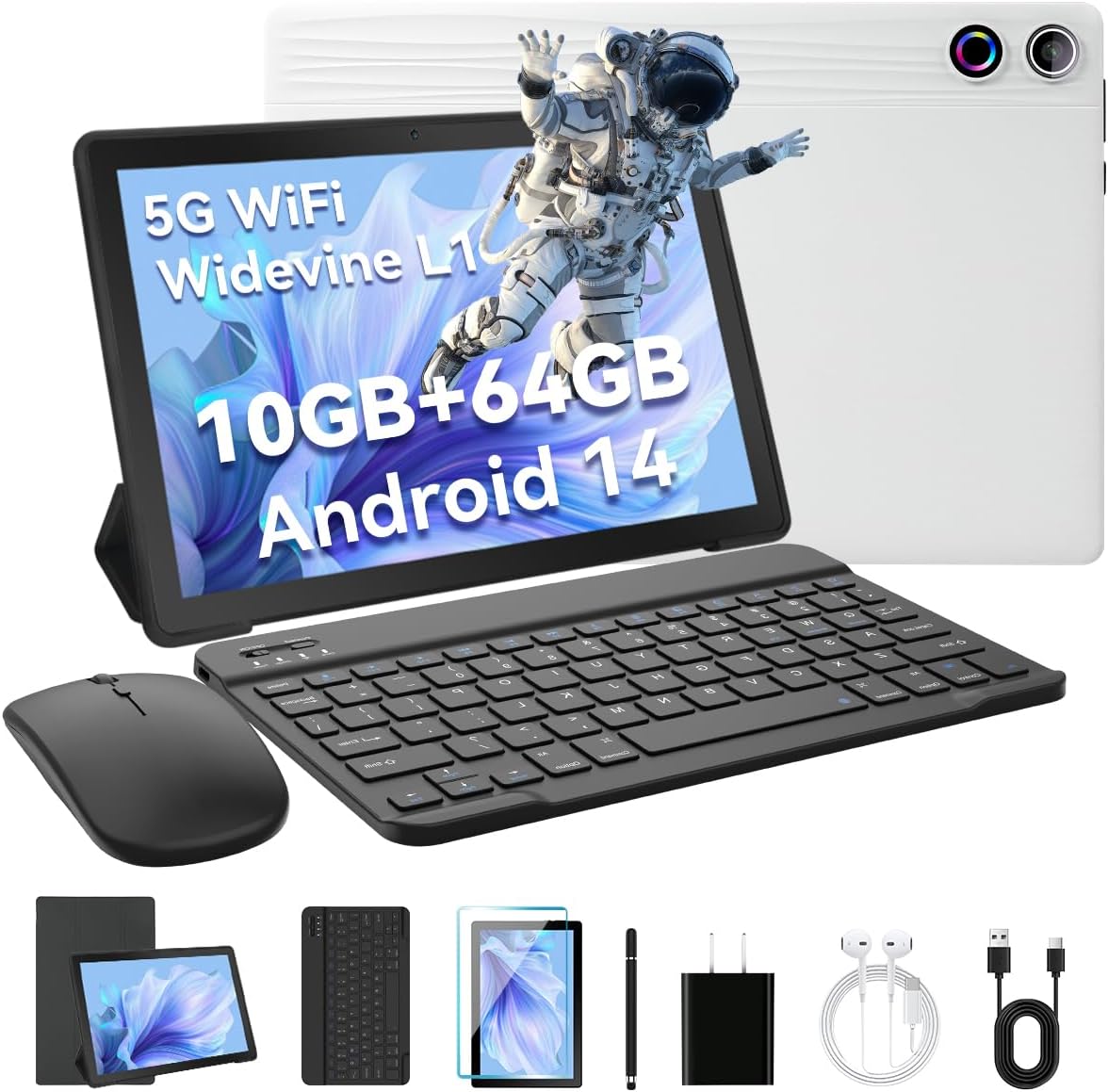
Image: The AEEZO Android 14 10-inch Tablet displayed with its full set of accessories, including the tablet itself, a detachable keyboard, a wireless mouse, a charger, and a USB cable.
3. Produktas baigtasview
Familiarize yourself with the main components of your AEEZO tablet.

Paveikslėlis: Priekinė dalis view of the AEEZO Android 14 10-inch Tablet, showcasing its display with various application icons. Below the tablet, key specifications are highlighted, including the Octa-Core Processor, Android 14 operating system, 10GB RAM + 64GB ROM, 1280x800 HD resolution, WiFi 6, and Bluetooth 5.0 connectivity.
3.1. Fiziniai komponentai
- Maitinimo mygtukas: Yra šone, naudojamas ekranui įjungti / išjungti arba pažadinti / užmigdyti.
- Garsumo mygtukai: Reguliuokite garso garsumą.
- C tipo USB prievadas: Įkrovimui ir duomenų perdavimui.
- 3.5 mm ausinių lizdas: Laidinių ausinių prijungimui.
- Priekinė kamera: Vaizdo skambučiams ir asmenukėms (5MP).
- Galinė kamera: Skirta nuotraukoms ir vaizdo įrašams daryti (8 MP).
- MicroSD kortelės lizdas: Expand storage up to 1TB (TF card sold separately).
- Dvigubi garsiakalbiai: Provide stereo audio output.

Image: The AEEZO Android 14 10-inch Tablet is shown with graphical representations highlighting its memory specifications: 10GB RAM, 64GB internal memory, and the capability for TF card expansion up to 1TB.
4. Sąranka
4.1. Planšetinio kompiuterio įkrovimas
Before first use, fully charge your tablet. Connect the provided charger to the USB Type-C port on the tablet and plug it into a power outlet. The battery indicator on the screen will show charging status.
4.2. Įjungimas/išjungimas
- Norėdami įjungti: Press and hold the Power button until the AEEZO logo appears.
- Norėdami išjungti: Press and hold the Power button until a power menu appears, then select "Power off".
- Miegui / pabudimui: Trumpai paspauskite maitinimo mygtuką.
4.3. Pradinė sąranka
Upon first power-on, follow the on-screen prompts to configure your tablet:
- Pasirinkite norimą kalbą.
- Prisijunkite prie „Wi-Fi“ tinklo.
- Prisijunkite naudodami „Google“ paskyrą arba sukurkite naują. Tai būtina norint atsisiųsti programas iš „Google Play“ parduotuvės.
- Nustatykite ekrano užraktą (PIN kodą, šabloną, slaptažodį arba veido atrakinimą).
- Review ir sutikite su sąlygomis ir nuostatomis.
4.4. Connecting Keyboard and Mouse
The included keyboard and mouse connect via Bluetooth. Ensure Bluetooth is enabled on your tablet (Settings > Connected devices > Bluetooth).
- Klaviatūra: Turn on the keyboard. It should appear in the list of available Bluetooth devices. Tap to pair.
- Pelė: Turn on the mouse. It should appear in the list of available Bluetooth devices. Tap to pair.
4.5. TF kortelės („MicroSD“) įdėjimas
To expand storage, locate the TF card slot on the side of the tablet. Gently insert a MicroSD card (up to 1TB, sold separately) until it clicks into place. The tablet will recognize the new storage.
5. Planšetinio kompiuterio valdymas
5.1. Pagrindinė navigacija
- Bakstelėkite: Pasirinkite elementą arba atidarykite programėlę.
- Palieskite ir palaikykite: Pasiekite kontekstinius meniu arba perkelkite piktogramas.
- Perbraukimas: Slinkite per ekranus arba sąrašus.
- Žiupsnelis, norint priartinti: Priartinkite arba atitolinkite vaizdus ir web puslapių.
- 3-Finger Screenshot: Swipe down with three fingers to capture a screenshot.
5.2. „Wi-Fi“ ryšys
Eikite į Nustatymai > Tinklas ir internetas > InternetasĮjunkite „Wi-Fi“, pasirinkite norimą tinklą ir, jei reikia, įveskite slaptažodį.
5.3. „Bluetooth“ ryšys
Eikite į Nustatymai > Prijungti įrenginiai > „Bluetooth“. Turn on Bluetooth, and the tablet will scan for nearby devices. Select a device to pair.
5.4. Fotoaparatų naudojimas
Open the Camera app to take photos or record videos. The tablet features a 5MP front camera and an 8MP rear camera.

Paveikslėlis: detalus view of the AEEZO Android 14 10-inch Tablet's rear, emphasizing its 8MP rear camera and 5MP front camera. The image also illustrates the Face Unlock feature and shows examples of video calls and outdoor scenes, demonstrating the tablet's utility for communication and capturing moments.
5.5. Tėvų kontrolė
Android 14 offers enhanced parental control features. Navigate to Nustatymai > Skaitmeninė gerovė ir tėvų kontrolė to manage screen time, app access, and content filters for children's accounts.
5.6. Veido atpažinimas atrakinant
Set up Face Unlock for convenient and secure access to your tablet. Go to Settings > Security & privacy > Device unlock > Face Unlock ir vykdykite ekrane pateikiamus nurodymus, kad užregistruotumėte savo veidą.
5.7. Kelių langų režimas
To use two apps simultaneously, open one app, then swipe up from the bottom of the screen to reveal the recent apps. Tap the app icon at the top of the window and select "Split screen". Choose another app to open in the second window.
5.8. Eye Protection Mode
Activate Eye Protection Mode (also known as Night Light or Reading Mode) to reduce blue light emission, which can help reduce eye strain. This setting is typically found in Nustatymai > Ekranas.
5.9. Garso funkcijos
The tablet features built-in dual speakers for a high-quality audio experience. For private listening, connect headphones to the 3.5mm headphone jack.
5.10. Widevine L1 Support
Your tablet supports Widevine L1, enabling high-definition streaming from popular platforms like Netflix, Hulu, and Amazon Prime Video. Ensure your internet connection is stable for optimal streaming quality.
6. Priežiūra
6.1. Planšetinio kompiuterio valymas
Planšetinio kompiuterio ekraną ir korpusą valykite minkštu, nepūkuotu audiniu. Įsisenėjusias dėmes šiek tiek nuvalykite.ampNuvalykite šluostę vandeniu arba ekrano valikliu. Venkite stiprių cheminių medžiagų ar abrazyvinių medžiagų.
6.2. Akumuliatoriaus priežiūra
- Venkite ekstremalių temperatūrų.
- Neleiskite baterijai dažnai visiškai išsikrauti.
- Optimaliam įkrovimui naudokite pridedamą įkroviklį.
6.3. Programinės įrangos atnaujinimai
Reguliariai tikrinkite, ar yra sistemos atnaujinimų, kad įsitikintumėte, jog jūsų planšetiniame kompiuteryje yra naujausios funkcijos ir saugos pataisymai. Eikite į Nustatymai > Sistema > Sistemos naujinimas.
6.4. Sandėliavimo valdymas
Reguliariai valykite nereikalingus files, cache data, and uninstall unused apps to free up storage space and maintain performance. You can manage storage in Nustatymai > Saugykla.
7. Problemų sprendimas
| Problema | Sprendimas |
|---|---|
| Planšetinis kompiuteris neįsijungia | Ensure the tablet is charged. Press and hold the Power button for 10-15 seconds to force restart. |
| Wi-Fi ryšio problemos | Restart your Wi-Fi router. Forget the network on the tablet and reconnect. Ensure Wi-Fi is enabled. |
| Programėlės stringa arba užstringa | Išvalykite programėlės talpyklą (Nustatymai > Programos > [Programėlės pavadinimas] > Atmintis ir talpykla > Išvalyti talpyklą). Atnaujinkite programėlę arba įdiekite ją iš naujo. |
| Lėtas veikimas | Uždarykite nenaudojamas programas. Išvalykite talpyklą. Atlaisvinkite vietos saugykloje. Paleiskite planšetinį kompiuterį iš naujo. |
| Keyboard/Mouse not connecting | Ensure devices are charged and in pairing mode. Re-pair them via Bluetooth settings. |
8. Specifikacijos
Detailed technical specifications for your AEEZO Android 14 10-inch Tablet:
| Funkcija | Detalė |
|---|---|
| Modelio pavadinimas | 10.1 colio planšetinis kompiuteris |
| Operacinė sistema | Android 14 |
| Procesorius | A523 8-core processor (up to 1.8 GHz) |
| GPU | Malis-G57 |
| RAM | 10GB (8GB built-in + 2GB virtual) |
| Vidinė saugykla | 64 GB ROM |
| Išplečiama saugykla | TF Card up to 1TB (sold separately) |
| Ekrano dydis | 10.1 colių |
| Ekrano raiška | 1280 x 800 IPS HD |
| Widevine palaikymas | Widevine L1 |
| Priekinė kamera | 5 MP |
| Galinė kamera | 8 MP |
| Baterijos talpa | 5000 mAh |
| Wi-Fi | Dual-band Wi-Fi 6 (2.4G/5G) |
| Bluetooth | Bluetooth 5.0 |
| Įkrovimo prievadas | C tipo USB |
| Garso lizdas | 3.5 mm ausinių lizdas |
| Matmenys (IxPxH) | 9.64 x 6.42 x 0.35 colio |

Image: A visual representation of the AEEZO Android 14 10-inch Tablet's internal components, specifically highlighting the Jeazans Octa-Core Processor and its support for WiFi 6. Accompanying text emphasizes key benefits such as large memory expandability up to 1TB via TF card, low power consumption with high performance, and a 2.0GHz main frequency for improved multi-tasking capabilities.
9. Garantija ir palaikymas
Your AEEZO tablet comes with a standard manufacturer's warranty. Please refer to the warranty card included in your packaging for specific terms and conditions. For technical support, product inquiries, or warranty claims, please contact AEEZO customer service through their official websvetainėje arba mažmenininke, iš kurio įsigijote produktą.
For further assistance, you may visit the AEEZO Store online: AEEZO Official Store
Ask a question about this manual
Ask about setup, troubleshooting, compatibility, parts, safety, or missing instructions. Manuals+ will review the question and use this page’s manual context to help answer it.