
MRSCOZ TCR
MRSCOZ Toddlers Sleep Training Clock
Model: TCR
Naudotojo instrukcija
1. Įvadas
The MRSCOZ Toddlers Sleep Training Clock is a multifunctional device designed to assist children with sleep training, provide alarm clock functionality, act as a Bluetooth music player, and offer various night light and sound machine features. Its intuitive design and multiple settings aim to create a comfortable and consistent sleep environment for toddlers and kids.

Image: The MRSCOZ Sleep Training Clock displaying different light colors, highlighting its versatile illumination options.
2. Saugos informacija
- Šis gaminys nėra žaislas. Mažiems vaikams rekomenduojama suaugusiųjų priežiūra.
- Keep the device away from water and excessive moisture to prevent electrical hazards.
- Įkrovimui naudokite tik pridėtą USB-C laidą. Nenaudokite pažeistų laidų ar įkroviklių.
- Nebandykite patys išardyti ar taisyti įrenginio. Kreipkitės pagalbos į klientų aptarnavimo tarnybą.
- Ensure the clock is placed on a stable, flat surface to prevent it from falling.
3. Pakuotės turinys
Atidarius pakuotę, prašome patikrinti jos turinį:
- MRSCOZ Toddlers Sleep Training Clock (White)
- USB-C įkrovimo laidas
- Vartotojo vadovas (šis dokumentas)
4. Produktas baigtasview
Familiarize yourself with the clock's components and controls.

Image: The multifunctional MRSCOZ Sleep Training Clock highlighting its use as an alarm clock, night light, Bluetooth music player, and sound machine.
Valdikliai ir indikatoriai:
| Mygtukas/indikatorius | Funkcija |
|---|---|
| Time Setting Button (Clock icon) | Paspauskite, kad įjungtumėte laiko nustatymo režimą. |
| Alarm Setting Button (Bell icon) | Press to set or adjust alarms. |
| Night Light Button (Sun icon) | Short press to change light color. Long press to adjust brightness. |
| Music/Sound Button (Music note icon) | Press to cycle through sleep sounds. |
| Bluetooth Button (M icon) | Ilgai paspauskite, kad įjungtumėte Bluetooth poravimo režimą. |
| Volume Up/Down Buttons (+/-) | Adjust volume for sounds and music. |
| Ekranas | Shows time, AM/PM, sleep/wake icons, and other indicators. |
| USB-C Port (Rear) | Prietaiso įkrovimui. |
5. Sąranka
5.1 Įrenginio įkrovimas
Before first use, fully charge the sleep training clock. Connect the provided USB-C cable to the charging port on the back of the clock and plug the other end into a compatible USB power adapter (not included).

Image: The sleep training clock connected to a USB-C charging cable, indicating its portable night light feature.
5.2 Pradinis įjungimas
The clock will automatically power on when connected to power or if it has sufficient battery charge. The display will light up.
5.3 Time Synchronization via Bluetooth
When connected to a smartphone via Bluetooth, the clock will automatically synchronize with your phone's time, simplifying initial setup.
6. Naudojimo instrukcijos
6.1 Laiko nustatymas
Norėdami rankiniu būdu nustatyti laiką:
- Paspauskite Laiko nustatymo mygtukas (Clock icon) to enter time setting mode.
- Naudokite +/- mygtukai reguliuoti valandą.
- Paspauskite Laiko nustatymo mygtukas again to move to minute adjustment.
- Naudokite +/- mygtukai sureguliuoti minutes.
- Paspauskite Laiko nustatymo mygtukas one more time to confirm and exit setting mode.
For a visual guide on setting up the time, please refer to the video below:
Video: A short demonstration on how to set up the time on the MRSCOZ Sleep Training Clock.
6.2 Miego mokymo funkcija
The clock uses visual cues to help children understand when it's time to sleep and wake up:
- Time to Sleep: The clock displays a closed-eye icon and emits a blue light, indicating it's bedtime.
- Time to Wake Up: The clock displays an open-eye icon and emits a yellow light, signaling it's okay to wake up.
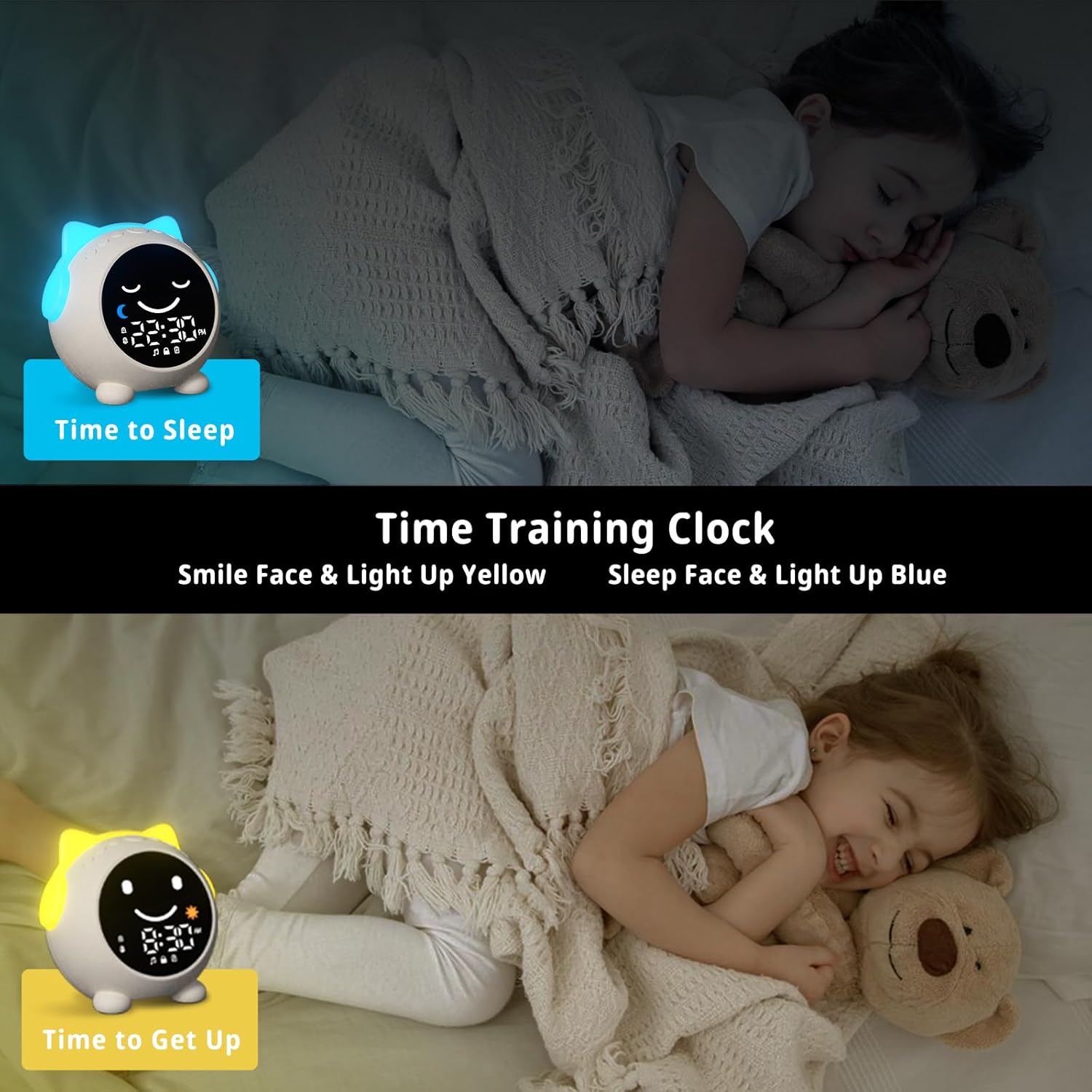
Image: The sleep training clock illustrating the "Time to Sleep" (blue light, closed eyes) and "Time to Get Up" (yellow light, open eyes) features.
6.3 Žadintuvo nustatymai
The clock features dual alarms and a snooze function:
- Paspauskite Signalizacijos nustatymo mygtukas (Bell icon) to select Alarm 1 or Alarm 2.
- Naudokite +/- mygtukai norėdami nustatyti norimą žadintuvo laiką.
- Paspauskite Signalizacijos nustatymo mygtukas dar kartą patvirtinti.
- To activate the snooze function, simply touch the clock when the alarm sounds. It will ring again after 10 minutes, up to 3 times.
- To stop the alarm, press any button on the clock.
Vaizdo įrašas: Viršijimasview of the Toddlers Sleep Training Clock and its alarm features, including snooze functionality.
6.4 Naktinės lemputės veikimas
The clock offers 9 light colors and 2 brightness levels:
- Keičiamos spalvos: Trumpai paspauskite Nakties šviesos mygtukas (Sun icon) to cycle through the 9 available colors.
- Ryškumo reguliavimas: Ilgai paspauskite mygtuką Nakties šviesos mygtukas to switch between the 2 brightness levels.

Image: The sleep training clock demonstrating its 9 distinct night light colors and two brightness settings.
6.5 Sleep Sound Machine
Choose from 7 soothing sleep sounds to help your child relax:
- Paspauskite Muzikos / garso mygtukas (Music note icon) to cycle through the available sounds: Ocean Wave, Rain, Campfire, Summer Night, Bird Songs, Wind Bell, and Fan.
- Naudokite +/- mygtukai to adjust the volume of the selected sound.

Image: The sleep training clock illustrating its 7 white noise options, including natural sounds like ocean waves and rain.
6.6 Bluetooth Music Player
Connect your smartphone or other Bluetooth-enabled device to play music through the clock's speaker:
- Ilgai paspauskite mygtuką Bluetooth mygtukas (M icon) to enter Bluetooth pairing mode. The display will show a Bluetooth icon.
- On your device, enable Bluetooth and search for "C1" (or similar device name).
- Select "C1" to pair. Once connected, the clock will synchronize its time with your phone.
- You can now play music from your device through the clock. Use the +/- mygtukai reguliuoti garsumą.
7. Priežiūra
- Laikrodį valykite minkšta, sausa šluoste. Nenaudokite abrazyvinių valiklių ar tirpiklių.
- Stenkitės ilgą laiką nelaikyti prietaiso ekstremaliose temperatūrose arba tiesioginiuose saulės spinduliuose.
- Store the clock in a cool, dry place when not in use for extended periods.
8. Problemų sprendimas
| Problema | Galimas sprendimas |
|---|---|
| Laikrodžio ekranas tuščias arba nereaguoja. | Ensure the clock is charged. Connect it to a power source using the USB-C cable. If the issue persists, try resetting the device (if a reset button is available, otherwise let it fully discharge and recharge). |
| Signalizacija neskamba. | Check if the alarm is enabled and the volume is not set to zero. Verify the alarm time is correctly set. |
| Nepavyksta prisijungti per „Bluetooth“. | Ensure the clock is in Bluetooth pairing mode (long press M button). Make sure Bluetooth is enabled on your device and it's within range. Try forgetting the device on your phone and re-pairing. |
| Time format stuck in 24-hour mode. | Refer to the time setting instructions. Some models may automatically switch based on phone sync, or require specific button combinations (e.g., long press time button) not explicitly detailed in general instructions. |
| Night light not changing colors/brightness. | Ensure you are using short presses for color change and long presses for brightness adjustment on the Night Light button. |
9. Specifikacijos
| Funkcija | Detalė |
|---|---|
| Prekės ženklas | MRSCOZ |
| Modelio numeris | TCR |
| Spalva | Baltas |
| Ekrano tipas | Skaitmeninis |
| Gaminio matmenys | 3.8 colio pločio x 3.9 colio aukščio |
| Maitinimo šaltinis | Corded Electric (Rechargeable Battery) |
| Medžiaga | Akrilnitrilo butadieno stirenas (ABS) |
| Ypatingos savybės | Bluetooth, Timer, Adjustable Brightness, LED Display, Adjustable Volume, Sleep Training, Night Light, Sound Machine |
| Baterijų skaičius | Reikalinga 1 12 V baterija (vidinė) |
| Prekės svoris | 9.6 uncijos |
10. Garantija ir palaikymas
This MRSCOZ product comes with a limited warranty. For detailed warranty information, product support, or to report any issues, please contact MRSCOZ customer service through the retailer's platform or the official brand websvetainėje. Prašome išsaugoti pirkimo įrodymą garantiniams reikalavimams.
Ask a question about this manual
Ask about setup, troubleshooting, compatibility, parts, safety, or missing instructions. Manuals+ will review the question and use this page’s manual context to help answer it.