
1. Įvadas
This manual provides detailed instructions for the safe and effective use of your TOTAL TMT57026 Laser Distance Meter. Please read this manual thoroughly before operating the device and keep it for future reference. This device is designed for accurate distance measurements up to 70 meters, suitable for various professional and DIY applications.
2. Saugos instrukcijos
- Lazerio spinduliuotė: This device emits Class 2 laser radiation. Do not stare into the laser beam or direct it at other people or animals.
- Akių apsauga: Venkite tiesioginio lazerio spindulio poveikio akims.
- Veikimo aplinka: Nenaudokite įrenginio sprogioje aplinkoje arba šalia degių medžiagų.
- Atsparumas vandeniui: Šis įrenginys yra nėra atsparus vandeniuiVenkite sąlyčio su vandeniu ar didele drėgme.
- Priežiūra: Only qualified personnel should repair the device.
- Baterijos: Naudokite tik nurodytas AAA baterijas. Nemaišykite senų ir naujų arba skirtingų tipų baterijų.
3. Produktas baigtasview
Familiarize yourself with the components of your TOTAL TMT57026 Laser Distance Meter.
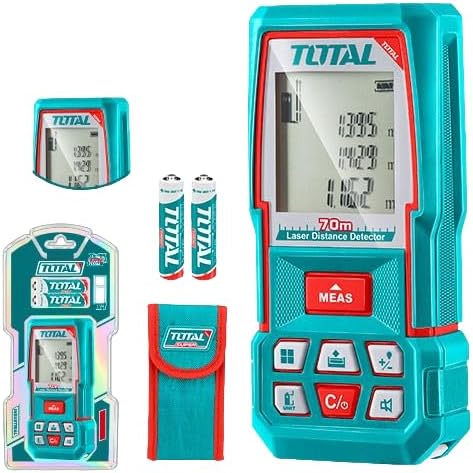
Figure 1: The TOTAL TMT57026 Laser Distance Meter, showing the device itself, two AAA batteries, a carrying pouch, and retail packaging. The device features a digital display and multiple function buttons.
Pagrindiniai komponentai:
- Lazerio skleidėjas/imtuvas: Įsikūręs įrenginio viršuje.
- Ekranas: Shows measurements, units, and mode indicators.
- MATAVIMO mygtukas: Initiates single or continuous measurement.
- UNIT mygtukas: Changes measurement units (e.g., meters, feet, inches).
- C/O Button: Clears the last measurement or turns the device off.
- Funkciniai mygtukai: For area, volume, addition, subtraction, and other calculations.
- Baterijų skyrius: Įsikūręs įrenginio gale.
4. Sąranka
4.1 Akumuliatoriaus įdėjimas
- Suraskite baterijų skyriaus dangtelį įrenginio gale.
- Pastumkite arba atkabinkite dangtelį, kad jį atidarytumėte.
- Insert two (2) AAA 1.5V disposable batteries, ensuring correct polarity (+/-). The device includes two AAA batteries.
- Saugiai uždarykite akumuliatoriaus skyriaus dangtelį.
4.2 Įjungimas / išjungimas
- Norėdami įjungti: Paspauskite PRIEMONĖS trumpai paspauskite mygtuką. Ekranas užsidegs.
- Norėdami išjungti: Paspauskite ir palaikykite C/O button for approximately 3 seconds. The device will also automatically power off after a period of inactivity to conserve battery life.
5. Naudojimo instrukcijos
5.1 Pagrindinis atstumo matavimas
- Įsitikinkite, kad įrenginys įjungtas.
- Nukreipkite lazerio spindulį į taikinio paviršių.
- Paspauskite PRIEMONĖS button once. The laser will activate, and the measurement will appear on the display.
- The measurement will be held on the screen until a new measurement is taken or the device is turned off.
5.2 Nuolatinis matavimas (sekimas)
- Paspauskite ir palaikykite PRIEMONĖS mygtuką maždaug 2 sekundes.
- The device will enter continuous measurement mode, displaying real-time distance as you move the device.
- Paspauskite PRIEMONĖS button again to stop continuous measurement and hold the last value.
5.3 Matavimo vienetų keitimas
- Paspauskite VIENETAS button repeatedly to cycle through available units: meters (m), feet (ft), and inches (in).
- Pasirinktas vienetas bus rodomas ekrane.
5.4 Ploto ir tūrio matavimas
The device supports calculation of area and volume. Refer to the icons on the function buttons for specific modes.
- Press the appropriate function button (e.g., the button with the square icon for area, or cube icon for volume).
- Follow the on-screen prompts to take the required measurements (e.g., length, width for area; length, width, height for volume).
- The calculated result will be displayed.
5.5 Sudėtis ir atimtis
Naudokite +/- button to add or subtract measurements.
- Take the first measurement.
- Paspauskite +/- button to select addition or subtraction mode.
- Take the second measurement. The device will automatically perform the calculation and display the result.
6. Priežiūra
6.1 Valymas
- Nuvalykite prietaisą minkšta, damp audinys. Nenaudokite abrazyvinių valiklių ar tirpiklių.
- Lazerio lęšį atsargiai nuvalykite minkštu, nepūkuotu skudurėliu, panašiai kaip valydami fotoaparatų objektyvus.
6.2 Saugykla
- Laikykite prietaisą sausoje, vėsioje vietoje, toliau nuo tiesioginių saulės spindulių ir ekstremalių temperatūrų.
- Jei ilgesnį laiką sandėliuosite, išimkite baterijas, kad išvengtumėte jų ištekėjimo.
6.3 Akumuliatoriaus keitimas
- Kai ekrane rodomas baterijų indikatorius rodo mažą įkrovą, pakeiskite abi AAA baterijas, vadovaudamiesi 4.1 skyriuje pateiktomis instrukcijomis.
7. Problemų sprendimas
| Problema | Galima priežastis | Sprendimas |
|---|---|---|
| Įrenginys neįsijungia. | Baterijos išsikrovusios arba neteisingai įdėtos. | Patikrinkite baterijų poliškumą arba pakeiskite jas naujomis AAA baterijomis. |
| Netikslūs matavimai. | Laser lens is dirty; target surface is too reflective/non-reflective; device is unstable. | Clean the laser lens. Measure against a suitable, stable surface. Ensure device is held steady. |
| Lazerio spindulio nematyti. | Bright ambient light; laser is off. | Operate in lower light conditions. Ensure device is powered on and MEAS button is pressed. |
| Ekrane rodomas klaidos kodas. | Matavimas už diapazono ribų; vidinė klaida. | Ensure target is within 0.05m to 70m range. Try restarting the device. If error persists, contact support. |
8. Specifikacijos
- Modelis: TMT57026
- Prekinis ženklas: IŠ VISO
- Matavimo diapazonas: Nuo 0.05 iki 70 XNUMX metrų
- Matavimo vienetai: Metrai (m), pėdos (ft), coliai (in)
- Lazerio klasė: 2 klasė
- Baterijos: 2 x AAA, 1.5V (included)
- Baterijos tipas: Vienkartiniai
- Automatinis lazerio išsijungimas: Yes (after inactivity)
- Automatinis įrenginio išsijungimas: Yes (after inactivity)
- Gaminio matmenys: Apytiksliai 17 x 5 x 0.1 cm
- Prekės svoris: Approximately 160 g (0.16 Kilograms)
- Medžiaga: Plastikiniai
- Spalva: Turkis
- Atsparumo vandeniui lygis: Neatsparus vandeniui
- Gamintojas: Iš viso
- Kilmės šalis: Kinija
9. Garantija ir palaikymas
For warranty information and technical support, please contact TOTAL customer service. Keep your purchase receipt as proof of purchase.
For further assistance, please refer to the official TOTAL websvetainėje arba susisiekite su vietiniu platintoju.