
1. Įvadas
Thank you for choosing the iClever BTH20 Active Noise Cancelling Headphones for Kids. These headphones are designed with your child's safety and comfort in mind, featuring an 80dBA volume limit and robust construction. Enjoy extended playtime, fast charging, and effective noise reduction for an immersive audio experience.
2. Kas yra dėžutėje
- iClever BTH20 aktyvios triukšmą slopinančios ausinės
- USB-C įkrovimo laidas
- 3.5 mm garso laidas
- Vartotojo vadovas
- Carrying Pouch (may vary by package)
3. Produktas baigtasview
The iClever BTH20 headphones are designed for ease of use and durability. Key components include:
- Reguliuojama galvos juosta: Features 10 levels of adjustment for a perfect fit for children aged 3 and up. Padded for comfort.
- Minkštos ausinės: 90° rotatable and made with pressure-reducing, skin-like texture for comfortable wear during extended periods.
- Intuityvus valdymas: Large, easily accessible buttons for power, volume, and Active Noise Cancellation (ANC) modes.
- Prisijungimo prievadai: Includes a USB-C port for charging and a 3.5mm audio jack for wired connection.
- Sulankstomas dizainas: Ausines galima sulankstyti, kad būtų patogu laikyti ir nešiotis.
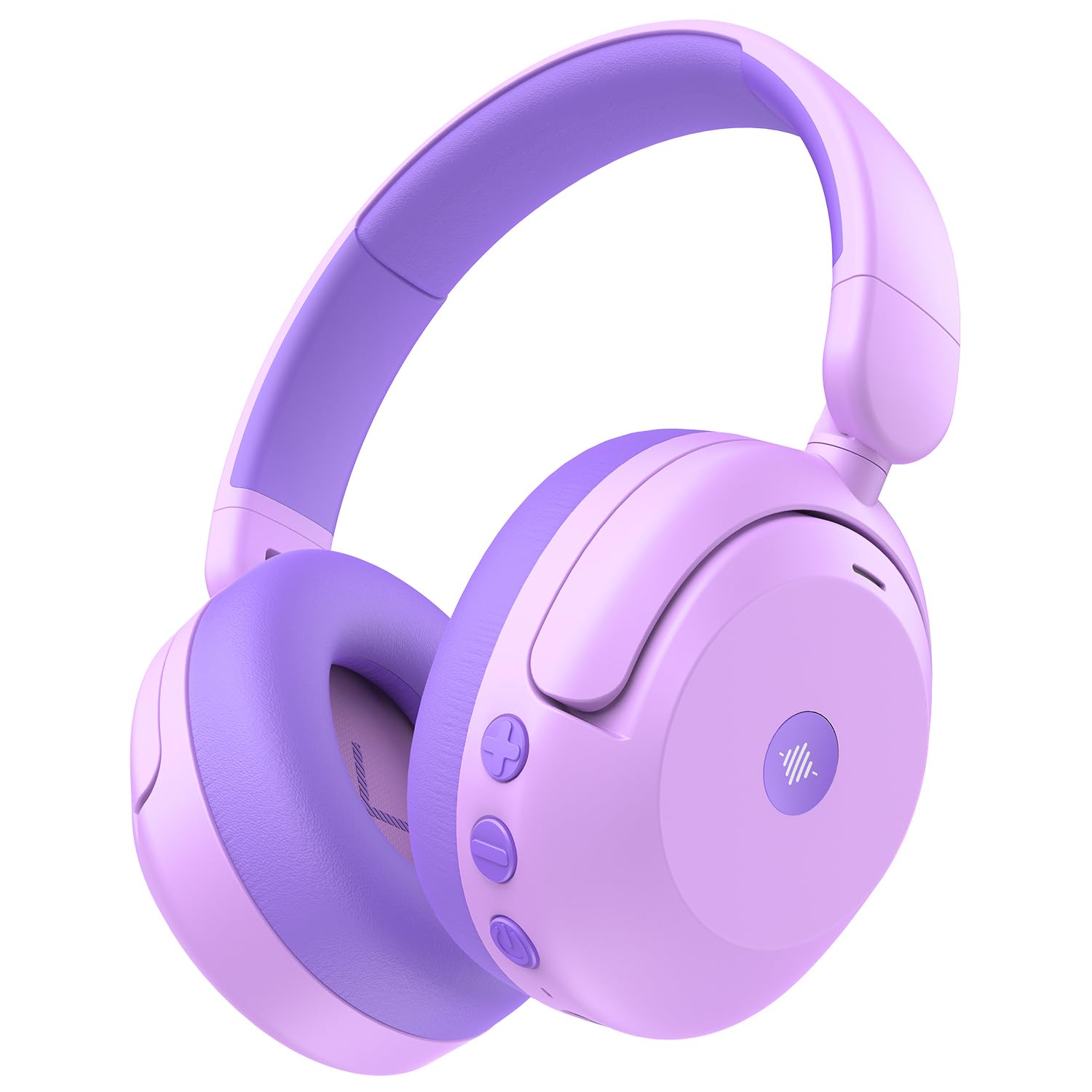
Image: iClever BTH20 headphones in purple, showcasing their over-ear design and vibrant color.

Video: A close-up view of the iClever BTH20 headphones, highlighting the control buttons, charging port, and audio jack. This video demonstrates the physical features and connectivity options.
4. Sąranka
4.1 Ausinių įkrovimas
- Prijunkite pridėtą USB-C įkrovimo laidą prie ausinių įkrovimo prievado.
- Kitą USB-C laido galą prijunkite prie suderinamo USB maitinimo adapterio (nepridedamas) arba kompiuterio USB prievado.
- LED indikatorius rodys įkrovimo būseną (pvz., raudona spalva reiškia, kad įrenginys kraunamas, mėlyna – kad įrenginys visiškai įkrautas).
- A full charge takes approximately 2 hours. A 10-minute fast charge provides about 5 hours of use.
4.2 Bluetooth poravimas
- Įsitikinkite, kad ausinės yra įkrautos ir išjungtos.
- Paspauskite ir palaikykite maitinimo mygtuką, kol LED indikatorius mirksės mėlynai ir raudonai, rodydamas susiejimo režimą.
- Savo įrenginyje (išmaniajame telefone, planšetiniame kompiuteryje ir kt.) įjunkite „Bluetooth“ ir ieškokite galimų įrenginių.
- Select "iClever BTH20" from the list of devices.
- Prijungus LED indikatorius ims šviesti mėlynai.
4.3 Laidinis ryšys
For devices without Bluetooth or when the battery is low, use the included 3.5mm audio cable:
- Prijunkite vieną 3.5 mm garso kabelio galą prie ausinių garso lizdo.
- Kitą galą prijunkite prie savo įrenginio 3.5 mm garso išvesties.
- Note: Active Noise Cancellation (ANC) is not available when using a wired connection.
5. Naudojimo instrukcijos
5.1 Maitinimo įjungimas/išjungimas
- Maitinimas: Press and hold the Power button for 2-3 seconds until the LED indicator lights up.
- Išjungti: Press and hold the Power button for 3-5 seconds until the LED indicator turns off.
5.2 Garsumo valdymas
The headphones feature an 80dBA volume limit to protect young hearing. Use the dedicated volume buttons:
- Pagarsink: Paspauskite mygtuką „+“.
- Patildyti: Paspauskite mygtuką „-“.
5.3 Aktyvus triukšmo slopinimas (ANC)
The BTH20 headphones offer two noise reduction modes for different environments:
- ANC aktyvinimas: Press the ANC button (often marked with a wave icon) to cycle through modes.
- Low Noise Reduction Mode: Provides a gentler ear pressure, suitable for environments with moderate background noise.
- High Noise Reduction Mode: Blocks out most engine and mechanical noises, ideal for travel (e.g., airplanes).

Image: Diagram illustrating the Active Noise Cancellation feature and its effectiveness in reducing ambient sound.
5.4 Mikrofono naudojimas
The headphones include an inbuilt microphone for basic voice chat and calls when connected via Bluetooth.
- Atsiliepimas / skambučių užbaigimas: Vieną kartą paspauskite daugiafunkcį mygtuką (dažnai maitinimo mygtuką).
- Skambučių atmetimas: Paspauskite ir 2 sekundes palaikykite daugiafunkcį mygtuką.
6. Patogumas ir tinkamumas
The iClever BTH20 headphones are designed for maximum comfort for children:
- Reguliuojama galvos juosta: The 10-level adjustable headband ensures a snug yet comfortable fit for various head sizes, accommodating children from 3 years old and up.
- Minkštos ausų pagalvėlės: The ear cushions are made from a pressure-reducing, skin-like texture, providing a gentle fit that prevents discomfort during long listening sessions.
- Lengvas dizainas: Weighing only 220 grams, these headphones are light enough for children to wear without feeling burdened.

Image: A child wearing the iClever BTH20 headphones, demonstrating the comfortable and secure fit.
7. Priežiūra
To ensure the longevity and optimal performance of your iClever BTH20 headphones, follow these maintenance guidelines:
- Valymas: Ausinėms valyti naudokite minkštą, sausą šluostę. Venkite naudoti stiprias chemines medžiagas ar abrazyvines medžiagas.
- Saugykla: When not in use, fold the headphones and store them in the provided carrying pouch to protect them from dust and damage. Store in a cool, dry place.
- Venkite vandens: These headphones are not water-resistant. Avoid exposure to liquids, moisture, or extreme temperatures.
- Elkitės atsargiai: Although durable, avoid excessive bending or dropping the headphones to prevent damage to internal components.
8. Problemų sprendimas
| Problema | Sprendimas |
|---|---|
| Ausinės neįsijungia. | Įsitikinkite, kad ausinės yra visiškai įkrautos. Prijunkite prie maitinimo šaltinio naudodami USB-C laidą. |
| Nepavyksta susieti per „Bluetooth“. | Make sure the headphones are in pairing mode (flashing blue/red LED). Turn off and on Bluetooth on your device. Ensure no other devices are connected. |
| Nėra garso arba garsas per mažas. | Check volume levels on both headphones and the connected device. Ensure the headphones are properly paired or the 3.5mm cable is securely connected. |
| ANC neveikia. | Ensure the headphones are powered on and not connected via the 3.5mm audio cable (ANC is only for Bluetooth mode). Press the ANC button to cycle through modes. |
| Mikrofonas neveikia. | Ensure headphones are connected via Bluetooth. Check microphone settings on your connected device. |
9. Specifikacijos
| Funkcija | Detalė |
|---|---|
| Modelio pavadinimas | 20 BTH |
| Prekės ženklas | „iClever“ |
| Ryšio technologija | Belaidis („Bluetooth 5.4“) / Laidinis (3.5 mm lizdas) |
| Bluetooth versija | 5.4 |
| Bluetooth diapazonas | 10 metrai |
| Triukšmo valdymas | Aktyvus triukšmo slopinimas (iki 40 dB) |
| Garsumo riba | 80dBA (iClever Sound Refiner Technology) |
| Garso tvarkyklės dydis | 40 milimetrų |
| Dažnių diapazonas | 20Hz - 20,000Hz |
| Baterijos veikimo laikas (išjungus ANC) | Iki 60 valandų |
| Baterijos veikimo laikas (įjungus ANC) | Iki 35 valandų |
| Akumuliatoriaus įkrovimo laikas | 2 Hours (10-min fast charge for 5 hours playtime) |
| Įkrovimo prievadas | USB-C |
| Medžiaga | Acrylonitrile Butadiene Styrene (ABS), Leather, POK (BPA/PVC free) |
| Prekės svoris | 220 gramų |
| Amžiaus diapazonas | 3+ metai |
| Atsparumas vandeniui | Neatsparus vandeniui |
10. Garantija ir palaikymas
iClever products come with a standard warranty. For specific warranty details and to register your product, please refer to the warranty card included in your package or visit the official iClever websvetainę.
For technical support, troubleshooting assistance, or any questions regarding your iClever BTH20 headphones, please contact iClever Customer Service:
- Websvetainė: Visit the official iClever webDUK ir pagalbos išteklių svetainė.
- El. paštas: Refer to your product packaging or the iClever webklientų aptarnavimo el. pašto adresų svetainė.