
1. Įvadas
This manual provides detailed instructions for the proper use and maintenance of your Oakcastle HIFI500 Remote Control. This remote is designed as a replacement or spare for the Oakcastle HIFI500 audio system, ensuring seamless control over its functions. Please read this manual thoroughly before use to ensure optimal performance and longevity of your remote control.
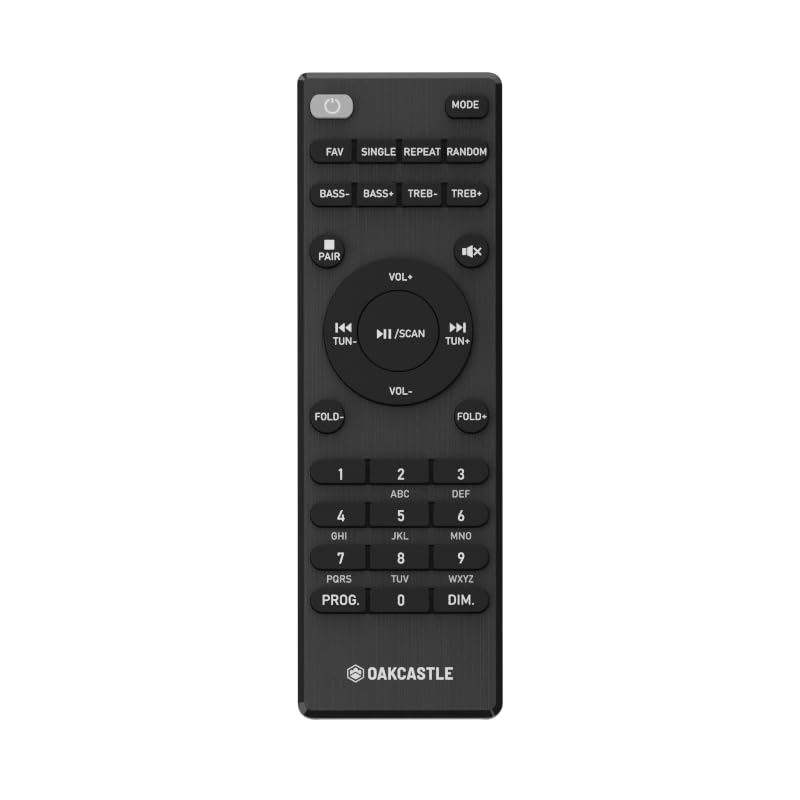
1.1 paveikslas: Priekyje view of the Oakcastle HIFI500 Remote Control. This image displays the compact design and button layout, including power, volume, source selection, and playback controls, typical for operating the HIFI500 audio system.
2. Sąranka
2.1. Akumuliatoriaus įdėjimas
The Oakcastle HIFI500 Remote Control requires two AAA batteries (not included) for operation. Follow these steps to install the batteries:
- Nuotolinio valdymo pulto gale raskite baterijų skyrių.
- Paspauskite skirtuką žemyn ir pastumkite akumuliatoriaus dangtelį žemyn, kad jį atidarytumėte.
- Įdėkite dvi AAA tipo baterijas, užtikrindami, kad teigiamas (+) ir neigiamas (-) poliai teisingai sutaptų su žymėjimais baterijų skyriuje.
- Stumkite akumuliatoriaus dangtelį atgal į vietą, kol jis patikimai užsifiksuos.
Pastaba: Always use new batteries and dispose of old batteries responsibly. Do not mix old and new batteries, or different types of batteries.
2.2. Pradinis naudojimas
Once batteries are installed, the remote control is ready for use with your Oakcastle HIFI500 audio system. Point the remote directly at the infrared (IR) receiver on your HIFI500 system. No additional pairing is typically required for this replacement remote.
3. Nuotolinio valdymo pulto valdymas
The Oakcastle HIFI500 Remote Control provides full functionality for your HIFI500 audio system. Below is a general guide to common button functions:
- Įjungimo mygtukas (⏻): Turns the HIFI500 system on or off.
- Garsumo didinimas / sumažinimas (Vol+ / Vol-): Reguliuoja garso išvesties lygį.
- Nutildyti (🔇): Laikinai nutildo garso išvestį.
- Source/Input (Šaltinis): Cycles through available audio inputs (e.g., CD, FM, Bluetooth, AUX).
- Atkūrimo valdikliai (▶ / ⏸ / ⏹ / ⏪ / ⏩): Controls media playback (Play, Pause, Stop, Rewind, Fast Forward) for compatible sources like CD or USB.
- Naršymo mygtukai (▲ / ▼ / ◀ / ▶): Used to navigate menus and selections on the HIFI500 system display.
- Gerai / Įvesties mygtukas: Patvirtina pasirinkimus.
- Skaičių klaviatūra (0–9): For direct input of radio frequencies, track numbers, or other numerical data.
Refer to your Oakcastle HIFI500 audio system's main user manual for specific functions and advanced operations.
4. Priežiūra
4.1. Valymas
To clean your remote control, gently wipe the surface with a soft, dry cloth. For stubborn dirt, slightly dampNuvalykite šluostę vandeniu arba švelniu, neabrazyviniu valikliu. Venkite naudoti stiprių cheminių medžiagų, tirpiklių ar abrazyvinių medžiagų, nes jos gali pažeisti nuotolinio valdymo pulto apdailą ar vidinius komponentus.
4.2. Baterijos keitimas
Replace batteries when the remote's response becomes sluggish or stops working. Follow the battery installation steps outlined in Section 2.1. Always replace both batteries simultaneously with new ones.
4.3. Sandėliavimas
When not in use for extended periods, it is recommended to remove the batteries from the remote control to prevent leakage, which can cause damage. Store the remote in a cool, dry place away from direct sunlight and extreme temperatures.
5. Problemų sprendimas
If you encounter issues with your Oakcastle HIFI500 Remote Control, please refer to the following common problems and solutions:
- Nuotolinis nereaguoja:
- Patikrinkite, ar baterijos įdėtos teisingai, laikantis teisingo poliškumo.
- Pakeiskite baterijas naujomis.
- Ensure there are no obstructions between the remote control and the HIFI500 system's IR receiver.
- Make sure you are within the effective range and pointing the remote directly at the HIFI500 system.
- Pertraukiamoji funkcija:
- Tai dažnai rodo, kad baterijos išsikrovė. Pakeiskite baterijas.
- Ensure the remote's IR emitter is clean and free from dirt or smudges.
If the problem persists after trying these solutions, please contact Oakcastle customer support.
6. Specifikacijos
| Funkcija | Specifikacija |
|---|---|
| Modelis | HIFI500 Remote Control |
| Prekės ženklas | Ąžuolas |
| Ryšio technologija | Infraraudonųjų spindulių (IR) |
| Maitinimo šaltinis | 2 x AAA baterijos (į komplektą neįeina) |
| Maksimalus palaikomų įrenginių skaičius | 1 (Oakcastle HIFI500 Audio System) |
| Ypatinga funkcija | Lengvas |
| Prekės svoris | 2.82 uncijos (apie 80 gramų) |
| Pakuotės matmenys | 8 x 3.2 x 2.5 colio (apytiksliai 20.3 x 8.1 x 6.3 cm) |
| Gamintojas | DAUGUMAS |
7. Garantija ir palaikymas
7.1. Informacija apie garantiją
This Oakcastle HIFI500 Remote Control is covered by a manufacturer's warranty. Please refer to the warranty card included with your original Oakcastle HIFI500 audio system or visit the official Oakcastle webIšsamias garantijos sąlygas ir nuostatas rasite svetainėje. Išsaugokite pirkimo įrodymą, jei prireiktų pateikti garantijos pretenzijas.
7.2. Pagalba klientams
For technical assistance, troubleshooting beyond this manual, or warranty inquiries, please contact Oakcastle customer support. You can typically find contact information, including phone numbers, email addresses, and support portals, on the official Oakcastle websvetainę.
Please have your product model (HIFI500 Remote Control) and purchase details ready when contacting support.