
Okin OKSM6545W3624WO-CA
Okin Small Electric Standing Desk (36" x 24") Instruction Manual
Model: OKSM6545W3624WO-CA
Įvadas
This manual provides detailed instructions for the assembly, operation, and maintenance of your Okin Small Electric Standing Desk. Please read this manual thoroughly before assembly and use to ensure safe and efficient operation. Retain this manual for future reference.

Image: The Okin Small Electric Standing Desk in white, featuring a monitor, laptop, and various office accessories, with optional casters shown separately.
Saugos informacija
- Neviršykite didžiausios 176 kg (80 svarų) svorio ribos.
- Prieš naudodami įsitikinkite, kad visi varžtai ir varžtai yra tvirtai priveržti.
- Darbo metu laikykite vaikus ir naminius gyvūnus atokiau nuo stalo.
- Avoid placing liquids directly on the desk surface to prevent damage to electronic components.
- Prieš valydami ar atlikdami techninę priežiūrą, visada atjunkite maitinimą.
- Do not attempt to modify the desk's structure or electrical system.
Pakuotės turinys
Prieš pradėdami surinkimą, patikrinkite, ar yra visi komponentai ir ar jie nepažeisti. Jei trūksta kokių nors dalių arba jos pažeistos, susisiekite su klientų aptarnavimo tarnyba.

Image: All components of the Okin Electric Standing Desk laid out for assembly, including the desktop, leg frames, motor, control panel, power adapter, headphone hook, adjustable foot pads, lockable casters, screws, and assembly tools.
The package includes the desktop, leg frames, motor, control panel, power adapter, headphone hook, adjustable foot pads, and lockable casters, along with all necessary screws and assembly tools.
Surinkimo instrukcijos
Assembly is straightforward with pre-drilled holes and included accessories. It is recommended to assemble the desk on a soft, clean surface to prevent scratches.
- Attach the Lifting Columns: Secure the lifting columns to the desktop using the provided screws. Ensure they are aligned correctly with the pre-drilled holes.
- Install the Feet: Attach the desk feet to the bottom of the lifting columns. You can choose between the adjustable foot pads for stability or the lockable casters for mobility.
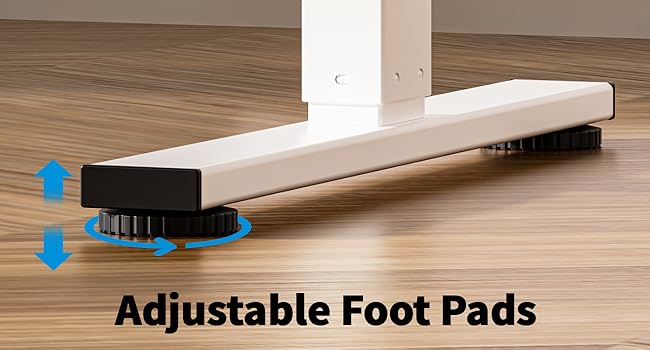
Image: Adjustable foot pads for leveling the desk on uneven surfaces.

Image: Lockable casters for easy movement and secure positioning of the desk.
- Connect the Motor and Control Panel: Follow the wiring diagram to connect the motor to the control box and the control panel to the control box. Ensure all connections are secure.
- Install the Headphone Hook: Attach the headphone hook to the desired location on the desk frame.
- Kabelių valdymas: Utilize the specially designed grooves at the back of the tabletop for easy cable arrangement to maintain a clutter-free workspace.
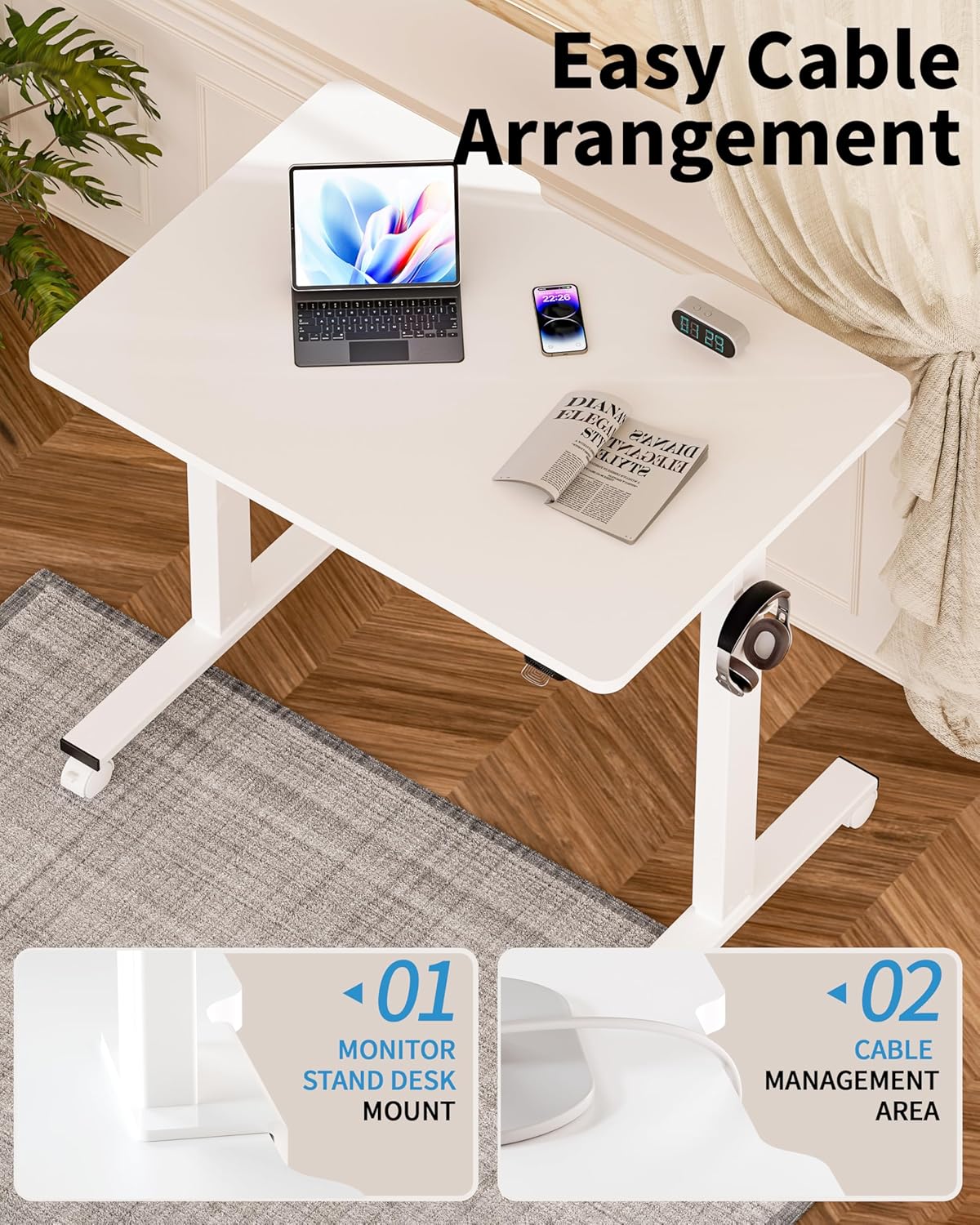
Image: Detail of the desk's cable management area and monitor stand mount feature.
- Maitinimo jungtis: Prijunkite maitinimo adapterį prie valdymo dėžutės, o tada – prie sieninio lizdo.
Naudojimo instrukcijos
Your Okin Electric Standing Desk allows for smooth and quiet height adjustments to suit your ergonomic needs.

Image: A user demonstrating the ergonomic height adjustment of the Okin standing desk, highlighting improved circulation, enhanced posture, and boosted productivity.
Aukščio reguliavimas
- Pakelkite stalą: Press and hold the "Up" button on the control panel. The desk will move upwards. Release the button at your desired height.
- Apatinis stalas: Press and hold the "Down" button on the control panel. The desk will move downwards. Release the button at your desired height.
- The desk adjusts smoothly from 27.56 inches to 45.28 inches in height. When using casters, the adjustable height range is 29.53 inches to 47.25 inches.
- The motor operates with low noise, typically below 50 dB.
Priežiūra
- Valymas: Wipe the desk surface and frame with a dry cloth. Avoid using abrasive cleaners or solvents that may damage the finish.
- Patikrinimai: Periodiškai patikrinkite visus varžtus ir jungtis, kad jie būtų tvirtai priveržti. Jei reikia, priveržkite.
- Kabelių valdymas: Ensure cables are neatly arranged and not pinched or strained, especially during height adjustments.
Trikčių šalinimas
If you encounter issues with your Okin Electric Standing Desk, refer to the following common problems and solutions.
- Nejudantis stalas:
- Patikrinkite, ar maitinimo laidas tvirtai įjungtas tiek į stalą, tiek į sieninį lizdą.
- Ensure all cables connecting the motor, control box, and control panel are properly connected.
- Patikrinkite, ar maitinimo lizdas veikia.
- Error Code E-3 Displayed:
- An E-3 error code typically indicates a motor or control system issue.
- Try unplugging the desk from the power source for 10-15 minutes, then plug it back in to reset the system.
- If the error persists, contact Okin customer support for assistance.
- Uneven Movement or Wobbling:
- Įsitikinkite, kad stalas yra ant lygaus paviršiaus.
- If using adjustable foot pads, adjust them to stabilize the desk.
- If using casters, ensure they are locked when the desk is in a stationary position.
- Patikrinkite, ar visi surinkimo varžtai yra priveržti.
- Triukšmas veikimo metu:
- A low noise level (below 50 dB) is normal during operation.
- If you hear unusual or loud noises, check for any obstructions in the lifting mechanism.
- Įsitikinkite, kad stalas nėra perkrautas, viršijant maksimalią leistiną svorį.
Specifikacijos
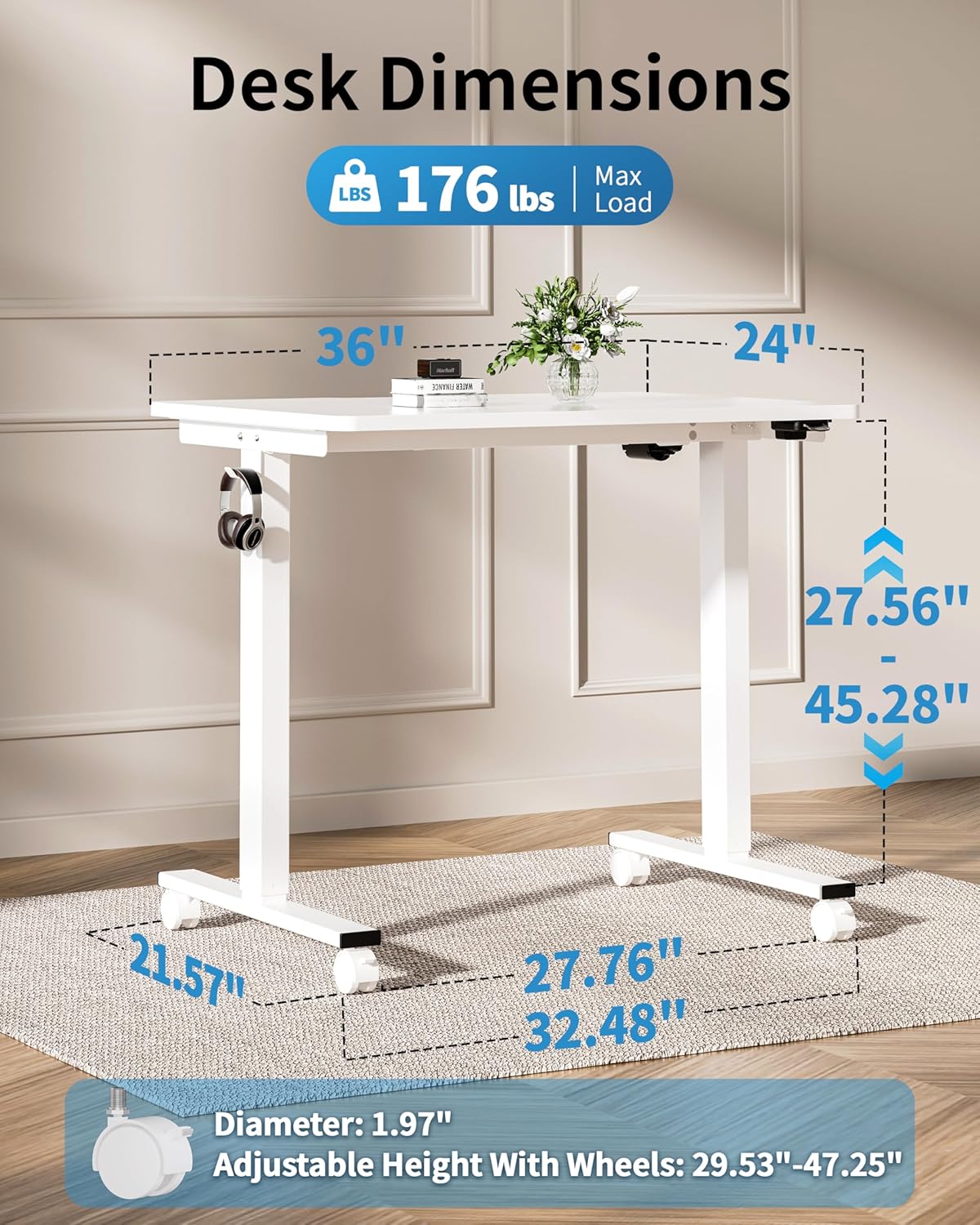
Image: Detailed dimensions of the Okin Electric Standing Desk, including desktop size (36"x24"), height range (27.56"-45.28"), and base dimensions.
| Prekės ženklas | Okin |
| Modelio numeris | OKSM6545W3624WO-CA |
| Darbastalio matmenys | 36 cm (plotis) x 24 cm (gylis) |
| Height Adjustment Range (without casters) | 27.56 colio – 45.28 colio |
| Height Adjustment Range (with casters) | 29.53 colio – 47.25 colio |
| Maksimali svorio talpa | 176 svarai (80 kg) |
| Triukšmo lygis | < 50 dB |
| Medžiaga | Wood (Desktop), Alloy Steel (Base) |
| Spalva | Baltas |
| Ypatingos savybės | Adjustable Height, Electric, Ergonomic, Wheels (optional), Headphone Hook, Cable Management Grooves |
| Prekės svoris | 43.74 svaro |
Garantija ir palaikymas
The Okin Small Electric Standing Desk comes with a Ribota garantija. For specific warranty terms and conditions, please refer to the documentation included with your purchase or contact Okin customer support.
For technical support, missing parts, or warranty claims, please contact Okin customer service through the retailer where the product was purchased or visit the official Okin websvetainė kontaktinei informacijai.
Ask a question about this manual
Ask about setup, troubleshooting, compatibility, parts, safety, or missing instructions. Manuals+ will review the question and use this page’s manual context to help answer it.