
Įvadas
Ačiū, kad pirkoteasing the Sigma 50mm F2 DG Contemporary lens. This manual provides essential information for the safe and effective use of your new lens. Please read it thoroughly before using the product and keep it for future reference.
Saugos priemonės
- Do not look at the sun or other strong light sources through the lens, as this can cause permanent vision damage.
- Kai nenaudojate, laikykite objektyvą atokiau nuo tiesioginių saulės spindulių, kad išvengtumėte gaisro pavojaus.
- Avoid exposing the lens to extreme temperatures, humidity, or dust.
- Nebandykite ardyti ar modifikuoti objektyvo. Remontą turėtų atlikti tik įgalioti techninės priežiūros darbuotojai.
- Laikyti vaikams nepasiekiamoje vietoje.
Pakuotės turinys
Patikrinkite, ar pakuotėje yra visi reikalingi daiktai:
- Sigma 50mm F2 DG Contemporary Lens
- Lens Hood (LH633-02S)
- Priekinis objektyvo dangtelis
- Galinis objektyvo dangtelis
- Instrukcijų vadovas (šis dokumentas)
Objektyvo dalys
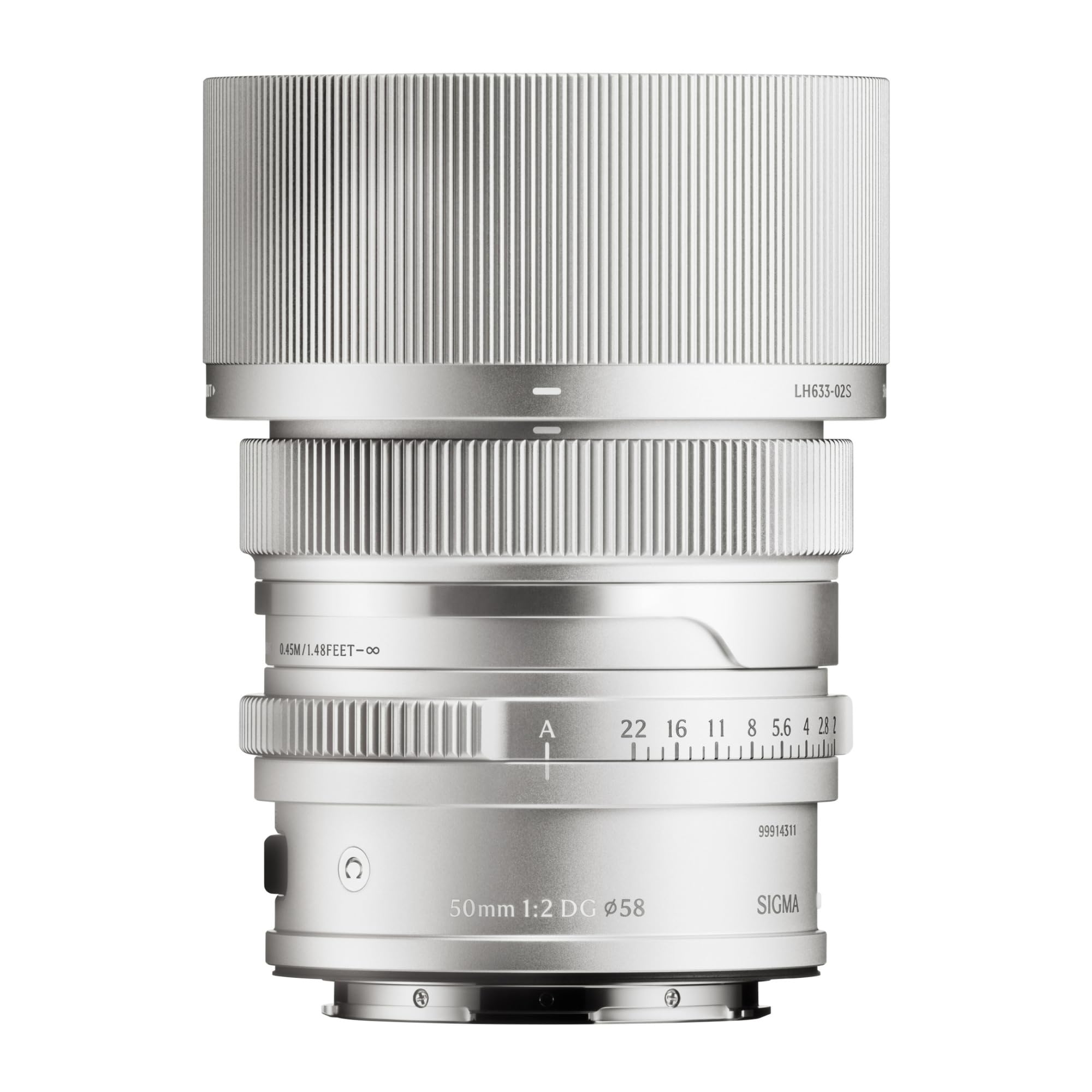
This image displays the Sigma 50mm F2 DG Contemporary lens, a prime lens designed for L-mount cameras. It features a sleek silver finish and a compact design, suitable for various photographic applications.
The Sigma 50mm F2 DG Contemporary lens features several key components:
- Fokusavimo žiedas: Naudojamas rankiniam fokusavimui.
- Diafragmos žiedas: Leidžia tiesiogiai valdyti objektyvo diafragmą.
- Objektyvo tvirtinimas: Connects the lens to the camera body (L-Mount).
- Lens Hood Attachment Point: Where the dedicated lens hood is secured.

The image shows the LH633-02S lens hood, a cylindrical accessory with a ribbed exterior, designed to attach to the Sigma 50mm F2 DG Contemporary lens. It helps to prevent stray light from entering the lens, reducing flare and ghosting, and offers protection to the front element.
Sąranka
Objektyvo pritvirtinimas
- Įsitikinkite, kad ir fotoaparatas, ir objektyvas yra išjungti.
- Nuimkite galinį objektyvo dangtelį nuo objektyvo ir korpuso dangtelį nuo fotoaparato.
- Suderinkite objektyvo tvirtinimo žymę su fotoaparato korpuso tvirtinimo žyme.
- Įstatykite objektyvą į fotoaparato jungtį ir sukite jį pagal laikrodžio rodyklę, kol jis spragtelės į vietą. Nespauskite objektyvo per jėgą.
Attaching the Lens Hood (LH633-02S)
- Suderinkite raudoną tašką ant objektyvo gaubto su raudonu tašku objektyvo priekyje.
- Rotate the lens hood clockwise until it locks securely into position.
- To remove, press the release button on the lens hood and rotate counter-clockwise.
Veikiantis
Fokusavimas
This lens supports both autofocus (AF) and manual focus (MF).
- Automatinis fokusavimas: Set your camera's focus mode to AF. The lens will automatically focus when the shutter button is half-pressed.
- Rankinis fokusavimas: Set your camera's focus mode to MF. Rotate the focus ring on the lens to adjust focus manually. Use your camera's focus peaking or magnification features for precise focusing.
Diafragmos valdymas
The lens features an aperture ring for direct control over the aperture setting. You can also control the aperture through your camera body, depending on your camera's settings and mode.
Suderinami fotoaparatai
This lens is designed for L-Mount cameras, including models such as Leica SL, Leica TL2, and Leica CL.
Priežiūra
Objektyvo valymas
- Dulkėms nuo objektyvo paviršiaus pašalinti naudokite pūstuvą.
- Dėmėms ar pirštų atspaudams valyti naudokite švarią, minkštą mikropluošto šluostę, specialiai skirtą optiniams lęšiams. Užtepkite nedidelį kiekį lęšių valymo skysčio ant šluostės, o ne tiesiai ant lęšio.
- Niekada nenaudokite abrazyvinių medžiagų, tirpiklių ar stiprių cheminių medžiagų objektyvui valyti.
Sandėliavimas
- Kai nenaudojate, uždėkite priekinį ir galinį objektyvo dangtelius.
- Objektyvą laikykite vėsioje, sausoje vietoje, toliau nuo tiesioginių saulės spindulių ir didelės drėgmės.
- Jei sandėliuojate ilgesnį laiką, apsvarstykite galimybę naudoti sausiklį, kad nesusidarytų pelėsis.
Trikčių šalinimas
- Fotoaparatas neatpažįsta objektyvo: Ensure the lens is securely attached to the camera body. Power off and restart the camera. Check for any firmware updates for both the lens and camera.
- Automatinis fokusavimas neveikia: Verify the camera's focus mode is set to AF. Ensure there is sufficient light and contrast in the scene for the autofocus system to operate effectively.
- Vaizdai neryškūs: Check that the lens is properly focused. Ensure the shutter speed is fast enough to prevent camera shake, especially in low light. Clean the lens elements if smudges are present.
- Lens hood difficult to attach/remove: Ensure proper alignment of the red dots. Do not force the hood; it should click into place smoothly.
Specifikacijos
| Modelio pavadinimas | 31S969 |
| Židinio nuotolis | 50 mm |
| Didžiausia diafragma | F2 |
| Minimali diafragma | F2 |
| Objektyvo tipas | Pirminis objektyvas |
| Suderinami tvirtinimai | Leica L |
| Fokusavimo tipas | Automatinis fokusavimas |
| Vaizdo stabilizavimas | Nėra vaizdo stabilizavimo |
| Atsparumo vandeniui lygis | Neatsparus vandeniui |
| Prekės svoris | 2 svaro |
Garantija ir palaikymas
Informacija apie garantiją
Šis produktas tiekiamas su a 9 metų garantija. Please retain your proof of purchase for warranty claims. The warranty covers manufacturing defects under normal use. It does not cover damage caused by misuse, accidents, unauthorized repairs, or normal wear and tear.
Pagalba klientams
For technical assistance, service, or warranty inquiries, please contact Sigma customer support through their official website or the retailer where you purchased the product. Have your model number (31S969) and proof of purchase ready when contacting support.