
1. Įvadas
This manual provides detailed instructions for the operation, setup, and maintenance of your TIDRADIO TD-H3 Plus GMRS Handheld Radio. Please read this manual thoroughly before using the device to ensure proper functionality and safety. The TD-H3 Plus is a 5W GMRS handheld radio featuring multi-band reception, USB-C charging, wireless programming, and integration with the Odmaster App.
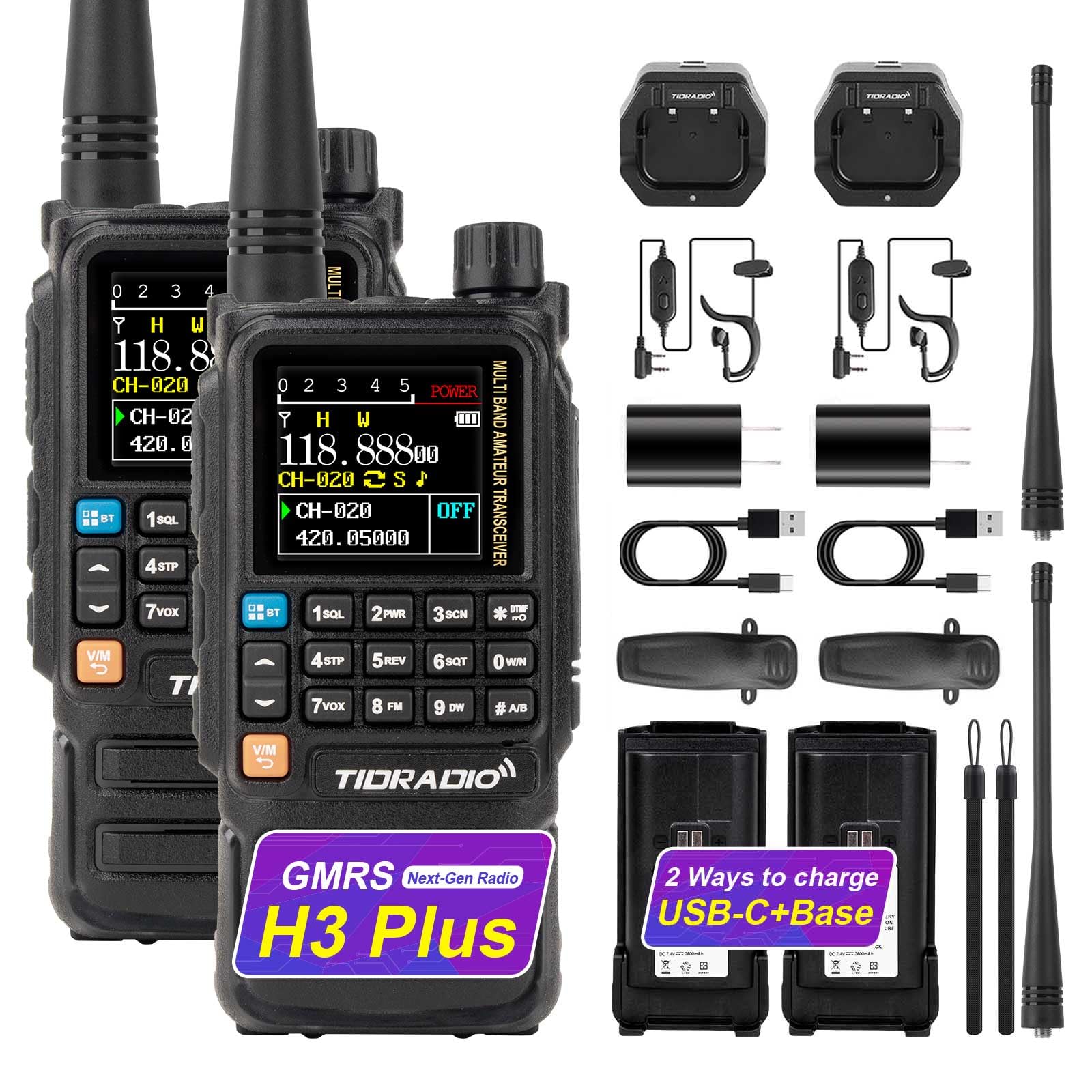
Image 1: TIDRADIO TD-H3 Plus GMRS Handheld Radio, a compact and feature-rich two-way radio.
2. Kas yra dėžutėje
Your TIDRADIO TD-H3 Plus GMRS Radio package includes the following items:
- 2 x TD-H3 Plus GMRS Radio
- 2 x 2500 mAh baterija
- 2 x USB-C Cable & Desktop Charger
- 2 x standartinė antena
- 2 x ausinė
- 2 x diržo segtukas
- 2 x Rankinis dirželis
- 1 x Vartotojo vadovas
3. Pagrindinės savybės
The TD-H3 Plus GMRS Radio offers a range of advanced features for enhanced communication:
- Multi-band Reception: Covers GMRS (RX/TX), FM, AM Aviation, VHF, and UHF bands.
- USB-C Charging & Programming: Convenient charging and direct programming via USB-C port.
- Belaidis programavimas: Configure settings via Bluetooth using the Odmaster App.
- Odmaster App Integration: Enables calling, audio functions, and global walkie-talkie functionality.
- NOAA orų radijas: Provides real-time weather alerts and broadcasts.
- Dažnio kopija: One-touch duplication of frequency settings.
- Pritaikomi šoniniai klavišai: Assign shortcuts for various functions like FM, Lamp, TONE, Alarm, Weather, PTT2, OD PTT.
- Dvigubi PTT mygtukai: Separate Push-to-Talk buttons for different channels.
- Patobulinta saugykla: 128MB external storage for more functions.
- Programinės įrangos atnaujinimas: Supports upgrades via Odmaster Web platform (CH340 cable required) or USB-C.

2 paveikslėlis: Viršutinis taškasview of the key features of the TD-H3 Plus GMRS radio, including wireless programming, multi-band reception, and NOAA weather radio.
4. Sąranka
- Įdėkite akumuliatorių: Sulygiuokite bateriją su radijo imtuvo galine dalimi ir stumkite ją į vietą, kol ji tvirtai spragtelės.
- Prijunkite anteną: Screw the provided antenna clockwise onto the antenna connector at the top of the radio until it is finger-tight.
- Pradinis mokestis: Before first use, fully charge the radio's battery using either the desktop charger or the USB-C port. Refer to the 'Charging' section for details.
5. Naudojimo instrukcijos
5.1 Maitinimo įjungimas/išjungimas
Norėdami įjungti radiją, pasukite garsumo rankenėlę pagal laikrodžio rodyklę. Norėdami išjungti, sukite ją prieš laikrodžio rodyklę, kol išgirsite spragtelėjimą.
5.2 Garsumo valdymas
Adjust the audio volume by rotating the volume knob located at the top of the radio. The display may show a visual indicator of the current volume level.
5.3 Kanalo pasirinkimas
Use the keypad to directly enter channel numbers or use the up/down arrow buttons to navigate through available channels. The display shows the current channel and frequency.

Image 3: The TD-H3 Plus features multiple display modes and 18 menu color options for user customization.
5.4 Tiesioginio ryšio funkcija (PTT)
Press and hold the main PTT button on the side of the radio to transmit. Release to receive. The TD-H3 Plus also features dual PTT buttons for quick switching between two active channels.
5.5 NOAA orų radijas
Access NOAA Weather Radio for real-time weather alerts and broadcasts. This feature can be assigned to a customizable side key for quick access.

Image 4: The TD-H3 Plus includes a built-in NOAA Weather Radio for receiving critical weather alerts.
5.6 FM radijas
The radio includes an FM broadcast receiver. Tune into your favorite FM stations for entertainment.
5.7 SMS Function
The TD-H3 Plus supports real-time text messaging for efficient communication. Navigate to the SMS menu to send, receive, and manage messages.

Image 5: The SMS function allows for real-time text communication between radios.
5.8 One-Touch Frequency Copy
Hold down the '1' key to activate the frequency copy feature. This allows you to quickly identify and duplicate frequencies from other transmitting radios, saving them to a new channel.

Image 6: The one-key frequency match feature simplifies channel setup by copying frequencies from other radios.
5.9 Cell Phone Voice Calling Mode
When integrated with the Odmaster App, the radio can function as an audio device for answering and making calls. Short press '1' to answer, short press '3' or PTT to hang up. Long press '4' to call back the previous number.

Image 7: The radio can be used for voice calls when connected to a smartphone via the Odmaster App.
5.10 Wireless Speaker Function
Play music from your connected device through the TD-H3 Plus using its wireless speaker function.

Image 8: The TD-H3 Plus can function as a wireless speaker for playing audio from a connected device.
6. Programinės įrangos atnaujinimas
To ensure optimal performance and access to the latest features, it is recommended to keep your radio's firmware updated. The TD-H3 Plus supports firmware upgrades via USB-C cable or the Odmaster Web platforma.
6.1 Firmware Upgrade via CH340 Cable
This method involves connecting the radio to a computer using a CH340 programming cable and using a dedicated upgrade tool.
Video 1: Tutorial on upgrading the firmware of the TD-H3 Plus GMRS Radio using a CH340 cable.
6.2 Firmware Upgrade via USB-C Cable
The radio can also be upgraded directly via its USB-C port. This method is often simpler and more convenient.
Video 2: Tutorial on upgrading the firmware of the TD-H3 Plus GMRS Radio using a USB-C cable.
6.3 Firmware Upgrade via Odmaster Web
The Odmaster Web platform provides a streamlined process for firmware upgrades. This method is fully compatible with macOS (requires FTDI programming cable).
Video 3: Tutorial on upgrading the firmware of the TD-H3 Plus GMRS Radio via the Odmaster Web platforma.
Svarbu: After upgrading to firmware V1.0.37, you can use a shortcut key to switch between GMRS, HAM, and normal versions. If you require assistance with this process, please contact the seller for detailed instructions.
7. Programavimas
The TD-H3 Plus offers multiple programming methods to customize your radio settings:
- Odmaster App (Bluetooth Programming): Connect your radio to the Odmaster app on your smartphone (iOS/Android) via Bluetooth for wireless programming. This allows for easy configuration of channels, frequencies, and other settings.
- USB-C Programming: Directly connect the radio to your computer using a USB-C cable for programming with compatible software like CHIRP or CPS.
- CH340/FTDI Cable Programming: Use a dedicated CH340 (for Windows) or FTDI (for macOS) programming cable with CHIRP or CPS software for advanced configuration.

Image 9: The Odmaster App allows for convenient wireless programming and integration with your smartphone.
8. Multi-band Reception
The TD-H3 Plus is designed for versatile reception across various frequency bands:
- GMRS Frequencies (RX/TX): 462.55000-467.72500MHz
- FM Broadcasts (RX Only): 87-108MHz
- AM Aviation Bands (RX Only): 108-136MHz
- VHF (RX Only): 136-174MHz, 200-230MHz, 350-370MHz
- UHF (RX Only): 400-520MHz

Image 10: The radio supports multi-band reception across GMRS, FM, AM, VHF, and UHF frequencies.
9. Įkrovimas
The TD-H3 Plus offers flexible charging options to keep your radio powered:
- USB-C įkrovimas: Connect a USB-C cable directly to the radio's USB-C port for fast charging. This is convenient for charging with power banks, laptops, or car chargers.
- Desktop Base Charging: Place the radio in the provided desktop charging cradle for convenient charging at home or in the office.

Image 11: The TD-H3 Plus can be charged via desktop base, USB-C cable, laptop, or car charger.
10. Pritaikomos funkcijos
The side keys of the TD-H3 Plus can be customized to provide quick access to frequently used functions. Options include:
- FM radijas
- Lamp (Žibintuvėlis)
- TONAS
- Signalizacija
- Weather (NOAA)
- PTT2 (Secondary PTT)
- OD PTT (Odmaster Push-to-Talk)
11. Problemų sprendimas
- Nėra galios: Įsitikinkite, kad akumuliatorius tinkamai įdėtas ir visiškai įkrautas. Patikrinkite, ar nėra kliūčių akumuliatoriaus kontaktuose.
- Negalima perduoti / gauti: Verify that the antenna is securely attached. Check the selected channel and frequency settings. Ensure you are within range of other radios or repeaters.
- Prasta garso kokybė: Adjust the volume. Check the earpiece or microphone connection if in use. Ensure no obstructions are blocking the speaker or microphone.
- Programavimo problemos: Ensure the correct drivers are installed for your programming cable (CH340/FTDI). Verify the Odmaster App or programming software is up-to-date and correctly configured.
- Radio Locks Up: If the radio becomes unresponsive, try removing and reinserting the battery to perform a hard reset.
12. Specifikacijos
| Funkcija | Specifikacija |
|---|---|
| Prekės ženklas | TIDRADIJAS |
| Modelio numeris | TIDRADIO TD-H3 Plus |
| Kanalų skaičius | 199 |
| Frequency Range (GMRS) | 462.55000-467.72500 MHz (RX/TX) |
| Maksimalus pokalbio diapazonas | 5 mylių |
| ttage | 7.4 voltų |
| Atsparumo vandeniui lygis | Atsparus vandeniui |
| Baterijos talpa | 2500 mAh (įskaičiuota) |
| Ryšio protokolas | Bluetooth |
| Tunerio tipas | GMRS dažnis |
13. Parama
For any questions, technical support, or assistance with firmware updates and unlocking procedures, please contact the seller directly through your purchase platform. Navigate to "Orders" > "Get Help" > Select the order > Click "Other" > Send to "Seller" > Then send your question.