
1. Įvadas
This manual provides detailed instructions for the installation, operation, and maintenance of your ESX Vision VMX900DAB Universal 1-DIN Multimedia Receiver. Please read this manual thoroughly before using the device to ensure proper functionality and to maximize your user experience.
The ESX Vision VMX900DAB is a versatile 1-DIN multimedia receiver featuring a 9-inch multi-angle touchscreen display. It integrates advanced connectivity options including wireless Apple CarPlay and Android Auto, DAB+ digital radio, Bluetooth hands-free calling and audio streaming, and a comprehensive media player. The unit is designed for universal compatibility and offers a removable monitor for enhanced security.
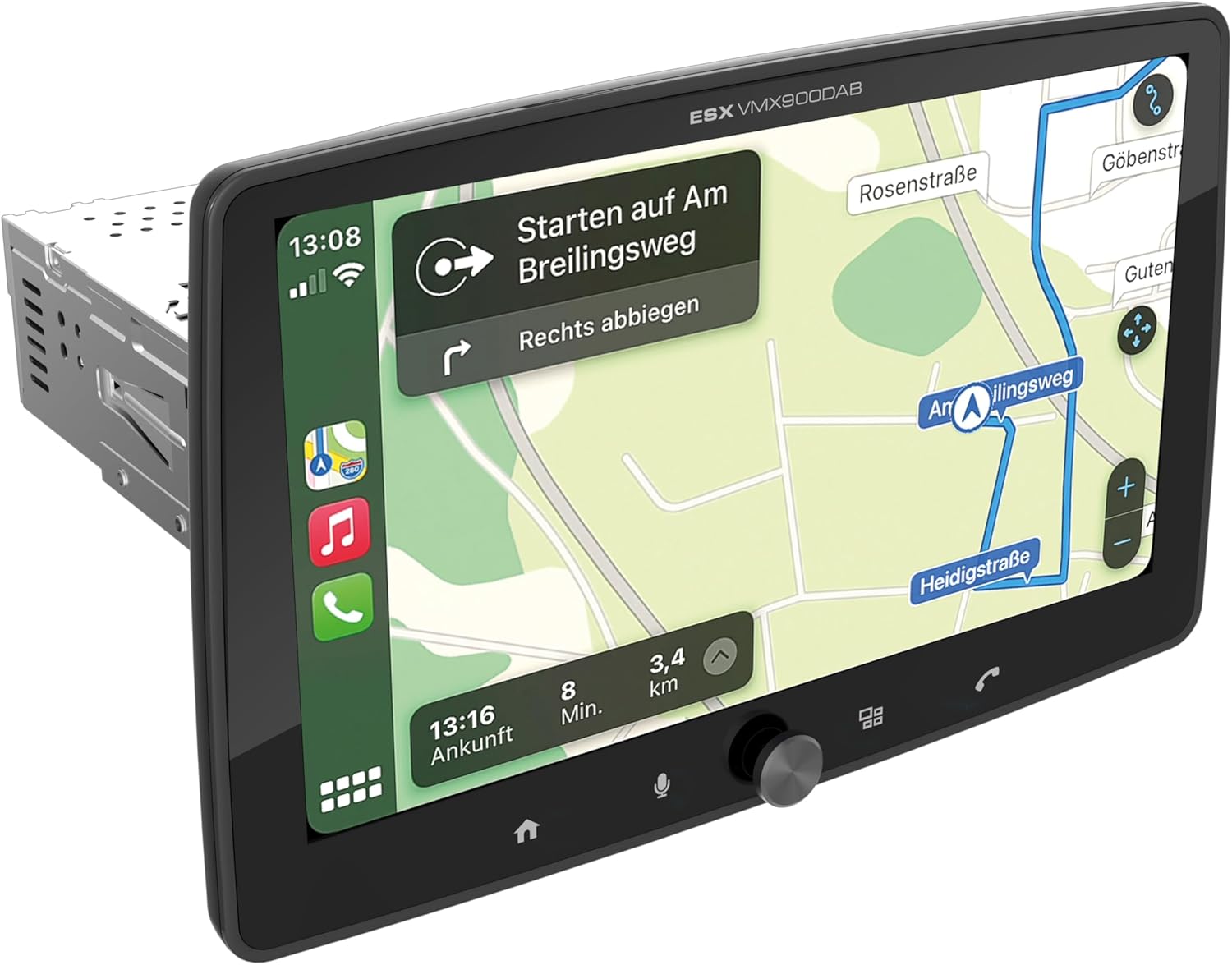
Figure 1.1: ESX Vision VMX900DAB with navigation interface.
2. Sąranka ir diegimas
2.1 Pakuotės turinys
Prieš montuodami patikrinkite, ar yra visi komponentai:
- ESX Vision VMX900DAB Main Unit
- Detachable 9-inch Touchscreen Monitor
- Maitinimo / garsiakalbio laidų jungtis
- Išorinis mikrofonas
- GPS antena
- DAB+ antena
- USB prailginimo kabeliai
- Tvirtinimo detalės (laikikliai, varžtai)
- Vartotojo vadovas (šis dokumentas)

2.1 pav.: Pridedami priedai ir komponentai.
2.2 Pagrindinio įrenginio montavimas
- Prieš pradėdami montavimą, įsitikinkite, kad automobilio akumuliatorius yra atjungtas.
- Insert the 1-DIN main unit into the vehicle's dashboard opening.
- Secure the main unit using the provided mounting brackets and screws.
2.3 Monitoriaus prijungimas
The 9-inch monitor is detachable and connects to the main unit via a click system.
- Align the monitor's connector with the slot on the main unit.
- Gently push the monitor until it clicks securely into place.
- To remove, press the release button (if applicable) and pull the monitor away.

Figure 2.2: Detachable monitor with click system.
2.4 Laidų jungtys
Konkrečius sujungimus žr. prie įrenginio pridėtoje laidų schemoje. Svarbiausios jungtys:
- Power and Speakers: Connect the main wiring harness to the vehicle's power supply and speakers.
- Išorinis mikrofonas: Plug the external microphone into its dedicated input for optimal hands-free call quality.
- GPS antena: Prijunkite GPS anteną ir pritvirtinkite ją vietoje, kur nėra šviesos. view dangaus vaizdą tiksliam padėties nustatymui.
- DAB+ antena: Connect the DAB+ antenna for digital radio reception.
- USB prievadai: Two USB-A ports are available. One for media playback and charging (1.5A), and another specifically for Apple CarPlay/Android Auto and charging (1.5A).
- RCA išankstinisampsutvarkyti išėjimai: Six 4V RCA outputs (FL/FR/RL/RR/SUB1/SUB2) are available for connecting external ampgelbėtojai.
- AUX RCA Inputs: Stereo audio and video inputs (L/R/VIDEO) for external audio/video sources.
- Camera RCA Inputs: Dedicated inputs for front and rear cameras.
- Vairo valdymas: Analog steering wheel remote control input (learnable) for integration with vehicle controls.
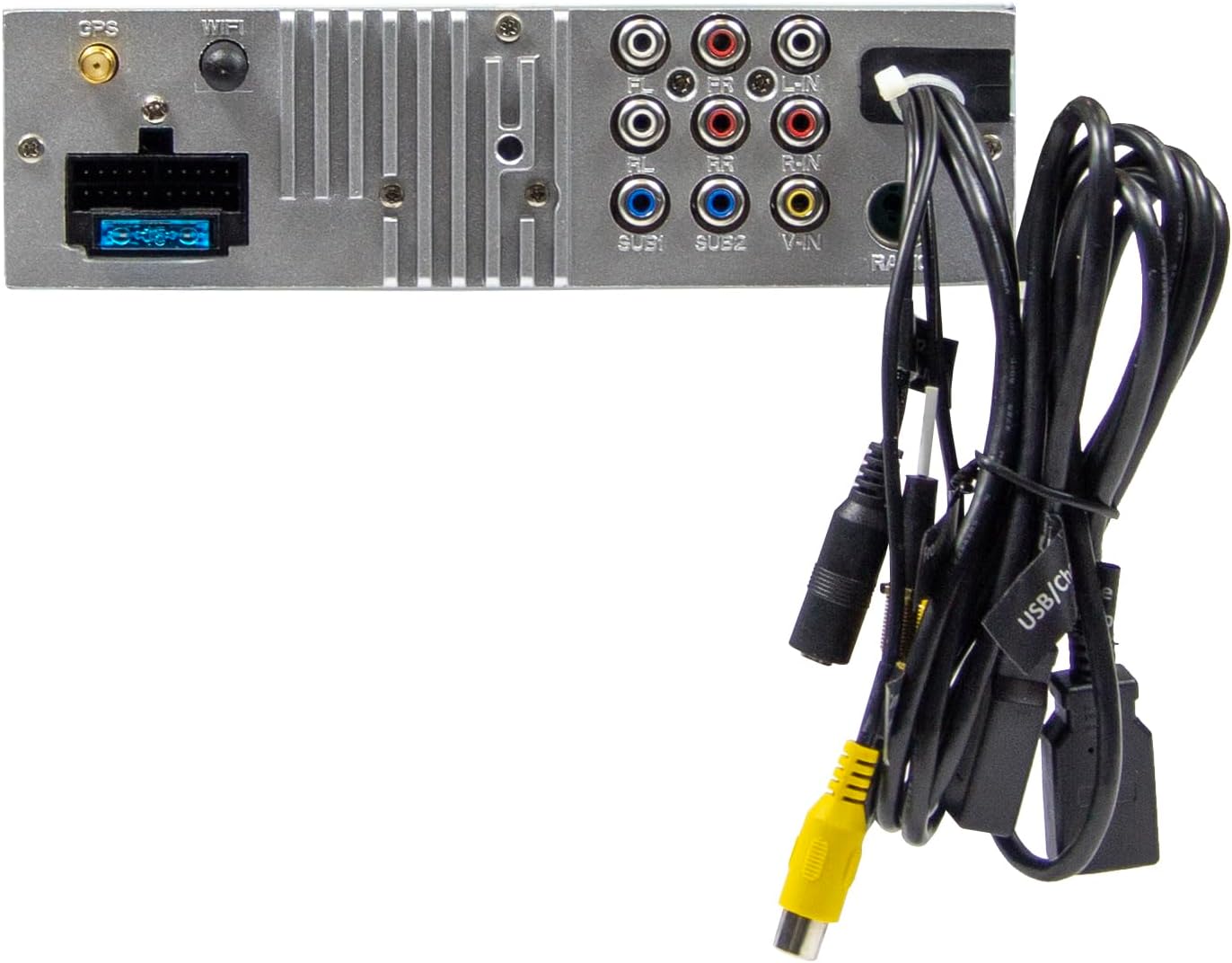
2.3 pav.: Pagrindinio įrenginio galinės jungtys.
3. Naudojimo instrukcijos
3.1 Įjungimas / išjungimas ir pagrindiniai valdikliai
- Maitinimas: The unit will power on automatically with the vehicle's ignition.
- Išjungti: The unit will power off automatically with the vehicle's ignition.
- Garsumo valdymas: Use the large rotary knob on the front panel to adjust the volume.
- Funkciniai klavišai: Four function keys on the front panel provide quick access to common features.
- Jutiklinis ekranas: All primary functions are controlled via the 9-inch touchscreen.
3.2 Pradinis ekranas ir naršymas
The home screen provides access to all main functions and applications.

Figure 3.1: Main menu/home screen.
3.3 „Apple CarPlay“ ir „Android Auto“
The VMX900DAB supports both wireless and wired (via USB) Apple CarPlay and Android Auto.
- Belaidis ryšys: Enable Bluetooth and Wi-Fi on your smartphone and follow the on-screen prompts to connect.
- Laidinis ryšys: Connect your smartphone to the dedicated USB-A port using a compatible USB cable.
- Once connected, your smartphone's compatible apps (navigation, music, calls, messages) will be mirrored on the receiver's display.

Figure 3.2: Apple CarPlay interface.
3.4 Radio Functions (DAB+/FM/AM)
- DAB+ radijas: Select the DAB+ icon from the home screen. The unit will scan for available digital radio stations.
- FM/AM radijas: Select the Radio icon. Use the touchscreen to tune to stations, save presets, and access RDS functions.
3.5 „Bluetooth“ laisvų rankų įranga ir garso transliacija
- Poravimas: Enable Bluetooth on your smartphone and search for the VMX900DAB. Select the device and confirm pairing.
- Skambinimas laisvų rankų įranga: Once paired, you can make and receive calls directly through the receiver. The external microphone ensures clear voice transmission. Your phonebook can be synchronized.
- Garso transliacija: Stream music wirelessly from your smartphone to the receiver.
3.6 Medijos atkūrimas
The unit supports various audio, video, and photo formats via USB.
- Palaikoma File Formatai: AVI, FLV, MOV, MKV, WMV, WMA, MP3, FLAC, JPEG, PNG, BMP.
- Insert a USB drive into the media USB-A port. Select the USB icon from the home screen to browse and play media files.
3.7 Monitor Adjustment
The monitor can be tilted and adjusted in height to achieve the optimal viewing angle and prevent obstruction of vehicle controls.

Figure 3.3: Adjustable monitor mechanism.
NIEKADA nepritaikymas
- Startup Logo: Customize the startup logo in the settings menu.
- RGB Key Illumination: Select from various RGB colors and animation effects for the key illumination.
- Meniu kalbos: Supported languages include DEU, ENG, SWE, ITA.
4. Priežiūra
4.1 Įrenginio valymas
- Use a soft, dry cloth to wipe the display and unit surfaces.
- Jei ekrane yra sunkiai įveikiamų žymių, naudokite specialiai elektroniniams ekranams skirtą ekrano valiklį ir mikropluošto šluostę.
- Do not use abrasive cleaners, solvents, or harsh chemicals, as these can damage the finish or screen.
4.2 Bendroji priežiūra
- Venkite įrenginio ilgalaikio laikymo tiesioginiuose saulės spinduliuose, itin aukštose temperatūrose ar didelėje drėgmėje.
- Užtikrinkite tinkamą vėdinimą aplink įrenginį, kad išvengtumėte perkaitimo.
- When removing the monitor, handle it carefully to avoid damage to the connectors.
5. Problemų sprendimas
If you encounter issues with your VMX900DAB, refer to the following common problems and solutions:
| Problema | Galima priežastis | Sprendimas |
|---|---|---|
| Nėra galios | Neteisingas laidų prijungimas; perdegęs saugiklis; išjungtas automobilio uždegimas | Check power connections; Replace fuse; Turn on vehicle ignition |
| Nėra garso | Per mažas garsumas; Įjungtas nutildymas; Garsiakalbio laidų problema | Padidinkite garsumą; Išjunkite nutildymą; Patikrinkite garsiakalbių jungtis |
| Bluetooth neprisijungia | Bluetooth off on phone/unit; Incorrect pairing process | Ensure Bluetooth is on; Re-attempt pairing process |
| Apple CarPlay/Android Auto not starting | Incorrect USB port; Faulty USB cable; Phone not compatible/configured | Use the dedicated USB port; Try a different USB cable; Check phone settings for CarPlay/Android Auto |
| Prastas radijo priėmimas | Antenna not connected; Poor antenna placement; Weak signal area | Check antenna connection; Adjust antenna position; Try in a different location |
| Monitorius nerodo | Monitor not securely attached; Connector issue | Ensure monitor is fully clicked into place; Check for debris in connector |
If the problem persists after attempting these solutions, please contact ESX customer support or your authorized dealer.
6. Specifikacijos
| Funkcija | Specifikacija |
|---|---|
| Modelio numeris | VMX900DAB |
| Ekranas | 9-inch Multi-angle Touchscreen |
| Formos faktorius | 1-DIN Universal |
| Ryšys | USB, Bluetooth, Auxiliary |
| Ypatingos savybės | Wireless Apple CarPlay, Wireless Android Auto, Detachable Monitor with Click System |
| Radijo imtuvas | DAB+ (Digital Radio), FM/AM with RDS |
| Bluetooth | Hands-free function, Audio Streaming |
| USB prievadai | 2x USB-A (1.5A charging, one dedicated for CarPlay/Android Auto) |
| Max Music Power | 4 x 80 W |
| iš ankstoamplified Outputs | 6x RCA (4V) (FL/FR/RL/RR/SUB1/SUB2) |
| AUX įėjimai | RCA (L/R/VIDEO) |
| Kameros įėjimai | RCA (Front/Rear) |
| Palaikoma File Formatai | AVI, FLV, MOV, MKV, WMV, WMA, MP3, FLAC, JPEG, PNG, BMP |
| Išorinis mikrofonas | Įtraukta |
| Vairo valdymas | Analog (learnable) |
| GPS imtuvas | Įtraukta |
| Meniu kalbos | DEU, ENG, SWE, ITA |
| Bendra išėjimo galia | 320 vatų |
| Erdvinio garso kanalo konfigūracija | 4.2 |
| Garso išvesties režimas | Stereo |
7. Garantija ir palaikymas
For warranty information, please refer to the documentation provided at the time of purchase or contact your authorized ESX dealer. Warranty terms and conditions may vary by region and retailer.
For technical support or further assistance, please contact ESX customer service or visit the official ESX webpalaikymo išteklių svetainė.